
Bold Gym Chain Pricing Table for Divi 5: Three Access Levels
A bold gym pricing section for Divi 5 featuring three tiered memberships (Home, Any Gym, Elite) with a striking yellow and black comparison table. No joining fee, month-to-month.
Rate this element
Download this section, free
- Divi 5 JSON, imports in seconds
- Commercial license included
- No account needed
Click to view the full page
Overview
The entire section sits on a solid #ffd60a yellow background, a deliberate choice that announces energy before a single word is read. Floating on that field is a 4-column CSS grid whose parent container is near-black (#0c0c14) with 1px column and row gaps. Those hairline gaps do the work of traditional table borders, creating a ruled-line cell separation without any visible border weight. The effect reads as a structured comparison matrix while keeping the layout visually flat and bold.
The header block runs a clear three-part hierarchy. A 13px uppercase Work Sans eyebrow labeled "Access levels" in muted #3d3d52 orients the reader. Below it, the H2 "One gym, or all forty" uses Unbounded at 800 weight, 44px, with -1px letter-spacing and textWrap: balance for clean wrapping at any container width. A single supporting sentence in Work Sans 18px at 1.6em line height keeps the preamble minimal and the eye moving to the table. Max-width constraints (1080px for the container, 720px for the heading, 640px for the subtext) keep the copy column tight while the yellow field bleeds to the section edge.
Three tiers occupy columns 2 through 4: Home gym ($29), Any gym ($49), and Elite ($79). The middle tier carries a "Most popular" label and is distinguished purely by swapping its cell background from yellow to white (#ffffff). There is no elevated card, no glow, no outline badge. The white column reads against the yellow columns flanking it through contrast alone. Five feature rows compare open gym floor access, opening hours (6 am to 10 pm / 5 am to 11 pm / 24 hours), pool and sauna, personal training sessions, and recovery lounge. Cells use FontAwesome solid checkmarks (, 16px, centered) for included features and an en-dash character in muted #3d3d52 for excluded ones. That color dimming ensures the "yes" cells read louder than the "no" cells without any extra visual element.
On mobile the outer row switches to flexDirection: column and the single column expands to full width. Section padding steps from 80px on desktop to 56px on tablet to 36px on phone. The H2 font scales from 44px to 36px to 30px. The comparison grid stays a 4-column layout at all breakpoints; horizontal cell padding compresses from 16px to 6px on phones so the table remains scannable on narrow viewports. A single "Join now" button in electric blue (#2438ff) with Work Sans 800 closes the section, with an inversion hover that flips fill and text color between blue and white.
What’s inside
- Full-section #ffd60a yellow background housing a 4-column CSS grid, with 1px near-black (#0c0c14) row and column gaps acting as cell separators
- Three pricing tiers (Home gym $29, Any gym $49, Elite $79) with the middle "Most popular" column differentiated by white (#ffffff) cell backgrounds against yellow
- Five feature rows: open gym floor, opening hours (with distinct time text per tier), pool and sauna, personal training session, and recovery lounge
- FontAwesome solid checkmark icons (, 16px) for included features and muted en-dash text for excluded ones, creating clear visual contrast between available and unavailable perks
- Unbounded 800-weight H2 with textWrap: balance and a three-step responsive font scale (44px / 36px / 30px across desktop, tablet, phone)
- Work Sans used throughout: eyebrow label, pricing cells, subtext, and CTA button, keeping the typographic system tight across the whole section
- Single "Join now" button in electric blue (#2438ff) with a full color-inversion hover state (white fill, blue text)
Who it’s for
This layout is built for fitness brands that run multiple locations and need to communicate tiered access clearly without a cluttered card layout. It fits gym chains, boutique fitness studios with multi-site passes, sports complexes, and leisure centers. It also works for any membership-based service with three access levels and a mix of binary (yes/no) and descriptive (text value) feature rows, such as coworking spaces, sports clubs, or wellness centers. The bold yellow palette and Unbounded typeface lean toward challenger brands rather than corporate chains.
Customization tips
The yellow (#ffd60a) section background and matching cell fills are set in the section and group decoration backgrounds, so a single global find-and-replace in the Divi 5 JSON swaps the palette across every cell at once. The near-black (#0c0c14) grid container background controls the 1px separator lines; changing it to any color shifts the entire ruled-line effect without touching individual cells. The white (#ffffff) cells belong exclusively to the "Any gym" (middle) column, so to restyle the highlighted tier you only need to update those four group backgrounds.
For copy, keep tier names to two words or fewer so the header cells fit at the compressed 6px horizontal padding on mobile. Feature row labels in the leftmost column are left-aligned and set at 14px; labels longer than roughly 20 characters may wrap on phones. The H2 uses textWrap: balance, so it handles rewrites cleanly up to about 8 words before the balance breaks. The CTA button label is a short "Join now"; labels longer than 12 characters will stretch the button visually but will not break the layout.
How to install this layout
- Download the layout JSON file from this page.
- Open the target page in the Divi 5 builder.
- Open the portability panel (up/down arrows icon) and choose the Import tab.
- Upload the JSON. Tick “replace existing content” only for full-page imports.
- Check the page at desktop and mobile widths, then swap in your copy and images.
Full walkthrough with troubleshooting: How to Import a Divi 5 Layout.
Questions about Bold Gym Chain Pricing Table for Divi 5: Three Access Levels
Does the comparison grid scroll horizontally on mobile?
No. The grid stays a 4-column layout at all breakpoints; horizontal cell padding compresses from 16px to 6px on phones to keep it within the viewport. It is scannable on most modern phones but may feel tight below 360px wide. If your feature labels are longer than the defaults, test on a narrow device and shorten the label text if needed.
What modules make up the comparison table?
The table is built entirely from nested divi/group modules laid out with CSS grid (gridColumnCount: 4, columnGap: 1px, rowGap: 1px). Individual cells contain either a divi/text module for labels and prices, or a divi/icon module for the checkmark. There is no third-party pricing table plugin involved.
How is the 'Most popular' tier highlighted?
The middle column uses white (#ffffff) cell backgrounds while the other columns use the same yellow (#ffd60a) as the section background. There is no badge, outline, or elevated card style. The contrast between white and yellow cells is the only visual differentiator, so the effect depends on keeping the surrounding cells yellow.
Can I add a fourth pricing tier?
Yes, but it requires updating the grid's gridColumnCount from 4 to 5 and adding a new group for each feature row. Because the grid uses 1px gap separators rather than individual cell borders, the separator lines will extend automatically. Plan to also adjust the max-width of the outer container (currently 1080px) to accommodate the extra column at desktop sizes.
What fonts does this layout use and are they included?
The layout uses two Google Fonts: Unbounded (for the H2 headline) and Work Sans (for all other text including the eyebrow, table cells, subtext, and button label). Both load through Divi's standard Google Fonts integration and do not require any manual font installation.
What should I edit first after importing?
Start with the three tier names and prices in the header row of the grid (the groups containing 'Home gym / $29', 'Any gym / $49', and 'Elite / $79'), then update the feature row labels in the leftmost column. After copy is in place, swap the section background color to match your brand palette. The CTA button color (#2438ff) is independent of the yellow palette and can be changed without affecting anything else in the layout.
Which Divi version does this layout need?
Divi 5. The layout is generated natively for Divi 5 and validated against its real module structure before publication, so it imports clean into the current builder.
Can I use this layout on client websites?
Yes. Every download includes a commercial license covering unlimited sites you own or build for clients. Only reselling or redistributing the layout file itself is prohibited.
More pricing tables
Browse all pricing tables
Organic Farm Share Pricing Table for Divi 5: Three-Box Comparison
pricing · restaurant · minimal

Dark Webinar Platform Pricing Table for Divi 5: Three-Plan Comparison
pricing · events · dark

Soft HR Software Pricing Table for Divi 5: Three-Plan Comparison
pricing · saas · minimal

Luxe Wealth Advisory Pricing Table for Divi 5: Three Service Levels
pricing · agency · elegant

Brutalist Design Tool Pricing Table for Divi 5: Three-Plan Comparison
pricing · agency · bold
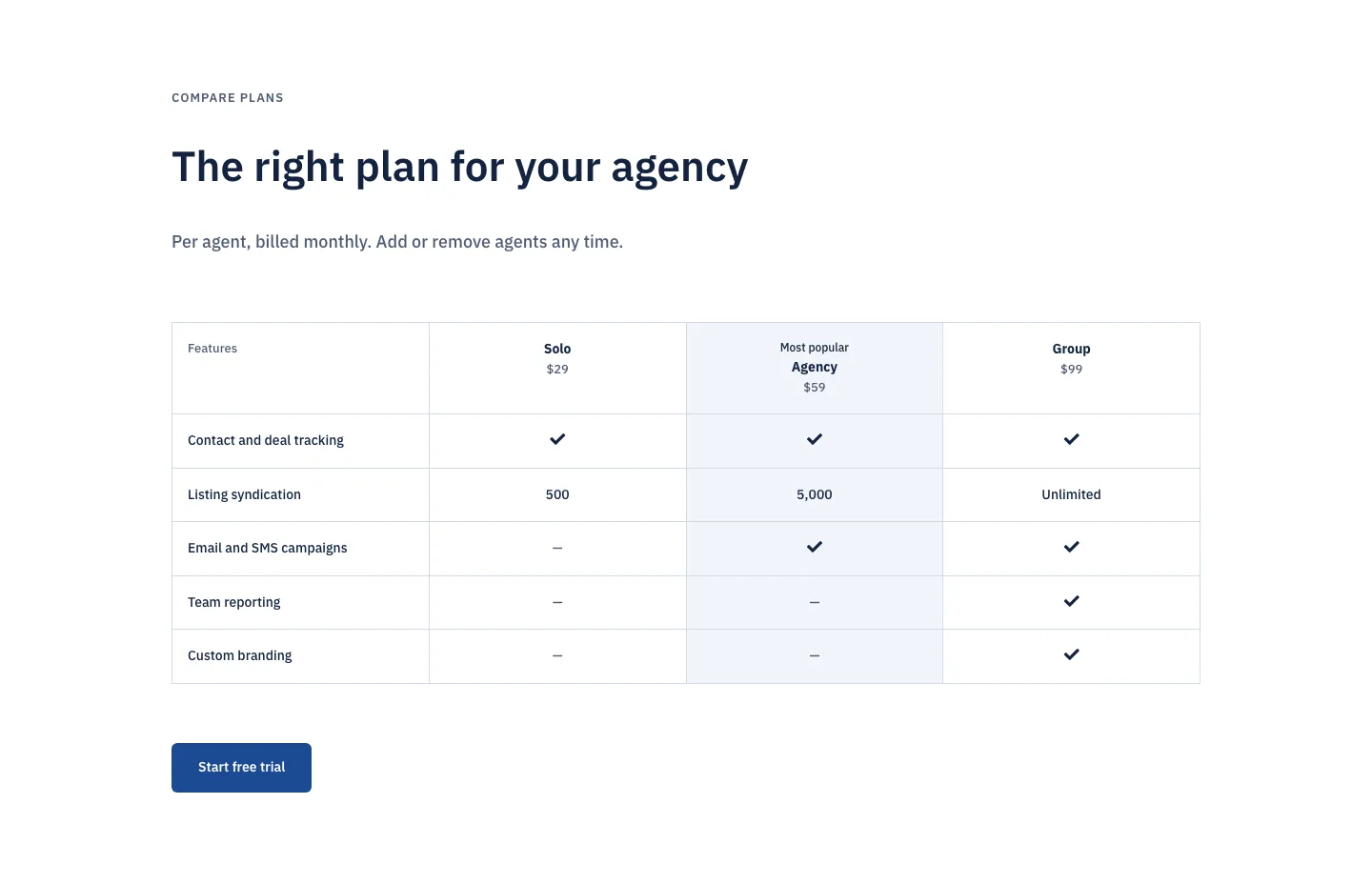
Corporate Real Estate CRM Pricing Table for Divi 5: Three-Plan Comparison
pricing · real_estate · corporate