
Anvil Mechanical — Dark Plumbing About Page for Divi 5
A bold dark about page layout for commercial plumbing contractors. Showcases company history, team bios, founder letter, and core values with a trust-first design.
Rate this element
Download this section, free
- Divi 5 JSON, imports in seconds
- Commercial license included
- No account needed
This page ships inside Anvil: Dark Commercial Plumbing & Contractor Theme (6 Pages), 6 coherent pages that share one brand.
Click to view the full page
Overview
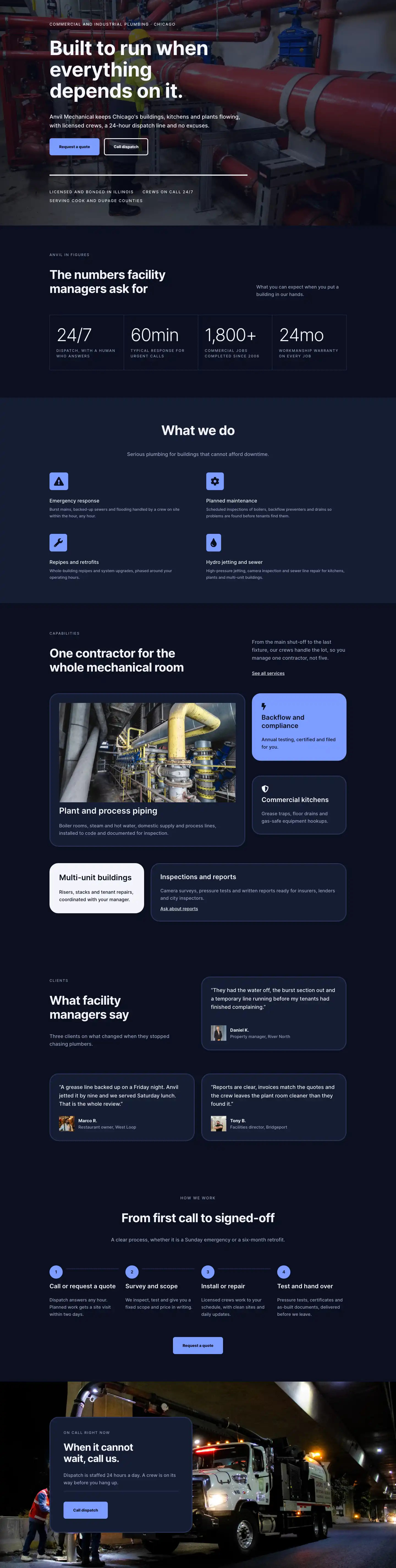
The layout opens on a deep navy section (#0b1020) structured as a two-column flex row. The text column claims 16 of 24 available flex units, leaving 8 for a portrait image at a 4:5 aspect ratio with objectFit: cover. Hierarchy inside that column runs three levels: a 14px uppercase Inter label in muted slate (#9aa4c0), a 64px h1 in near-white (#f2f4fa) with textWrap: balance and -1px letter-spacing, and a 19px body paragraph. Below the paragraph, a CTA group pairs a solid #7c9cff button with an inline ghost text link, giving visitors two exit paths without stacking elements vertically. On mobile the row switches to flexWrap: wrap, stacks text above the image, and the left column gains a 32px bottom margin so the content separates cleanly before the portrait.
The second section keeps the same dark background but adds a full-bleed image behind a 70% opacity Divi gradient overlay defined as two identical stops of rgba(7,11,26,0.7) with overlaysImage: on. Inside, a four-column milestone grid tells the company history in year-plus-copy cards. Each card opens with a 4px solid white top border as its only decorative rule, then drops a 48px bold year number, an h3 milestone label, and a one-line description. The grid steps from four columns on desktop to two on tablet and one on phone via explicit gridColumnCount changes, so the timeline remains legible at every viewport without custom CSS.
Sections three and four handle the people story. The crew section uses a two-row structure on a solid #0b1020 base: an asymmetric header row with 14/24 and 10/24 columns aligned via alignItems: flex-end so the heading and supporting copy share the same baseline, then a four-card team row where each column is sized at 6/24 desktop, 12/24 tablet, and 24/24 phone. Each card holds a square 1:1 image and a below-image group with a 4px top border that echoes the milestone section above, followed by the person's name and an uppercase role label. Section 4 shifts to #151c33 for contrast, places a 4:5 portrait with a pill-top and flat-bottom border radius on the left, and gives the right column three paragraphs of first-person copy at 22px, the largest body size in the layout, lending the founder statement deliberate weight.
The final two sections close the page. The values block places four Blurb modules in a 2x2 grid, each with a Font Awesome icon on a solid #7c9cff square with 8px corner radius; the icon itself renders at #0b1020 for full contrast against the accent fill. The CTA floats a 520px card left-anchored against a full-bleed photo (no overlay), with a #151c33 fill, 32px border-radius, a thin #2a3558 border, a horizontal divider rule separating copy from the button, and a solid accent call-to-action completing the visual circuit from the opening hero.
What’s inside
- Two-column hero: 64px h1 with `textWrap: balance` (scales to 36px on phone), dual CTA pairing a solid accent button with a ghost inline text link in the same flex group
- Full-bleed story section: 4-column milestone timeline (year number + h3 label + description) with 4px top-border card anchors set against a background image behind a 70% Divi gradient overlay
- 4-up team grid: square 1:1 crew photos with name and uppercase role labels, responsive from 4-across to 2-up tablet to single-stack phone via 6/24, 12/24, and 24/24 flex column sizing
- Founder letter section: 4:5 portrait with pill-top and flat-bottom border radius, three paragraphs of first-person copy at 22px, italic signature line
- Values block: 4 Blurb modules in a 2x2 grid, each with a Font Awesome icon inside a solid `#7c9cff` square with 8px radius, icon color set to `#0b1020` for contrast
- Floating CTA card: 520px max-width, 32px border-radius, `#2a3558` border, horizontal divider rule between copy and button, left-anchored against a full-bleed background image
- Coordinated section rhythm: backgrounds alternate between `#0b1020` and `#151c33` across six sections, with padding stepping from 100px/128px on desktop down to 48px/64px on phone at explicit tablet and phone breakpoints
Who it’s for
This layout is built for commercial and industrial plumbing contractors, mechanical services firms, and HVAC businesses whose pitch centers on reliability and 24-hour response rather than lowest price. Property managers, restaurant groups, and industrial facility operators are the implied client, so any trade contractor serving those audiences (electrical, fire suppression, HVAC, drain jetting) can adapt it without reskinning the layout's core structure. Web designers and Divi freelancers building sites for the skilled trades will find the dark industrial palette, milestone timeline, and founder letter directly transferable to any regional service business that needs to establish trust before a buyer commits to a large-ticket contract.
Customization tips
The palette is driven by four values: #0b1020 and #151c33 as section fills, #9aa4c0 as secondary text, and #7c9cff as the accent. Replacing those four with a warm charcoal-and-amber set, for instance, shifts the feel from industrial-cool to construction-warm without touching individual modules. Keep the h1 under 50 characters so textWrap: balance maintains orphan control across all three responsive font sizes. The hero portrait and founder portrait both enforce a 4:5 aspect ratio via Divi's aspectRatio sizing control, so crop source images to roughly 800x1000px. Team photos are locked to 1:1; crop to 600x600px or larger. For the Blurb icons, the glyph color is set separately in the module's advanced color field (#0b1020); if you change the #7c9cff background, update the icon color at the same time to maintain contrast. Milestone cards in the story section are Groups inside a CSS grid container; add or remove a Group to change the number of timeline entries.
How to install this layout
- Download the layout JSON file from this page.
- Open the target page in the Divi 5 builder.
- Open the portability panel (up/down arrows icon) and choose the Import tab.
- Upload the JSON. Tick “replace existing content” only for full-page imports.
- Check the page at desktop and mobile widths, then swap in your copy and images.
Full walkthrough with troubleshooting: How to Import a Divi 5 Layout.
Questions about Anvil Mechanical — Dark Plumbing About Page for Divi 5
How does the layout respond on mobile?
Section 1 wraps its two-column row with `flexWrap: wrap` and stacks the text above the portrait, adding a 32px bottom margin to separate them. The story milestone grid drops from 4 columns to 1 via explicit `gridColumnCount` overrides at tablet and phone. Team cards step from 4 across to 2 on tablet and a full-width single stack on phone. Section 4 also wraps its founder portrait column above the copy block. All paddings scale down at each breakpoint using Divi's responsive controls, so no custom CSS is needed.
Which Divi 5 modules does this layout use?
Heading, Text, Button, Image, Group (for layout containers and card structures), Blurb (values section), and Divider. All are native Divi 5 core modules. No Slider, Video, or third-party modules are included.
Where does the dark overlay on the story section come from?
It is a Divi 5 gradient layer applied inside the section's background decoration with `overlaysImage: on` and two stops both set to `rgba(7,11,26,0.7)` at 0% and 100%. To lighten it, reduce the alpha value on both stops. To remove it entirely, disable the gradient toggle in the section's Background settings.
Can I add or remove team member cards?
Yes. Each card is a column in a 4-column flex row sized at 6/24 (desktop), 12/24 (tablet), and 24/24 (phone). Duplicate a column to add a member. If you drop to three, the remaining columns distribute evenly. Adding a fifth requires adjusting the row's Column Structure setting to accommodate the extra column.
What aspect ratios do the images need?
The hero portrait (Section 1, right column) and the founder portrait (Section 4) both use 4:5. The four team card photos use 1:1 (square). Divi enforces these ratios via the `aspectRatio` sizing control in each Image module, so your source can be larger, but matching the crop orientation in your source file prevents unintended subject clipping.
Which Divi version does this layout need?
Divi 5. The layout is generated natively for Divi 5 and validated against its real module structure before publication, so it imports clean into the current builder.
Can I use this layout on client websites?
Yes. Every download includes a commercial license covering unlimited sites you own or build for clients. Only reselling or redistributing the layout file itself is prohibited.
Included in these packs
More full landing pages
Browse all full landing pages
Kiln & Clay — Minimal Pottery_studio Visit Page for Divi 5
full_landing · pottery_studio · minimal

Kiln & Clay — Minimal Pottery_studio Our Story Page for Divi 5
full_landing · pottery_studio · minimal

Kiln & Clay — Minimal Pottery_studio Studio Membership Page for Divi 5
full_landing · pottery_studio · minimal

Kiln & Clay — Minimal Pottery_studio The Shop Page for Divi 5
full_landing · pottery_studio · minimal

Kiln & Clay — Minimal Pottery_studio Classes Page for Divi 5
full_landing · pottery_studio · minimal

Kiln & Clay — Minimal Pottery_studio Home Page for Divi 5
full_landing · pottery_studio · minimal