
Anvil Mechanical — Dark Plumbing Contact Page for Divi 5
A dark-themed Divi 5 contact page for a commercial plumbing and mechanical contractor. Includes a contact form, address and hours block, FAQ accordion, and a 24/7 dispatch CTA banner.
Rate this element
Download this section, free
- Divi 5 JSON, imports in seconds
- Commercial license included
- No account needed
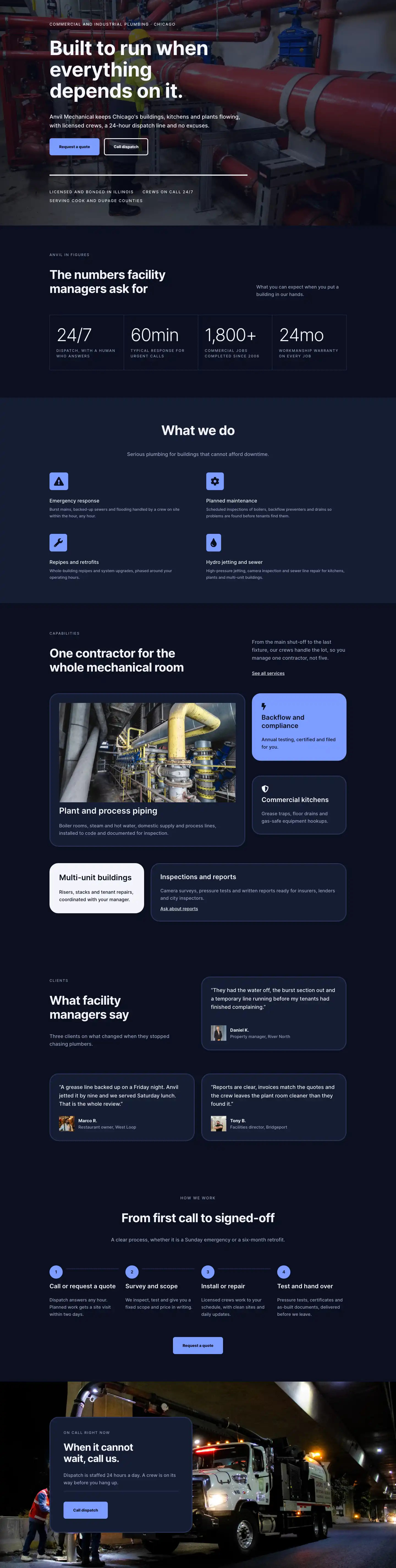
This page ships inside Anvil: Dark Commercial Plumbing & Contractor Theme (6 Pages), 6 coherent pages that share one brand.
Click to view the full page
Overview
Anvil Mechanical opens with a two-column header section on a deep navy field (#151c33), with 72px top padding on desktop stepping down to 40px on phones. The left column carries an uppercase breadcrumb at 13px with 2px letter-spacing in muted blue-grey (#9aa4c0), followed by a 52px Inter 700 H1 in near-white (#f2f4fa) with -1px letter-spacing to tighten the characters at large sizes. The right column holds a single sentence at 18px, acting as a brief sub-header. A 1px bottom border in #2a3558 closes the section and marks the transition to the darker content below.
The central section drops to the deepest background tone (#0b1020) and splits into an asymmetric pair of columns: a 10/24 left column holding a portrait image with a pill-top, square-bottom border treatment (999px top radii, 32px bottom), clipped to a 4:5 aspect ratio at 420px max-width; and a 14/24 right column containing the enquiry form. Beneath the image, two contact-detail rows pair Font Awesome icons (map pin and clock face) with a 12px uppercase label and a 17px value line, covering address and office hours. The right column opens with a 13px eyebrow heading and a 40px Inter 700 H2, then a body paragraph surfacing the direct phone number and email before presenting the contact form inside a rounded card: #151c33 fill, 3px solid #2a3558 border, 32px corner radius, and 40px padding on all sides. The three form fields use the deep background as their fill so the boundary between card and input is defined by a 3px solid #9aa4c0 border rather than a fill contrast. The submit button fills with the periwinkle accent (#7c9cff) and reverses to #0b1020 on hover.
The FAQ section keeps the #0b1020 background and centres its content at a max-width of 1080px. Five Toggle modules each carry a 28px Inter 600 title and a 17px #9aa4c0 body answer at 1.7em line-height, separated by 3px bottom borders in #2a3558. The first toggle opens by default so the page never lands in a fully collapsed state on arrival. A 4px top rule in #f2f4fa anchors the group visually without wrapping it in a card or box.
The closing strip inverts to the layout's accent color (#7c9cff), placing high-contrast periwinkle behind dark (#0b1020) type. A flex row spaces a 48px Inter 700 H2 against a button-and-note group: the button fills with #151c33 and swaps to #f2f4fa on hover, with a reassuring "Open 24 hours for emergencies." note at 14px underneath. On phones the row flips to a column and alignment shifts to flex-start, so the heading and button each occupy the full width without centring or cropping.
What’s inside
- Four-section layout: a breadcrumb header, an asymmetric two-column contact body, a full-width FAQ accordion, and an accent-color CTA strip
- Portrait image column with pill-top and rounded-bottom border radii (999px top, 32px bottom) clipped to a 4:5 aspect ratio using the native Divi 5 Image module
- Icon-and-label contact detail rows using native Divi 5 Icon and Text modules for address and opening hours, with styled uppercase labels in Inter
- Rounded contact form card (3px border, 32px radius, 40px padding) housing a native Divi 5 Contact Form with three full-width fields and a branded submit button
- Five-item FAQ accordion built entirely from native Divi 5 Toggle modules, with the first item open by default and 3px rule separators between items
- Periwinkle (#7c9cff) CTA banner with a space-between H2 and a dark button group, reverting to dark text and hover swap on click
- Three-breakpoint responsive layout: font sizes step down at tablet and phone, two-column rows wrap to single columns, and section padding reduces progressively
Who it’s for
This contact page is built for independent plumbing and mechanical contracting firms that handle commercial or mixed-use buildings: HVAC installers, fire suppression contractors, facilities maintenance companies, and property management offices that field service requests. The 24/7 dispatch messaging, fixed-scope site visit promise, and insurance-documentation FAQ entry project the kind of institutional reliability that property owners and general contractors expect. It would transfer cleanly to any licensed trade contractor, drain and sewer specialist, or building-services consultancy that needs a professional, low-friction enquiry page rather than a residential-style contact form.
Customization tips
The palette turns on three variables. Swap #7c9cff (used as the CTA section background, form button fill, and button border) to your brand's primary color. Then adjust #151c33 (header section and form card background) and #0b1020 (main, FAQ, and form field backgrounds) together, keeping them at least 10-15 lightness points apart so the card boundary remains visible. The portrait image is constrained to a 4:5 ratio at 420px max-width; a well-cropped job-site or crew shot works best at that proportion. The form has three fields (Name, Email, Message) baked in; adding a fourth requires adjusting the card's row-gap. FAQ toggle titles display at 28px and wrap cleanly to two lines up to about 70 characters; answers have no practical length limit. Replace the Pexels placeholder image and update contact data in five places: header sub-copy, address row, hours row, body text above the form, and FAQ answers.
How to install this layout
- Download the layout JSON file from this page.
- Open the target page in the Divi 5 builder.
- Open the portability panel (up/down arrows icon) and choose the Import tab.
- Upload the JSON. Tick “replace existing content” only for full-page imports.
- Check the page at desktop and mobile widths, then swap in your copy and images.
Full walkthrough with troubleshooting: How to Import a Divi 5 Layout.
Questions about Anvil Mechanical — Dark Plumbing Contact Page for Divi 5
The image in the contact column shows a glass office tower. Is that placeholder content?
Yes, it is a Pexels stock photo included for layout demonstration. Replace it with a photo of your team, yard, or a job site at a 4:5 portrait ratio and the pill-top, rounded-bottom border treatment applies automatically.
Does the contact form send emails without a plugin?
The layout uses the native Divi 5 Contact Form module. It delivers submissions to the email address you set in Divi's form settings. No third-party form plugin is required.
How do the two dark section backgrounds behave when columns stack on mobile?
The header (#151c33) and the contact and FAQ sections (#0b1020) are separate Divi sections, so each keeps its own background at every viewport size. When the two-column rows wrap to single columns on phones, columns follow source order in the JSON, placing the image above the form.
Can I change which FAQ item is open when the page loads?
Yes. In the Divi editor, select any Toggle module and enable or disable the "Open by default" setting. Only the first toggle has it on in this layout; the other four are closed on load.
Where does the phone number appear and how many places need updating?
Five places: the header section sub-copy, the hours row beneath the image, the body paragraph above the form, the first FAQ answer, and the small note in the CTA strip. Updating all five in the Divi editor takes about two minutes.
Which Divi version does this layout need?
Divi 5. The layout is generated natively for Divi 5 and validated against its real module structure before publication, so it imports clean into the current builder.
Can I use this layout on client websites?
Yes. Every download includes a commercial license covering unlimited sites you own or build for clients. Only reselling or redistributing the layout file itself is prohibited.
Included in these packs
More full landing pages
Browse all full landing pages
Kiln & Clay — Minimal Pottery_studio Visit Page for Divi 5
full_landing · pottery_studio · minimal

Kiln & Clay — Minimal Pottery_studio Our Story Page for Divi 5
full_landing · pottery_studio · minimal

Kiln & Clay — Minimal Pottery_studio Studio Membership Page for Divi 5
full_landing · pottery_studio · minimal

Kiln & Clay — Minimal Pottery_studio The Shop Page for Divi 5
full_landing · pottery_studio · minimal

Kiln & Clay — Minimal Pottery_studio Classes Page for Divi 5
full_landing · pottery_studio · minimal

Kiln & Clay — Minimal Pottery_studio Home Page for Divi 5
full_landing · pottery_studio · minimal