
Anvil Mechanical — Dark Plumbing Emergency & Plans Page for Divi 5
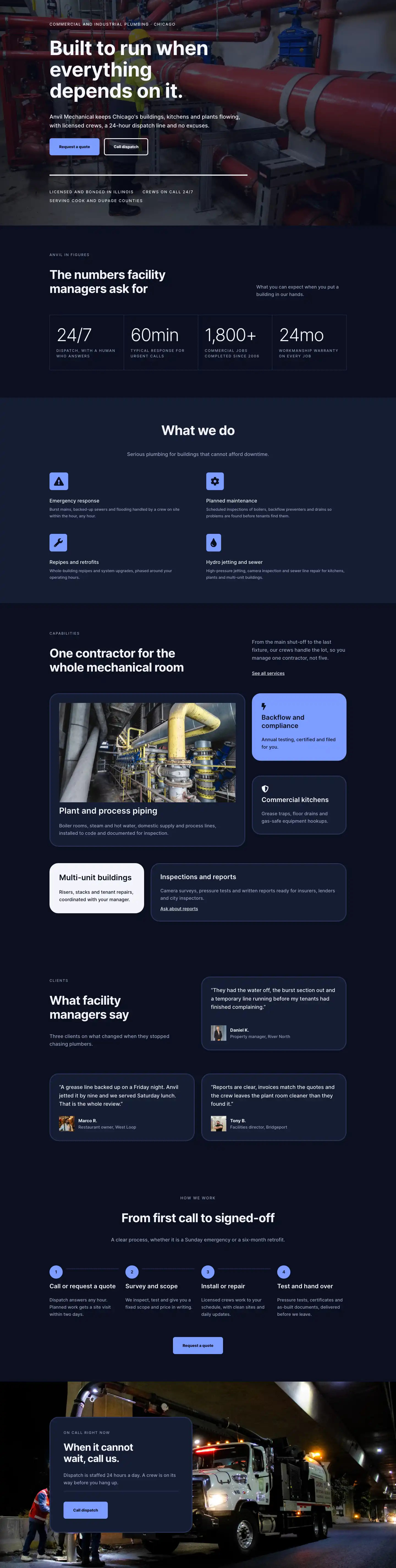
Burst pipe at 2 a.m.? Anvil Mechanical dispatches a stocked crew within the hour, 365 days a year. Compare pay-as-you-go call-outs and monthly service agreements.
Rate this element
Download this section, free
- Divi 5 JSON, imports in seconds
- Commercial license included
- No account needed
This page ships inside Anvil: Dark Commercial Plumbing & Contractor Theme (6 Pages), 6 coherent pages that share one brand.
Click to view the full page
Overview
The layout opens on a flat #151c33 navy background that runs unbroken through four of its five sections, creating a night-shift register that suits emergency services better than any hero image could. The entry section divides the desktop viewport into an asymmetric two-column row: the headline column occupies 16 of 24 flex units, leaving 8 for a subtext column that holds a single body sentence at 18px. The H1 is set at 52px Inter 700 with -1px letter-spacing, a compression that reads as deliberate and authoritative. A breadcrumb line above it uses 13px uppercase Inter at #9aa4c0 and 2px letter-spacing, establishing the typographic system that all section labels will follow. Both columns become full-width on phones and stack vertically, with section padding stepping down from 72px/64px on desktop to 40px/36px on phone so the entry never feels cramped on smaller screens.
The emergency process section introduces the layout's primary structural device: step numbers rendered as Text modules at 80px bold on desktop, scaling to 64px at tablet and 52px on phone, functioning as large anchors that break the right column into scannable thirds. Between each step a Divider module draws a 2px #2a3558 rule that separates the steps without adding visual weight. The left column carries the uppercase section label, a 44px H2, and a single-sentence intro; the right column holds the three numbered steps with H3 titles at 26px and body text at 17px. On phones the row wraps and the label-heading column arrives first, keeping context before content.
The plans section is the structural centerpiece and contains the layout's most considered design decision. Two pricing cards are nested inside a Group module configured as a CSS grid with two equal columns on desktop and a single column on phones. The cards are deliberately inverted rather than color-differentiated: the On-call card uses #0b1020 as its background, which is darker than the surrounding page navy, bordered with a 3px #2a3558 rule and 32px corner radii. The Service Agreement card flips to #f2f4fa, creating a sharp light/dark contrast entirely within the dark page without introducing a third color. Both cards hold a tier label, plan name at 28px, a 56px price figure with -1px letter-spacing, a top-ruled feature list using Font Awesome checkmarks in icon-and-text row groups, and a CTA button. The dark card gets a ghost outline button; the light card gets a filled dark button with inverse hover states on both.
The FAQ section splits into a header row and a question grid. The header row uses a 14:10 column split with alignItems: flex-end, so the phone CTA button on the right sits at the bottom of the H2 on the left, a small alignment choice that avoids floating the button awkwardly mid-column. Below it, six questions are distributed across two equal columns with 40px of row gap. Each Q&A block is a Group module anchored by a 4px #f2f4fa top border, an H3 question at 21px, and body text at 16px in #9aa4c0. The page closes with the only color break in the layout: a #7c9cff periwinkle section using space-between row justification, pairing a 48px heading on the left with a dispatch button and a 14px reassurance line on the right. No images appear anywhere in the layout; all visual hierarchy is carried by type scale, spacing, the light/dark card inversion, and that single accent section.
What’s inside
- Asymmetric intro row: H1 at 52px Inter 700 spanning 16/24ths of desktop width, with a separated 18px subtext column at 8/24ths offset by 36px of top padding
- Three-step emergency sequence using 80px bold display numerals (scaling to 52px on phone) as structural anchors, with 2px dividers between each step
- Two-card pricing grid in a CSS grid Group module: dark `#0b1020` On-call card and inverted `#f2f4fa` Service Agreement card with matching 32px corner radii and 3px borders
- Font Awesome checkmark icon lists inside each pricing card: five icon-and-text row groups per card with independent icon colors matching each card's foreground
- Contrasting button styles per card: ghost outline button on the dark card, filled dark button on the light card, each with full inverse hover states wired independently
- Six-question FAQ in a two-column grid, each Q&A anchored with a 4px top rule, H3 question at 21px, and muted body text at 16px
- Periwinkle `#7c9cff` closing CTA section with space-between row layout: 48px heading on the left, dispatch button and 14px reassurance line on the right
Who it’s for
A natural fit for 24-hour plumbing and mechanical contractors who need one page to handle two very different audiences: a panicked tenant at 2 a.m. looking for a number to call, and a property manager comparing retainer plans. The tone and information density also suit commercial HVAC companies with emergency dispatch, building maintenance contractors pitching monthly agreements to strata councils or commercial landlords, and trade-services businesses in any category where a flat-rate call-out fee and a recurring plan are the two core products. The all-type, no-image approach means it loads fast on a mobile signal when urgency is highest.
Customization tips
The entire dark palette is controlled by two values: #151c33 for all section backgrounds and #7c9cff for the closing CTA section. Shift the mood by changing those two in tandem and updating the border and divider color #2a3558 to stay proportionally darker than the background. For a warmer brand, a deep slate or dark brown works as a drop-in replacement for the navy.
The inverted light card uses #f2f4fa as its background with #0b1020 for all text; if you want a colored featured card instead of a white one, swap the background value and ensure text colors inside the card are updated to maintain contrast.
Step numbers are standard Text modules. Replace '01 / 02 / 03' with any short label and keep step descriptions under 20 words each; the column has no fixed height so longer copy will push dividers out of alignment. Pricing figures and per-line subtitles are also plain Text modules — edit them directly. Each feature list is a stack of icon-and-text Group rows: add or remove rows freely without affecting card layout. Update the phone number in the FAQ CTA button as both the label text and the button link (tel:+1XXXXXXXXXX).
How to install this layout
- Download the layout JSON file from this page.
- Open the target page in the Divi 5 builder.
- Open the portability panel (up/down arrows icon) and choose the Import tab.
- Upload the JSON. Tick “replace existing content” only for full-page imports.
- Check the page at desktop and mobile widths, then swap in your copy and images.
Full walkthrough with troubleshooting: How to Import a Divi 5 Layout.
Questions about Anvil Mechanical — Dark Plumbing Emergency & Plans Page for Divi 5
Does this layout include any image slots or background photos?
No. Every section uses a flat color background with no image modules, hero photos, or gradients anywhere in the layout. All visual hierarchy comes from type scale, the dark/light card inversion, and the periwinkle CTA section. You can add a background image to any section through its standard decoration settings without touching the existing modules.
Which Divi 5 modules does the layout use?
Section, Row, Column, Heading, Text, Divider, Group, Button, and Icon. Every module is a native Divi 5 core module. No third-party plugins or extensions are required beyond Divi 5 itself.
How do the two pricing cards behave on mobile?
On desktop they sit in a two-column CSS grid inside a Group module with a 24px column gap. On phones the Group switches to `gridColumnCount: 1`, so the cards stack vertically at full width. The card order is preserved: On-call appears first, Service Agreement below it.
The step numbers are very large. Can I scale them down?
Yes. They are standard Text modules with a font size of 80px on desktop, 64px at tablet, and 52px on phone, all set in the module's font decoration settings. Edit those three breakpoint values to any size that fits your content without affecting the surrounding step titles or dividers.
What should I edit first after importing the layout?
Start with the phone number in two places: the FAQ header CTA button ('Call (312) 555-0118') and the closing CTA button ('Call dispatch'). Update both the button label and the href to a real `tel:` link. Then update the pricing figures, plan names, and feature bullet copy to match your actual service tiers.
Which Divi version does this layout need?
Divi 5. The layout is generated natively for Divi 5 and validated against its real module structure before publication, so it imports clean into the current builder.
Can I use this layout on client websites?
Yes. Every download includes a commercial license covering unlimited sites you own or build for clients. Only reselling or redistributing the layout file itself is prohibited.
Included in these packs
More full landing pages
Browse all full landing pages
Kiln & Clay — Minimal Pottery_studio Visit Page for Divi 5
full_landing · pottery_studio · minimal

Kiln & Clay — Minimal Pottery_studio Our Story Page for Divi 5
full_landing · pottery_studio · minimal

Kiln & Clay — Minimal Pottery_studio Studio Membership Page for Divi 5
full_landing · pottery_studio · minimal

Kiln & Clay — Minimal Pottery_studio The Shop Page for Divi 5
full_landing · pottery_studio · minimal

Kiln & Clay — Minimal Pottery_studio Classes Page for Divi 5
full_landing · pottery_studio · minimal

Kiln & Clay — Minimal Pottery_studio Home Page for Divi 5
full_landing · pottery_studio · minimal