
Anvil Mechanical — Dark Plumbing Home Page for Divi 5
Licensed commercial plumbing contractor serving Chicago. 24/7 dispatch, 60-minute emergency response, plant piping, hydro jetting, backflow compliance and more. Serving Cook and DuPage counties since 2006.
Rate this element
Download this section, free
- Divi 5 JSON, imports in seconds
- Commercial license included
- No account needed
This page ships inside Anvil: Dark Commercial Plumbing & Contractor Theme (6 Pages), 6 coherent pages that share one brand.
Click to view the full page
Overview
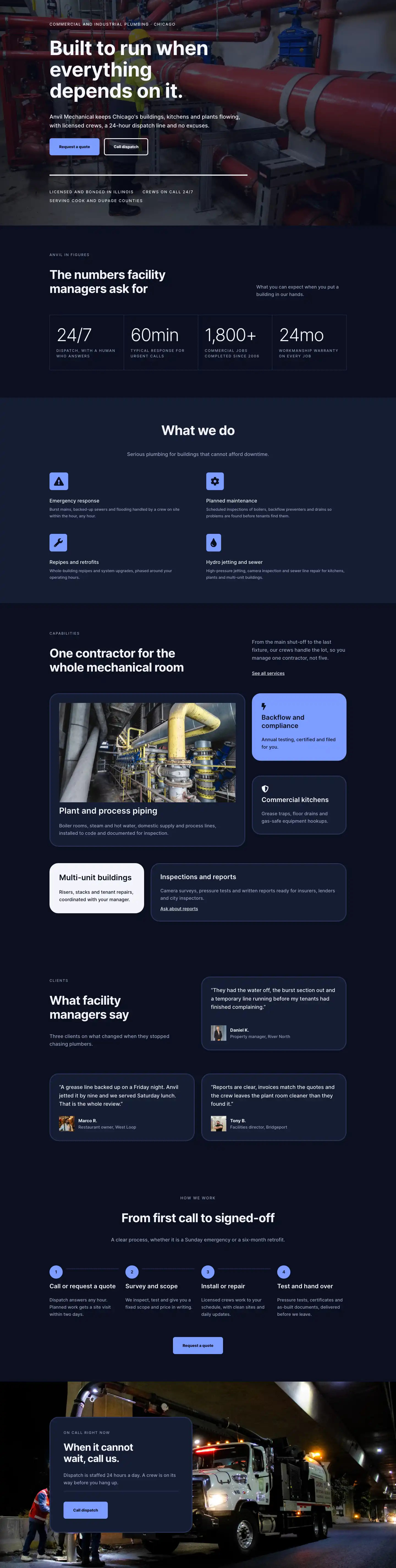
The layout opens with a full-viewport hero built on a single full-width column set to min-height: 80vh on desktop, 70vh on tablet, and a fixed 560px on mobile, so the fold never collapses on any device. The section layers a near-black base (#0b1020) with a Pexels industrial photograph and a 70% opacity gradient overlay that runs left to right across both stops, creating depth without competing with the type. The Inter typeface carries the entire page: the hero eyebrow sits at 14px with 2px letter-spacing and uppercase transforms, while the H1 scales from 72px on desktop down to 38px on mobile with text-wrap: balance and tight negative tracking. A filled accent button (#7c9cff periwinkle) and a ghost-outline secondary button sit in a flex row with 16px column-gap and wrap enabled, so they stack vertically on narrow viewports. A 4px solid white divider anchors the block before three trust-line items (licensed, 24/7 crews, service area) rendered in spaced uppercase at 14px.
The stats section uses a CSS Grid group with columnGap: 1px and rowGap: 1px, the parent background set to #2a3558, so the narrow gaps read as hairline gridlines separating the four stat cells. Each cell holds an oversized numeral (Inter Light at 64px, 1em line-height, −2px tracking) above a short uppercase caption in muted slate (#9aa4c0). The grid collapses from four columns to two on tablet and phone. The capabilities section that follows deploys an asymmetric card system: a 16/24-flex wide card carries a 16:9 object-fit: cover image from Pexels, while narrower cards on the opposing column alternate between a solid accent fill (#7c9cff with dark text), an off-white fill (#f2f4fa with dark text), and the standard mid-navy surface (#151c33 with light text). All cards share 32px corner radii and a 3px border that animates to #f2f4fa on hover.
The testimonials section pairs a left-aligned section header with a staggered card arrangement: the first row's right column holds a single card; the second row splits into two equal cards side by side. Each card sits on #151c33 with a 32px radius and contains a 19px quote, a 56px square portrait image (1:1 aspect ratio, object-fit: cover), a bold name, and a muted role line. The four-step process section closes the page body with a numbered grid (4 columns desktop, 2 tablet, 1 phone). Each step is anchored by a 48px periwinkle pill badge with a bold numeral; a flex-grow Divider module connects steps horizontally on desktop and is disabled on phone. The final section places a #151c33 frosted card (max-width 520px, 32px radius) over a second industrial background image, with a stripped-down emergency CTA, a hairline divider, and the accent-fill dispatch button.
What’s inside
- Full-viewport hero with Pexels industrial background image, 70% gradient overlay, and H1 scaling from 72px (desktop) to 38px (mobile) via responsive breakpoints
- Dual-button CTA row (filled accent + ghost-outline) with flex-wrap stacking on narrow screens and hover-invert color transitions
- 4-cell CSS Grid stat block with 1px #2a3558 hairline gridlines, 64px Inter Light numerals (24/7, 60min, 1,800+, 24mo), and 2-column collapse on tablet
- 2x2 Blurb module services grid with left-aligned #7c9cff icon badge backgrounds, Font Awesome icons (warning, gear, wrench, droplet), and slate body copy
- Asymmetric capabilities card system mixing accent-fill, off-white, and dark-navy cards, all with 32px radii, 3px borders, and hover-to-white border transitions
- Staggered testimonials layout (1-card first row, 2-card second row) with 56px square portrait images, 19px quote text, and inline name/role attribution
- 4-step numbered process grid with 48px periwinkle pill badges, flex-grow connecting divider lines that hide on phone, and a centered repeat CTA button
- Emergency CTA section: max-520px frosted card over a second industrial background image, with internal divider and accent-fill dispatch button
Who it’s for
This layout is a strong fit for WordPress/Divi designers building sites for commercial and industrial trade contractors: mechanical plumbers, HVAC firms, fire suppression contractors, industrial pipe fabricators, and facilities maintenance businesses. The dark palette and large-numeral stats are aimed at a B2B audience of facility managers, property managers, and procurement teams rather than residential customers. The services blurb grid, asymmetric capability cards, and four-step process structure also adapt cleanly for electrical contractors, industrial cleaning companies, and any multi-service trade business that needs to communicate operational credibility concisely.
Customization tips
The palette reduces to four values: the near-black background (#0b1020), the mid-navy surface (#151c33), the border/separator tone (#2a3558), and the periwinkle accent (#7c9cff). Replacing all four globally shifts the layout to forest green, slate gray, or any dark corporate scheme without touching individual modules.
The hero H1 uses text-wrap: balance with a 720px max-width; copy up to around 60 characters wraps cleanly across three lines on desktop. Beyond 75 characters the line-height starts to feel loose. Update the four stat numerals (24/7, 60min, 1,800+, 24mo) first since they carry the most immediate trust signal and are plain Text modules.
The 16:9 capability card image expects a landscape photograph with a clear center subject. Avoid crops wider than roughly 2.5:1 or object-fit: cover will clip the focal point. The 56px square testimonial portraits are tight, so center faces before uploading to avoid off-center crops at that size.
How to install this layout
- Download the layout JSON file from this page.
- Open the target page in the Divi 5 builder.
- Open the portability panel (up/down arrows icon) and choose the Import tab.
- Upload the JSON. Tick “replace existing content” only for full-page imports.
- Check the page at desktop and mobile widths, then swap in your copy and images.
Full walkthrough with troubleshooting: How to Import a Divi 5 Layout.
Questions about Anvil Mechanical — Dark Plumbing Home Page for Divi 5
How does the hero section handle different screen heights?
The hero Group module is set to `min-height: 80vh` on desktop, `70vh` on tablet, and a fixed `560px` on phone. The flex container uses `justifyContent: center` so the text block stays vertically centered regardless of actual window height. The section itself has zero top and bottom padding to avoid adding extra space above or below the group.
What creates the thin gridlines in the stats section?
The stat block is a Group module configured as a CSS Grid with `columnGap: 1px` and `rowGap: 1px`. The parent group's background is #2a3558, and each stat cell sits on #0b1020. The narrow gap exposes the parent color as hairline separators. Changing the parent background color updates all gridlines at once.
The capabilities section has cards in different colors. How do I change which one gets the accent fill?
Each card is an independent Group module with its own background color. The #7c9cff accent card, the #f2f4fa off-white card, and the #151c33 dark cards are all separate groups. Open the group you want to recolor, change the background in the module settings, then adjust the heading and text color to maintain contrast (dark text on light or accent backgrounds, light text on dark).
Do the testimonial portrait images need to be square before uploading?
The images are constrained to a 1:1 aspect ratio with `object-fit: cover`, so any image will be square-cropped automatically. Uploading a pre-cropped square with the face centered gives the most predictable result. The layout applies no border-radius to these images, so they display as sharp squares.
What is the 'accordion-automated' CSS class on the services section?
That class is present in the section's HTML attributes field. It does not affect default Divi rendering and was added as a hook for optional JavaScript accordion behavior. You can remove it from the section's Advanced CSS Class field with no visual effect if you are not wiring up custom accordion logic.
Can I replace the Pexels background images, and are there constraints on the photos?
The layout uses Pexels images in three places: the hero section background, the 16:9 capabilities card image, and the emergency CTA section background. The hero and CTA images sit under a gradient overlay, so dark or mid-tone industrial photographs work best. The 16:9 card image has no overlay, so use a photograph with a clear subject in the center third. Update the `src` values in the respective Image module and Section background fields.
Which Divi version does this layout need?
Divi 5. The layout is generated natively for Divi 5 and validated against its real module structure before publication, so it imports clean into the current builder.
Can I use this layout on client websites?
Yes. Every download includes a commercial license covering unlimited sites you own or build for clients. Only reselling or redistributing the layout file itself is prohibited.
Included in these packs
More full landing pages
Browse all full landing pages
Kiln & Clay — Minimal Pottery_studio Visit Page for Divi 5
full_landing · pottery_studio · minimal

Kiln & Clay — Minimal Pottery_studio Our Story Page for Divi 5
full_landing · pottery_studio · minimal

Kiln & Clay — Minimal Pottery_studio Studio Membership Page for Divi 5
full_landing · pottery_studio · minimal

Kiln & Clay — Minimal Pottery_studio The Shop Page for Divi 5
full_landing · pottery_studio · minimal

Kiln & Clay — Minimal Pottery_studio Classes Page for Divi 5
full_landing · pottery_studio · minimal

Kiln & Clay — Minimal Pottery_studio Home Page for Divi 5
full_landing · pottery_studio · minimal