
Anvil Mechanical — Dark Plumbing Projects Page for Divi 5
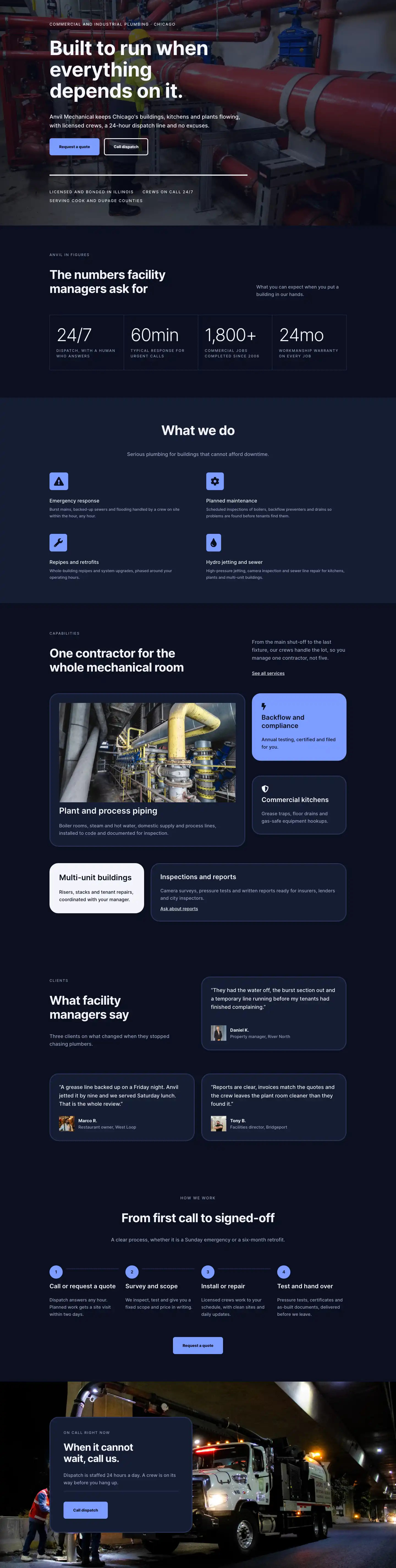
Browse Anvil Mechanical's commercial and industrial plumbing projects across Chicago: process piping, boiler plants, multi-unit repipes, backflow compliance, and more.
Rate this element
Download this section, free
- Divi 5 JSON, imports in seconds
- Commercial license included
- No account needed
This page ships inside Anvil: Dark Commercial Plumbing & Contractor Theme (6 Pages), 6 coherent pages that share one brand.
Click to view the full page
Overview
The layout opens with a compact header section on #151c33 (one shade lighter than the main near-black) that uses a 16/24 + 8/24 asymmetric two-column split to pair the H1 "Projects" (Inter 700, 52px, letter-spacing -1px) with a short location descriptor. A 1px #2a3558 bottom border draws a hard edge between the header and the content below, establishing the section-separation language used throughout. On phones the row wraps to a single column and the H1 steps down to 32px, keeping the hierarchy readable without overflow.
The portfolio section sits on #0b1020 (near-black) with 100px vertical padding. A flex row aligned to flex-end pairs the eyebrow-plus-H2 group on the left with a ghost CTA button on the right, so the conversion intent lands before a visitor finishes reading the section label. Below it, a native CSS grid (two columns, 32px gap) holds five project cards. The first, Calumet Process Plant, spans both columns at a 2:1 landscape ratio, giving it the visual weight of a featured case study. The remaining four fill at 4:3. Each card pairs a sharp-edge object-fit: cover image with an H3 project name (Inter 600, 22px) and a category badge: a rounded pill with a 3px #2a3558 border and uppercase #9aa4c0 label. On phones the grid drops to one column and the row gap tightens to 32px.
The third section, "The work behind the work," shifts to process photography across a three-column equal grid. Each column stacks two images at mixed aspect ratios (a 4:5 portrait above a 4:3 landscape, or the inverse) so column heights stagger naturally without masonry JavaScript. A standard Divi 1_3/1_3/1_3 row collapses to a single column on mobile, letting visitors scroll all six process shots in sequence. The section header uses the same asymmetric 14/24 + 10/24 column split as the portfolio header, keeping the layout's internal rhythm consistent.
A full-bleed testimonial section overlays a Pexels industrial photograph with a uniform rgba(7,11,26,0.7) gradient on both stops, ensuring legibility regardless of the underlying image content. An oversized opening quotation mark at 120px and a pull-quote body at 42px create unmistakable typographic hierarchy, bridged to the attribution by a 64px white divider rule. The layout closes on a #7c9cff periwinkle section, the only warm accent in the otherwise navy-and-near-black palette. It places the H2 and the primary "Request a quote" button side-by-side with a short scarcity note below the button, projecting the quiet selectivity of a contractor that books by project value rather than volume.
What’s inside
- Asymmetric two-column header (16/24 + 8/24 desktop split) with breadcrumb navigation and a `#2a3558` bottom-border separator between the header and main content
- Five-card CSS-grid portfolio: one 2-column featured card at 2:1 aspect ratio plus four standard cards at 4:3, each with a per-project category badge (rounded pill, 3px `#2a3558` border, uppercase `#9aa4c0` label)
- Ghost "Request a quote" button positioned inline with the portfolio section header, right-aligned at `flex-end`, with 3px solid white border and inverted fill on hover
- Three-column staggered process gallery: six images across three equal columns using mixed 4:5 and 4:3 aspect ratios to vary column heights organically without any JavaScript
- Full-bleed testimonial with an oversized 120px opening quote mark, 42px pull-quote body, 64px white divider rule, and two-line name-plus-title attribution
- `#7c9cff` periwinkle CTA section with a solid dark button and scarcity subtext, providing the layout's only warm contrast against the navy and near-black palette
- Three responsive breakpoints on every section with explicitly coded stepped padding (100px desktop, 72px tablet, 48px phone) and font-size ramps on all headings
Who it’s for
This layout suits commercial and industrial plumbing and mechanical contractors whose portfolios span multi-unit residential, restaurant, process-plant, and institutional work. It also fits HVAC and fire-suppression firms, general contractors wanting a standalone project-gallery page, and any trade business where the photography of completed work is the primary sales tool. The category badge system makes it straightforward to distinguish service lines (process piping, boiler replacement, multi-unit repipe) within a single page, and the testimonial section gives space to a single high-authority client quote rather than a grid of short reviews.
Customization tips
The two background colors (#151c33 in the header and #0b1020 in the main sections) can be adjusted as a coordinated pair. Swapping both to a warm charcoal or a deep slate shifts the mood while the #9aa4c0 muted text and #f2f4fa primary text continue to read well against any dark value. The periwinkle accent (#7c9cff) in the CTA section is the fastest single-swatch change to make the layout feel brand-specific. For images, the featured project card expects a 2:1 wide-crop at minimum 1600px wide. The four grid cards and all gallery slots expect 4:3 or 4:5 as specified. Project names read best at under 30 characters so the H3 and category badge stay on one line. Category badge labels are plain Divi Text modules and take about 30 seconds each to update. Both "Request a quote" buttons are independent modules, so update each href separately when wiring up your contact or quote form.
How to install this layout
- Download the layout JSON file from this page.
- Open the target page in the Divi 5 builder.
- Open the portability panel (up/down arrows icon) and choose the Import tab.
- Upload the JSON. Tick “replace existing content” only for full-page imports.
- Check the page at desktop and mobile widths, then swap in your copy and images.
Full walkthrough with troubleshooting: How to Import a Divi 5 Layout.
Questions about Anvil Mechanical — Dark Plumbing Projects Page for Divi 5
How does the project grid behave on mobile?
The CSS grid collapses from two columns on desktop to a single column on phones. The featured card, which spans both columns at a 2:1 ratio on desktop, becomes a standard full-width card on mobile. Row gap tightens from 40px to 32px and section padding steps down from 100px to 48px.
What aspect ratios should my project images be?
The featured card uses a 2:1 ratio (wide landscape, minimum 1600px wide). The four remaining grid cards use 4:3. The six gallery images alternate between 4:5 portrait slots and 4:3 landscape slots per column, so bring at least two strong portrait-orientation process shots alongside your wider site photography.
Which Divi 5 modules does this layout use?
Only native Divi 5 modules: Section, Row, Column, Group, Heading, Text, Image, Button, and Divider. No third-party modules or plugins are required beyond Divi 5 itself.
How dark is the testimonial background overlay, and will my own photo work?
The gradient applies `rgba(7,11,26,0.7)` uniformly across both the 0% and 100% stops, producing a consistent 70% dark veil. Any industrial or architectural photograph with reasonable contrast will read well beneath it. Avoid very light or washed-out images, as the overlay is not dark enough to compensate for a near-white photo.
What should I edit first after importing?
Replace the five project images and their H3 names, then update the category badge label inside each pill (those are plain Text modules). After that, wire both "Request a quote" buttons to your actual contact or quote form URL. The testimonial copy and attribution are the last thing to swap, as they sit in a separate section with no structural dependencies.
Which Divi version does this layout need?
Divi 5. The layout is generated natively for Divi 5 and validated against its real module structure before publication, so it imports clean into the current builder.
Can I use this layout on client websites?
Yes. Every download includes a commercial license covering unlimited sites you own or build for clients. Only reselling or redistributing the layout file itself is prohibited.
Included in these packs
More full landing pages
Browse all full landing pages
Kiln & Clay — Minimal Pottery_studio Visit Page for Divi 5
full_landing · pottery_studio · minimal

Kiln & Clay — Minimal Pottery_studio Our Story Page for Divi 5
full_landing · pottery_studio · minimal

Kiln & Clay — Minimal Pottery_studio Studio Membership Page for Divi 5
full_landing · pottery_studio · minimal

Kiln & Clay — Minimal Pottery_studio The Shop Page for Divi 5
full_landing · pottery_studio · minimal

Kiln & Clay — Minimal Pottery_studio Classes Page for Divi 5
full_landing · pottery_studio · minimal

Kiln & Clay — Minimal Pottery_studio Home Page for Divi 5
full_landing · pottery_studio · minimal