
Anvil Mechanical — Dark Plumbing Services Page for Divi 5
Emergency repairs, planned maintenance, installations and drain jetting for commercial and industrial buildings. Licensed, bonded and fixed-price. Serving Chicago and Cook/DuPage counties.
Rate this element
Download this section, free
- Divi 5 JSON, imports in seconds
- Commercial license included
- No account needed
This page ships inside Anvil: Dark Commercial Plumbing & Contractor Theme (6 Pages), 6 coherent pages that share one brand.
Click to view the full page
Overview
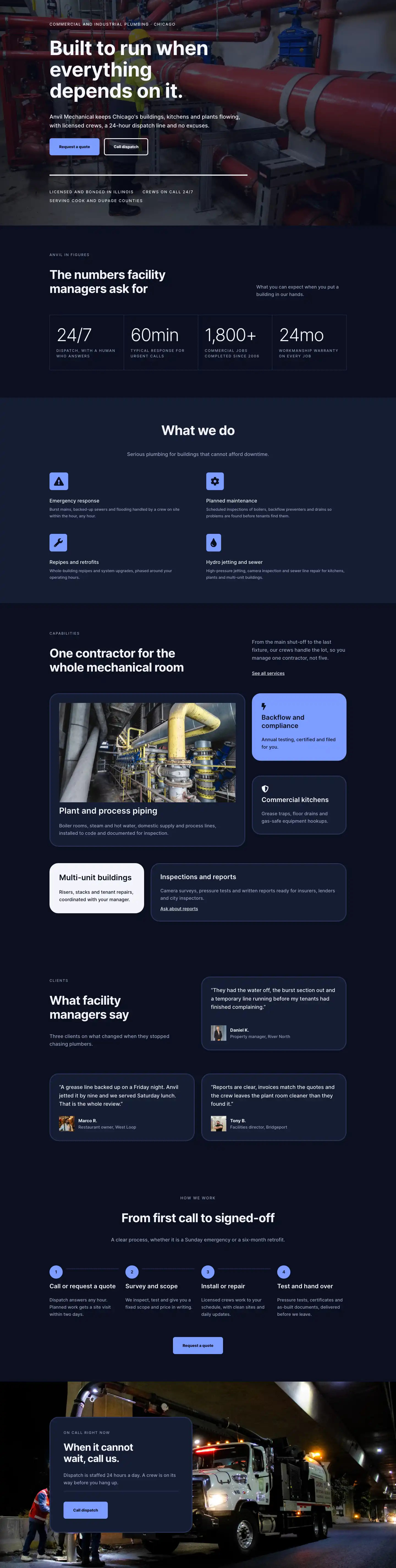
Anvil Mechanical opens with a full-bleed hero that layers a Pexels industrial photograph under a near-opaque rgba(7,11,26,0.7) gradient, holding the #0b1020 near-black navy behind sharp, legible type at every viewport width. The H1 sits at 56px with -1px letter-spacing on desktop, stepping down to 42px on tablet and 32px on mobile without any custom CSS needed. A 13px uppercase breadcrumb in Inter with 2px letter-spacing sits above it, and a subtitle paragraph constrained to 600px max-width keeps line length tight below. The top padding scales from 120px on desktop to 64px on phone, so the hero never feels cramped or oversized across devices.
The services section uses a deliberate asymmetric column split: the left third carries an eyebrow label, a 44px H2, and a flat-bordered Accordion for four service categories, while the right two-thirds fills with a 4:5 portrait image with object-fit: cover locked in the module. The accordion strips its borders entirely except for a single 3px #2a3558 bottom rule per item, so the list reads as an indexed inventory rather than a widget. First item opens by default. On mobile both columns stack and the image drops below the accordion copy.
The third section shifts the background one step to #151c33 and pairs a narrow label-and-heading column (8/24 flex units) against a 2-column CSS grid of eight icon-plus-text pairs (16/24). Each row uses a Font Awesome checkmark at 18px beside 17px Inter body copy, with 14px of symmetric vertical padding. The grid collapses to a single column on phones. The section handles the factual work: licensing, fixed pricing, permits, daily updates, pressure testing, as-built drawings, clean site, and a 24-month warranty.
The comparison band returns to #0b1020 and places two 32px-radius Group modules side by side. The left card stays in #151c33 with muted X icons and lists four reactive-mode pain points in #9aa4c0 text. The right card inverts entirely to #f2f4fa with dark checkmarks and matching dark text, closes with an outlined CTA button, and creates the clearest contrast moment in the layout. The final section breaks the navy run with a #7c9cff periwinkle background, the only warm-bright tone in the layout, carrying a short heading and a "Request a quote" button in a horizontal flex row that collapses to a column stack on mobile.
What’s inside
- Full-bleed hero with Pexels industrial photo, `rgba(7,11,26,0.7)` gradient overlay, 56px H1, and 13px uppercase breadcrumb
- Four-item Accordion module (Emergency repair, Planned maintenance, Installations and retrofits, Drains and jetting) with flat bottom-border-only styling
- Locked 4:5 portrait Image module paired with the services accordion in an asymmetric 12/24 + 12/24 column row
- Eight-item standards checklist rendered as a 2-column CSS grid of Font Awesome checkmark Icon modules and Text modules, collapsing to single column on mobile
- Side-by-side 32px-radius comparison cards: dark navy "Without a plan" with X icons vs. white "With Anvil" with checkmarks and an inline outlined Button module
- Six-item FAQ Accordion with 32px rounded corners and a full 3px `#2a3558` border, pre-filled with commercial plumbing Q&A
- Periwinkle `#7c9cff` CTA band with a horizontal flex Group, H2 heading, primary Button, and sub-note below the button
Who it’s for
This layout is built for commercial and industrial plumbing contractors, mechanical services firms, and building-services companies targeting property managers, facilities directors, and building owners rather than homeowners. The four-discipline accordion and the comparison cards are structured specifically for businesses that pitch both reactive call-outs and contracted maintenance programmes in the same conversation. Divi designers and web agencies building sites for HVAC, electrical, or fire-suppression contractors will find the dark industrial tone and modular section structure transferable with straightforward copy and palette changes.
Customization tips
The entire palette runs on three hex values: #0b1020 for the primary background, #151c33 for surface sections and card backgrounds, and #7c9cff for the accent CTA band. Swapping all three at the Section level immediately rebrands the layout for other trade sectors. A forest-green and charcoal scheme works equally well for HVAC or electrical contractors without structural changes.
The 4:5 portrait image in the services section requires a tall crop (minimum 800px wide). Landscape photographs will not fill the aspect-ratio-locked container cleanly and should be avoided. Supply a boiler room, pipe manifold, or active worksite photograph for best visual continuity with the hero overlay.
Accordion body copy in the services section should stay under 60 words per item to preserve a clean fold height. The eight standards checklist items are written as short noun phrases of five words or fewer; extending them to full sentences will cause the two-column grid to break unevenly on tablet widths. Comparison card bullets work best in pairs: the cards share equal height on desktop and diverge visually if one side carries significantly more items than the other.
How to install this layout
- Download the layout JSON file from this page.
- Open the target page in the Divi 5 builder.
- Open the portability panel (up/down arrows icon) and choose the Import tab.
- Upload the JSON. Tick “replace existing content” only for full-page imports.
- Check the page at desktop and mobile widths, then swap in your copy and images.
Full walkthrough with troubleshooting: How to Import a Divi 5 Layout.
Questions about Anvil Mechanical — Dark Plumbing Services Page for Divi 5
Does the layout stack correctly on mobile without any extra CSS?
Yes. Every row has explicit phone-breakpoint values in the JSON: all two-column rows switch to `flexDirection: column`, font sizes step down (H1 from 56px to 32px, section H2s from 44px to 30px), and section padding roughly halves. No additional overrides are needed for a functional mobile layout out of the box.
Which Divi 5 modules does this layout use?
Section, Row, Column, Heading, Text, Image, Group, Icon, Button, and Accordion with Accordion Item children. All are native Divi 5 modules. No third-party plugins are required.
The services accordion and the FAQ accordion look different. Why?
By design. The services accordion strips all borders except a single 3px `#2a3558` bottom rule per item, so it reads as a flat indexed list. The FAQ accordion applies 32px rounded corners with a full-perimeter 3px border, giving each item a distinct card-like panel. Both use the same dark `#151c33` open/closed toggle background.
What image works best in the 4:5 portrait slot in the services section?
Any portrait-oriented industrial photograph at 4:5 or taller. The Image module locks the aspect ratio and applies `object-fit: cover`, so the crop is automatic. Typical fits: boiler rooms, pipe manifolds, pressure gauges, or an on-site crew shot. Landscape images will appear visually compressed within the container.
Can the CTA band color be changed without editing every element inside it?
The periwinkle `#7c9cff` is set on one Section background property. Changing that single value recolors the entire band. The H2 heading and sub-note both use `#0b1020`, so choose a mid-value replacement that keeps dark text readable, avoiding very dark accent colors.
What is the first thing to edit after importing the layout?
The business name and phone number. "Anvil Mechanical" appears in the hero H1 area via the page title, and "(312) 555-0118" appears in a Text module beneath the FAQ accordion. Update those two, then swap the two Pexels image URLs for your own photography, and the layout is functionally yours.
Which Divi version does this layout need?
Divi 5. The layout is generated natively for Divi 5 and validated against its real module structure before publication, so it imports clean into the current builder.
Can I use this layout on client websites?
Yes. Every download includes a commercial license covering unlimited sites you own or build for clients. Only reselling or redistributing the layout file itself is prohibited.
Included in these packs
More full landing pages
Browse all full landing pages
Kiln & Clay — Minimal Pottery_studio Visit Page for Divi 5
full_landing · pottery_studio · minimal

Kiln & Clay — Minimal Pottery_studio Our Story Page for Divi 5
full_landing · pottery_studio · minimal

Kiln & Clay — Minimal Pottery_studio Studio Membership Page for Divi 5
full_landing · pottery_studio · minimal

Kiln & Clay — Minimal Pottery_studio The Shop Page for Divi 5
full_landing · pottery_studio · minimal

Kiln & Clay — Minimal Pottery_studio Classes Page for Divi 5
full_landing · pottery_studio · minimal

Kiln & Clay — Minimal Pottery_studio Home Page for Divi 5
full_landing · pottery_studio · minimal