
Bureau of Bad Ideas — Bold Creative_agency Contact Page for Divi 5
Submit your project brief to the Bureau of Bad Ideas. Bold, direct contact page for creative agency clients — form, FAQ, and studio info in one sharp layout.
Rate this element
Download this section, free
- Divi 5 JSON, imports in seconds
- Commercial license included
- No account needed
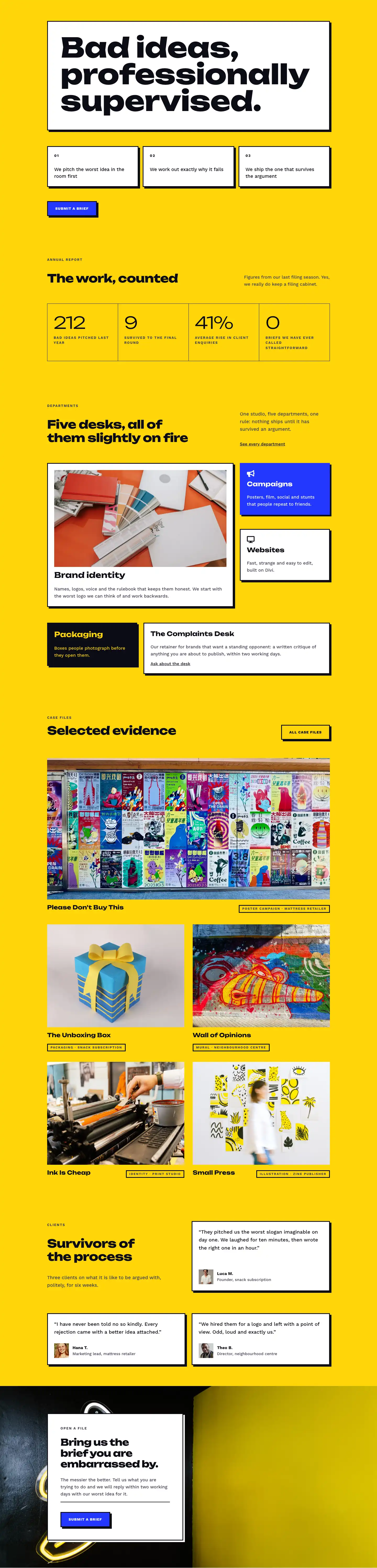
This page ships inside Bureau of Bad Ideas: Creative Agency Theme (6 Pages), 6 coherent pages that share one brand.
Click to view the full page
Overview
Bureau of Bad Ideas — File a Brief is a three-section contact page built around a single editorial decision: every element earns its place by moving the visitor toward submission. The opening section runs white (#ffffff) with a 1px bottom border separating it from the rest of the page. A two-column flex row places the H1 "File a brief" — set in Unbounded 800-weight at 52px desktop, scaling to 32px on mobile — in the left column, while a short permission-giving line of body copy sits in the narrower right column. That asymmetry (16-of-24 units left, 8-of-24 right on desktop) is intentional: the heading dominates, the supporting text whispers.
The second section is where the page's character lives. A full yellow (#ffd60a) background floods the viewport at 80px vertical padding, creating an immediate shift in energy. The left column carries four contact detail rows — email, phone, address, hours — each separated by a 2px solid border-top, with an 18px Font Awesome icon pinning the row left and the actual detail set in Work Sans at 17px. The right column is a white contact form card with a 3px solid black border, a 6px/6px hard box shadow (no blur), and yellow-filled input fields that match the background. Input padding is generous (14px top/bottom, 28px left/right) and the "Submit brief" button is electric blue (#2438ff) with the same hard shadow treatment and a -4px translate-Y on hover.
The third section delivers an FAQ accordion — six items, all written in the agency's dry, confident voice — on a second yellow block. Unbounded headings at 44px center the block visually, and the accordion itself is constrained to 800px max-width so long answers never span the full container. A final cobalt-blue (#2438ff) section closes the page with a horizontal split: "Bring us your worst." at 48px on the left, a white CTA button with a white hard shadow on the right. On mobile, the row collapses to column-direction and the button stacks below the heading naturally.
What’s inside
- H1 breadcrumb header section with Unbounded 800-weight type at 52px (scales to 32px on mobile) plus a two-column asymmetric layout (16/8 column split)
- Contact detail column with four bordered rows — email, phone, address, hours — each anchored by an 18px Font Awesome icon (envelope, phone, map pin, clock)
- Native Divi 5 Contact Form module with yellow-filled fields, 3px hard black borders, and a blue "Submit brief" button with hover lift animation
- White form card with a 6px/6px zero-blur box shadow and 48px padding, visually separating the form from the yellow section background
- Six-item Divi 5 Accordion module in a full-width FAQ block, constrained to 800px max-width with hard-border toggle styling that matches the page's graphic identity
- Closing CTA section in electric blue (#2438ff) with a horizontal heading-plus-button layout that collapses gracefully to a stacked column on mobile
- Three-breakpoint responsive spacing on every section (desktop 80px / tablet 56px / phone 36px), with column flex-direction overrides on phone throughout
Who it’s for
This layout fits creative studios, branding agencies, design consultancies, and independent art directors who want a contact page that reads like a personality statement rather than a form dump. It also works well for copywriters, strategists, production companies, and any service business where the brief is the first real deliverable. The tone — dry, direct, faintly self-deprecating — lands best for boutique shops that compete on culture and craft, not on enterprise scale.
Customization tips
The three-color system (yellow #ffd60a, near-black #0c0c14, electric blue #2438ff) is the personality of this layout. To rebrand it, swap those three values consistently: yellow becomes your accent, blue becomes your CTA color, and near-black stays the border and text anchor. Keep border widths at 3px and box shadows at 6px/6px with no blur — reducing either softens the graphic edge significantly. The Contact Form fields inherit the yellow background by design; if you change the section background, update the field background to match. For the accordion, aim for questions under 60 characters so they sit on one line in the Unbounded typeface at 19px. The CTA heading "Bring us your worst." is deliberately short (four words); replacing it with anything over eight words will break the horizontal balance against the button on tablet.
How to install this layout
- Download the layout JSON file from this page.
- Open the target page in the Divi 5 builder.
- Open the portability panel (up/down arrows icon) and choose the Import tab.
- Upload the JSON. Tick “replace existing content” only for full-page imports.
- Check the page at desktop and mobile widths, then swap in your copy and images.
Full walkthrough with troubleshooting: How to Import a Divi 5 Layout.
Questions about Bureau of Bad Ideas — Bold Creative_agency Contact Page for Divi 5
Which Divi 5 modules does this layout use?
It uses Heading, Text, Icon, Group, Section, Row, Column, Contact Form with Contact Field children, Accordion with Accordion Item children, and Button — all native Divi 5 modules, no third-party dependencies.
How does the layout handle mobile?
Every row uses an explicit flex-direction column override at phone breakpoint, so the two-column sections (header, contact/form, CTA) all stack vertically. Section padding drops to 36px on phone. The H1 scales from 52px to 32px and the FAQ heading from 44px to 30px using Divi's built-in breakpoint font controls.
The contact form fields are yellow — can I change that?
Yes. The field background is set directly on the Contact Form module's field decoration. If you change the section background away from yellow, open the Contact Form module settings and update the field background color there to keep them coordinated.
What is the hard box shadow on the form card and buttons?
It is Divi's preset4 box shadow with horizontal 6px, vertical 6px, and blur set to 0px in the JSON — producing the flat graphic offset shadow. You can adjust the offset values in the Box Shadow panel, but keeping blur at 0 is what gives it the editorial look.
How many FAQ items can I have before the accordion looks wrong?
The accordion is constrained to 800px max-width and has no item limit. Six items is the default. You can safely add more; just keep question text short (under 70 characters) so it renders on one line in the Unbounded font.
Do I need to add images to use this layout?
No. The layout contains no image modules — it is entirely typographic and structural. All visual weight comes from the color blocks, hard borders, and box shadows. This also means it loads fast out of the box.
Which Divi version does this layout need?
Divi 5. The layout is generated natively for Divi 5 and validated against its real module structure before publication, so it imports clean into the current builder.
Can I use this layout on client websites?
Yes. Every download includes a commercial license covering unlimited sites you own or build for clients. Only reselling or redistributing the layout file itself is prohibited.
Included in these packs
More full landing pages
Browse all full landing pages
Kiln & Clay — Minimal Pottery_studio Visit Page for Divi 5
full_landing · pottery_studio · minimal

Kiln & Clay — Minimal Pottery_studio Our Story Page for Divi 5
full_landing · pottery_studio · minimal

Kiln & Clay — Minimal Pottery_studio Studio Membership Page for Divi 5
full_landing · pottery_studio · minimal

Kiln & Clay — Minimal Pottery_studio The Shop Page for Divi 5
full_landing · pottery_studio · minimal

Kiln & Clay — Minimal Pottery_studio Classes Page for Divi 5
full_landing · pottery_studio · minimal

Kiln & Clay — Minimal Pottery_studio Home Page for Divi 5
full_landing · pottery_studio · minimal