
Bureau of Bad Ideas — Bold Creative_agency Departments Page for Divi 5
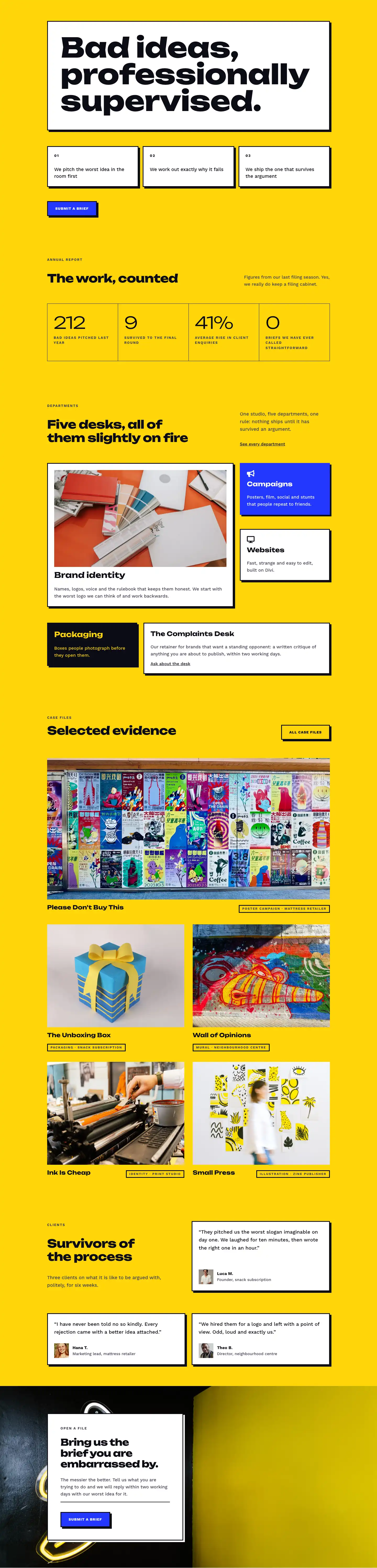
Five specialist desks. Naming and strategy, identity, campaigns, Divi websites, and packaging — all run by a senior partner. Retainers from $2,400/month.
Rate this element
Download this section, free
- Divi 5 JSON, imports in seconds
- Commercial license included
- No account needed
This page ships inside Bureau of Bad Ideas: Creative Agency Theme (6 Pages), 6 coherent pages that share one brand.
Click to view the full page
Overview
The layout opens with a cinematic hero: a full-bleed photograph sits behind a flat dark overlay (rgba(12,12,20,0.7) at both gradient stops), letting the near-black tint do the contrast work while the section's base color of electric yellow (#ffd60a) reads through at the edges. The H1 "Departments" is set in Unbounded at 56px, weight 800, -1px letter-spacing, collapsing to 32px on phones. A white Work Sans breadcrumb above it and a subheading capped at 600px max-width below create a reading column that stays left-aligned rather than centered, which keeps the page editorial rather than corporate. Section padding steps down in three explicit breakpoints (120px, 88px, 64px top) so the hero never feels cramped on a tablet.
The services section on white runs a single column at 880px max-width. Five departments are presented as horizontal rows, each opening with a FontAwesome 5 solid icon (lightbulb, paintbrush, megaphone, desktop, cube) at 24px with a 24px column gap before the H3 title and description text. A heavy 4px divider opens the list; 2px dividers separate every entry. The H3 labels are Unbounded at 20px; descriptions are Work Sans 16px in #3d3d52. There are no cards or shadows here: the rhythm is purely typographic and relies entirely on rule weight and spacing to signal hierarchy.
The retainer section flips to yellow and introduces three pricing cards in equal third columns. Cards carry a 3px solid black border and a 6px/6px offset box shadow with zero blur, giving the whole section a flat, screen-printed quality. The middle card ("The Full Argument") inverts to vivid blue (#2438ff) with white text and carries a pill-shaped "Most popular" badge. Each card's feature list uses flexGrow on the containing group so all three cards in a row stretch to identical height regardless of bullet count. Every card and its button lift 4px on hover via CSS translate.
A white "process promises" section below uses a two-column layout: the left holds the heading copy and the right arranges eight checkmark items in a CSS grid with two equal columns, collapsing to one on phones. Below that, the FAQ follows the same two-column structure, six questions split evenly, each framed by a 4px top border without needing extra vertical spacing. The page closes on a full-width blue CTA banner that places the H2 and the button group in a horizontal flex row with space-between justification, stacking cleanly on phones.
What’s inside
- Hero section with Pexels photo, flat 70% dark gradient overlay, and three-breakpoint padding scale (120px / 88px / 64px)
- Five-department services list using FontAwesome 5 solid icons in horizontal rows separated by 2px and 4px solid dividers
- Three-tier retainer pricing cards with 3px borders, 6px/0-blur offset box shadows, and hover lift animation on both card and button
- Featured middle pricing card in electric blue (#2438ff) with inverted white text, white-on-blue feature bullets, and a "Most popular" pill badge
- Eight-item project-promise checklist in a two-column CSS grid that collapses to a single column on mobile
- Six-question FAQ in a two-column layout with 4px top-border rule per entry and a contact button in the section header row
- Full-width blue (#2438ff) CTA banner with horizontal heading-plus-button flex layout and a white solid-shadow CTA button
Who it’s for
This layout fits creative agencies and branding studios that want to present a structured, opinionated service offer. It works well for a brand consultancy, an independent design studio, a campaign-and-film practice, or a web-build shop positioning itself above commodity freelancers. The three-tier retainer section, with named plans and explicit monthly figures, also makes it practical for any professional-services business that sells ongoing relationships: UX consultancies, copywriting studios, or marketing agencies that want the site to qualify prospects before the first call.
Customization tips
The three-color palette (near-black #0c0c14, electric yellow #ffd60a, vivid blue #2438ff) is applied at the section level: swap the hero base color, the retainer section background, and the CTA section background in three places and the whole page shifts to a new scheme. Replace the hero photograph URL with your own image at 1920px wide and at least 900px tall; the dark overlay handles contrast for white text so photos with mixed brightness work fine. Unbounded's display sizes (56px H1, 44px H2) are tight: keep H1 copy to four words or fewer and H2s to six to avoid wrapping onto a third line. Department names in the services list are H3 at 20px; one short line each is the sweet spot. Pricing figures live inside plain divi/text nodes, so edit the number directly. FontAwesome 5 solid icon unicodes can be swapped for any other FA5 solid glyph without touching the surrounding layout. The "Most popular" badge is a nested group with padding and a 12px border-radius: update its label text in a single divi/text node.
How to install this layout
- Download the layout JSON file from this page.
- Open the target page in the Divi 5 builder.
- Open the portability panel (up/down arrows icon) and choose the Import tab.
- Upload the JSON. Tick “replace existing content” only for full-page imports.
- Check the page at desktop and mobile widths, then swap in your copy and images.
Full walkthrough with troubleshooting: How to Import a Divi 5 Layout.
Questions about Bureau of Bad Ideas — Bold Creative_agency Departments Page for Divi 5
What dimensions should the hero photograph be?
The image is set to cover at center/center, so any landscape photo at 1920px wide and 900px or taller will fill the hero correctly. The dark gradient overlay at 70% opacity on both stops handles text contrast, so photos with varied brightness or busy compositions work without needing manual adjustment.
How do the pricing cards stay the same height when bullet counts differ?
Each card's feature list sits inside a group with flexGrow applied, so Divi stretches that area to consume the remaining column height. Add or remove bullets freely and the three cards in the row will still align at the bottom where the call-to-action button sits.
Can I add a sixth department to the services list?
Yes. Copy any existing department group (the icon plus the nested heading-and-text group), paste it after the last entry, and add one more 2px solid divider above it. The list is entirely linear with no grid constraints, so it extends without breaking anything.
How do I move the "Most popular" badge to a different pricing card?
The badge is a divi/group containing a single divi/text node, nested inside the middle column's header group. Cut that group and paste it into the equivalent position in whichever column you want to highlight. On a white card you will also want to change the badge background from white to a contrasting color so it reads against the card.
How does the FAQ section behave on mobile?
The two FAQ columns stack vertically via flexDirection column on phones. Each question group keeps its 4px top border and 20px top padding intact, so the stacked list reads as a clean ruled sequence with consistent breathing room between entries.
The hero uses a Pexels URL. Is that safe to publish as-is?
The Pexels URL is a placeholder to demonstrate the layout at build time. Replace it with a properly licensed photograph before the page goes live. The layout's dark overlay and yellow section background-color fallback mean the design holds its structure even if the image fails to load.
Which Divi version does this layout need?
Divi 5. The layout is generated natively for Divi 5 and validated against its real module structure before publication, so it imports clean into the current builder.
Can I use this layout on client websites?
Yes. Every download includes a commercial license covering unlimited sites you own or build for clients. Only reselling or redistributing the layout file itself is prohibited.
Included in these packs
More full landing pages
Browse all full landing pages
Kiln & Clay — Minimal Pottery_studio Visit Page for Divi 5
full_landing · pottery_studio · minimal

Kiln & Clay — Minimal Pottery_studio Our Story Page for Divi 5
full_landing · pottery_studio · minimal

Kiln & Clay — Minimal Pottery_studio Studio Membership Page for Divi 5
full_landing · pottery_studio · minimal

Kiln & Clay — Minimal Pottery_studio The Shop Page for Divi 5
full_landing · pottery_studio · minimal

Kiln & Clay — Minimal Pottery_studio Classes Page for Divi 5
full_landing · pottery_studio · minimal

Kiln & Clay — Minimal Pottery_studio Home Page for Divi 5
full_landing · pottery_studio · minimal