
Bureau of Bad Ideas — Bold Creative_agency Case Files Page for Divi 5
Ten years of deliberately bad ideas that became better work. Browse the Bureau's case files: murals, brand turnarounds, and city permits redesigned through argument.
Rate this element
Download this section, free
- Divi 5 JSON, imports in seconds
- Commercial license included
- No account needed
This page ships inside Bureau of Bad Ideas: Creative Agency Theme (6 Pages), 6 coherent pages that share one brand.
Click to view the full page
Overview
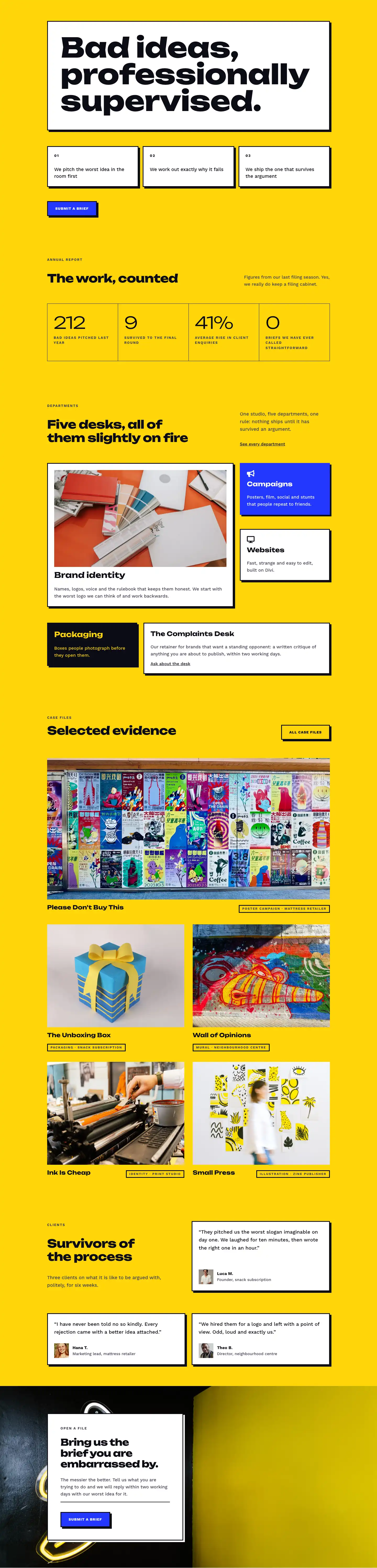
The page opens with a white header section built around a deliberate asymmetry. The left column (flexType 16_24) carries the breadcrumb trail and the H1 "Case files" set in Unbounded at 52px, stepping down to 40px on tablet and 32px on phone. The narrower right column (flexType 8_24) holds a single editorial line in Work Sans 18px, positioned 36px below the heading on desktop. A 1px solid border in #0c0c14 runs the full section width at the bottom, closing the header the way a rule closes a newspaper column. The visual language is set before a single case appears: this is an agency that documents its arguments.
The two yellow (#ffd60a) sections carry the page's main content. Inside the first, three numbered case-study rows alternate their image position. Cases 01 and 03 place the 4:3-ratio photo on the left half; Case 02 places it on the right and applies a column order of -1 at the phone breakpoint, so the image still appears above the text copy when the row stacks vertically. Each case opens with a small-caps Work Sans label at 13px and 2px letter-spacing, followed by an Unbounded H3 at 32px (dropping to 28px on tablet, 24px on phone), a body paragraph constrained inside a 480px maxWidth group and an underlined "Read the file" link. The text column receives 48px right padding on desktop and 24px on tablet, preventing it from pressing against the photograph at mid-viewport widths.
Between the two yellow sections, a white section introduces the page's native interactive element: a divi/before-after-image slider. The columns are weighted 9/24 (legend) and 15/24 (slider), giving the comparison image the majority of the row width. The legend uses two stacked groups, each sitting beneath a 4px top border in #0c0c14 with a small-caps Before/After label above a one-sentence description. This border motif reappears in the press-quote columns later, visually tying the two white sections together. On tablet and phone both columns become full-width and the slider fills the screen, remaining fully operable via touch drag.
The second yellow section runs a three-column masonry-style gallery (1_3, 1_3, 1_3) with 16px gaps in both axes. Each column holds two stacked images: columns 1 and 3 lead with a tall 4:5 portrait followed by a 4:3 landscape; column 2 reverses the order. The deliberate height stagger reads as a pinboard without any JavaScript. The page closes in electric blue (#2438ff) with a horizontal flex group at the section level: a large Unbounded H2 on the left and a CTA group on the right containing a white button with square corners, a 3px black border, a 6px/6px white box-shadow offset that mimics a screen-print registration mark and a -4px Y translate on hover.
What’s inside
- Five-section structure alternating white and electric yellow (#ffd60a) backgrounds, capped by an electric-blue (#2438ff) CTA section with consistent padding that scales from 80px (desktop) to 36px (phone)
- Three numbered case-study rows with Unbounded H3 headings at 32px, small-caps Work Sans labels, 480px-capped body groups and underlined "Read the file" links, alternating image-left and image-right layout
- Native `divi/before-after-image` slider module in a weighted 9/24-to-15/24 column split, paired with a Before/After text legend built on 4px top-border rules
- Six-image gallery across three equal columns mixing 4:5 portrait and 4:3 landscape aspect ratios per column to create a natural pinboard stagger with no JavaScript
- Three-column press-quote block using Unbounded italic at 22px for pull quotes and 4px top-border column dividers, matching the border motif from the before-after section
- Mobile column ordering: the second case study's image uses order -1 at the phone breakpoint so photos appear above copy on every breakpoint regardless of desktop position
- Sharp-cornered CTA button with a 3px black border, 6px/6px white box-shadow offset and -4px Y-axis translate on hover, built entirely from native Divi 5 button decoration options
Who it’s for
This layout is built for independent creative studios, brand consultancies and experiential-marketing agencies that want to present their work as a documented process rather than a finished portfolio grid. The numbered case-file format works equally well for print studios, zine publishers, civic design practices and cultural-sector agencies that want editorial credibility without a custom CMS. The press-quote section and before-after slider add social proof and proof of transformation, making it a strong fit for any agency pitching clients on process-led or unconventional creative methods.
Customization tips
The two accent fills, electric yellow (#ffd60a) and electric blue (#2438ff), control the page's visual weight. Swapping both in Divi's global color presets updates all section backgrounds, the CTA fill and the button box-shadow in one pass. Unbounded is used at 800 weight for all display headings; if your brand uses a different high-weight display face, check the H1 (52px) and section H2s (40-44px) for line-height tightness after substituting the font family.
Case study body paragraphs sit inside 480px maxWidth groups and work best at 30-45 words each to keep the image-to-text rhythm balanced across the alternating rows. Gallery images should be supplied at a minimum of 1200px wide: portrait slots use a 4:5 crop (e.g. 1200x1500px) and landscape slots use 4:3 (e.g. 1600x1200px). For the before-after slider, supply both images at the same dimensions so the drag handle starts centered on meaningful content rather than a colour boundary.
How to install this layout
- Download the layout JSON file from this page.
- Open the target page in the Divi 5 builder.
- Open the portability panel (up/down arrows icon) and choose the Import tab.
- Upload the JSON. Tick “replace existing content” only for full-page imports.
- Check the page at desktop and mobile widths, then swap in your copy and images.
Full walkthrough with troubleshooting: How to Import a Divi 5 Layout.
Questions about Bureau of Bad Ideas — Bold Creative_agency Case Files Page for Divi 5
How does the before-after slider behave on phones?
The `divi/before-after-image` module is native to Divi 5 and handles touch drag without any extra script. On mobile, both the legend column and the slider column collapse to full width, so the slider spans the screen and the Before/After text legend stacks above it.
The gallery columns have images at different heights. Will they stay aligned or create gaps?
Each image uses Divi's built-in aspect-ratio sizing (4:5 or 4:3 per slot) with object-fit set to cover, so every image crops precisely to its fixed ratio with no gaps or stretching. The height stagger between columns is intentional and requires no CSS masonry or JavaScript.
Case 02 is image-right on desktop. Does the image still appear first when the row stacks on mobile?
Yes. That image column has order -1 set at the phone breakpoint in Divi's column decoration options, which promotes it above the text copy when the row collapses to a single column. The other two case rows do not need this because their images are already in the first (left) column.
Can I add a fourth or fifth case study row to the yellow section?
Yes. Duplicate an existing case row inside that section and alternate which column holds the image manually to continue the left/right rhythm. Update the numbered label (04, 05...) and keep each body paragraph under 45 words to preserve the even spacing between image and text.
What should I replace first when adapting this to a real project?
Start with the three case titles and their body paragraphs in the yellow section, then swap the images (4:3 ratio, minimum 1600x1200px). Update the press quotes and publication names next. The before-after slider and the CTA headline are last because they depend on having a real transformation story and a working contact destination.
Which Divi version does this layout need?
Divi 5. The layout is generated natively for Divi 5 and validated against its real module structure before publication, so it imports clean into the current builder.
Can I use this layout on client websites?
Yes. Every download includes a commercial license covering unlimited sites you own or build for clients. Only reselling or redistributing the layout file itself is prohibited.
Included in these packs
More full landing pages
Browse all full landing pages
Kiln & Clay — Minimal Pottery_studio Visit Page for Divi 5
full_landing · pottery_studio · minimal

Kiln & Clay — Minimal Pottery_studio Our Story Page for Divi 5
full_landing · pottery_studio · minimal

Kiln & Clay — Minimal Pottery_studio Studio Membership Page for Divi 5
full_landing · pottery_studio · minimal

Kiln & Clay — Minimal Pottery_studio The Shop Page for Divi 5
full_landing · pottery_studio · minimal

Kiln & Clay — Minimal Pottery_studio Classes Page for Divi 5
full_landing · pottery_studio · minimal

Kiln & Clay — Minimal Pottery_studio Home Page for Divi 5
full_landing · pottery_studio · minimal