
Copperline Plumbing & Heating — Corporate Plumbing About Page for Divi 5
A corporate Divi 5 about page layout for a local plumbing and heating company. Features founder story, team grid, company timeline, values, and a contact CTA — clean navy and white design with IBM Plex Sans typography.
Rate this element
Download this section, free
- Divi 5 JSON, imports in seconds
- Commercial license included
- No account needed
This page ships inside Copperline: Plumbing & Home Services Theme (6 Pages), 6 coherent pages that share one brand.
Click to view the full page
Overview
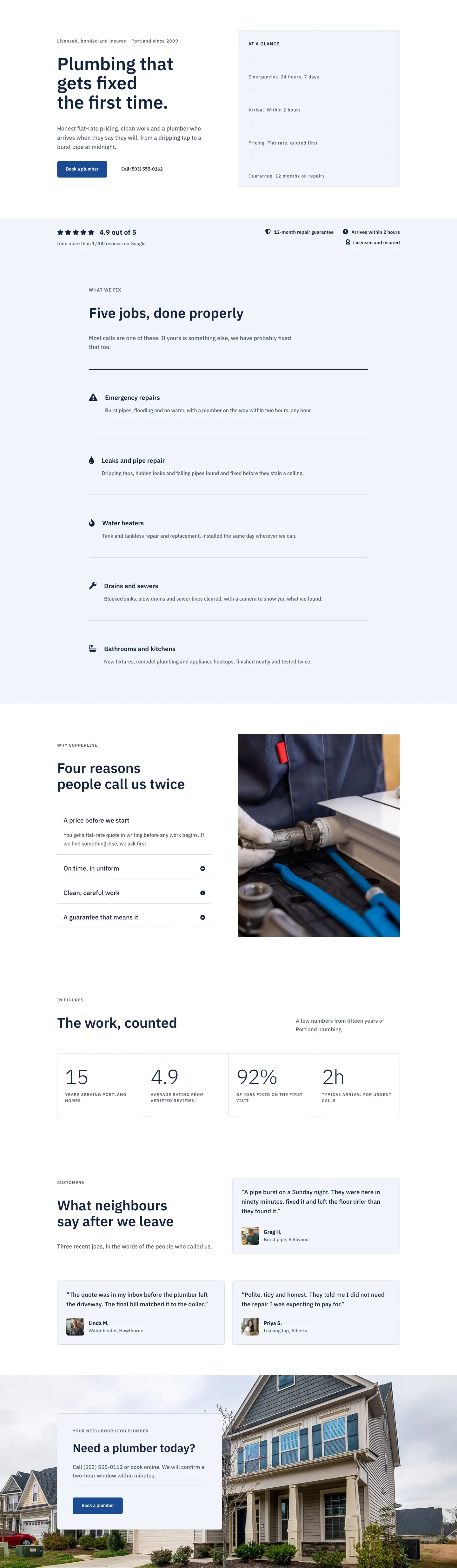
The layout opens with a clean white section that splits immediately into a weighted two-column row. The left column takes roughly two-thirds of the available flex grid (16 of 24 units) and leads with an uppercase eyebrow heading at 14px in slate #4f5d73, followed by an h1 at 64px in deep navy #13233f that steps down to 46px on tablet and 36px on phone. Below it, the intro body text runs at 19px with a 1.6 line-height inside a hard 560px max-width constraint, preventing the paragraph from stretching uncomfortably on wide monitors. The CTA pair is a flex row: a solid navy button (#1c4a94, 6px border-radius, 14px vertical padding) sits beside a plain underlined text link, giving visitors two action paths without either competing for the eye. The right column is deliberately narrower (8 of 24 units) and holds a single 4:5 portrait image rendered with object-fit cover, so it fills its container edge-to-edge. On mobile the two columns stack, image moving below the text block.
The second section flips the palette entirely. A full-bleed background photo sits behind a uniform dark gradient overlay (rgba(10,26,56,0.72) at both stops, so the photo is evenly dimmed rather than directionally faded), and all text switches to near-white #f6f8fc. The four-milestone timeline beneath the eyebrow and h2 is structured as a CSS grid: four columns on desktop, two on tablet, one on phone, with 32px column gaps and 40px row gaps. Each milestone uses a 2px top border as its separator instead of a card or box component, keeping the layout visually light. Year numerals run at 48px with weight 700 and -1px letter-spacing, reading as display figures rather than body text. The team section that follows returns to white and introduces a split header row where the h2 and a short description are baseline-aligned across two proportional columns (14:10 flex ratio), a deliberate detail that prevents the heading and its supporting copy from sitting at the same height. Below it, four team members each get a 1:1 square portrait with object-fit cover and a name block anchored by the same 2px top-border treatment used in the timeline, linking the two sections visually.
The fourth section uses the solid navy #13233f background with no photo and no overlay, arranging four operating principles as numbered rows divided by full-width 2px white horizontal dividers. Each row is a flex container: a fixed 64px-wide number column (01-04, 15px, bold, 2px letter-spacing) sits beside a flex-grow heading column (h3 at 34px) and a max-360px body column, so the three elements read left-to-right at a glance on desktop and stack top-to-bottom on phone. The fifth and final section places a background photo behind a floating contact card constrained to 520px, left-aligned. The card carries its own #f2f5fa background, a 1px #d3dbe8 border, 6px radius, and 48px internal padding on all sides, making it feel lifted off the page rather than flat against it. A thin divider between the descriptive text and the booking button gives the card a clean internal rhythm. IBM Plex Sans runs through every module at every breakpoint, giving the layout a single-font consistency that suits a trade service brand competing on trust.
What’s inside
- Weighted two-column hero row (16:8 flex ratio) with h1, a 560px-constrained intro paragraph, and a paired button/text-link CTA
- Four-milestone timeline built as a CSS grid (4 cols desktop, 2 tablet, 1 phone) with 48px bold year numerals and 2px top-border milestone separators
- Full-bleed background photo section with a uniform dark gradient overlay (no directional fade) and near-white #f6f8fc type throughout
- Four-member team grid (4 cols desktop, 2 tablet, 1 phone) with 1:1 square cover-fit portraits and top-border-accented name/role blocks
- Numbered values list (01-04) on solid navy, separated by full-width 2px white dividers with a fixed number column and a flex-grow h3 heading column
- Floating contact card (max-width 520px, 6px radius, 48px padding, 1px border) over a full-bleed photo, self-contained with its own heading, body, divider, and booking button
- Single IBM Plex Sans type system across all five sections using a consistent eyebrow (13-14px uppercase, weight 600, letter-spaced) plus h2/h3/body scale
Who it’s for
This layout is a direct fit for plumbing, heating, and HVAC companies that want to communicate reliability and local credibility. It also works well for any residential trade service: electrical contractors, roofing companies, drainage specialists, or general home-maintenance businesses. The corporate structure (story, team, values, CTA) suits established operators with more than one or two staff members, and the numbered values section is particularly useful for businesses that want to make a service guarantee or a specific process their main selling point. Web designers and agency developers building sites for trade-service clients will be able to adapt the layout to any contractor brand in a single session.
Customization tips
The two key colors are the navy #13233f (used for body headings, the values section background, and team portrait borders) and the mid-blue #1c4a94 (both buttons). These are set per-module rather than via a global CSS variable, so the most efficient way to rebrand is to update your Divi global presets first, then apply the preset to each affected module.
For imagery, the hero portrait expects a 4:5 container (roughly 800x1000px), and the four team portraits expect 1:1 squares (600x600px minimum). The story and CTA sections use full-bleed background images; any landscape photo works, though the story section's uniform dark overlay means high-contrast photos with mid-range detail read best. The timeline year labels are plain Text modules, not Heading modules, so swapping year numerals is a single click per milestone. Keep milestone descriptions to two lines at 16px to preserve the grid rhythm across columns.
How to install this layout
- Download the layout JSON file from this page.
- Open the target page in the Divi 5 builder.
- Open the portability panel (up/down arrows icon) and choose the Import tab.
- Upload the JSON. Tick “replace existing content” only for full-page imports.
- Check the page at desktop and mobile widths, then swap in your copy and images.
Full walkthrough with troubleshooting: How to Import a Divi 5 Layout.
Questions about Copperline Plumbing & Heating — Corporate Plumbing About Page for Divi 5
Which Divi 5 modules does this layout use?
Section, Row, Column, Heading, Text, Image, Button, Group, and Divider. No third-party modules or plugins are required beyond Divi 5 itself.
What image aspect ratios should I use for my own photos?
The hero portrait slot is set to a 4:5 ratio (taller than wide, e.g., 800x1000px). The four team portrait slots are 1:1 squares. The story-section and CTA-section backgrounds are full-bleed section background images; landscape photos work well for both, though the story section applies a uniform dark overlay so fine background detail is largely hidden.
How does the layout respond on phone and tablet?
All multi-column rows revert to a single stacked column on phone. The hero places text above the portrait; the timeline collapses from four columns to one; the team grid collapses from four to one; and each values row stacks its number, heading, and description text vertically. Section padding also steps down at each breakpoint (96px on desktop to 44px on phone for most sections, 120px to 56px for the photo sections).
What is the dark photo section built with, and is there any JavaScript involved?
It is a standard Divi Section with a Pexels JPEG loaded as a background image and a CSS gradient overlay applied inside Divi's own background settings (two stops both set to rgba(10,26,56,0.72)). There is no video, no JavaScript, and no external embed.
What should I edit first after importing the layout?
Replace the two section background photos (the story overlay section and the CTA section), then swap the four team portrait images and update the name and role Text modules. After that, update the hero h1 and the contact card heading to your own copy. Leave all spacing and font settings in place until your brand colors are confirmed.
Can I add or remove team members or timeline milestones?
Yes. Each team member is a self-contained Column inside the four-column Row, so you can duplicate or delete columns to adjust the count. The timeline milestones are Group modules inside a CSS-grid Group, so adding a fifth milestone means duplicating one Group block and updating the year, heading, and description text. On tablet the grid switches to two columns automatically, so an odd number of items will leave a gap in the final row at that breakpoint.
Which Divi version does this layout need?
Divi 5. The layout is generated natively for Divi 5 and validated against its real module structure before publication, so it imports clean into the current builder.
Can I use this layout on client websites?
Yes. Every download includes a commercial license covering unlimited sites you own or build for clients. Only reselling or redistributing the layout file itself is prohibited.
Included in these packs
More full landing pages
Browse all full landing pages
Kiln & Clay — Minimal Pottery_studio Visit Page for Divi 5
full_landing · pottery_studio · minimal

Kiln & Clay — Minimal Pottery_studio Our Story Page for Divi 5
full_landing · pottery_studio · minimal

Kiln & Clay — Minimal Pottery_studio Studio Membership Page for Divi 5
full_landing · pottery_studio · minimal

Kiln & Clay — Minimal Pottery_studio The Shop Page for Divi 5
full_landing · pottery_studio · minimal

Kiln & Clay — Minimal Pottery_studio Classes Page for Divi 5
full_landing · pottery_studio · minimal

Kiln & Clay — Minimal Pottery_studio Home Page for Divi 5
full_landing · pottery_studio · minimal