
Copperline Plumbing & Heating — Corporate Plumbing Service Areas Page for Divi 5
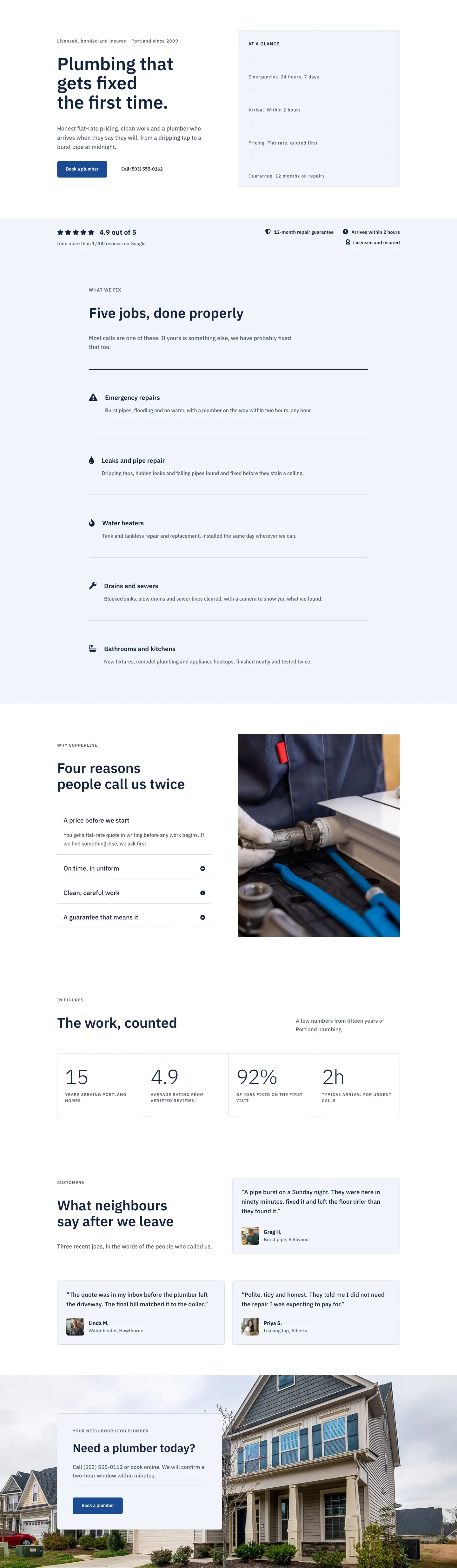
Copperline Plumbing & Heating serves Southeast, Northeast, North Portland, Beaverton, Tigard, Lake Oswego, Gresham and beyond. Two-hour arrival windows, no travel fees.
Rate this element
Download this section, free
- Divi 5 JSON, imports in seconds
- Commercial license included
- No account needed
This page ships inside Copperline: Plumbing & Home Services Theme (6 Pages), 6 coherent pages that share one brand.
Click to view the full page
Overview
The layout opens with a full-width hero on deep navy (#13233f), padded 112px top and 168px bottom on desktop, stepping down to 64px/88px on phones. A centered uppercase H4 label and a 60px IBM Plex Sans H1 (scaling to 46px tablet, 34px phone) sit above a 72px white rule, then a white curve section divider (100px desktop, 44px phone) dissolves the transition into the body. There is no background image in the hero at all -- the authority comes entirely from color, scale, and the tight 1.12em line height that keeps the headline compact. The curve divider is a deliberate structural choice: it moves the eye downward and signals that what follows is connected to the header claim rather than a separate page zone.
The service-area section uses an asymmetric flex split -- roughly one-third label column and two-thirds checklist column -- on a pale blue-grey field (#f2f5fa). The right column renders a native Divi CSS grid with two columns and 40px horizontal gap, housing eight geographic items. Each item is a Divi Group in flex-row with a Font Awesome checkmark icon at 18px alongside a 17px text label, padded 14px top and bottom so the list breathes without crowding. On phones the grid collapses to a single column and the whole row stacks vertically, so even a long list of suburb names remains legible at 320px.
The "Recent Jobs" gallery section uses an editorial header technique: a two-column row with baseline (flex-end) alignment and unequal flex widths (14/24 vs 10/24). The H2 sits in the wider left column and the subtitle sits in the narrower right column, producing a horizontal editorial pair rather than a centred block. Below it, a three-column image grid stacks two photos per column at alternating 4:5 and 4:3 aspect ratios, all set to objectFit: cover with no border radius. The staggered crops create visual rhythm across the row without requiring identical photo heights or manual sizing.
The FAQ section centers a six-item Divi Accordion at max-width 800px, each toggle styled with a 1px #d3dbe8 border and 6px corner radius against a #f2f5fa background -- matching the service-area section's field color for visual coherence. The layout closes with a horizontal CTA bar on mid-blue (#1c4a94): the headline fills a flex-grow column on the left, and a pale button group with micro-copy sits on the right. On phones the row collapses to a stacked column with left-aligned text, keeping the call to action prominent on small screens without centered-text crowding.
What’s inside
- Full-width navy hero section with centered IBM Plex Sans H1 (60px/46px/34px breakpoints), a 72px white rule, and a white curve section divider -- no images required
- Asymmetric two-column service-area block (8/24 + 16/24 flex widths) with a native Divi CSS grid checklist: 8 area items, each a Divi Group with a Font Awesome checkmark icon module and inline text module
- Mixed-ratio three-column photo gallery: two stacked Divi Image modules per column at alternating 4:5 and 4:3 aspect ratios, all `cover` fit with 16px row gap and zero border radius
- Editorial two-column section header using `alignItems: flex-end` for baseline pairing between an H2 column and a subtitle column -- used consistently across the gallery and areas sections
- Six-item Divi Accordion module centered at max-width 800px, styled with 1px #d3dbe8 borders, 6px corner radius, and #f2f5fa toggle backgrounds that echo the service-area section's field color
- Horizontal CTA bar on mid-blue (#1c4a94) with a `flex-grow` headline column and a button-plus-micro-copy group, collapsing to stacked column on phones
- Responsive padding on every section: hero steps 112px to 64px top, body sections step 96px to 44px; all font sizes have explicit tablet and phone overrides
Who it’s for
This layout is built for plumbing, heating, and HVAC companies that serve a defined metro area and need a dedicated service-areas page rather than a footnote on a contact form. Drainage specialists, gas engineers, and multi-van tradespeople covering a city or county will find the checklist format directly transferable. It also suits landlord property management companies and letting agents who want to vet contractors by coverage zone. Because the design uses no trade-specific icons beyond a standard checkmark, electricians, boiler installers, and general builders can adapt the copy and swap the gallery images without touching layout structure.
Customization tips
The palette is built on three hex values -- #13233f (hero and body text), #1c4a94 (CTA bar), and #f2f5fa (service-area section background and accordion toggles). Updating these three colors in Divi's global color presets recolors the entire layout in one operation. IBM Plex Sans is applied consistently at every heading and body level, so replacing it in the Divi typography preset propagates across all modules simultaneously.
The checklist grid holds eight items cleanly in two columns; adding a ninth or tenth requires no structure change, but beyond twelve the grid height outpaces the left-column text block. Each label is designed for 2-5 words -- longer suburb names wrap at the 17px size and look best kept to a single line. Gallery images should be at minimum 800px wide; the 4:5 slots suit portrait-oriented shots (fitted bathrooms, close-up fixtures) and the 4:3 slots suit wider scenes (installed boilers, finished rooms). Accordion answer copy is set at 16px with 1.7em line height -- keep each answer under 60 words for clean toggle height.
How to install this layout
- Download the layout JSON file from this page.
- Open the target page in the Divi 5 builder.
- Open the portability panel (up/down arrows icon) and choose the Import tab.
- Upload the JSON. Tick “replace existing content” only for full-page imports.
- Check the page at desktop and mobile widths, then swap in your copy and images.
Full walkthrough with troubleshooting: How to Import a Divi 5 Layout.
Questions about Copperline Plumbing & Heating — Corporate Plumbing Service Areas Page for Divi 5
What modules make up the service-areas checklist?
Each area item is a Divi Group module set to `flexDirection: row` containing a Divi Icon module (Font Awesome checkmark , 18px, navy) and a Divi Text module beside it. The eight items sit inside an outer Divi Group set to CSS grid with two columns and a 40px column gap. On phones, the grid switches to a single column via a phone-breakpoint override on the outer group.
How does the photo gallery handle different crop ratios without breaking alignment?
Each Divi Image module has an explicit `aspectRatio` value set in its module sizing options (4:5 or 4:3), which Divi enforces with CSS. The columns stack two images each, with the ratios alternated (4:5 over 4:3, 4:3 over 4:5, 4:5 over 4:3 across the three columns). Because the ratios are enforced by the module, any photo you drop in crops automatically as long as the subject is centered -- no manual height matching needed.
What happens to the two-column header rows on mobile?
Both the gallery section header and the service-area section use a Divi Row with a phone-breakpoint `flexDirection: column` override, so the two columns stack vertically on phones. The H2 column appears first, then the subtitle text, preserving a logical reading order without any custom CSS.
Does the hero section require a background image?
No. The hero is built entirely from a solid #13233f background color, white type, a short white divider line, and a white curve section divider. There is no image slot in the hero at all, which means the section loads instantly and a color swap is the only edit needed to rebrand it.
How do I add or remove FAQ accordion items?
The FAQ uses a native Divi Accordion module with six Accordion Item children. Add or delete child items directly inside the Accordion in the Divi editor. The 1px border, 6px radius, and toggle background colors are all set at the parent Accordion level, so new items inherit the styling automatically.
Can I replace the CTA button link and label without affecting the layout?
Yes. The button is a standalone Divi Button module inside a flex-column Divi Group on the right side of the CTA bar. Its text, link URL, and colors are all self-contained in the module settings. Changing the label length by a few words will not affect the bar's flex-row layout, since the left headline column is set to `flexGrow` and absorbs any horizontal shift.
Which Divi version does this layout need?
Divi 5. The layout is generated natively for Divi 5 and validated against its real module structure before publication, so it imports clean into the current builder.
Can I use this layout on client websites?
Yes. Every download includes a commercial license covering unlimited sites you own or build for clients. Only reselling or redistributing the layout file itself is prohibited.
Included in these packs
More full landing pages
Browse all full landing pages
Kiln & Clay — Minimal Pottery_studio Visit Page for Divi 5
full_landing · pottery_studio · minimal

Kiln & Clay — Minimal Pottery_studio Our Story Page for Divi 5
full_landing · pottery_studio · minimal

Kiln & Clay — Minimal Pottery_studio Studio Membership Page for Divi 5
full_landing · pottery_studio · minimal

Kiln & Clay — Minimal Pottery_studio The Shop Page for Divi 5
full_landing · pottery_studio · minimal

Kiln & Clay — Minimal Pottery_studio Classes Page for Divi 5
full_landing · pottery_studio · minimal

Kiln & Clay — Minimal Pottery_studio Home Page for Divi 5
full_landing · pottery_studio · minimal