
Copperline Plumbing & Heating — Corporate Plumbing Home Page for Divi 5
A clean, corporate Divi 5 full landing page for a plumbing and heating business. Includes hero with trust signals, service list, stats, testimonials, and booking CTA. Ready to import.
Rate this element
Download this section, free
- Divi 5 JSON, imports in seconds
- Commercial license included
- No account needed
This page ships inside Copperline: Plumbing & Home Services Theme (6 Pages), 6 coherent pages that share one brand.
Click to view the full page
Overview
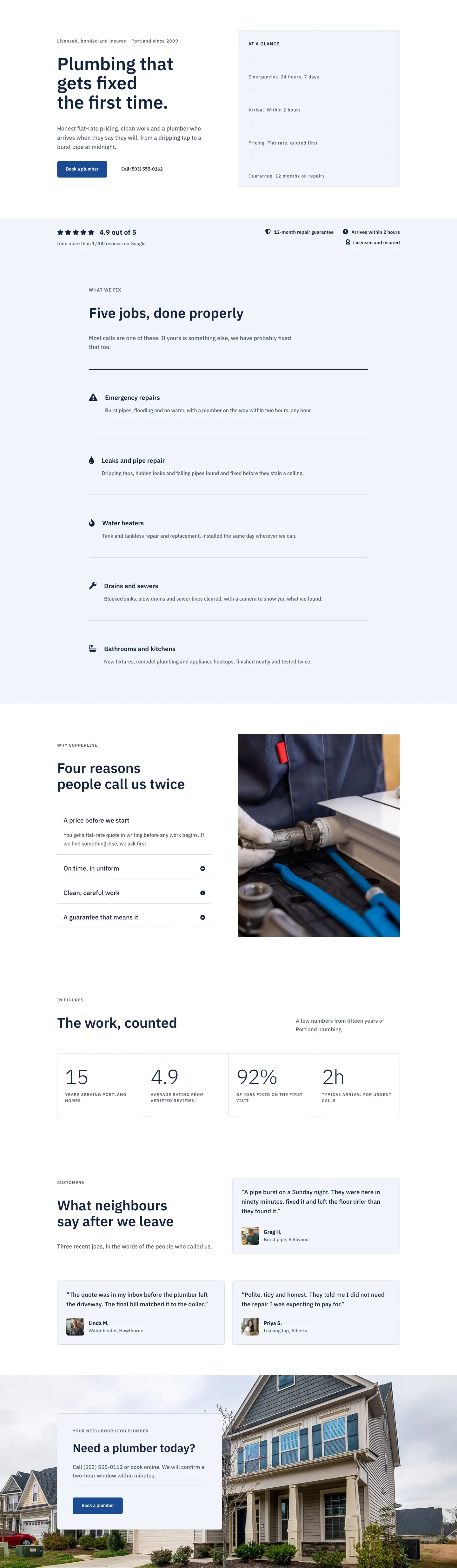
The layout opens with a 50/50 split hero on a white section that scales from 96px vertical padding on desktop to 44px on phone. The left column carries the full conversion stack: a 14px trust badge in IBM Plex Sans at 1px letter-spacing establishes credentials before the visitor reaches the headline, then a 56px H1 with a 1.08em line-height and textWrap: balance prevents orphaned words at any breakpoint (42px on tablet, 34px on phone). An 18px body paragraph at 1.6em closes the argument in one sentence, and a flex row groups a filled navy CTA (#1c4a94, "Book a plumber") alongside a ghost call button so phone and digital booking share equal visual weight without stacking. The right column places a bordered info card (#f2f5fa background, 1px #d3dbe8 border, 6px radius, 32px padding) with four divider-separated rows covering emergencies, arrival time, pricing model, and guarantee, giving a scanning visitor all the decision-critical facts before reading a word of paragraph copy.
Directly below, a slim social proof bar (32px vertical padding, bottom-border-only) runs full width in #f2f5fa. The left side stacks five Font Awesome solid star icons, a 22px bold rating figure, and a plain-text source line. The right side places three icon-plus-label trust badges that are right-aligned on desktop and shift to left-aligned on phone. It reads as a data row rather than a marketing claim. The services section that follows uses a single centred column (max-width 880px) anchored by a 2px navy rule before five icon-headed service rows, each holding a 24px Font Awesome icon, a 20px H3 at 1.25em line-height, and a 16px/1.6em supporting sentence, all separated by 1px light dividers.
The second half shifts from building trust to converting it. A two-column section pairs a four-item accordion (bottom-border-only dividers, no radius, white background, first item open by default) against a 4:5-aspect-ratio portrait image of copper pipe work set to cover. A CSS grid stats block renders four editorial figures at 64px weight-300 with -2px letter-spacing, switching from a 4-column grid on desktop to 2 columns on tablet and phone, with the 1px gaps drawn against a #d3dbe8 wrapper rather than as borders on each cell so the lines stay crisp at every scale. Three testimonial cards built from native divi/group modules (not a carousel) hold 19px quotes, 56px square avatar images, and name-plus-job attribution arranged as one card in the first row and two side by side in the second.
The page closes with a full-bleed background image section (120px padding, scaling to 56px on phone) that contains a max-520px left-aligned card in #f2f5fa with a divider and the same primary blue booking button from the hero. The background image is set to cover at center-center, framing the card without competing with it. IBM Plex Sans is used at every size throughout, a single-typeface consistency that reads as considered rather than sparse.
What’s inside
- Split hero with 56px H1 (IBM Plex Sans 600, textWrap:balance, responsive to 34px on phone), 18px lead paragraph, and a side-by-side filled-plus-ghost CTA pair
- Bordered 'At a glance' info card with four divider-separated spec rows covering 24/7 availability, 2-hour arrival, flat-rate pricing, and 12-month guarantee
- Social proof bar with five Font Awesome solid star icons, a 22px rating figure, and three icon-plus-label trust badges in a single contained horizontal band
- Services list: five icon-headed rows (24px FA icon, 20px H3, 16px/1.6em body) separated by 1px dividers under a 2px navy anchor rule, centred at max-width 880px
- Four-item accordion (bottom-border-only dividers, first item open by default) paired with a 4:5 portrait image in the 'Why Copperline' section
- CSS grid stats block with four figures at 64px weight-300 and -2px letter-spacing, reflows from 4 columns on desktop to 2 on tablet and phone
- Three testimonial cards (divi/group modules, 19px quote text, 56px 1:1 avatar images, name and job attribution) in an asymmetric 1-plus-2 row arrangement
- Full-bleed background-image CTA section with a contained max-520px card, a horizontal divider, and the primary navy booking button
Who it’s for
This layout suits designers and agencies building or refreshing sites for residential and commercial plumbing, heating, or HVAC businesses. The corporate tone, conservative palette, and trust-first structure work for established companies replacing a dated template and for newer local services businesses launching their first professional presence. With minimal copy changes it also adapts cleanly to electricians, gas engineers, drain specialists, boiler service companies, and any trade business where availability, pricing transparency, licensing credentials, and a satisfaction guarantee carry more conversion weight than visual flair.
Customization tips
The palette rests on three hex values: navy #13233f for headings and icons, steel blue #1c4a94 for the primary button, and slate #4f5d73 for body text and labels. Swapping those three values globally recolours every heading, button, and label at once. The info card, testimonial cards, social proof bar, and stats cells all share the same #f2f5fa fill and #d3dbe8 border; update both together to keep them visually unified. IBM Plex Sans is applied at every size, so replacing it in Divi's theme typography settings propagates site-wide without touching individual modules. The hero H1 uses textWrap:balance and the demo headline is 40 characters; keep your own headline under 50 characters to avoid awkward wraps at the 34px phone size. The services section is built for exactly five rows; a sixth works but removing one leaves a visible gap above the section close. Testimonial avatars display at 56x56px with a 1:1 ratio, so square crops are required. The final CTA background image is set to cover at 1920px wide; supply a landscape photo at that width or wider for clean rendering on retina displays.
How to install this layout
- Download the layout JSON file from this page.
- Open the target page in the Divi 5 builder.
- Open the portability panel (up/down arrows icon) and choose the Import tab.
- Upload the JSON. Tick “replace existing content” only for full-page imports.
- Check the page at desktop and mobile widths, then swap in your copy and images.
Full walkthrough with troubleshooting: How to Import a Divi 5 Layout.
Questions about Copperline Plumbing & Heating — Corporate Plumbing Home Page for Divi 5
How does the hero reflow on mobile?
The row has flexWrap:wrap and flexDirection:column set at the phone breakpoint, so the text column stacks above the 'At a glance' card. The left column drops its 40px right padding and gains 32px bottom padding so the card has breathing room. Both columns expand to full width (24/24 flex units).
How many items can I add to the 'Why Copperline' accordion?
The accordion is configured with four items using bottom-border-only dividers and no border radius. You can add more in the Divi editor. The rhythm holds well up to six; beyond that the accordion column will noticeably outgrow the portrait image beside it on desktop.
How does the stats grid reflow on smaller screens?
The outer group uses display:grid with gridColumnCount:4 on desktop and gridColumnCount:2 on tablet and phone. The 1px grid lines are produced by a #d3dbe8 background on the wrapper group with 1px column and row gaps, not borders on individual cells, so they remain sharp at every breakpoint.
What aspect ratio do the testimonial avatars and the 'Why Copperline' image require?
Testimonial avatars are set to a 1:1 aspect ratio at 56px display width; use square source images or centre-crop before uploading. The 'Why Copperline' image uses a 4:5 ratio with objectFit:cover, so supply a portrait-oriented photo at least 800x1000px for clean results.
Are the star icons and the review count connected to a live review platform?
No. Both the five star icons (Font Awesome solid stars, unicode f005) and the '4.9 out of 5 from more than 1,200 reviews' text are plain Divi icon and text modules. Update the figure and source line directly in the editor to match your actual review platform and count.
What should I change first after importing?
Replace the phone number in two places: the hero ghost button ('Call (503) 555-0162') and the CTA card body text. Then update the H1 headline and the trust badge line at the top of the hero ('Licensed, bonded and insured · Portland since 2009'). Those four edits cover everything a first-time visitor reads before deciding whether to call.
Which Divi version does this layout need?
Divi 5. The layout is generated natively for Divi 5 and validated against its real module structure before publication, so it imports clean into the current builder.
Can I use this layout on client websites?
Yes. Every download includes a commercial license covering unlimited sites you own or build for clients. Only reselling or redistributing the layout file itself is prohibited.
Included in these packs
More full landing pages
Browse all full landing pages
Kiln & Clay — Minimal Pottery_studio Visit Page for Divi 5
full_landing · pottery_studio · minimal

Kiln & Clay — Minimal Pottery_studio Our Story Page for Divi 5
full_landing · pottery_studio · minimal

Kiln & Clay — Minimal Pottery_studio Studio Membership Page for Divi 5
full_landing · pottery_studio · minimal

Kiln & Clay — Minimal Pottery_studio The Shop Page for Divi 5
full_landing · pottery_studio · minimal

Kiln & Clay — Minimal Pottery_studio Classes Page for Divi 5
full_landing · pottery_studio · minimal

Kiln & Clay — Minimal Pottery_studio Home Page for Divi 5
full_landing · pottery_studio · minimal