
Copperline Plumbing & Heating — Corporate Plumbing Services Page for Divi 5
Portland plumbing and heating from Copperline — water heaters, bathrooms, drain clearing, and more. Flat-rate quotes, licensed plumbers, 12-month guarantee.
Rate this element
Download this section, free
- Divi 5 JSON, imports in seconds
- Commercial license included
- No account needed
This page ships inside Copperline: Plumbing & Home Services Theme (6 Pages), 6 coherent pages that share one brand.
Click to view the full page
Overview
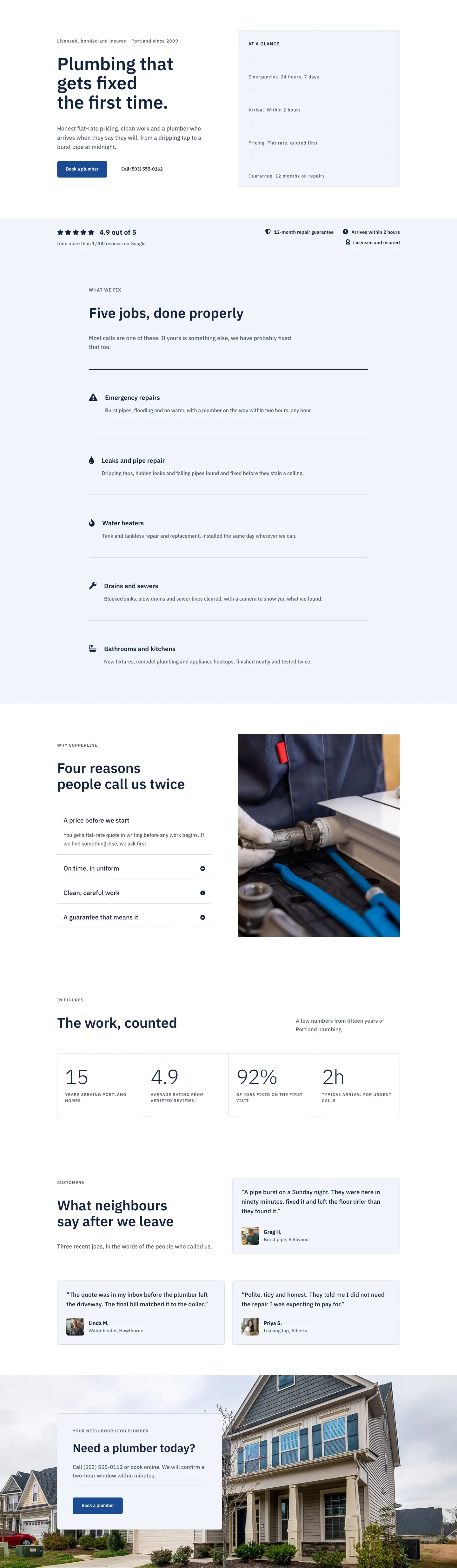
Copperline opens with a full-width hero that layers a real Pexels photograph of a plumbing installation under a uniform navy gradient overlay (rgba(10,26,56,0.72) at both gradient stops), creating a dark, controlled tone without the colour bleed that happens when a gradient transitions between two different hues. The H1 "Plumbing services" is set in IBM Plex Sans at 56px semi-bold on desktop, stepping to 42px on tablet and 32px on phone, while a breadcrumb text module above it uses 13px uppercase with 1px letter-spacing to orient visitors without competing with the headline. A subtitle text module below the H1 is capped at max-width 600px and left-aligned, keeping the reading line short on wide monitors. Section padding contracts deliberately at each breakpoint (120px top on desktop, 88px on tablet, 64px on phone) so the hero stays proportionate rather than over-tall on small screens.
The services section uses three alternating two-column rows to present water heaters, bathrooms, and drains. Each row pairs a 4:3 locked image module on one side with a numbered label (01, 02, 03 in 13px uppercase), an H3 headline, a one-sentence body paragraph, and an inline underline text link on the other. The text column carries 48px of outer padding on desktop (24px on tablet, zero on phone), giving the content breathing room that disappears gracefully when the grid stacks. The bathroom row places its image second in the DOM and applies order: -1 at the phone breakpoint so the photograph still leads above the text on all three service blocks, maintaining the visual-first reading order without manually rearranging columns. All images use objectFit: cover against the fixed aspect ratio, so replacing a photo never distorts the grid.
Two supporting sections share the pale blue-grey background (#f2f5fa) and an asymmetric column split of 8/24 on the left for the section headline and 16/24 on the right for the content. The checklist section puts eight trust signals into a native Divi Group configured as a two-column CSS grid (columnGap 40px, collapsing to a single column on phone); each item pairs a Font Awesome checkmark icon at 18px navy (#13233f) with a 17px text module inside a flex row. The process section reuses the same asymmetric split for three numbered steps, where the numerals are plain Divi Text modules styled to 80px, weight 700, with -2px letter-spacing to act as large display figures rather than labels. Divi Divider modules in light grey (#d3dbe8) sit between the steps as separators.
The FAQ section uses five native Divi Toggle modules wrapped in a centred group (max-width 1080px outer, max-width 720px for the H2). A 2px navy top border opens the stack and 1px light-grey bottom borders divide each toggle, while the first item is set open by default so visitors see an immediate answer on load. Toggle titles are H3 at 28px on desktop scaling to 20px on phone, with open and closed states both assigned white backgrounds for a clean surface. The closing CTA band fills in mid-blue (#1c4a94) and places the headline and button group in a horizontal flex row with justifyContent space-between on desktop, which collapses to a left-aligned column on phone. The button is pale grey (#f2f5fa) with navy text and a 6px radius, paired with a 14px reassurance line beneath it that reads "Flat-rate quotes. Two-hour arrival windows."
What’s inside
- Hero section with IBM Plex Sans H1 (56/42/32px), a breadcrumb text module, a max-width 600px subtitle, and a Pexels photo under a two-stop uniform navy gradient overlay
- Three alternating 1/2 + 1/2 service rows, each with a 4:3 locked image module, a numbered label (01-03), an H3 headline, a body paragraph, and an inline underline text link; image column order reverses on mobile via CSS order property
- Asymmetric 8/24 + 16/24 column split with an 8-item icon checklist in a 2-column CSS grid (Font Awesome checkmarks at 18px, collapses to 1 column on phone), no third-party plugins
- Three-step process block using large display numerals (80px weight 700, -2px letter-spacing) and Divi Divider modules as light-grey separators, in the same asymmetric column layout
- Five native Divi Toggle FAQ modules with a 2px navy top border and 1px grey bottom separators on each row; first toggle open by default
- Full-width CTA section in mid-blue (#1c4a94) with a horizontal headline and button group on desktop that stacks to a left-aligned column on phone
Who it’s for
This layout suits any residential plumbing, heating, or drain-clearing business that needs a dedicated services page rather than a generic homepage. It adapts cleanly to HVAC companies, gas engineers, and general home-maintenance contractors, since the three numbered service rows, eight-point checklist, and three-step process block can all be rewritten without touching the structure. Divi designers and web agencies building sites for tradespeople or local service businesses will find it a fast starting point: the numbered service format works for any business with two to four core offerings to explain side by side.
Customization tips
The layout runs on four key hex values: #13233f for headings and icons, #4f5d73 for body text, #1c4a94 for the CTA band background, and #f2f5fa for the alternating section backgrounds and the CTA button. Replacing those four values in your global colour preset updates the whole page at once. The typeface is IBM Plex Sans set at the module level; swapping to Inter, Outfit, or DM Sans means updating each heading and text module individually since the font fields are not linked to a global preset by default. The three service images lock to a 4:3 aspect ratio with objectFit cover, so supply any landscape photograph at 1600px wide minimum and the grid holds. Body paragraphs are deliberately one to two sentences at 17-19px; adding a third sentence will push column heights apart on the alternating image rows, so check alignment on desktop after any longer copy additions. The CTA button label, the sub-text line beneath it, and the FAQ phone number are the first fields to personalise for a new client.
How to install this layout
- Download the layout JSON file from this page.
- Open the target page in the Divi 5 builder.
- Open the portability panel (up/down arrows icon) and choose the Import tab.
- Upload the JSON. Tick “replace existing content” only for full-page imports.
- Check the page at desktop and mobile widths, then swap in your copy and images.
Full walkthrough with troubleshooting: How to Import a Divi 5 Layout.
Questions about Copperline Plumbing & Heating — Corporate Plumbing Services Page for Divi 5
The three service rows alternate image-left and image-right on desktop. Does that order hold on mobile?
Yes. The second row (Bathrooms and fixtures) uses a CSS order value of -1 on the image column at the phone breakpoint, so the photograph appears above the text on all three rows when the layout stacks to a single column. You do not need to rearrange column order manually.
What modules make up the icon checklist in the 'What comes with every job' section?
Each item is a Divi Group set to flex row, containing a Divi Icon module (Font Awesome checkmark, 18px, colour #13233f) and a Divi Text module side by side. The parent group is a native Divi CSS grid with two columns on desktop and one column on phone. No third-party plugins are used.
What image dimensions and compositions work best in the three service rows?
Each image module locks to a 4:3 aspect ratio with objectFit cover. Supply landscape photographs at least 1600px wide. Subject matter near the left or right edges may be cropped at narrower viewports, so centre-heavy compositions crop most predictably.
Can I add a fourth service row without breaking the alternating layout?
Yes. Duplicate one of the existing rows in the Divi builder, adjust the column order if needed to continue the alternating pattern, and replace the image and copy. The section has no fixed row count in its styling, so the new row inherits the same spacing and mobile behaviour.
The FAQ stack has a thick navy border at the top but not at the bottom. Where is that set?
It is applied to the outer Divi Group that wraps all five toggle modules, via the group's border settings (top border 2px, colour #13233f, all other sides 0px). If you add more toggles, place them inside that same group so the bottom-separator styling already set on each toggle continues uninterrupted.
Which Divi version does this layout need?
Divi 5. The layout is generated natively for Divi 5 and validated against its real module structure before publication, so it imports clean into the current builder.
Can I use this layout on client websites?
Yes. Every download includes a commercial license covering unlimited sites you own or build for clients. Only reselling or redistributing the layout file itself is prohibited.
Included in these packs
More full landing pages
Browse all full landing pages
Kiln & Clay — Minimal Pottery_studio Visit Page for Divi 5
full_landing · pottery_studio · minimal

Kiln & Clay — Minimal Pottery_studio Our Story Page for Divi 5
full_landing · pottery_studio · minimal

Kiln & Clay — Minimal Pottery_studio Studio Membership Page for Divi 5
full_landing · pottery_studio · minimal

Kiln & Clay — Minimal Pottery_studio The Shop Page for Divi 5
full_landing · pottery_studio · minimal

Kiln & Clay — Minimal Pottery_studio Classes Page for Divi 5
full_landing · pottery_studio · minimal

Kiln & Clay — Minimal Pottery_studio Home Page for Divi 5
full_landing · pottery_studio · minimal