
Elegant Furniture Maker Portfolio Landing Page for Divi 5: Ashdown Workshop
A full landing page Divi 5 layout for a bespoke furniture maker portfolio. Warm cream tones, editorial typography, commission gallery, founder story, FAQ and contact form — ready to import.
Rate this element
Download this section, free
- Divi 5 JSON, imports in seconds
- Commercial license included
- No account needed
Click to view the full page
Overview
Eight sections carry the Ashdown Workshop portfolio from a 104-pixel editorial headline to a walnut-brown commission CTA, using Fraunces for every display moment and Instrument Sans for every label, caption, and body line. The page opens on a warm parchment field (#faf7f2, 180px top padding on desktop) where the maker's name and city run as a 13-pixel tracked uppercase eyebrow above a full-column H1. A #dcd3c4 ruled divider breaks the hero before a two-column row pairs a 20-pixel opening paragraph (capped at 560px) with a bare underlined text link, keeping the first screen typographically restrained and unhurried. The two typefaces never appear at the same hierarchy level: Fraunces holds weight and editorial authority; Instrument Sans holds precision and legibility.
The commission showcase takes three alternating half-half rows, each pairing a 4:3 image with a numbered piece card built from a small tracked eyebrow, a Fraunces h3, a single-sentence description, and a text link. The second row places the image on the right on desktop and uses an explicit order: -1 on the image column so that, when the row stacks on mobile, the photograph still appears above the copy. The process section switches to an asymmetric 8/16 column split: the left side holds a compact section label and H2; the right side stacks three large Fraunces numerals (80px, weight 700, negative letter-spacing), each h3 step title, a one-sentence description, and a #dcd3c4 divider used as a quiet ruled separator between steps.
A six-photograph workshop gallery fills a three-column group where each column holds two vertically stacked images at mixed 4:5 and 4:3 ratios, creating a masonry-like composition using only native Divi 5 Image modules and Group stacking. The founder section pairs a portrait image decorated with a pill-top border radius (999px top, 32px bottom, set in the native decoration panel) against three paragraphs of editorial copy in Fraunces at 22px and a line-height of 1.6, closing with an italic italic signature. Press quotes use a three-column layout where a 2px top border opens each column, followed by a publication name in tracked uppercase Fraunces, an italic pull quote, and a volume citation in 15px Instrument Sans. The layout closes with a deep warm-brown band (#6e3a22), the one section that breaks the cream-and-white palette to signal a clear conversion intent.
On mobile, every multi-column row carries explicit flexDirection: column breakpoint values encoded in the layout JSON. The H1 steps from 104px on desktop to 72px on tablet and 44px on phone; all H2 section titles step from 44px to 30px. Section padding compresses from 120px to 56px. The three-column gallery linearises to full-width single columns. The contact section reorders so the commission context appears before the enquiry form. No custom CSS is required at any breakpoint.
What’s inside
- Nine native Divi 5 sections covering hero, three alternating commission showcases, a three-step process strip, a six-image workshop gallery, a founder letter, a press quotes row, an FAQ accordion with four items, a Toggle FAQ with five items plus contact form, and a closing CTA band
- Dual editorial type system: Fraunces (display, 104px H1 through 22px body quote) paired with Instrument Sans (body, labels, form fields), with all font families, sizes, weights, and letter-spacing values set directly in module settings and loaded automatically by Divi 5
- Native Divi 5 Accordion module (four items: Timber, Joinery, Finish, Delivery) and a separate group of five Toggle modules for the commission FAQ, both styled with 1px bottom-only borders and a warm-cream open state, zero custom CSS
- Built-in Divi 5 Contact Form with Name, Email and Message fields, styled field borders, placeholder colour, and a `#6e3a22` warm-brown send button, all configured in the layout with no plugin or shortcode required
- Alternating commission image rows where the second row uses an `order: -1` breakpoint on the image column so the photograph always precedes the copy when stacked on mobile, without any custom CSS
- Six-image workshop gallery using three equal columns, each holding two images stacked vertically at a mix of 4:5 and 4:3 aspect ratios, creating a masonry rhythm with native Image modules and Group decoration only
- Founder portrait with a pill-top / rounded-bottom border radius (999px top, 32px bottom) applied through the native Divi 5 image border decoration panel
- Closing CTA section on a `#6e3a22` walnut-brown background with a white Fraunces H2 at 48px and a white-fill button with near-black text, the only section that breaks the parchment-and-white palette to drive enquiry
Who it’s for
This layout is built for independent furniture makers, cabinetmakers, and woodworkers who sell through commissions rather than a catalogue. It also fits any bespoke craft studio where the sale depends on a prospective client reading a process, trusting a maker's biography, and then writing an enquiry: a ceramicist, metalworker, leatherworker, or upholsterer. Interior designers presenting a fit-out portfolio or heritage restoration studios will find the structure adaptable with copy changes alone. The commission-process section and the embedded contact form also make it practical for any service business, such as an architect or garden designer, where every project begins with a conversation.
Customization tips
The fastest global change is replacing #6e3a22 (used on the CTA section background and the contact form send button) with your own brand colour. That single hex value drives both the page's only dark accent and its primary action. The parchment #faf7f2 and near-black #17130f are deliberately neutral and rarely need changing for craft or portfolio contexts.
For the commission showcase rows, piece titles work best at under 40 characters to avoid wrapping in the 32px Fraunces h3. Each description slot holds roughly 120 characters comfortably within the 480px max-width group before line length becomes uneven. The 4:3 images in those rows are cropped with objectFit: cover, so horizontal photographs of finished pieces in a room context read best; avoid portrait-orientation hero shots in these slots.
The six gallery images can mix process, material, and tool photographs. The 4:5 slots suit portrait-format images; the 4:3 slots suit landscape. The founder portrait uses a pill-top radius that clips the top corners of the frame, so keep the subject's face below the top 10% of the image to avoid clipping.
How to install this layout
- Download the layout JSON file from this page.
- Open the target page in the Divi 5 builder.
- Open the portability panel (up/down arrows icon) and choose the Import tab.
- Upload the JSON. Tick “replace existing content” only for full-page imports.
- Check the page at desktop and mobile widths, then swap in your copy and images.
Full walkthrough with troubleshooting: How to Import a Divi 5 Layout.
Questions about Elegant Furniture Maker Portfolio Landing Page for Divi 5: Ashdown Workshop
How does the alternating image layout behave when columns stack on mobile?
The three commission rows all collapse to a single column on phones. The second row (oak kitchen table) has `order: -1` set on its image column, which places the photograph above the copy text when stacked, matching the visual order of the first and third rows. This is encoded in the layout JSON and requires no adjustment after import.
Which modules make up the two FAQ sections?
There are two distinct interactive components. The 'How we work' section uses a single Divi 5 Accordion module with four items (Timber, Joinery, Finish, Delivery) and a warm-cream open state. The 'Questions before you write' section uses five separate Divi 5 Toggle modules stacked inside a Group, styled with 1px bottom borders. Both are editable inside standard Divi 5 module settings with no custom code.
What aspect ratios should I use for the workshop gallery images?
Each of the three gallery columns holds two stacked images. In columns 1 and 3, the first image uses a 4:5 ratio (portrait) and the second uses 4:3 (landscape). Column 2 reverses this order. All six images use `objectFit: cover`, so any source image will fill the frame, but matching the target ratio reduces unwanted cropping and keeps the composition balanced.
What should I edit first after importing the layout?
Configure the contact form's email recipient in your WordPress SMTP settings, then update the hero H1, the maker name eyebrow, and the three commission piece titles and descriptions. The press quotes section contains placeholder publication names and copy: replace these with real citations or remove the section entirely if press coverage is not yet available.
Does the layout use any custom CSS or shortcodes?
No. Every visual treatment, including the pill-top portrait radius, the mobile column reorder, the masonry gallery composition, the 2px top borders on the press quote columns, and the ruled dividers between process steps, is achieved using native Divi 5 module decoration settings encoded in the layout JSON. No custom CSS fields or shortcodes are needed.
Which Divi version does this layout need?
Divi 5. The layout is generated natively for Divi 5 and validated against its real module structure before publication, so it imports clean into the current builder.
Can I use this layout on client websites?
Yes. Every download includes a commercial license covering unlimited sites you own or build for clients. Only reselling or redistributing the layout file itself is prohibited.
More full landing pages
Browse all full landing pages
Dark Developer Tool Landing Page for Divi 5: Log Tracing Platform
full_landing · saas · dark

Elegant Coaching Landing Page for Divi 5: Founder Burnout Recovery
full_landing · coaching · elegant
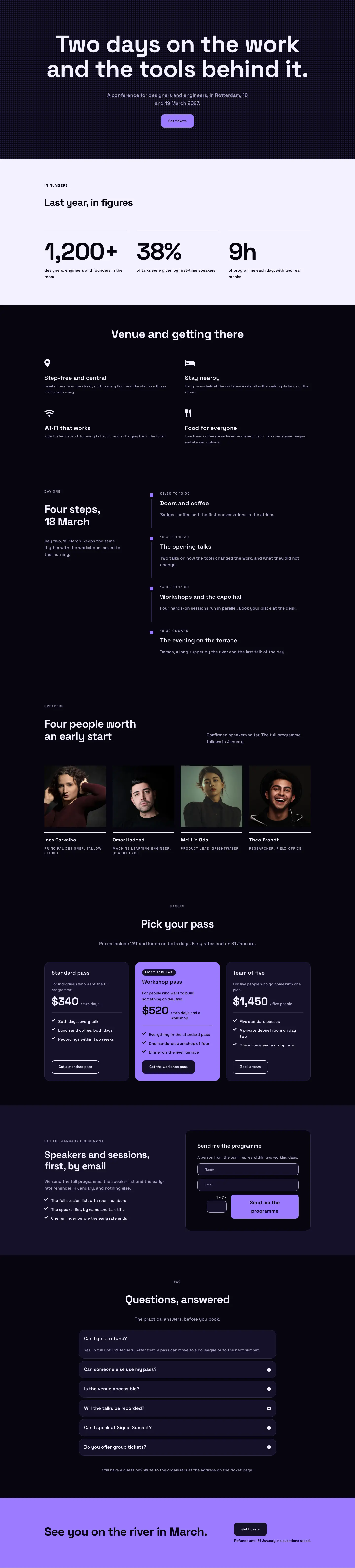
Dark Glass Conference Landing Page for Divi 5: Signal Summit
full_landing · events · dark

Elegant Restaurant Landing Page for Divi 5: Ten-Seat Omakase Counter
full_landing · restaurant · elegant

Bold Studio Landing Page for Divi 5: Motion and Brand Design
full_landing · agency · bold

Playful Small-Batch Preserves Landing Page for Divi 5: Little Jars
full_landing · ecommerce · playful