
Evermore Weddings — Elegant Wedding_planner Contact Page for Divi 5
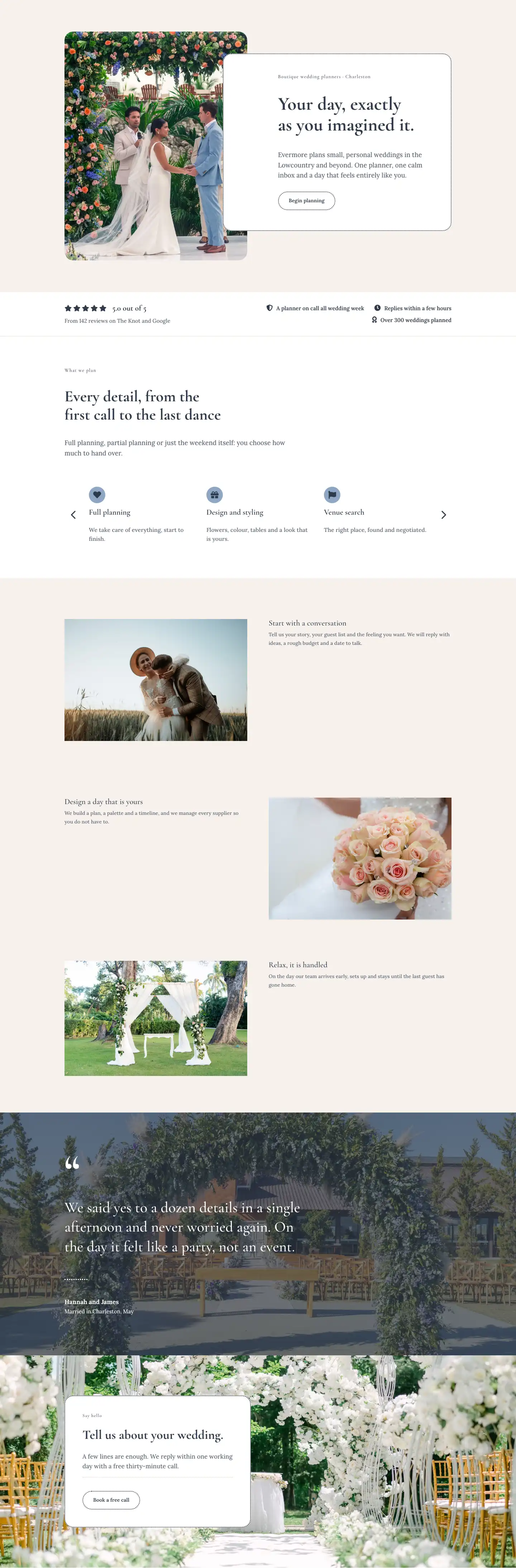
A refined contact page layout for wedding planners. Features a two-column inquiry form, studio address, office hours, FAQ section, and a soft CTA strip in Cormorant Garamond and Lora.
Rate this element
Download this section, free
- Divi 5 JSON, imports in seconds
- Commercial license included
- No account needed
This page ships inside Evermore: Wedding Planner Theme (6 Pages), 6 coherent pages that share one brand.
Click to view the full page
Overview
Evermore Weddings Contact is a four-section contact page built entirely from native Divi 5 modules, designed for wedding planners who want their inquiry experience to feel as considered as the weddings they plan. The page opens with a lean header section on pure white (#ffffff) using a subtle 1px warm-sand bottom border (#e8dccf) as the only divider — no heavy chrome, no competing imagery. Cormorant Garamond at 52px carries the H1 "Say hello" on desktop, stepping down to 32px on phones, while a Lora body line in the right column explains the brief in 18px at 1.6em line-height. The asymmetric column weights (16/24 left, 8/24 right on desktop, full-width stacked on phones) give the heading the mass it deserves without crowding the supporting copy.
The main content section sits on a warm linen background (#f6f1ec) with 88px vertical padding that eases to 40px on phones. The left column holds a 4:5 portrait image with a distinctive pill-arch border-radius (999px top corners, 32px bottom corners) — a detail that reads immediately as bridal without using a single generic element. Below the image, two icon-and-text contact details (address and opening hours) use FA solid icons at 18px in the deep navy (#2f3a4a), paired with Cormorant Garamond 12px uppercase labels and Lora 17px values. The right column carries the contact form inside a white card with 24px rounded corners and a 2px dotted navy border — a deliberate texture choice that adds craft without weight. Form fields repeat the same pill shape and dotted border treatment at the input level, creating a unified decorative system rather than borrowed defaults.
The FAQ section on white uses a split heading row (14/24 left, 10/24 right on desktop) where the H2 "Before you write" aligns bottom with a right-column subtext and ghost button. Six FAQ items are distributed evenly across two equal columns, each separated by a 3px dotted top border in navy — a clean horizontal rule that avoids the visual noise of full dividers. H3 questions sit at 21px Cormorant Garamond 600-weight; answers at 16px Lora in the muted slate (#5a6372), which keeps the hierarchy readable at a glance. The closing CTA section breaks the neutral palette with a composed dusty-blue (#8da7c4) background, anchoring a full-width row that holds an H2 at 48px on the left and a "Book a free call" ghost button on the right — ghost on the blue background rather than on white, so the dotted border and transparent fill read as intentional restraint rather than an unfinished state.
What’s inside
- Three-section page structure: white header with breadcrumb and H1, linen contact section with portrait image plus form, white FAQ grid, and dusty-blue CTA strip
- Native Divi 5 Contact Form module with pill-shaped dotted-border fields and a matching "Send message" button with hover fill — no third-party plugin required
- 4:5 portrait image with pill-arch border-radius (999px top, 32px bottom) inside a max-width 420px Group, paired with FA icon + label/value contact detail rows
- Six FAQ items in a two-column equal grid, each topped by a 3px dotted navy top border and styled in H3 Cormorant Garamond / Lora body pairs
- Full responsive cascade: desktop 16/8 and 10/14 column splits collapse to full-width stacked columns on tablets and phones with reduced padding at every breakpoint
- Consistent dotted-border design language carried across the form card, field inputs, submit button, FAQ separators, and the CTA ghost button for a coherent branded feel
- Dual-typeface hierarchy: Cormorant Garamond (headings, labels, eyebrow text) and Lora (body, form, buttons) with precisely set letter-spacing and line-heights throughout
Who it’s for
This layout is purpose-built for independent wedding planners, boutique wedding coordination studios, and event-planning agencies that want their contact page to match the elegance of their brand. It also fits elopement specialists, destination-wedding consultants, and luxury event stylists who need a page that converts inquiries without feeling transactional. The warm palette, serif typography, and considered form design communicate trust and taste — qualities that matter when couples are choosing someone to manage one of the most important days of their lives.
Customization tips
The two-typeface system (Cormorant Garamond + Lora) is set at the module level, so swapping both fonts site-wide takes two preset changes if your Divi theme already defines global font roles. The three palette values to update are: #ffffff (white sections), #f6f1ec (linen section background), and #8da7c4 (the closing CTA band) — change these in the section backgrounds and the form card background to shift the mood from warm-neutral to cool-grey or deep emerald without touching any text colors. The contact form card is a Group module, not a widget, so padding and border-radius are all Divi-native controls. Keep H1 copy to one or two short words (the layout reserves roughly 60% column width for it). The 4:5 portrait image works best with a vertical wedding or venue shot — avoid landscape crops, which will be center-cropped by the objectFit: cover setting baked into the image module. FAQ answers read best at one to two sentences; longer answers will push the dotted-border grid items out of vertical alignment across the two columns.
How to install this layout
- Download the layout JSON file from this page.
- Open the target page in the Divi 5 builder.
- Open the portability panel (up/down arrows icon) and choose the Import tab.
- Upload the JSON. Tick “replace existing content” only for full-page imports.
- Check the page at desktop and mobile widths, then swap in your copy and images.
Full walkthrough with troubleshooting: How to Import a Divi 5 Layout.
Questions about Evermore Weddings — Elegant Wedding_planner Contact Page for Divi 5
How does the contact form work — does it need a plugin?
No third-party plugin is needed. The form uses Divi 5's native Contact Form module (divi/contact-form) with three full-width fields: Name, Email, and Message. Email delivery is handled by Divi's built-in form handler; you configure the recipient address in the Contact Form module settings after import.
What image dimensions work best for the portrait photo in the left column?
The image module is locked to a 4:5 aspect ratio with objectFit set to cover, so any vertical photo crops to that ratio automatically. A source image of at least 800×1000px keeps it sharp on retina screens. The module has a max-width of 420px, so there is no need to upload anything wider than 900px.
How does the layout stack on mobile?
Every row uses flexWrap: wrap and flexDirection: column on phones, so all columns become full-width and stack top-to-bottom. Section padding steps down in three stages (88px desktop → 60px tablet → 40px phone) and heading font sizes drop at each breakpoint — for example the H1 goes from 52px to 40px to 32px. No manual phone overrides are needed beyond those already baked in.
The FAQ items are split across two columns on desktop. How do they reorder on phones?
The FAQ row also uses flexDirection: column on phones, so both columns stack vertically. The left column's three items appear first, followed by the right column's three items. If you need a different reading order, resequence the items within each column before import.
The CTA section uses a blue background (#8da7c4) that may not match my brand. What is the safest way to change it?
Open the last section's background setting in Divi 5 and replace #8da7c4 with your brand color. The H2 and button text are both set to #2f3a4a (dark navy), which holds legibility on light-to-mid tones. If you switch to a dark background, update those text and border values to #ffffff or a light tint to maintain contrast.
Can I add extra contact detail rows (phone, social links) below the address and hours?
Yes. Each detail row is a Divi Group containing an Icon module and a nested Group with two Text modules (label + value). Duplicate one of the existing rows, swap the FA icon unicode for your target icon, and update the label and value text. The column gap and row gap on the parent Group are already set, so the new row slots in automatically.
Which Divi version does this layout need?
Divi 5. The layout is generated natively for Divi 5 and validated against its real module structure before publication, so it imports clean into the current builder.
Can I use this layout on client websites?
Yes. Every download includes a commercial license covering unlimited sites you own or build for clients. Only reselling or redistributing the layout file itself is prohibited.
Included in these packs
More full landing pages
Browse all full landing pages
Kiln & Clay — Minimal Pottery_studio Visit Page for Divi 5
full_landing · pottery_studio · minimal

Kiln & Clay — Minimal Pottery_studio Our Story Page for Divi 5
full_landing · pottery_studio · minimal

Kiln & Clay — Minimal Pottery_studio Studio Membership Page for Divi 5
full_landing · pottery_studio · minimal

Kiln & Clay — Minimal Pottery_studio The Shop Page for Divi 5
full_landing · pottery_studio · minimal

Kiln & Clay — Minimal Pottery_studio Classes Page for Divi 5
full_landing · pottery_studio · minimal

Kiln & Clay — Minimal Pottery_studio Home Page for Divi 5
full_landing · pottery_studio · minimal