
Evermore Weddings — Elegant Wedding_planner Home Page for Divi 5
Evermore plans small, personal weddings in Charleston and the Lowcountry. Full planning, design, venue search and day-of coordination — one calm planner from first call to last dance.
Rate this element
Download this section, free
- Divi 5 JSON, imports in seconds
- Commercial license included
- No account needed
This page ships inside Evermore: Wedding Planner Theme (6 Pages), 6 coherent pages that share one brand.
Click to view the full page
Overview
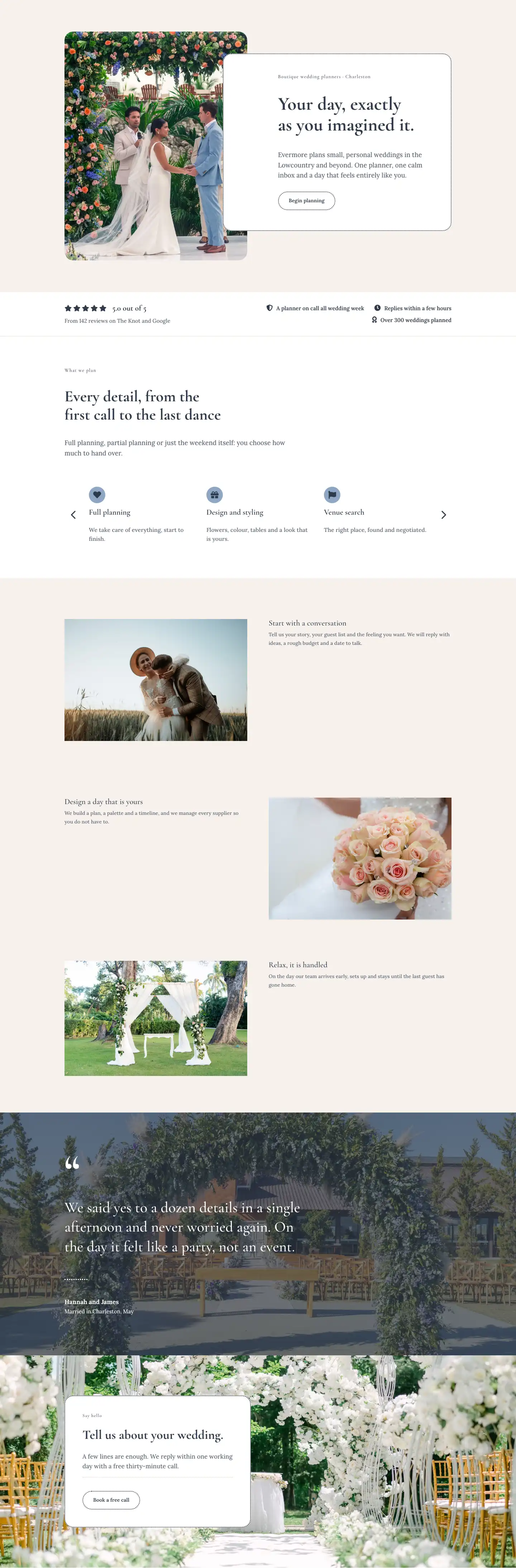
Evermore Weddings is a full-page home layout built around a single design conviction: luxury wedding planning communicates trust through restraint, not decoration. The page opens with a split hero — a 4:5 portrait image of a floral arch on the left, overlapped on the right by a white card group that slides 128 px into the image at desktop, creating depth without a drop shadow. That card contains an h4 location tag in tracked Cormorant Garamond, a 52 px h1 in the same face, a Lora body paragraph, and a pill-shaped outline button. Every border in the layout — the hero card, the services carousel cards, the contact form — uses the same 2 px dotted ink stroke (#2f3a4a), which ties the page together without resorting to color blocks.
The second section is a lean social-proof bar on white, bordered at the bottom by a 1 px warm line. Five FontAwesome star icons sit in a flex row beside a 22 px bold score, with three icon-plus-label trust chips aligned to the right: planner on call all week, replies within a few hours, over 300 weddings. It conveys credibility in a single viewport band without a separate testimonials section.
The services section uses a group-carousel showing three slides at desktop, two at tablet, one at phone. Each card carries a filled circle icon in muted slate blue (#8da7c4), an h3 title, and a short body line. The carousel has arrow navigation but no dot nav, keeping the bottom edge clean. Below the carousel, a three-row alternating editorial grid pairs full-bleed images with text blocks on the warm parchment ground (#f6f1ec), telling the planning journey in three steps.
The layout closes with two full-bleed sections: a large testimonial pulled over a dark overlay (68 % opacity slate over a ceremony photo), with the opening quote mark rendered at 120 px in Cormorant Garamond — a typographic flourish that photographs well — and a contact card floating over a garden image, again using the dotted white box with a CTA button. Padding scales gracefully across all three breakpoints, dropping from 88 px desktop top/bottom to 40 px on phone, and the two-column rows flip to single-column via flexWrap: wrap and flexDirection: column.
What’s inside
- Split hero with a 4:5 ratio image module and an overlapping white group card using negative left margin at desktop, collapsing to stacked single-column on phone
- Social-proof bar with five FontAwesome solid star icons in a flex row, a bold 22 px score, and three icon-plus-label trust chips — all in a single compact section
- Services group-carousel showing 3/2/1 slides per breakpoint with arrow navigation, each card using a circular icon badge in `#8da7c4`, an h3 heading, and a body line
- Three-row alternating editorial grid (image left/text right, text left/image right) on the warm parchment background, building a visual story of the planning process
- Full-bleed testimonial section with a 68 % dark gradient overlay, a 120 px decorative quote mark in Cormorant Garamond, a dotted white divider, and a two-line attribution block
- Contact card floating over a full-bleed background image: white padded group with a dotted border, h4 label, h2 headline, body text, Divi divider, and a pill CTA button
- Consistent dotted-border design language (`2px dotted #2f3a4a`) applied to the hero card, service cards, buttons, dividers, and the contact form — unifying the whole page
Who it’s for
This layout is the right starting point for independent wedding planners, boutique planning studios, and destination wedding specialists who want a site that reads as personal and considered rather than corporate. It also works for elopement packages, intimate celebration planners, and honeymoon travel consultants. The warm parchment palette and editorial image grid translate naturally to event stylists, floral designers who offer day-of coordination, and any planner positioning themselves at the premium end of the market where trust and personality matter more than a feature list.
Customization tips
The entire palette resolves to three hex values: #f6f1ec (parchment ground), #2f3a4a (ink), and #8da7c4 (icon accent). Swap all three globally and the dotted borders, icon badges, and text hierarchy update together. The hero h1 is set with textWrap: balance and handles well up to about 60 characters — keep your headline under that to avoid a single orphaned word on tablet. The hero body paragraph is best kept to two short sentences; the container padding leaves limited room before it pushes the button below the fold at desktop. Replace the three editorial images with portrait-oriented photos at roughly 3:4 for the best fill — the image modules use objectFit: cover. For the carousel, each card description is one short sentence in the JSON; keep additions to a single line to prevent uneven card heights across slides.
How to install this layout
- Download the layout JSON file from this page.
- Open the target page in the Divi 5 builder.
- Open the portability panel (up/down arrows icon) and choose the Import tab.
- Upload the JSON. Tick “replace existing content” only for full-page imports.
- Check the page at desktop and mobile widths, then swap in your copy and images.
Full walkthrough with troubleshooting: How to Import a Divi 5 Layout.
Questions about Evermore Weddings — Elegant Wedding_planner Home Page for Divi 5
How does the hero overlap effect work on mobile?
On desktop the right-column group card uses `margin-left: -128px` to slide over the image. On phone the row switches to `flexDirection: column` and the group's margin resets to 0, with a negative top margin of -64 px so the card still slightly overlaps the image from below rather than sitting fully separate.
What image aspect ratios should I use for the editorial grid rows?
The three alternating-row images are full-column width with no fixed aspect ratio constraint set in the JSON — they display at the image's natural ratio. Landscape photos at roughly 3:2 or 4:3 work well; avoid very tall portraits here since the matching text column is short.
How many service cards can the carousel hold before it feels cramped?
The layout ships with six cards. Three show at desktop, two at tablet, one at phone. You can add up to eight cards comfortably; beyond that the arrow navigation becomes the only way to discover cards at tablet and phone, which increases interaction cost for visitors.
Can I replace the testimonial quote with a video background?
The testimonial section background is a Divi section image with a gradient overlay applied in the JSON. Divi 5 sections do not support native video backgrounds in the same decoration block, so you would need to restructure that section or use a custom CSS approach — the supplied JSON uses only the image-plus-gradient pattern.
What does the contact section connect to out of the box?
The contact section contains a heading, body text, a divider, and a button — there is no Divi form module in this layout. You will need to link the button to a separate contact page or swap the button for a Divi contact form module if you want enquiries captured directly on the page.
Which Divi version does this layout need?
Divi 5. The layout is generated natively for Divi 5 and validated against its real module structure before publication, so it imports clean into the current builder.
Can I use this layout on client websites?
Yes. Every download includes a commercial license covering unlimited sites you own or build for clients. Only reselling or redistributing the layout file itself is prohibited.
Included in these packs
More full landing pages
Browse all full landing pages
Kiln & Clay — Minimal Pottery_studio Visit Page for Divi 5
full_landing · pottery_studio · minimal

Kiln & Clay — Minimal Pottery_studio Our Story Page for Divi 5
full_landing · pottery_studio · minimal

Kiln & Clay — Minimal Pottery_studio Studio Membership Page for Divi 5
full_landing · pottery_studio · minimal

Kiln & Clay — Minimal Pottery_studio The Shop Page for Divi 5
full_landing · pottery_studio · minimal

Kiln & Clay — Minimal Pottery_studio Classes Page for Divi 5
full_landing · pottery_studio · minimal

Kiln & Clay — Minimal Pottery_studio Home Page for Divi 5
full_landing · pottery_studio · minimal