
Evermore Weddings — Elegant Wedding_planner Planning Page for Divi 5
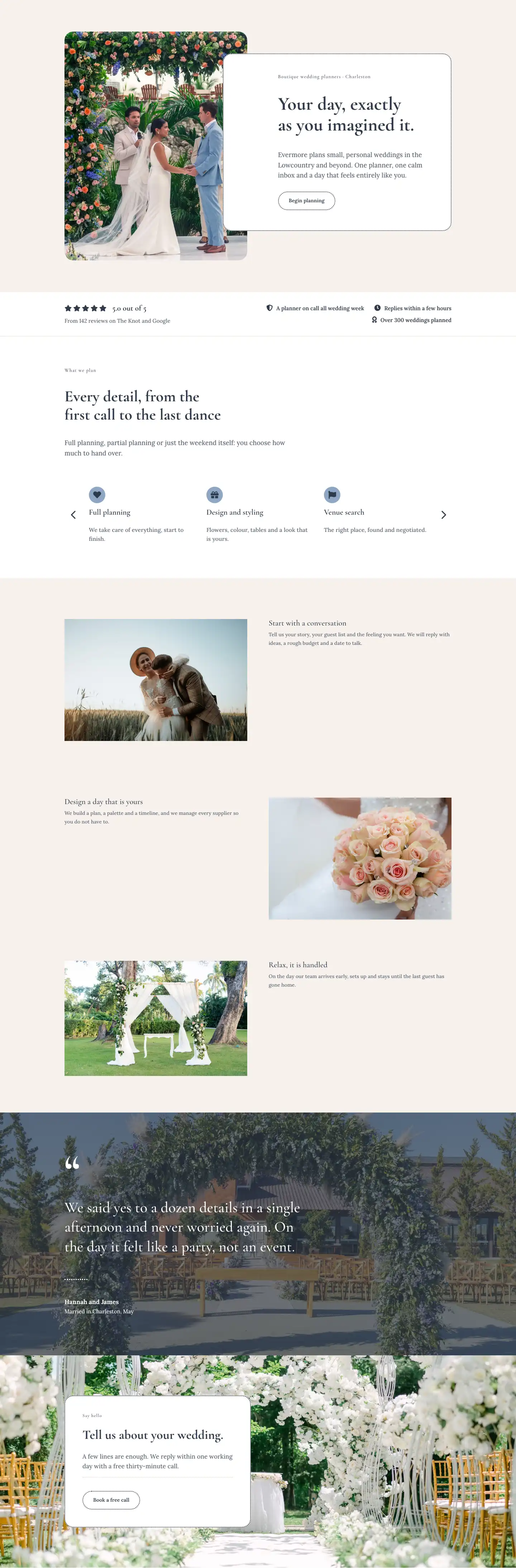
Elegant wedding planning in Charleston. Choose from day-of coordination at $2,400, partial planning at $5,800, or full planning at $9,800. One calm planner, fixed fees, no surprises.
Rate this element
Download this section, free
- Divi 5 JSON, imports in seconds
- Commercial license included
- No account needed
This page ships inside Evermore: Wedding Planner Theme (6 Pages), 6 coherent pages that share one brand.
Click to view the full page
Overview
Evermore Weddings Planning is a five-section full landing page built entirely from native Divi 5 modules, designed around the specific conversion goal of a wedding planning service: turning a curious couple into a booked inquiry. The page opens with a deep slate hero (#2f3a4a) carrying a centered H1 in Cormorant Garamond at 60px, flanked by a dotted divider accent and a single line of Lora body copy — the visual weight signals premium positioning before a word is read. A sweeping curve divider (100px on desktop, scaling to 44px on mobile) transitions cleanly into the cream section below, so the layout never feels cut.
The pricing section is where the real structural thinking lives. Three equal-column cards sit in a 1_3,1_3,1_3 flex row with alignItems: stretch, so every card reaches the same height regardless of content length. The middle card uses a muted blue-slate fill (#8da7c4) with a "Most loved" badge built from a nested group with a white pill background — a deliberate visual lift that guides the eye without resorting to a separate badge component. Each card carries a price in 44px Cormorant Garamond, a dotted top-border separator above the feature list, Font Awesome checkmark icons paired with 16px Lora text, and a pill-shaped ghost button with an invert-on-hover state. On tablet the row wraps; on phone each card goes full width and stacks.
The "How it works" section uses a two-column split: a narrow left column (one-third weight) anchors the heading and subtext, while the right column carries three numbered steps with oversized 80px numerals in Cormorant Garamond and dotted #e8dccf dividers between steps. This rhythm creates a clear scan path without bullet points. The before-and-after section that follows pairs narrative text (Before/After vignettes with 3px dotted top borders) against Divi 5's native before-after-image module — no third-party slider needed. The final FAQ section uses the native accordion module with rounded 24px corners, matching the card style from the pricing section, and a dotted 2px border that keeps the visual language consistent across the whole page.
What’s inside
- Dark slate hero section with centered H1 at 60px Cormorant Garamond, dotted accent divider, and a curved section-bottom divider that blends into the content below
- Three-column equal-height pricing cards with stretch flex layout, dotted borders, 44px price figures, Font Awesome checkmark feature lists, and ghost buttons with hover fill states
- "Most loved" pill badge built as a nested group with a white rounded background — sits inside the middle card without requiring a custom module
- Two-column process section with oversized 80px step numbers and dotted Lora dividers creating a numbered timeline without bullet-list clutter
- Native Divi 5 Before/After Image module in a two-column layout paired with before-and-after vignette text using dotted top-border separators
- Cream-background FAQ section using the native Divi 5 Accordion module with 24px rounded corners, matching the pricing card border style
- Fully responsive across all three breakpoints: hero text scales from 60px to 34px, price figures from 44px to 36px, step numbers from 80px to 52px, and card rows collapse to full-width stacks on mobile
Who it’s for
This layout is built for independent wedding planners, boutique planning studios, and event coordination businesses that offer tiered service packages. It works equally well for planners specializing in destination weddings, barn and outdoor venues, or urban hotel events. The pricing card structure maps naturally to any three-tier service model, so it adapts to elopement coordinators, day-of-only operators, or full-service luxury planners. The before-and-after image section is particularly effective for vendors with strong venue transformation photography, including florists and stylists who also manage event logistics.
Customization tips
Start by swapping the two brand colors: replace #2f3a4a (dark slate) and #f6f1ec (warm cream) at the section level, and the rest of the type and border values inherit the scheme automatically. The middle pricing card uses #8da7c4 as its highlight fill — pick any accent color from your brand palette here. For the hero, the Cormorant Garamond H1 handles well up to about 55 characters before textWrap: balance starts compressing line rhythm; keep headlines short. Body copy inside the pricing cards sits in cells with 24px padding on all sides, so feature list items should stay under 40 characters each to avoid awkward wraps at tablet width. The before-and-after images work best with landscape photos at a 16:9 ratio and consistent framing between the two shots. For the accordion FAQ, answers up to about 120 words render cleanly without the panel feeling cramped.
How to install this layout
- Download the layout JSON file from this page.
- Open the target page in the Divi 5 builder.
- Open the portability panel (up/down arrows icon) and choose the Import tab.
- Upload the JSON. Tick “replace existing content” only for full-page imports.
- Check the page at desktop and mobile widths, then swap in your copy and images.
Full walkthrough with troubleshooting: How to Import a Divi 5 Layout.
Questions about Evermore Weddings — Elegant Wedding_planner Planning Page for Divi 5
Does the before-and-after image slider require a plugin?
No. It uses Divi 5's native `before-after-image` module, which ships with the builder. No third-party slider plugin or shortcode is needed.
How does the "Most loved" badge on the middle pricing card work?
It is a plain Divi 5 Text module wrapped in a Group module with a white background and 12px border radius applied in the decoration settings. There is no custom CSS or badge widget involved.
The three pricing cards stack on mobile — can I control the order?
Yes. The row uses `flexDirection: column` on phone. You can reorder the columns in the Divi builder to control which card appears first when stacked, independently of the desktop layout.
What aspect ratio should I use for the before-and-after images?
The module renders both images at the same dimensions, so both photos should share the same crop and aspect ratio. Landscape 16:9 or 3:2 works best; avoid mixing portrait and landscape shots or the slider handle will feel misaligned.
Can I add a fourth pricing tier without rebuilding the row?
Adding a fourth column will shift the layout to a `1_4` structure. The cards are built with padding and flex-grow so a fourth card fits, but you will need to update the column structure setting in the row and adjust the tablet wrap behavior so the cards pair into two rows rather than all collapsing individually.
The hero uses a curve divider — will it match if I change the section below it to a different background color?
Yes. The curve divider color is set explicitly to `#f6f1ec` in the section's bottom divider settings. If you change the background of the following section, update that divider color value to match and the transition will remain seamless.
Which Divi version does this layout need?
Divi 5. The layout is generated natively for Divi 5 and validated against its real module structure before publication, so it imports clean into the current builder.
Can I use this layout on client websites?
Yes. Every download includes a commercial license covering unlimited sites you own or build for clients. Only reselling or redistributing the layout file itself is prohibited.
Included in these packs
More full landing pages
Browse all full landing pages
Kiln & Clay — Minimal Pottery_studio Visit Page for Divi 5
full_landing · pottery_studio · minimal

Kiln & Clay — Minimal Pottery_studio Our Story Page for Divi 5
full_landing · pottery_studio · minimal

Kiln & Clay — Minimal Pottery_studio Studio Membership Page for Divi 5
full_landing · pottery_studio · minimal

Kiln & Clay — Minimal Pottery_studio The Shop Page for Divi 5
full_landing · pottery_studio · minimal

Kiln & Clay — Minimal Pottery_studio Classes Page for Divi 5
full_landing · pottery_studio · minimal

Kiln & Clay — Minimal Pottery_studio Home Page for Divi 5
full_landing · pottery_studio · minimal