
Evermore Weddings — Elegant Wedding_planner Real Weddings Page for Divi 5
Browse real weddings planned by Evermore Weddings — seaside terraces, clifftop ceremonies, garden lawns and more. See photos, couple stories and planning inspiration.
Rate this element
Download this section, free
- Divi 5 JSON, imports in seconds
- Commercial license included
- No account needed
This page ships inside Evermore: Wedding Planner Theme (6 Pages), 6 coherent pages that share one brand.
Click to view the full page
Overview
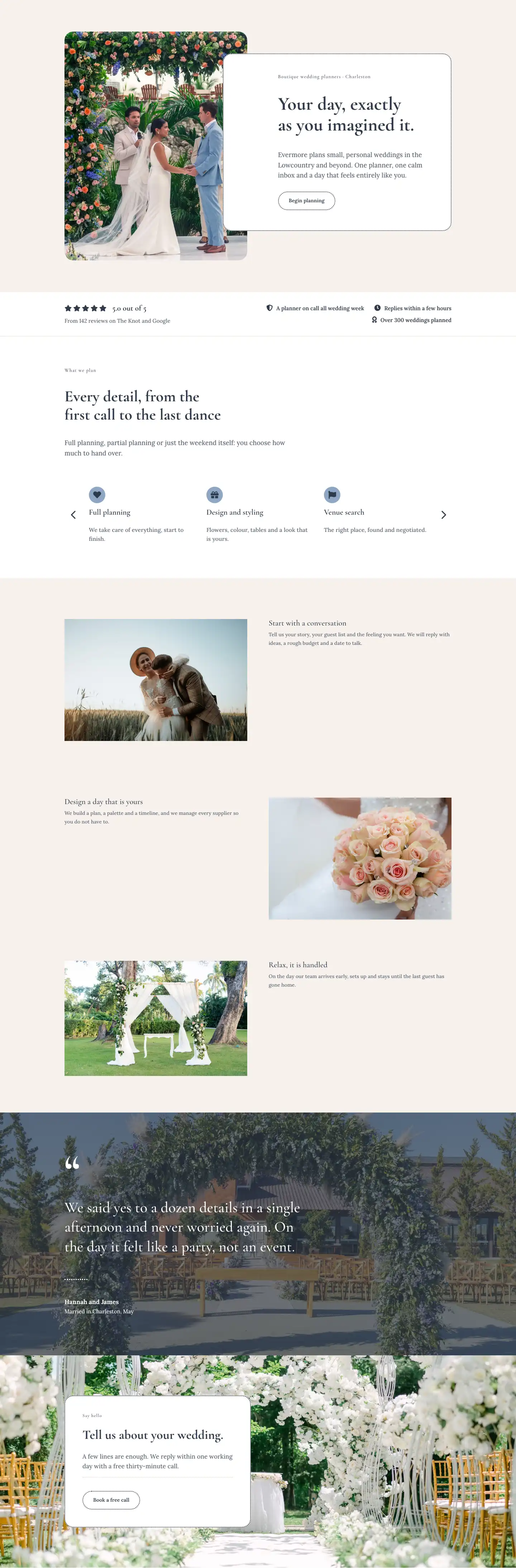
The layout opens with a full-width hero built around a Pexels photograph of a flower-covered seaside arch, darkened by a uniform navy gradient overlay at 68% opacity that holds readable contrast across any image you swap in. Desktop padding sits at 120px top and 104px bottom, stepping down to 64px and 56px on mobile, so the section breathes without crowding smaller screens. A 13px Cormorant Garamond breadcrumb anchors the hierarchy above an H1 set at 56px (42px tablet, 32px phone), followed by a Lora 19px subheadline capped at 600px wide. The two typefaces set the tonal contract for the whole page: Cormorant Garamond carries all display copy in deep navy #2f3a4a, while Lora carries body text and button labels throughout.
The featured weddings section uses a CSS grid that places the lead couple in a full-width 2:1 cinematic card before four 4:3 portrait cards fill the two-column grid below. Each card carries a 24px border radius and a signature detail: a dotted-border pill badge in 12px Cormorant Garamond naming the venue and guest count. That dotted-pill motif reappears on the section ghost button and on every testimonial card border, connecting visual decisions across all four sections. On mobile the grid collapses to a single column with all cards stacking at full width.
A moments section follows with a deliberate shift in texture: the three-column photo grid drops rounded corners entirely, using 0px border radius for a straight-edged editorial feel that contrasts the soft gallery cards above. The columns interleave 4:5 portrait and 4:3 landscape images so column heights stay visually close without being identical. The section intro splits across two unequal columns (roughly 58% for the H2, 42% for a short body line in Lora 17px) so the heading has room to breathe while the descriptor sits at reading weight alongside it rather than below.
Each testimonial sits inside a white card with a 2px dotted dark-navy border set on the warm linen background (#f6f1ec). A quote runs in Lora 19px at 1.6em line height, and the attribution row below pairs a 56px circular avatar photo with the couple name in bold Lora and venue in muted slate. Cards use justifyContent: space-between so the attribution always pins to the bottom regardless of quote length. The page closes with a dusty-blue CTA band (#8da7c4), the only section that breaks from warm linen, carrying a 48px Cormorant Garamond headline and a pill ghost button. The palette shift signals a clean tonal close without requiring a heavy dark block.
What’s inside
- Full-width hero section with a 68% navy gradient overlay, Cormorant Garamond H1 scaling from 56px to 32px across breakpoints, and a Lora subheadline constrained to 600px max-width
- Two-column featured weddings grid: one 2:1 cinematic lead card spanning full grid width, followed by four 4:3 portrait cards, all with 24px border radius and dotted-pill venue and guest-count badges
- Pill-shaped ghost buttons (999px border radius, transparent fill, dotted outline, invert-on-hover) used consistently as section-level CTAs
- Three-column editorial moments grid mixing 4:5 portrait and 4:3 landscape aspect ratios with intentional 0px corner radius for a magazine-spread contrast with the rounded gallery section
- Three testimonial cards in a two-row two-column layout, each a white rounded card (2px dotted border, 24px radius) containing a Lora 19px quote and a 56px circular avatar photo with bold name and venue attribution
- Asymmetric split-column section headers pairing a large Cormorant Garamond H2 on one side with a short Lora descriptor on the other, collapsing to full-width stacked on mobile
- Dusty-blue CTA band (`#8da7c4`) with horizontal headline-plus-button split on desktop, stacking vertically on phone, creating a distinct tonal close from the warm linen body sections
Who it’s for
This layout is built for independent wedding planners and small wedding studios who want to document their portfolio with the editorial weight of a print magazine. It suits destination specialists, elopement planners, and intimate-ceremony services where the emotional story of each couple matters as much as the logistics. Photographers who co-brand with a planning service, and boutique event companies expanding into wedding coordination, will find the tone and structure immediately usable. The linen-and-navy palette with serif-only typography reads as considered and personal rather than corporate, which fits boutique positioning at any price point.
Customization tips
The palette reduces to three values: the warm linen body (#f6f1ec), the deep navy used for all headings and borders (#2f3a4a), and the dusty-blue CTA band (#8da7c4). Changing the first two globally re-skins the layout entirely. Hero and gallery images should be provided at 1600px wide minimum. The 2:1 lead card needs a wide-crop landscape; the 4:3 grid cards and detail shots are standard landscape; the three-column moments column slots alternate between 4:5 portraits and 4:3 landscapes, and objectFit: cover is set on all images so exact dimensions are flexible but the declared aspect ratios are locked. Venue pill badges are short by design: two or three words plus a guest count fits the 12px Cormorant Garamond comfortably. Testimonial quotes read best between 25 and 45 words; the space-between column layout pushes the avatar attribution to the bottom regardless of quote length, so slightly longer quotes will not break the card.
How to install this layout
- Download the layout JSON file from this page.
- Open the target page in the Divi 5 builder.
- Open the portability panel (up/down arrows icon) and choose the Import tab.
- Upload the JSON. Tick “replace existing content” only for full-page imports.
- Check the page at desktop and mobile widths, then swap in your copy and images.
Full walkthrough with troubleshooting: How to Import a Divi 5 Layout.
Questions about Evermore Weddings — Elegant Wedding_planner Real Weddings Page for Divi 5
How does the featured weddings grid behave on mobile?
The two-column grid collapses to a single column on phone breakpoint. The 2:1 lead card and all four 4:3 portrait cards stack vertically at full width. The row gap shrinks from 40px to 32px.
The moments section images have no rounded corners. Is that intentional?
Yes. The border radius on those images is explicitly set to 0px, creating a straight-edged editorial contrast with the 24px-rounded gallery cards in the section above. If you prefer consistent rounding, update the radius on each image module in that section.
What aspect ratios should my photos be for each section?
Hero background and the lead wedding card: 2:1 (wide cinematic). Wedding gallery cards and most detail shots: 4:3 (standard landscape). Moments column portrait slots: 4:5. Testimonial avatars: 1:1 (square, displayed at 56px). All images use objectFit cover, so slight deviations are fine, but the declared ratios are locked in the module.
Can I add more testimonials beyond the three included?
The testimonial section uses two standard Divi rows of two equal columns each. There is no carousel or slider. Adding a third row is straightforward: duplicate an existing row, replace the quote text, swap the avatar image, and update the couple name and venue lines.
The hero gradient is quite dark. How do I lighten it?
The overlay is a flat gradient with both stops set to rgba(47,58,74,0.68), making it a uniform 68% tint rather than a fade. In the hero section background settings, lower the opacity value on both gradient stops to let more of the background photo through.
Which Divi 5 modules does this layout use?
Section, Row, Column, Text, Heading, Image, Button, and Group. No third-party modules or plugins are required beyond Divi 5 itself.
Which Divi version does this layout need?
Divi 5. The layout is generated natively for Divi 5 and validated against its real module structure before publication, so it imports clean into the current builder.
Can I use this layout on client websites?
Yes. Every download includes a commercial license covering unlimited sites you own or build for clients. Only reselling or redistributing the layout file itself is prohibited.
Included in these packs
More full landing pages
Browse all full landing pages
Kiln & Clay — Minimal Pottery_studio Visit Page for Divi 5
full_landing · pottery_studio · minimal

Kiln & Clay — Minimal Pottery_studio Our Story Page for Divi 5
full_landing · pottery_studio · minimal

Kiln & Clay — Minimal Pottery_studio Studio Membership Page for Divi 5
full_landing · pottery_studio · minimal

Kiln & Clay — Minimal Pottery_studio The Shop Page for Divi 5
full_landing · pottery_studio · minimal

Kiln & Clay — Minimal Pottery_studio Classes Page for Divi 5
full_landing · pottery_studio · minimal

Kiln & Clay — Minimal Pottery_studio Home Page for Divi 5
full_landing · pottery_studio · minimal