
Fernhill Botanicals — Minimal Plant_shop Our Story Page for Divi 5
A clean, story-driven Divi 5 full landing page for a boutique plant shop. Features a brand timeline, founder letter, values list and hiring CTA — dark green palette with elegant serif typography.
Rate this element
Download this section, free
- Divi 5 JSON, imports in seconds
- Commercial license included
- No account needed
This page ships inside Fernhill: Plant Shop & Florist Theme (6 Pages), 6 coherent pages that share one brand.
Click to view the full page
Overview
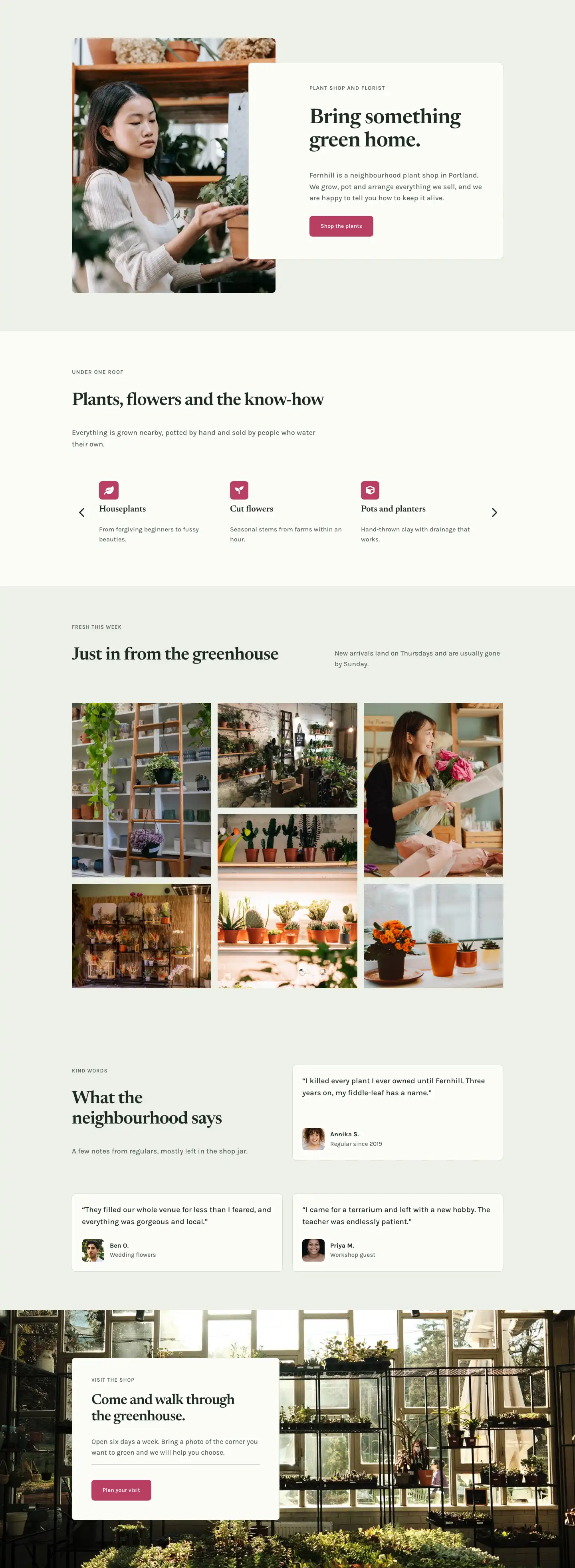
The layout opens on a full-width section set against a deep forest-green background (#1f2b22), with generous asymmetric padding: 112px at the top and 168px at the bottom on desktop, compressing to 64px / 88px on phone. A 13px Karla uppercase eyebrow in sage cream establishes the page as a brand story before the h1 enters in Newsreader at 60px, tightened to -1px letter-spacing and set to textWrap: balance to prevent awkward orphan words at every breakpoint. A centered rule just 72px wide anchors the eye below the headline, then a constrained text block (maxWidth 640px) keeps the opening copy narrow and readable. A CSS curve divider in sage cream transitions the hero into the rest of the page at 100px on desktop, stepping down to 70px on tablet and 44px on phone so the shape reads proportionally across screen sizes.
The second section puts a full-bleed Pexels greenhouse photograph to work as atmosphere without sacrificing legibility: a uniform 70% dark overlay (rgba(24,34,26,0.7)) covers the image edge to edge, so all the light-colored type above it passes contrast regardless of what the photograph contains. Inside, a four-column CSS grid built from native Divi Group modules holds the milestone cards, with 32px column gaps and 40px row gaps. On tablet the grid collapses to two columns; on phone it becomes a single-column stack with a tighter 32px row gap. Each milestone card uses a 2px solid top border in #f6f9f1 as its primary visual separator, followed by a large Newsreader year number at 48px (responsive down to 36px on phone), an h3 heading at 20px, and a short Karla body paragraph at 16px. That three-tier hierarchy stays scannable regardless of column width because each text element has its own size step baked in at the module level.
The third section uses a true two-column row with asymmetric flex widths (9/24 and 15/24 of the available space) and a 72px column gap that gives the portrait room to breathe beside the letter copy. The portrait image is capped at 360px wide with a 4:5 aspect ratio. Its border radius mixes 999px on both top corners (creating a half-pill arch) with 32px on both bottom corners, landing somewhere between a conventional rectangle and a full arch. The right column carries three body paragraphs in Newsreader at 22px / 1.6em line height, the most generous font size on the page, chosen to make the founder's note feel like a personal letter rather than web copy. A muted italic signature in #566558 Newsreader closes the section. On phone both columns collapse to full width and stack vertically.
The fourth section returns to dark forest green and presents four core values as horizontal rows separated by 2px dividers. Each row is a flex container holding three sibling Group modules: a fixed-width 64px label column with a bold Karla step number (01 to 04), a flex-grow center column carrying the h3 in Newsreader at 34px, and a maxWidth 360px right column with Karla body copy at 17px. On phone the row direction flips to column so the number, heading, and supporting text stack naturally. The page closes with a full-bleed botanical photograph (no overlay) carrying an off-white card (#fbfcf8, 8px border radius, 1px sage-green border) positioned to the left at maxWidth 520px. The card contains an eyebrow, an h2 in Newsreader at 36px, a short Karla paragraph, a rule, and a rose-pink CTA button (#b83d63, 8px radius). That rose accent appears nowhere else in the design, making the call to action visually unambiguous without requiring any extra weight or size.
What’s inside
- Dark forest-green hero with h1 in Newsreader at 60/46/34px across three breakpoints, a centered 72px rule, and a CSS curve bottom divider that scales from 100px on desktop to 44px on phone
- Four-column CSS Grid timeline built from native Divi Group modules, collapsing to 2-col on tablet and 1-col on phone, each card using a 2px top border, a large Newsreader year number (48px), an h3 milestone title, and a Karla body line
- Two-column founder portrait section with a 4:5 portrait image (pill-top / 32px-bottom border radius), asymmetric flex widths (9/24 and 15/24), three Newsreader 22px body paragraphs, and an italic Newsreader signature
- Numbered values list in four rows on a dark green background, each row a flex container with a fixed 64px label column, a flex-grow h3 in Newsreader at 34px, and a constrained body column, all separated by 2px solid Divider modules
- Full-bleed photo background section with a uniform two-stop dark overlay gradient (70% opacity) keeping all light-colored type legible over any content image
- Off-white CTA card (maxWidth 520px, 8px radius, 1px sage-green border) floating over a background photograph with a rose-pink (#b83d63) Button module as the sole warm accent in the palette
- Consistent two-typeface system: Newsreader serif for all editorial headings, timeline years, and signature text; Karla sans-serif for eyebrow labels, body copy, and numbered step indicators
Who it’s for
This layout fits independent plant shops, botanical retailers, nurseries, and florists that want a founder-led story page with real editorial weight. The timeline structure and numbered values section suit any small retail or lifestyle brand that has been operating for several years and wants to communicate provenance, ethics, and the people behind the counter. It also works for artisan garden centres, sustainability-focused home goods shops, and herbalists. Any business where the story of who started it and why matters as much as the product itself will find the three-section narrative arc (origin, values, invitation) maps naturally onto their content.
Customization tips
The two-stop overlay gradient in Section 2 uses a single alpha value (0.7 on both stops). Raise it toward 0.9 for a darker, more dramatic result or lower it to 0.5 to let more of the photograph show through. Swapping the full palette means touching four hex values: #1f2b22 for the dark section backgrounds, #eef1e8 and #fbfcf8 for the light section backgrounds and type, and #b83d63 for the CTA button. Those four values cover every surface in the design. The timeline grid accepts any even number of milestones cleanly on desktop (four fills the grid without gaps; six creates a tidy second row). Portrait images should be cropped to a 4:5 ratio before uploading, since the image module has that aspect ratio set directly. An 800x1000px export is sufficient. Background images for full-bleed sections read best at 1920px wide. Keep the founder letter paragraphs to 35 words or fewer each: the Newsreader 22px size is designed for short, considered sentences and will feel crowded if paragraphs run long.
How to install this layout
- Download the layout JSON file from this page.
- Open the target page in the Divi 5 builder.
- Open the portability panel (up/down arrows icon) and choose the Import tab.
- Upload the JSON. Tick “replace existing content” only for full-page imports.
- Check the page at desktop and mobile widths, then swap in your copy and images.
Full walkthrough with troubleshooting: How to Import a Divi 5 Layout.
Questions about Fernhill Botanicals — Minimal Plant_shop Our Story Page for Divi 5
How does the timeline grid adapt on smaller screens?
The timeline uses a native Divi Group set to CSS Grid with four columns on desktop. On tablet it switches to two columns; on phone it drops to a single column with a 32px row gap. Each card's top border, year number, h3 title, and body text stack vertically within the column at all three breakpoints, so the milestone rhythm stays readable without any custom CSS.
What aspect ratio should my founder portrait image use?
The image module in the founder section has a 4:5 aspect ratio set in its sizing options. Crop your photo to that ratio before uploading (800x1000px or 1000x1250px both work). The top corners use a 999px radius and the bottom corners use 32px, so a tight head-and-shoulders or three-quarter framing reads best. Full-length standing shots lose too much of the subject inside the cropped area.
Can I add or remove timeline milestones?
Yes. Four milestones fill the four-column desktop grid without gaps. Adding a fifth creates a second row with one card sitting alone on the right, which is slightly unbalanced but acceptable. Dropping to three leaves an empty column on desktop. For the cleanest result, stick to four, six, or eight. Duplicate or delete the Group modules inside the grid Group and update the year, h3 heading, and body text for each.
The background image in Section 2 is from Pexels. Can I replace it?
Yes, and you should for a live site. The image URL sits in that section's background decoration settings alongside the overlay gradient. Any landscape photograph at 1920px wide will work. The 70% dark overlay is applied on top, so brightly lit or colorful images all produce legible type. Botanical, outdoor, and workspace photographs all read naturally behind this overlay.
Where should I start when adapting this layout to a different brand?
Start with the four palette values (#1f2b22, #eef1e8, #fbfcf8, #b83d63), then swap the two background photographs, then update the timeline milestones and the three founder letter paragraphs. The typeface pairing (Newsreader and Karla) is set at the module level throughout. A global font swap via Divi's theme customizer will override both families site-wide if you prefer different typefaces.
Which Divi version does this layout need?
Divi 5. The layout is generated natively for Divi 5 and validated against its real module structure before publication, so it imports clean into the current builder.
Can I use this layout on client websites?
Yes. Every download includes a commercial license covering unlimited sites you own or build for clients. Only reselling or redistributing the layout file itself is prohibited.
Included in these packs
More full landing pages
Browse all full landing pages
Kiln & Clay — Minimal Pottery_studio Visit Page for Divi 5
full_landing · pottery_studio · minimal

Kiln & Clay — Minimal Pottery_studio Our Story Page for Divi 5
full_landing · pottery_studio · minimal

Kiln & Clay — Minimal Pottery_studio Studio Membership Page for Divi 5
full_landing · pottery_studio · minimal

Kiln & Clay — Minimal Pottery_studio The Shop Page for Divi 5
full_landing · pottery_studio · minimal

Kiln & Clay — Minimal Pottery_studio Classes Page for Divi 5
full_landing · pottery_studio · minimal

Kiln & Clay — Minimal Pottery_studio Home Page for Divi 5
full_landing · pottery_studio · minimal