
Fernhill Botanicals — Minimal Plant_shop Home Page for Divi 5
A clean, neighbourhood plant shop homepage for Fernhill Botanicals. Features houseplants, cut flowers, pots, gift boxes, workshops and local delivery — built with Divi 5.
Rate this element
Download this section, free
- Divi 5 JSON, imports in seconds
- Commercial license included
- No account needed
This page ships inside Fernhill: Plant Shop & Florist Theme (6 Pages), 6 coherent pages that share one brand.
Click to view the full page
Overview
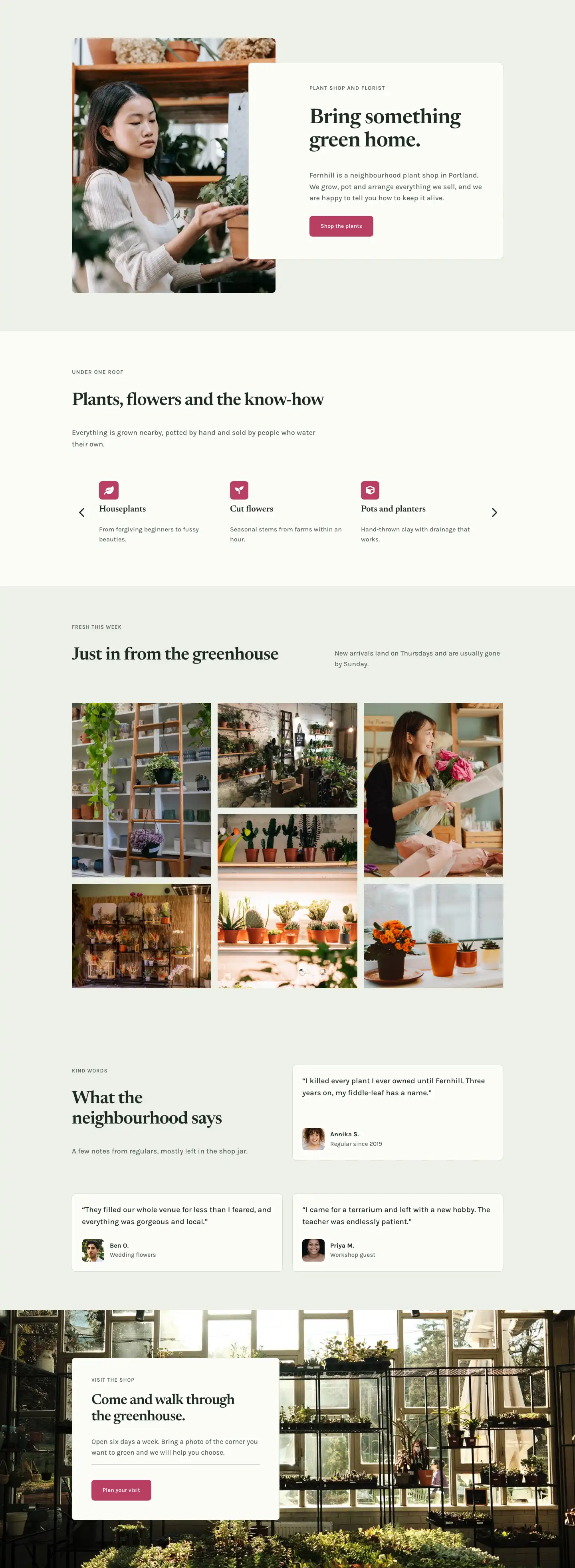
Fernhill Botanicals opens with a full-bleed two-column hero: a 4:5 portrait photograph sits flush on the left, while a off-white card panel (#fbfcf8) overlaps it from the right, pulled 128 px into the image on desktop to create physical depth without any CSS trickery. The card carries four elements stacked in order of hierarchy — an uppercase Karla eyebrow at 14 px tracking 1 px in sage green (#566558), a Newsreader h1 at 52 px with tight −1 px letter-spacing and text-wrap: balance, a body paragraph in Karla at 18 px / 1.6 em, and a rose-pink button (#b83d63) with 8 px radius. Section padding steps down cleanly: 96 px on desktop, 64 px on tablet, 44 px on mobile, so breathing room scales rather than disappears.
The second section switches to the off-white background (#fbfcf8) and introduces a full-width carousel powered by a native divi/group-carousel module showing three slides on desktop, two on tablet, and one on mobile. Each slide holds an icon badge (leaf, plant, cube, gift, graduation cap, truck — one per category), an h3 in Newsreader at 22 px, and a one-line Karla descriptor. Arrow controls are enabled; dot navigation is off. This keeps the services scannable without cluttering the viewport.
The third section — "Fresh this week" — returns to the sage tint (#eef1e8) and uses a staggered three-column masonry-style image grid. Each column is a divi/group containing two images at alternating 4:5 and 4:3 aspect ratios, so the columns read at different heights and the eye moves naturally across the viewport. All six images use object-fit: cover without border-radius, giving the gallery a raw, editorial quality that contrasts with the rounded cards elsewhere. The section header splits across two columns — h2 on the left, descriptive text on the right — aligned to flex-end so the body copy rests on the baseline of the heading.
The testimonials section and the final CTA close the page. Three bordered review cards (#fbfcf8 on #eef1e8) each hold a quote in Karla at 19 px, followed by a small square portrait (1:1, 56 px wide, 8 px radius) alongside the customer name and context. The last section overlays a full-bleed greenhouse photograph with a contained content card using the same #fbfcf8 / #d4dccb border system established in the hero, plus a divi/divider before the CTA button — a deliberate pause that increases tap-target separation on mobile.
What’s inside
- Split hero: 4:5 portrait image with an overlapping off-white card panel, h4 eyebrow + h1 Newsreader headline + Karla body + rose CTA button
- Six-category services carousel (`divi/group-carousel`, 3/2/1 slides per breakpoint) with FontAwesome icon badges, h3 titles, and one-line descriptions
- Staggered three-column editorial image grid with alternating 4:5 and 4:3 aspect ratios across six Pexels photographs — no border-radius for a raw gallery feel
- Split-header section pattern: h2 + eyebrow on the left column, supporting body copy on the right, aligned to flex-end baseline
- Three testimonial cards with 1:1 customer portrait, quote text at 19 px, name and context line — laid out in two rows of a two-column grid
- Full-bleed background-image CTA section with a contained off-white card, a `divi/divider` separator, and a rose button — all within a 520 px max-width group
- Two-tone palette system — sage tint (`#eef1e8`) and near-white (`#fbfcf8`) — alternating across five sections with a single accent (`#b83d63`) used exclusively on buttons and icon badges
Who it’s for
This layout suits independent plant shops, neighbourhood florists, and garden boutiques that want their website to feel as considered as their shelving. It also translates well to gift shops, artisan nurseries, wellness retail, and any small-format retail brand with a local-first story to tell. The six-category carousel makes it practical for shops with a product mix — plants, flowers, pots, workshops, delivery — rather than a single SKU type. A web designer building a site for a hospitality client with a plant-forward interior concept will find the editorial image grid and testimonial cards equally transferable.
Customization tips
The two-tone palette is set in exactly two places: #eef1e8 on sections 1, 3, 4, and 5, and #fbfcf8 on section 2 and all card backgrounds. Swapping both hex values in the Divi global presets carries the change across every section at once. The accent #b83d63 is used only on the two buttons and the six icon badge backgrounds — replace it with your brand colour and the change propagates everywhere.
The hero photograph should be portrait-oriented (4:5) and well-lit; anything shot from a low angle looking up at shelves works. For the editorial grid, mix one 4:5 and one 4:3 image per column to preserve the staggered height rhythm. Portrait photos shot tightly (faces or hands at 800 px wide) work best for the 56 px testimonial avatars — the 1:1 crop is tight. The h1 headline is set with text-wrap: balance and reads well up to about 40 characters; keep it short and the layout stays intact. Carousel category labels sit below their icons at 22 px — aim for one to three words per title.
How to install this layout
- Download the layout JSON file from this page.
- Open the target page in the Divi 5 builder.
- Open the portability panel (up/down arrows icon) and choose the Import tab.
- Upload the JSON. Tick “replace existing content” only for full-page imports.
- Check the page at desktop and mobile widths, then swap in your copy and images.
Full walkthrough with troubleshooting: How to Import a Divi 5 Layout.
Questions about Fernhill Botanicals — Minimal Plant_shop Home Page for Divi 5
How does the hero card overlap the image — is it a CSS trick or a Divi module?
It is a standard `divi/group` module inside the right column of a two-column row. The group has a negative left margin of −128 px on desktop (−96 px on tablet) which pulls it across the column boundary and over the image. On mobile the margin resets to 0 and the group instead uses a −64 px top margin to create a vertical overlap as the columns stack.
What happens to the services carousel on mobile?
The `divi/group-carousel` is configured to show one slide at a time on phones (up from two on tablet and three on desktop). Arrow navigation stays enabled so visitors can step through all six categories. Horizontal padding on the carousel drops from 48 px to 40 px on mobile to keep the arrows from clipping the viewport edge.
The editorial image grid has no border-radius — is that intentional?
Yes. The hero card, testimonial cards, and CTA card all use 8 px radius to signal interactivity and softness. The product gallery images deliberately use 0 px radius to read as documentary photographs rather than UI cards. If you prefer consistency, add a `border-radius` value inside each image's border settings.
Can I replace the Pexels images with my own product photography?
Yes. Match the aspect ratios already set on each image module: 4:5 for the tall portrait slots and 4:3 for the wide landscape slots. The layout uses `object-fit: cover` on every image, so the crop handles minor size differences automatically. For the testimonial avatars, use square crops at least 200 px wide.
Which module powers the 'Fresh this week' gallery and is it a real Divi module?
It uses standard `divi/image` modules inside `divi/group` containers inside a three-column `divi/row`. There is no third-party gallery plugin — the staggered look comes from combining 4:5 and 4:3 aspect ratios within the same column group, not from a masonry script.
What should I edit first after importing this layout?
Start with the h1 headline in the hero (keep it under 40 characters for `text-wrap: balance` to hold), then swap the hero photograph, then update the button label and link. The rest of the copy and images can follow in one pass through the remaining sections. Font and colour changes are fastest from Divi's global presets.
Which Divi version does this layout need?
Divi 5. The layout is generated natively for Divi 5 and validated against its real module structure before publication, so it imports clean into the current builder.
Can I use this layout on client websites?
Yes. Every download includes a commercial license covering unlimited sites you own or build for clients. Only reselling or redistributing the layout file itself is prohibited.
Included in these packs
More full landing pages
Browse all full landing pages
Kiln & Clay — Minimal Pottery_studio Visit Page for Divi 5
full_landing · pottery_studio · minimal

Kiln & Clay — Minimal Pottery_studio Our Story Page for Divi 5
full_landing · pottery_studio · minimal

Kiln & Clay — Minimal Pottery_studio Studio Membership Page for Divi 5
full_landing · pottery_studio · minimal

Kiln & Clay — Minimal Pottery_studio The Shop Page for Divi 5
full_landing · pottery_studio · minimal

Kiln & Clay — Minimal Pottery_studio Classes Page for Divi 5
full_landing · pottery_studio · minimal

Kiln & Clay — Minimal Pottery_studio Home Page for Divi 5
full_landing · pottery_studio · minimal