
Fernhill Botanicals — Minimal Plant_shop The Plants Page for Divi 5
Browse Fernhill Botanicals' full plant collection, sorted by the light they need. From low-light parlour palms to sun-loving cacti and succulents, find the right plant for your room.
Rate this element
Download this section, free
- Divi 5 JSON, imports in seconds
- Commercial license included
- No account needed
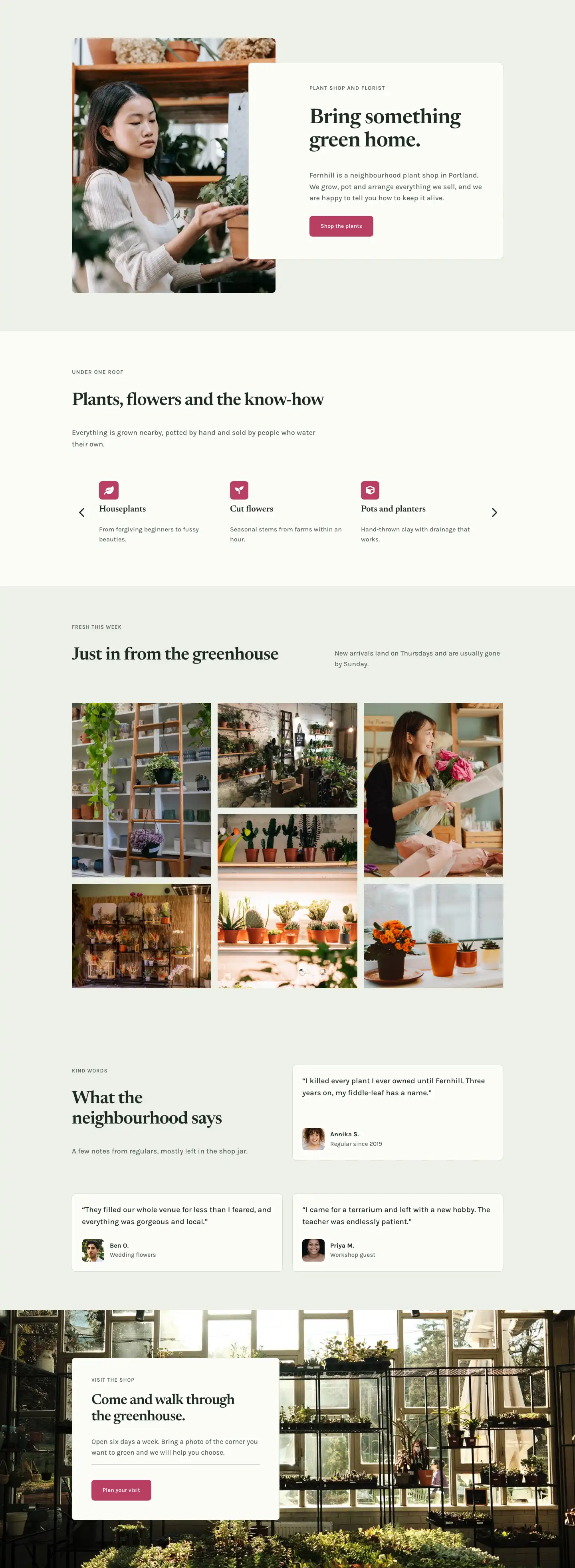
This page ships inside Fernhill: Plant Shop & Florist Theme (6 Pages), 6 coherent pages that share one brand.
Click to view the full page
Overview
The layout opens on a full-bleed hero: a botanical photograph sits behind a rgba(24,34,26,0.7) dark-green gradient overlay at 120px top padding on desktop, stepping down to 64px on mobile. Against that deep ground, breadcrumb navigation, an H1 in Newsreader at 56px with -1px letter-spacing, and a single 19px Karla subtitle float in #f6f9f1 near-white. Three typographic elements, no decorative flourishes -- all attention stays on the photograph.
The catalog section works on a native CSS Grid: two equal columns at 32px gap on desktop, collapsing to one column on mobile. The hero plant (Aloe) gets a 2:1 wide card spanning both columns; the four remaining plants (Chinese money plant, Echeveria, Parlour palm, Cactus trio) each hold a 4:3 ratio. Every card pairs a cover-fit image with a Newsreader H3 and a small bordered pill -- uppercase Karla at 12px, #566558 muted sage -- surfacing light level and watering cadence without a separate page visit. The section header row floats a ghost "See every plant" button baseline-right of the H2 on desktop and stacks vertically on mobile.
The third section introduces a two-column light guide built from Divi Group containers. The left card (#fbfcf8 off-white with a #d4dccb border) lists low-light species using a FontAwesome X glyph at 16px in sage; the right card (#1f2b22 deep forest green) lists bright-light plants with a checkmark icon in #eef1e8. The visual contrast between cards carries the same meaning that a colour-coded legend would, without adding one. A solid "Ask about your room" button sits inside the dark card, its #eef1e8 fill inverting cleanly against the background.
The page closes with a six-question FAQ grid on #fbfcf8 and a full-width CTA banner in #b83d63 berry pink -- the only warm accent in an otherwise cool botanical palette. FAQ pairs use a 2px top-border rule as the only divider, keeping vertical rhythm open. The CTA runs headline and button side-by-side on desktop at 40px gap, collapsing to a stacked column on mobile where the H2 hits 32px. Padding scales consistently across all five sections: 96px desktop, 64px tablet, 44px phone.
What’s inside
- Full-bleed hero with a Pexels background image, 70% dark-green gradient overlay, breadcrumb nav, H1, and single-line subtitle -- all in near-white with three-breakpoint padding
- Native CSS Grid plant catalog: one wide 2:1 hero card spanning both columns plus four 4:3 cards, each with a cover-fit image, Newsreader H3 name, and a bordered care-data pill (light level and watering schedule)
- Inline section header combining an H4 eyebrow, Newsreader H2, and a ghost button aligned to the row's baseline on desktop -- collapses to stacked column on mobile
- Two-column light-guide comparison built from Divi Group containers: a light card for north windows (X icon list markers) and a dark `#1f2b22` card for south windows (checkmark icons), with an embedded CTA button inside the dark card
- Six-question FAQ in a two-column equal grid, each Q&A item separated by a 2px top-border rule rather than a full dividing line
- Berry-pink (`#b83d63`) CTA banner with a Newsreader H2 and a solid `#fbfcf8` button running side-by-side on desktop, stacking vertically on mobile
- Consistent two-font system throughout: Newsreader serif for all headings (H1 to H4), Karla sans-serif for body text, labels, care pills, and buttons
Who it’s for
This layout fits independent plant shops, garden centres, and florists building a catalog page that doubles as a buying guide. The care-pill grid and light-guide sections work equally well for succulent studios, terrarium makers, and any specialty retailer where helping customers match a product to their environment is the primary sales job. Divi freelancers working for clients in the plant, homewares, or slow-living space will find the minimal palette and editorial typography straightforward to rebrand -- the same structure translates to ceramics, candles, or any tactile product sold on care and character.
Customization tips
The full palette lives in five hex values (#eef1e8, #fbfcf8, #1f2b22, #566558, #b83d63). Swap every instance of #b83d63 to shift the CTA accent without touching anything else -- terracotta, slate, or mustard all hold the contrast. The hero background image should be at least 1920px wide and landscape-oriented; the 70% gradient overlay handles moderate exposure variation, but very flat-lit studio shots lose depth behind it. Plant card images must be cropped before uploading: the hero card expects a 2:1 ratio, the four standard cards expect 4:3. The aspectRatio + objectFit: cover combination fills the frame but does not reframe your subject. Care pill text ("Bright light · Water monthly") is a plain Divi Text module -- keep labels under 35 characters or the pill wraps to two lines inside the card. FAQ answers are set at Karla 16px with 1.6em line-height; two to three sentences per answer keeps the two-column grid balanced.
How to install this layout
- Download the layout JSON file from this page.
- Open the target page in the Divi 5 builder.
- Open the portability panel (up/down arrows icon) and choose the Import tab.
- Upload the JSON. Tick “replace existing content” only for full-page imports.
- Check the page at desktop and mobile widths, then swap in your copy and images.
Full walkthrough with troubleshooting: How to Import a Divi 5 Layout.
Questions about Fernhill Botanicals — Minimal Plant_shop The Plants Page for Divi 5
How does the plant grid handle a different number of cards?
The grid is a Divi Group set to `display: grid` with two columns. The first card is hard-coded to `gridColumnSpan: 2`, making it the wide hero slot. You can add or remove the remaining cards and the grid wraps automatically, but the spanning card should stay first in the source order.
What aspect ratios do the card images need?
The hero card uses 2:1 and the four standard cards use 4:3. Both are enforced via `aspectRatio` on the Divi Image module with `objectFit: cover`, so the image fills its frame at any viewport width. Crop to those ratios before uploading rather than relying on the ratio constraint to do the cropping.
The light-guide uses FontAwesome X and checkmark icons as list markers. Can I change them?
Yes. Each marker is a Divi Icon module with a `unicode` value of `` (X) or `` (check). Open any icon module and pick a different glyph from the picker. Size is set to 16px and colour matches the card's text colour, so both update automatically when you change the card background.
How does the layout behave on a phone?
Every multi-column row has an explicit `flexDirection: column` phone override. The hero padding drops from 120px to 64px, section padding from 96px to 44px, and the H1 scales from 56px to 32px. The plant grid goes from two columns to one, and the CTA banner stacks headline above button.
What should I edit first to make this feel like my shop?
Start with the hero image and the H1. The overlay is already colour-matched to `#1f2b22`, so any botanical or lifestyle photograph with reasonable contrast will work. Then update the five plant names, care pills, and FAQ answers -- all are plain Text and Heading modules with no custom code.
Which Divi version does this layout need?
Divi 5. The layout is generated natively for Divi 5 and validated against its real module structure before publication, so it imports clean into the current builder.
Can I use this layout on client websites?
Yes. Every download includes a commercial license covering unlimited sites you own or build for clients. Only reselling or redistributing the layout file itself is prohibited.
Included in these packs
More full landing pages
Browse all full landing pages
Kiln & Clay — Minimal Pottery_studio Visit Page for Divi 5
full_landing · pottery_studio · minimal

Kiln & Clay — Minimal Pottery_studio Our Story Page for Divi 5
full_landing · pottery_studio · minimal

Kiln & Clay — Minimal Pottery_studio Studio Membership Page for Divi 5
full_landing · pottery_studio · minimal

Kiln & Clay — Minimal Pottery_studio The Shop Page for Divi 5
full_landing · pottery_studio · minimal

Kiln & Clay — Minimal Pottery_studio Classes Page for Divi 5
full_landing · pottery_studio · minimal

Kiln & Clay — Minimal Pottery_studio Home Page for Divi 5
full_landing · pottery_studio · minimal