
Fernhill Botanicals — Minimal Plant_shop Visit Page for Divi 5
A clean, minimal Divi 5 contact and visit page for a local plant shop. Includes address, hours, contact form, FAQ accordion, and a bold CTA — ready to import.
Rate this element
Download this section, free
- Divi 5 JSON, imports in seconds
- Commercial license included
- No account needed
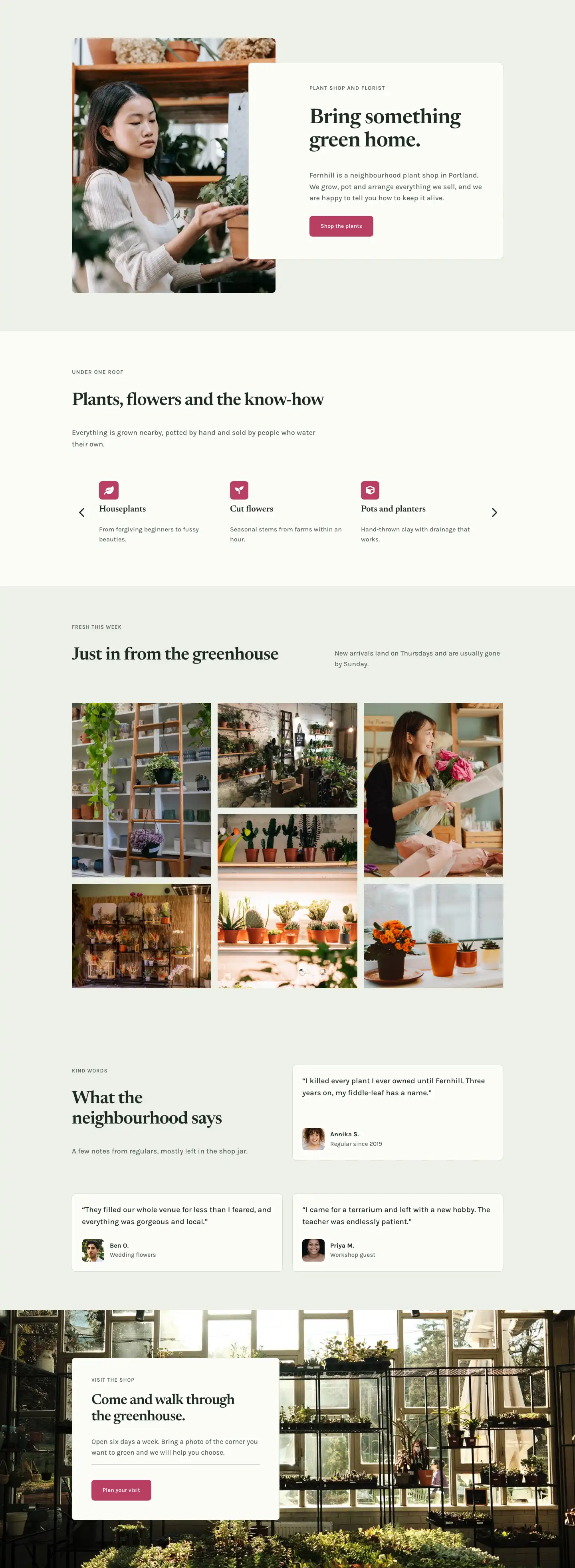
This page ships inside Fernhill: Plant Shop & Florist Theme (6 Pages), 6 coherent pages that share one brand.
Click to view the full page
Overview
The layout opens with a lean header section on an off-white ground (#fbfcf8): a breadcrumb in small-caps Karla sits above a 52px Newsreader H1, while a short descriptor rides the right column at 8/24 width on desktop. A 1px sage border (#d4dccb) at the section foot separates this orientation layer from the main content below, keeping the page hierarchy clear without adding visual bulk. On tablet and phone, the two columns stack vertically so the H1 always reads first.
The centrepiece section pairs a 10/24 image column with a 14/24 content column on a sage green ground (#eef1e8), with a 72px column gap on desktop that collapses on tablet. The photograph is forced to a 4:5 portrait ratio with arched top corners (999px radius) and softer bottom corners (32px), so it reads as a shaped editorial element rather than a plain rectangle. Below the image, two icon-and-label rows built from native Divi Icon, Group, and Text modules present the address and opening hours: an all-caps 12px Karla overline over a 17px Karla value, each anchored by a Font Awesome map-pin or clock icon at 18px in #1f2b22. The right column leads with a small overline heading, then a 40px Newsreader H2, a supporting body paragraph in Karla 17px, and a contact form nested inside a bordered card (#fbfcf8 background, 1px #d4dccb border, 8px radius). The three full-width fields sit on the same sage green as the section ground, and the submit button in dusty rose (#b83d63) provides the only warm colour accent in the section.
The FAQ section returns to the sage ground and anchors its toggle stack with a 2px top rule. Five Divi Toggle modules divide with 1px #d4dccb bottom borders and 28px vertical padding per item. Question titles are set in 28px Newsreader, body copy in 17px Karla at 1.7em line height. The first item is pre-expanded. A closing text module beneath the stack, in 16px Karla with a 24px top margin, carries an email address for any question the accordions do not cover.
The page closes on a full-width #b83d63 section where "Come and say hello." in 48px white Newsreader and a "Get directions" button in off-white (#fbfcf8) sit in a flex row with space-between justification on desktop. Opening hours appear in 14px white Karla beneath the button. On mobile the group collapses to a left-aligned column, keeping the CTA legible at any viewport without additional breakpoint overrides.
What’s inside
- Off-white header section with a two-column row: breadcrumb plus H1 in Newsreader (52px desktop, drops to 32px phone) on the left, a short tagline in Karla 18px on the right, stacking vertically on mobile
- Shaped portrait image at a forced 4:5 aspect ratio with 999px arched top corners and 32px bottom corners, object-fit cover
- Address and opening hours built from native Divi Icon, Group, and Text modules, with a 12px uppercase Karla overline above a 17px Karla value, each entry anchored by a Font Awesome icon
- Embedded Divi Contact Form inside a styled card group (off-white background, 1px sage border, 8px radius) with sage-green field backgrounds, muted placeholder colour, and a dusty-rose submit button
- Five Divi Toggle modules with Newsreader heading text, custom open/closed state colours, 1px bottom dividers, and the first item pre-expanded by default
- Split CTA banner in dusty rose with a flex row containing a Newsreader H2, a Button module, and an opening-hours subtext line that collapses to a left-aligned column on phone
Who it’s for
A natural fit for independent plant shops, florists, garden centres, and nurseries that want a calm, editorial page over a generic WordPress template. The contact form and icon-led address block make it equally useful for wellness studios, pottery workshops, or small artisan retailers where visitors need directions and a quick way to ask a question. Designers working on local-business Divi sites will find the modular structure easy to repurpose: swap the shaped image, update the icon data, edit the toggle questions, and the page serves a tea room, a bookshop, or a maker studio just as well as a plant shop.
Customization tips
The palette is driven by four hex values used across every section: #fbfcf8 (off-white), #eef1e8 (sage), #1f2b22 (dark green), and #b83d63 (dusty rose). To shift the tone, replace the two greens with cream and warm sand, then swap the berry for terracotta or any accent that fits your brand. The form submit button and the CTA section background share the same #b83d63 value, so updating both together keeps the page consistent.
The shaped image expects a portrait crop close to 4:5. Landscape photos will be center-cropped by the object-fit cover rule and may lose their focal point, so source or shoot vertically. Address and hours text modules are plain Divi Text modules, editable with a single click per block. Toggle questions can be added or removed freely; the 2px top rule and 1px bottom dividers are inherited by any new toggle you drop into the group. Keep toggle titles under 60 characters to avoid line-wrap at the 24px tablet heading size.
How to install this layout
- Download the layout JSON file from this page.
- Open the target page in the Divi 5 builder.
- Open the portability panel (up/down arrows icon) and choose the Import tab.
- Upload the JSON. Tick “replace existing content” only for full-page imports.
- Check the page at desktop and mobile widths, then swap in your copy and images.
Full walkthrough with troubleshooting: How to Import a Divi 5 Layout.
Questions about Fernhill Botanicals — Minimal Plant_shop Visit Page for Divi 5
What image dimensions work best for the portrait photo?
The module enforces a 4:5 aspect ratio with object-fit cover, so any portrait image at least 800px wide fills it cleanly. Horizontal crops will be center-cropped and may lose the top or bottom of the subject, so use portrait or near-square source images.
How does the contact form send messages?
It uses Divi's native Contact Form module, which routes submissions to the WordPress admin email by default. No plugin is needed. To send to a different address, open the form module in the Divi builder and update the Email field in the module settings.
The toggle FAQ items contain Fernhill-specific copy. How do I replace them?
Each FAQ entry is a standalone Divi Toggle module. Click into any toggle to rewrite the title and body text. To add a new question, duplicate an existing toggle and drop it inside the bordered group; the 1px bottom divider styling carries over automatically.
How does the layout respond on smaller screens?
The header columns stack vertically (H1 first, then the tagline). The main section image column appears above the contact form column on tablet and phone. The CTA banner shifts from a side-by-side row to a top-down, left-aligned column. Section padding reduces at every breakpoint: 96px on desktop, 64px on tablet, 44px on phone.
Can I change the dusty-rose colour used for the CTA background and form button?
Yes. The value `#b83d63` appears in both the CTA section background and the contact form submit button. Update both to the same replacement value to keep the page consistent. There is no shared global preset for this colour in the layout, so you will need to change each location separately.
Which Divi version does this layout need?
Divi 5. The layout is generated natively for Divi 5 and validated against its real module structure before publication, so it imports clean into the current builder.
Can I use this layout on client websites?
Yes. Every download includes a commercial license covering unlimited sites you own or build for clients. Only reselling or redistributing the layout file itself is prohibited.
Included in these packs
More full landing pages
Browse all full landing pages
Kiln & Clay — Minimal Pottery_studio Visit Page for Divi 5
full_landing · pottery_studio · minimal

Kiln & Clay — Minimal Pottery_studio Our Story Page for Divi 5
full_landing · pottery_studio · minimal

Kiln & Clay — Minimal Pottery_studio Studio Membership Page for Divi 5
full_landing · pottery_studio · minimal

Kiln & Clay — Minimal Pottery_studio The Shop Page for Divi 5
full_landing · pottery_studio · minimal

Kiln & Clay — Minimal Pottery_studio Classes Page for Divi 5
full_landing · pottery_studio · minimal

Kiln & Clay — Minimal Pottery_studio Home Page for Divi 5
full_landing · pottery_studio · minimal