
Fernhill Botanicals — Minimal Plant_shop Workshops Page for Divi 5
Book a hands-on plant workshop at Fernhill Botanicals. Terrarium building, wreath nights and repotting classes from $34. Small groups, all materials included.
Rate this element
Download this section, free
- Divi 5 JSON, imports in seconds
- Commercial license included
- No account needed
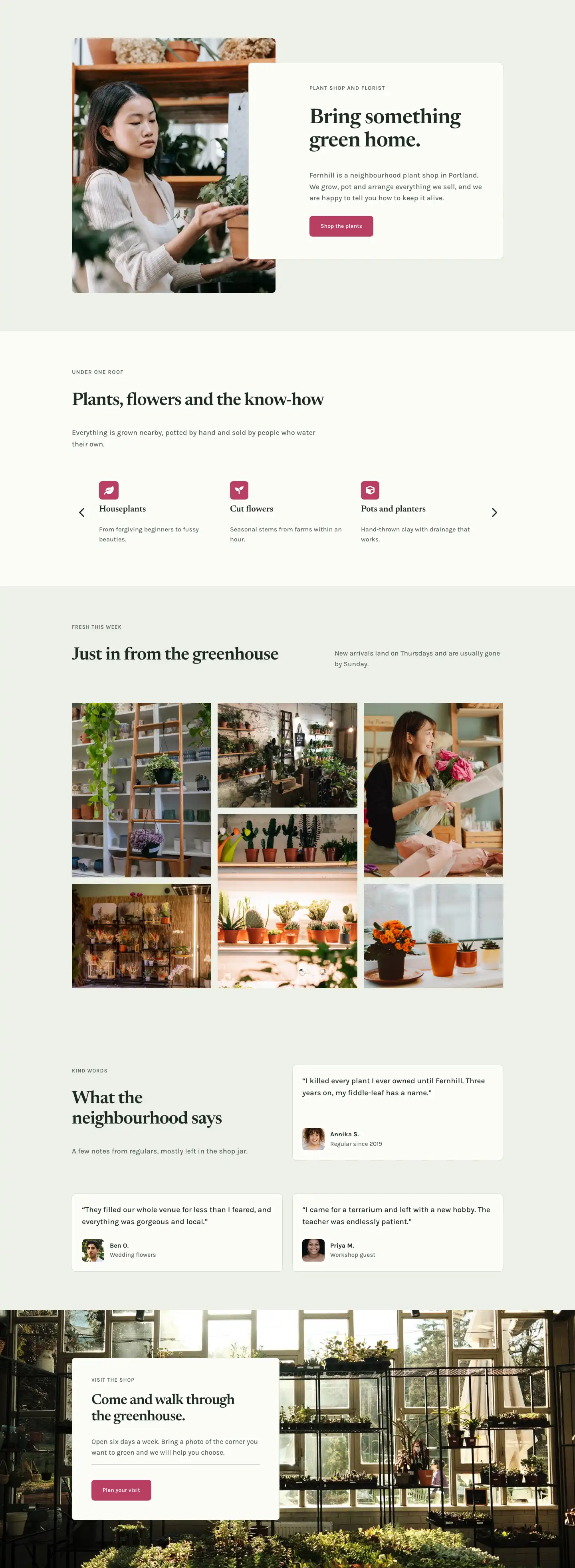
This page ships inside Fernhill: Plant Shop & Florist Theme (6 Pages), 6 coherent pages that share one brand.
Click to view the full page
Overview
The layout opens on a deep forest green hero section (#1f2b22) with 112px top padding and 168px bottom padding on desktop, tapering to 64px and 88px on phone. Two heading modules establish the typographic system immediately: a small-caps Karla overline at 13px with 1px letter-spacing, followed by an H1 in Newsreader at 60px with tight -1px tracking and text-wrap: balance to prevent orphaned words at any viewport width. A short ruled line, constrained to 72px and auto-centered, closes the heading cluster before a lead paragraph capped at 640px max-width. A curve-style bottom section divider at 100px, with explicit heights at all three breakpoints (100px / 70px / 44px), transitions cleanly into the sage linen below so the shape scales without abrupt jumps on tablet or phone.
The workshops pricing section uses a three-column equal-height card grid with alignItems: stretch, so every card reaches the same bottom edge regardless of how much copy it carries. Two cards use a near-white cream background (#fbfcf8) with a sage border (#d4dccb); the center "Wreath night" card breaks into dusty rose (#b83d63) and adds a small pill-shaped "Most loved" badge built from a Group module with a cream background and rounded corners. Each card displays its price as a 44px Newsreader bold figure alongside a small "per person" label aligned to the baseline, so the cost reads at a glance without a separate pricing table module. Below a thin top-border divider, three icon-and-text rows use Font Awesome check marks in flexbox rows to list what is included, and every card closes with a "Book a seat" button. On tablet the columns wrap two-up before going fully single-column on phone.
The "What you will make" section delivers three alternating 50/50 image-and-text rows, each image locked to a 4:3 aspect ratio with objectFit: cover. Odd rows place the image on the left with the text column padded 48px on the right; the middle row reverses the layout, and its image column carries an order: -1 override on phone so images always appear above their text on small screens regardless of DOM position. Each text panel pairs a small Karla step label (01, 02, 03) in sage green, an H3 in Newsreader at 32px, a short body paragraph, and a plain underlined text link to available dates, keeping the section editorially calm rather than CTA-heavy.
A "How it works" split on #fbfcf8 uses a 1/3 + 2/3 column ratio, placing a section headline on the narrower left and three numbered steps on the wider right. Each step number is an 80px Newsreader bold figure, giving strong visual anchoring before the H3 and body text, with thin #d4dccb dividers separating the steps. The final section pairs a private-events feature checklist on the left with a contact form card on the right, padded at 48px on all sides and set on the sage linen background to lift it off the page. The contact form's submit button uses the same dusty rose as the featured pricing card, visually connecting the two primary conversion paths of the page.
What’s inside
- Dark forest green hero section with a Newsreader H1 (60px desktop, 34px phone), a centered 72px ruled divider accent, and a curve-style bottom section divider with responsive height values at all three breakpoints
- Three equal-height pricing cards (1/3 + 1/3 + 1/3 desktop, single-column phone) with baseline-aligned 44px Newsreader price figures and a highlighted featured card in dusty rose (#b83d63) with a pill-shaped "Most loved" badge built from a styled Group module
- Font Awesome icon checklists inside each card: three included-items rows per card, each built as a flex Group with a check icon module and a Text module, separated from the price block by a thin top-border divider
- Three alternating 50/50 image-and-text rows at a locked 4:3 aspect ratio, with numbered Karla overlines (01/02/03) and explicit `order: -1` mobile reordering on the second row's image column
- "How it works" split section with 80px Newsreader bold step numerals on the right column, three steps separated by thin horizontal dividers, and a 1/3 + 2/3 asymmetric column ratio
- Private events feature column with a Font Awesome icon checklist paired with a native Divi 5 Contact Form module: Name and Email fields, styled rounded inputs, and a rose-colored submit button
- Dual typeface system throughout: Newsreader serif for all headings, prices, and step numerals; Karla sans-serif for body text, overlines, labels, and buttons
Who it’s for
This page fits independent plant shops, botanical studios, and florists that run in-person workshops as part of their retail offer. It also works well for garden centers, craft boutiques, homeware stores, and lifestyle businesses that host small-group hands-on events and need a clean way to present what is available, what each class costs, and how to book. The private events section and inline contact form make it equally useful for any venue that accepts group bookings for birthdays, hen parties, or corporate team days.
Customization tips
The three-color palette (forest green #1f2b22, warm linen #eef1e8, dusty rose #b83d63) is applied at the section and column decoration level, so a brand swap means updating those three values in their respective background fields. The hero headline sits comfortably at three to six words; text-wrap: balance handles reflow gracefully, but beyond eight words the 60px size may push to three lines on desktop. The alternating image rows expect a 4:3 ratio, so crop source photos to 1600 x 1200px before uploading to avoid stretch or centering surprises. Each pricing card's checklist is clean at three to four items; adding a fifth stretches that card taller than its neighbors unless you add a matching item to the other two as well, since the row uses alignItems: stretch. The contact form's Name and Email fields can be extended inside the Divi Contact Form settings without touching the layout structure.
How to install this layout
- Download the layout JSON file from this page.
- Open the target page in the Divi 5 builder.
- Open the portability panel (up/down arrows icon) and choose the Import tab.
- Upload the JSON. Tick “replace existing content” only for full-page imports.
- Check the page at desktop and mobile widths, then swap in your copy and images.
Full walkthrough with troubleshooting: How to Import a Divi 5 Layout.
Questions about Fernhill Botanicals — Minimal Plant_shop Workshops Page for Divi 5
How do the three pricing cards stay the same height if one has more text than another?
The card row sets `alignItems: stretch` in its flex layout, so every column grows to match the tallest card. The feature list group inside each card also has `flexGrow` and `flexShrink` sizing applied, which pushes the "Book a seat" button to the card's bottom edge automatically. If you add extra checklist rows to one card, the others will stretch to match without any manual adjustment.
What is the "Most loved" badge on the center card made of?
It is a Group module with a cream background (`#fbfcf8`) and a 12px border radius containing a Text module with 12px Karla text in small caps. It is not a separate badge component, so you edit the label text directly inside that Text module and change the highlight color by updating the Group's background decoration setting. The badge sits inside a flex row that also holds the card title, so it wraps naturally if you add a second badge.
What image dimensions work best for the alternating rows?
Each Image module has a 4:3 aspect ratio locked in its sizing settings with `objectFit: cover`. Supply photos at 1600 x 1200px for the sharpest result at the column's rendered width. Portrait-oriented photos will be cropped to fill the 4:3 frame, so center the main subject horizontally before uploading. Landscape photos wider than 4:3 will also crop, trimming the left and right edges.
What should I edit first to adapt this to a different type of workshop?
Start with the three pricing card titles, one-line descriptions, and prices, then update the hero H1 and the three numbered items in the "What you will make" rows. The "How it works" step copy and the private events paragraph describe process rather than specific classes, so they are the last things to change. The overline labels ("Workshops", "Tickets", "What you will make") each live in a separate Heading module and can be updated individually.
How does the image order change on mobile in the second alternating row?
The second row places text on the left and the image on the right in the desktop layout. On phone, the image column has `order: -1` set in its decoration, which pulls it above the text in the visual stack regardless of its position in the markup. The first and third rows already have their image on the left side, so they display correctly on mobile without an order override.
Can I add a fourth pricing card to the ticket grid?
The row is set to `1_3, 1_3, 1_3` with `flexWrap: nowrap` on desktop. Adding a fourth column will overflow the row unless you change the column structure to a four-column split (e.g. `1_4, 1_4, 1_4, 1_4`) and adjust the individual column type values to match. On tablet the row already wraps to two columns, so a fourth card would leave one card alone on the third line unless you set the tablet flex-type to `12_24` on each column.
Which Divi version does this layout need?
Divi 5. The layout is generated natively for Divi 5 and validated against its real module structure before publication, so it imports clean into the current builder.
Can I use this layout on client websites?
Yes. Every download includes a commercial license covering unlimited sites you own or build for clients. Only reselling or redistributing the layout file itself is prohibited.
Included in these packs
More full landing pages
Browse all full landing pages
Kiln & Clay — Minimal Pottery_studio Visit Page for Divi 5
full_landing · pottery_studio · minimal

Kiln & Clay — Minimal Pottery_studio Our Story Page for Divi 5
full_landing · pottery_studio · minimal

Kiln & Clay — Minimal Pottery_studio Studio Membership Page for Divi 5
full_landing · pottery_studio · minimal

Kiln & Clay — Minimal Pottery_studio The Shop Page for Divi 5
full_landing · pottery_studio · minimal

Kiln & Clay — Minimal Pottery_studio Classes Page for Divi 5
full_landing · pottery_studio · minimal

Kiln & Clay — Minimal Pottery_studio Home Page for Divi 5
full_landing · pottery_studio · minimal