
Fieldnote Coffee Roasters — Brutalist Coffee Coffee Page for Divi 5
A bold brutalist Divi 5 full landing page for a specialty coffee roaster. Features a product grid, comparison section, brew guide accordion, FAQ, and subscription CTA.
Rate this element
Download this section, free
- Divi 5 JSON, imports in seconds
- Commercial license included
- No account needed
This page ships inside Fieldnote: Coffee Roaster & Cafe Theme (6 Pages), 6 coherent pages that share one brand.
Click to view the full page
Overview
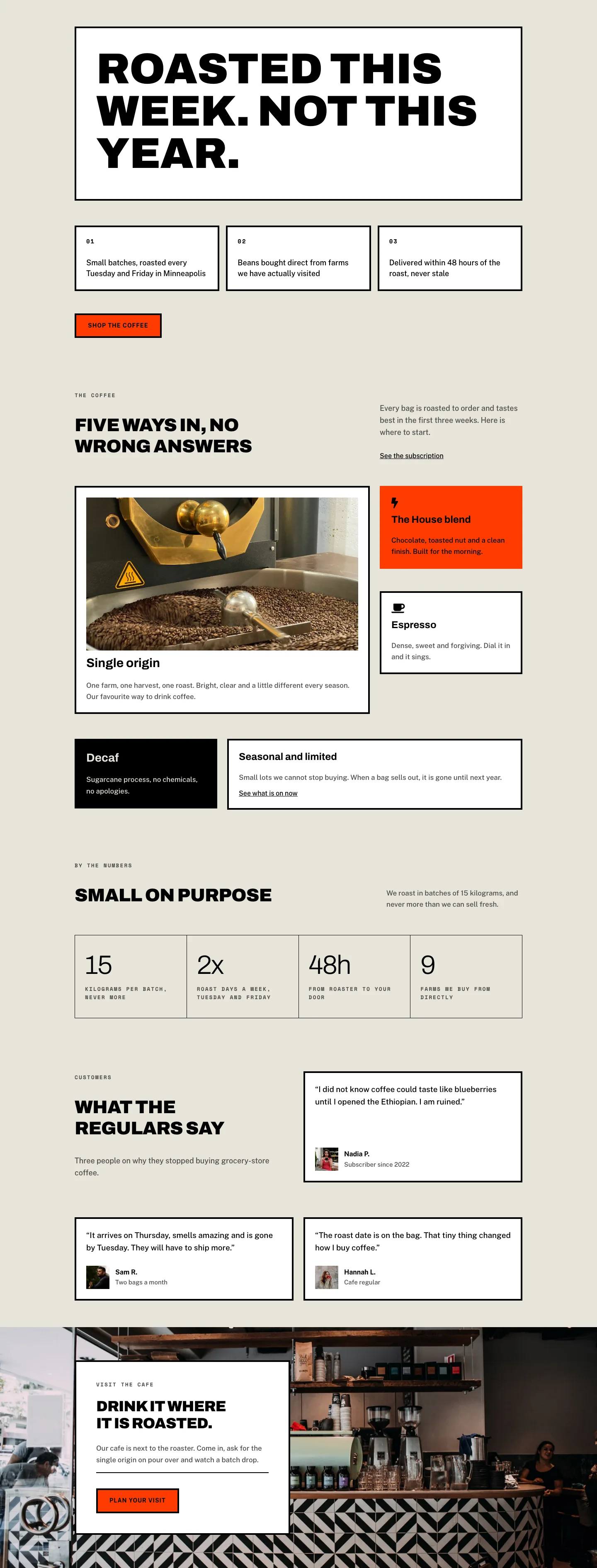
The layout opens with a full-bleed hero section built on a Pexels coffee photograph covered by a dual-stop gradient overlay at 70% black opacity on both stops. That near-total overlay turns the image into texture rather than subject matter, letting the white H1 type read cleanly at any screen size. "The coffee" is set in Archivo Black at 56px, uppercase, with -1px letter spacing and a 1.12em line height, scaling to 42px on tablet and 32px on phone via explicit breakpoint values encoded in the layout JSON. A Space Mono breadcrumb at 13px / 2px letter spacing anchors the hierarchy above the heading, and a Public Sans body paragraph at 19px / 1.6em line height sits inside a 600px-wide group aligned left. Hero section padding steps from 120px top / 104px bottom on desktop down to 64px / 56px on phone, compressing the section proportionally without losing the editorial breathing room.
The product catalog section is the functional core. A flex header row aligns the H2 "Five coffees we are proud of" (Archivo 44px, weight 900, -1px tracking, uppercase, text-wrap balance) against a ghost CTA button on the opposite end. The button uses a transparent fill, a 4px solid black border, and zero corner radius on all corners, a constraint applied to every interactive element in the layout. Below this header, five coffee cards are arranged in a Divi Group module set to CSS grid with two columns, a 32px column gap, and a 40px row gap. The first card (House Blend) spans both grid columns and carries a 2:1 aspect-ratio image; the other four (Ethiopia Guji, Colombia Huila, Espresso No. 7, Swiss Water Decaf) use 4:3 images. Each card ends with a flavor-note tag, a Divi Group with 4px solid black borders on all sides and zero radius, containing a Space Mono 12px uppercase tasting descriptor. On phone, the grid drops to a single column and row gaps reduce to 32px.
The comparison section uses two equal-height padded Group modules inside a 1/2 + 1/2 equal-columns row. The left panel carries a white (#ffffff) background with a 4px black border; the right panel inverts to solid black (#000000) with the same border treatment. Inside each panel, four rows pair a Font Awesome icon (f00d, an X mark in the white panel; f00c, a check mark in the black panel) with a Public Sans 17px text description at a 14px column gap and 10px vertical row padding. The check icon in the dark panel is colored #e8e4da (the same parchment tone used for section backgrounds) rather than pure white, keeping contrast within the established palette. The dark panel closes with a "Taste the difference" button whose parchment fill inverts to transparent on hover.
The brew guide section places a Divi Accordion against a tall 4:5 portrait image in a two-column flex row. The accordion carries four items (Pour over, French press, Espresso, Cold brew), styled with a bottom-border-only approach: 4px solid black on the bottom edge, zero width on all other sides, no radius. Open and closed toggle states both use the parchment background, keeping the module visually flat rather than inset. A final section closes the page in solid #ff3b00 orange-red, the only chromatic accent in an otherwise parchment-black-white palette. It carries an Archivo 48px H2 in black and a white-fill subscription button with a 4px black border in a flex row with space-between justification. All two-column rows in the layout collapse to single vertical stacks on mobile via explicit flexDirection column overrides set at the row decoration level.
What’s inside
- Full-bleed hero with a Pexels background image, a dual-stop 70% black gradient overlay, and an Archivo 900-weight H1 at 56px that scales through tablet (42px) and phone (32px) breakpoints defined in the JSON
- Five-item product grid using a native Divi Group set to CSS display:grid with two columns and 32px gap, the featured card spanning both columns at a 2:1 aspect ratio, secondary cards at 4:3
- Per-card flavor-note tags built as bordered Divi Groups (4px solid black, zero radius, Space Mono 12px uppercase), one per product with the tasting descriptor as the inner Text module content
- Two-panel comparison section using equal-height padded Group modules (white and black backgrounds, 4px black borders, 44px padding), with Font Awesome icon rows (fa-times vs. fa-check at 16px) and a CTA button inside the dark column
- Divi Accordion with four brew-method items (pour over, French press, espresso, cold brew) using bottom-border-only styling (no box outline, no radius) and Public Sans 16px / 1.7em body text
- Two-column FAQ grid of six questions where each entry is separated by a 4px top border rather than a card container, keeping the section typographically open
- Full-width subscription CTA section with a solid #ff3b00 orange-red background, a space-between flex row pairing a large H2 with a white-fill button, and micro-copy below the CTA
Who it’s for
This layout is built for independent specialty coffee roasters, direct-trade importers, and subscription coffee brands that need a catalog page with editorial weight. It also adapts well to craft tea, small-batch chocolate, or any artisan food and beverage brand whose product differentiation depends on provenance and process rather than price. Agencies building Divi sites for food-and-beverage clients will find the white-vs-black comparison panel reusable for any "us vs. the rest" positioning argument. The brutalist visual language (hard edges, monospace labels, constrained palette) suits brands projecting craft seriousness and confidence rather than softness or a family-friendly tone.
Customization tips
The palette has four anchor points: the parchment section background (#e8e4da), the 4px border color used on every button, tag, card, and accordion item (currently always #000000), the hero gradient overlay opacity (two stops, both at 70% black), and the CTA section accent (#ff3b00). Changing the parchment to a warm white or a neutral stone and the orange-red to your brand color updates the entire page in under ten edits. The product grid supports three to seven items without structural changes; add or remove Group blocks inside the grid wrapper and adjust the first item's gridColumnSpan decoration if you want a different card to feature at full width. Flavor-note tags should stay at three to six words because Space Mono 12px does not wrap gracefully inside the bordered container. Replace the hero and brew-guide photos with images pre-cropped to their encoded aspect ratios (2:1 for the featured product card, 4:5 for the brew-guide portrait) so objectFit cover does not cut off important content.
How to install this layout
- Download the layout JSON file from this page.
- Open the target page in the Divi 5 builder.
- Open the portability panel (up/down arrows icon) and choose the Import tab.
- Upload the JSON. Tick “replace existing content” only for full-page imports.
- Check the page at desktop and mobile widths, then swap in your copy and images.
Full walkthrough with troubleshooting: How to Import a Divi 5 Layout.
Questions about Fieldnote Coffee Roasters — Brutalist Coffee Coffee Page for Divi 5
Can I show more or fewer than five coffees in the product grid?
Yes. The grid wrapper is a Divi Group module configured to display:grid with two columns. Add or remove Group blocks inside it. The first item has a gridColumnSpan of 2 set in its sizing decoration, which you can reassign to any card or remove entirely for a uniform two-column grid.
What image aspect ratios does the layout expect?
The hero uses a full-bleed CSS background image at any ratio. The featured product card is locked to 2:1; the four secondary product cards use 4:3. The brew-guide portrait uses 4:5. All product and brew images use objectFit cover, so cropping your photos to these ratios before import prevents unintended subject cropping.
How does the brew guide section behave on narrow screens?
The two-column row (accordion on the left, portrait image on the right) switches to a single column on phone breakpoints via a flexDirection column override on the row, stacking the accordion above the image. The accordion items themselves are unaffected and continue to open and close independently.
Can I add a third column to the comparison section?
The row uses a 1/2 + 1/2 equal-columns structure with flexWrap set to nowrap on desktop. Adding a third panel requires changing the column structure to a three-way split and reducing the column gap, since the layout is currently sized for exactly two equal panels side by side.
What fonts does the layout use, and do they require manual installation?
Three Google Fonts: Archivo (headings, weight 900), Space Mono (labels and tags, weight 700), and Public Sans (body text, weights 400 and 700). Divi 5 reads the font settings stored in the layout JSON and loads them from Google Fonts automatically on import, so no manual setup is needed.
The CTA section uses a vivid orange-red background. How do I change it to my brand color?
Open the final section's Background settings and update the solid color value. The H2 and button inside that section are black and white respectively, so they hold readable contrast against most brand accent colors without needing changes to the type or border settings.
Which Divi version does this layout need?
Divi 5. The layout is generated natively for Divi 5 and validated against its real module structure before publication, so it imports clean into the current builder.
Can I use this layout on client websites?
Yes. Every download includes a commercial license covering unlimited sites you own or build for clients. Only reselling or redistributing the layout file itself is prohibited.
Included in these packs
More full landing pages
Browse all full landing pages
Kiln & Clay — Minimal Pottery_studio Visit Page for Divi 5
full_landing · pottery_studio · minimal

Kiln & Clay — Minimal Pottery_studio Our Story Page for Divi 5
full_landing · pottery_studio · minimal

Kiln & Clay — Minimal Pottery_studio Studio Membership Page for Divi 5
full_landing · pottery_studio · minimal

Kiln & Clay — Minimal Pottery_studio The Shop Page for Divi 5
full_landing · pottery_studio · minimal

Kiln & Clay — Minimal Pottery_studio Classes Page for Divi 5
full_landing · pottery_studio · minimal

Kiln & Clay — Minimal Pottery_studio Home Page for Divi 5
full_landing · pottery_studio · minimal