
Fieldnote Coffee Roasters — Brutalist Coffee Contact Page for Divi 5
A bold brutalist contact page layout for coffee roasters. Includes a contact form, address and hours, FAQ accordion, and a high-contrast CTA — built for Divi 5.
Rate this element
Download this section, free
- Divi 5 JSON, imports in seconds
- Commercial license included
- No account needed
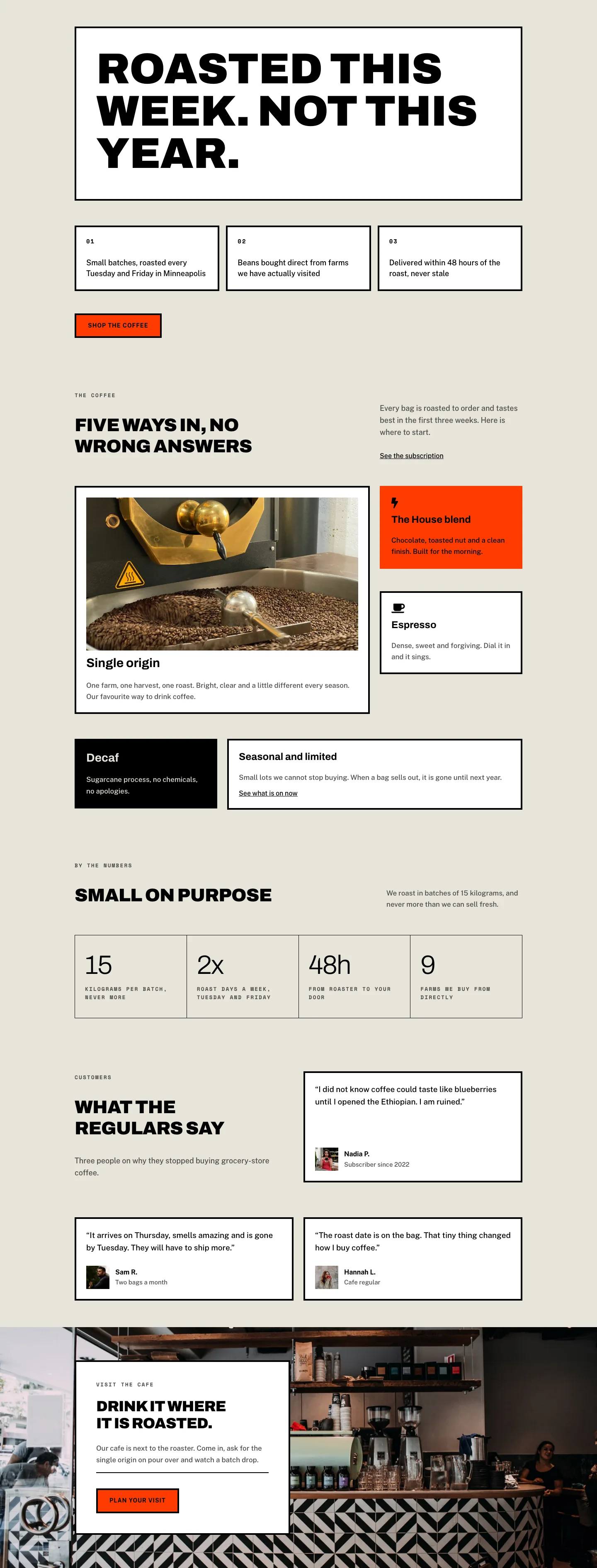
This page ships inside Fieldnote: Coffee Roaster & Cafe Theme (6 Pages), 6 coherent pages that share one brand.
Click to view the full page
Overview
Fieldnote Coffee Roasters Contact is a three-section brutalist contact page built entirely from native Divi 5 modules. The layout opens with a white header section carrying a Space Mono breadcrumb trail in 2px-tracked uppercase and an Archivo Black h1 at 52px — compressed to 40px on tablet and 32px on phone — paired with an 18px Public Sans descriptor in a narrower flex column. No decorative graphics interrupt the entry: just type, negative letterspacing, and a hard 1px black bottom border that closes the section like a rule drawn with a pen.
The central section sits on a warm parchment ground (#e8e4da) and splits into a 10/24 left column and a 14/24 right column. The left holds a 4:5 portrait image with pill-rounded top corners and squared bottom corners — an unusual mixed-radius treatment that reads as brutalist rather than generic — followed by two icon-and-text contact detail rows using FontAwesome map-pin and clock glyphs at 18px. The right column leads with a Space Mono eyebrow, an Archivo Black h2 at 40px, a short prose line, then a white contact form card framed by a 4px solid black border on all four sides. Form fields and the submit button share the same heavy-border language: square radius, 4px black stroke, warm-parchment field backgrounds, and an #ff3b00 button that inverts to black on hover.
The third section is a full-width FAQ on the same parchment ground. Toggles use Archivo 28px h3 titles and 4px bottom-border separators — zero radius throughout — with Public Sans 17px body at 1.7 line-height inside. A fourth section closes the page: a solid #ff3b00 band carrying a centered Archivo Black headline at 48px and a white CTA button that inverts on hover, with a 14px shipping note beneath it.
Responsive behavior is systematic: columns switch from flexWrap: nowrap to wrap at tablet and column direction at phone, section padding steps down at each breakpoint (72/56/40px top, 64/48/32px bottom depending on section), and all headings scale in two steps. The form card padding reduces from 40px to 20px on phone. Nothing is hidden or rearranged arbitrarily — the whole page collapses cleanly into a single reading column.
What’s inside
- Three-section full-page layout: white header with breadcrumb, parchment content section with split columns, and an `#ff3b00` CTA band
- Native Divi 5 Contact Form module with three full-width fields (Name, Email, Message), warm-parchment field backgrounds, and a square-radius 4px-border button that flips from orange to black on hover
- 4:5 portrait Image module with mixed border radius (pill-top, 32px-bottom corners) and `cover` object-fit, ready to swap with any portrait-crop photo
- Two inline contact-detail rows built from Icon + nested Group + Text modules, carrying address and opening-hours data with Space Mono uppercase labels
- Five Toggle modules in the FAQ section with Archivo 28px h3 titles, 4px bottom-border dividers, and first toggle open by default
- Full-page flex column structure with explicit `flexType` fractions (10/24 left, 14/24 right) that reflow to 24/24 full-width at tablet and phone
- Dual-font system: Archivo Black for all display headings (negative letterspacing, uppercase) and Public Sans for all body and UI text, with Space Mono reserved for labels and eyebrows
Who it’s for
This layout is built for independent coffee roasters, specialty cafes, and artisan food and beverage brands that want a contact page with the same confidence their product has. It also suits design agencies and freelancers building for hospitality clients who need a brutalist or editorial aesthetic over a polished corporate template. The form-plus-FAQ structure makes it equally useful for wholesale inquiry pages, event-hire landing pages, or any small business that handles several distinct contact reasons and wants to answer the most common ones before the visitor even reaches the form.
Customization tips
The three palette slots are straightforward to swap at the preset level: replace #e8e4da (parchment) with any neutral ground, #ff3b00 (signal orange) with your brand accent, and #000000 (type) stays as-is or shifts to navy or espresso brown. The form card border, button border, field border, and FAQ dividers all share that same 4px black stroke -- update the color token once and every ruled element updates together.
For the hero heading, keep copy under 20 characters to hold the single-line layout at desktop; two short words like "Say hello" or "Get in touch" work best. The contact detail rows accept one line of address text comfortably -- wrap to a second line and the flex column stretches gracefully. The portrait image should be cropped to a 4:5 ratio before upload; the module enforces object-fit: cover so a taller source simply centers. FAQ toggles can be extended to seven items without visual strain; beyond that, consider splitting into two groups.
How to install this layout
- Download the layout JSON file from this page.
- Open the target page in the Divi 5 builder.
- Open the portability panel (up/down arrows icon) and choose the Import tab.
- Upload the JSON. Tick “replace existing content” only for full-page imports.
- Check the page at desktop and mobile widths, then swap in your copy and images.
Full walkthrough with troubleshooting: How to Import a Divi 5 Layout.
Questions about Fieldnote Coffee Roasters — Brutalist Coffee Contact Page for Divi 5
Which Divi 5 modules does this layout use?
Section, Row, Column, Group, Text, Heading, Image, Icon, Contact Form, Contact Field, Toggle, and Button -- all native Divi 5 modules, no third-party plugins required.
How does the contact form work out of the box?
It uses Divi's built-in Contact Form module with three fields: Name, Email, and Message. The form sends to whatever address you configure in the Divi module settings. No external form plugin is needed.
The portrait image has an unusual border radius -- can I change it?
Yes. The Image module is set to 999px top-left and top-right (pill) and 32px bottom corners. You can flatten all corners to 0px for a fully brutalist look or match your brand radius in the module's border settings.
What happens to the two-column layout on mobile?
Both the header row and the content section row switch to `flexDirection: column` at phone breakpoint, stacking the image and contact details above the form. Each column expands to full 24/24 width. No content is hidden.
How many FAQ toggles can I add before it looks crowded?
Up to seven is comfortable. Each toggle has 28px of padding top and bottom with a 4px bottom border separator, so the section scales naturally. The first toggle is set to open by default -- adjust that in the Toggle module's Advanced tab.
What image should I use in the left column to match the original composition?
A portrait-oriented photo (4:5 ratio) of your space, product, or team works best. The module uses object-fit cover, so any portrait image will crop to fill the frame. Avoid landscape crops -- they will be center-cropped and lose the top and bottom.
Which Divi version does this layout need?
Divi 5. The layout is generated natively for Divi 5 and validated against its real module structure before publication, so it imports clean into the current builder.
Can I use this layout on client websites?
Yes. Every download includes a commercial license covering unlimited sites you own or build for clients. Only reselling or redistributing the layout file itself is prohibited.
Included in these packs
More full landing pages
Browse all full landing pages
Kiln & Clay — Minimal Pottery_studio Visit Page for Divi 5
full_landing · pottery_studio · minimal

Kiln & Clay — Minimal Pottery_studio Our Story Page for Divi 5
full_landing · pottery_studio · minimal

Kiln & Clay — Minimal Pottery_studio Studio Membership Page for Divi 5
full_landing · pottery_studio · minimal

Kiln & Clay — Minimal Pottery_studio The Shop Page for Divi 5
full_landing · pottery_studio · minimal

Kiln & Clay — Minimal Pottery_studio Classes Page for Divi 5
full_landing · pottery_studio · minimal

Kiln & Clay — Minimal Pottery_studio Home Page for Divi 5
full_landing · pottery_studio · minimal