
Fieldnote Coffee Roasters — Brutalist Coffee Home Page for Divi 5
Small-batch coffee roasted twice a week in Minneapolis and shipped within 48 hours. Single origin, house blend, espresso and decaf — bought direct from farms we have visited.
Rate this element
Download this section, free
- Divi 5 JSON, imports in seconds
- Commercial license included
- No account needed
This page ships inside Fieldnote: Coffee Roaster & Cafe Theme (6 Pages), 6 coherent pages that share one brand.
Click to view the full page
Overview
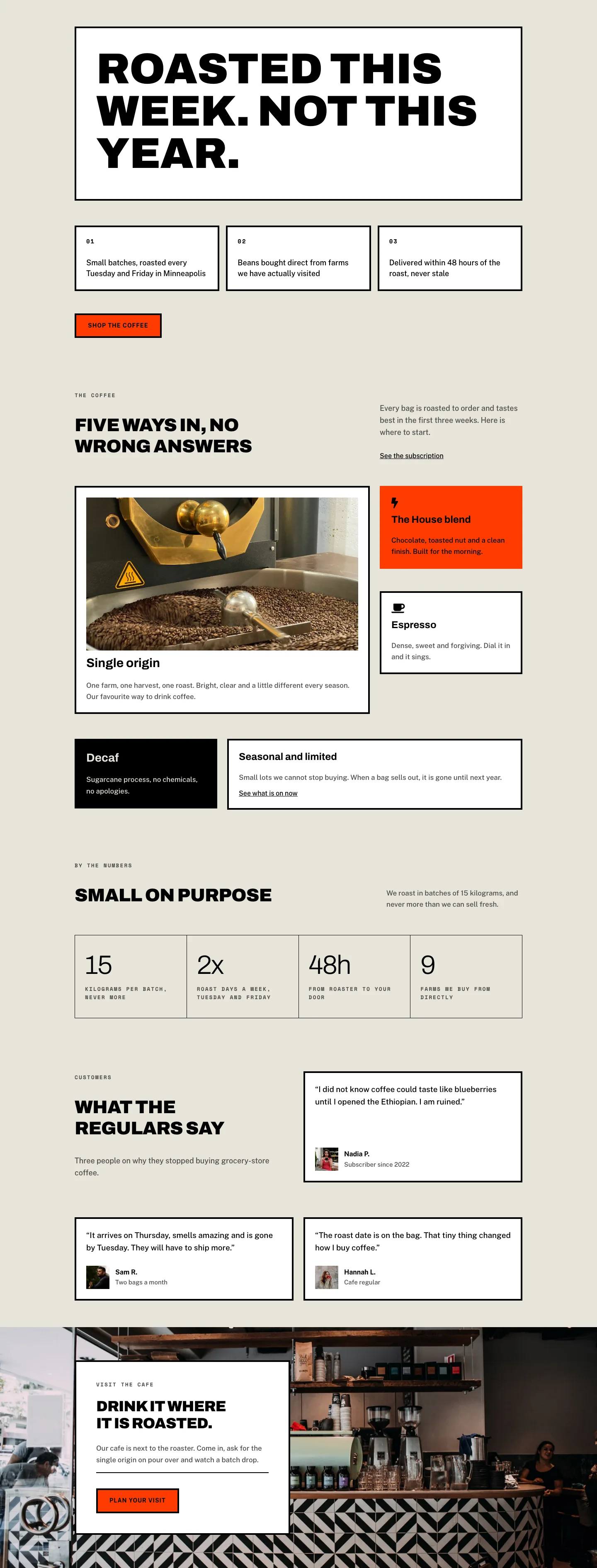
Fieldnote Coffee Roasters is built on a single architectural decision: every card has hard corners, a 4-pixel solid black stroke, and zero border radius. That consistency makes the brutalist aesthetic feel like a system rather than a style choice. The page opens with an H1 set in Archivo Black at 104 pixels and a line-height of 0.98em, so the display text sits tighter than its own cap height. Below it, a CSS-grid row of three numbered fact cards (01, 02, 03) uses Space Mono uppercase at 13px with 2px letter-spacing for the index labels, a typographic device that signals craft and precision without relying on illustration.
The warm stone background (#e8e4da) runs across all five sections, giving the page a unified parchment feel. Against it, white card fills and isolated black (#000000) fills read clearly, while the burnt-orange accent (#ff3b00) appears only on the primary CTA button and the House Blend product card, making those two elements the only warm interruptions on the page. Both buttons invert on hover: the orange background with black text flips to a black background with orange text, a micro-interaction that reinforces the palette's internal logic without introducing a third color.
The product listing uses an intentionally asymmetric two-row grid. Columns are sized 16/24 and 8/24 on desktop using Divi's flex-type system, creating a left-heavy hierarchy where the headline and featured Single Origin card dominate. The stats section resolves differently: a four-column inner grid separated by 1-pixel gaps (built by placing a black-background group behind stone-colored cells with 1px spacing, not by border properties on each cell) displays 15, 2x, 48h, and 9 in Archivo Light 300 at 64px with minus-2px letter-spacing, each paired with a Space Mono uppercase caption.
On mobile, every asymmetric column split becomes full-width and stacked (24/24 flex type). The three-column fact grid collapses to one column, the four-column stats grid drops to two columns on both tablet and phone, and section padding steps from 64px down to 32px. The H1 scales from 104px to 40px across three breakpoints using explicit per-breakpoint overrides, preserving the tight 0.98em leading throughout so the heading never reflows awkwardly at any screen width.
What’s inside
- Hero H1 in Archivo Black 900 at 104px with 0.98em line-height, scaling through 68px (tablet) to 40px (phone) via explicit breakpoint overrides
- Numbered three-column CSS grid of fact cards (01/02/03) using Space Mono index labels, collapsing to a single column on mobile
- Five coffee product cards (Single Origin, House Blend, Espresso, Decaf, Seasonal) with mixed white, burnt-orange, and black card fills, two cards carrying FontAwesome icons
- 16:9 Pexels product image on the Single Origin card enforced by Divi Image module's native aspect-ratio property
- Four-column stats block (15kg, 2x, 48h, 9 farms) built with CSS grid and 1-pixel black cell dividers, collapsing to two columns on tablet and phone
- Three testimonial cards with 1:1 portrait images, 19px Public Sans quotes, and stacked name and role attribution
- Background-image CTA section with a constrained 520px-wide white card pinned left over a full-width Pexels photo
- Two CTA buttons (Shop the coffee, Plan your visit) with 4px solid black borders and a hover color-invert from burnt orange to black
Who it’s for
Specialty coffee roasters, coffee subscription services, and artisan food producers who need a homepage that leads with craft credentials rather than photography. A natural fit for freelancers and agencies building sites for independent cafes, micro-roasters, or direct-trade importers, especially clients whose brand story lives in production process and provenance. The numbered fact cards and stats grid make it straightforward to surface specific, verifiable claims (batch sizes, roast frequency, farm relationships) that resonate with coffee-literate buyers who already distrust supermarket brands.
Customization tips
The entire palette is driven by four hex values set in module decoration backgrounds: swap #e8e4da for a cooler linen or a deep slate to shift the mood without touching a single border color. The 4px solid black borders are applied consistently across all groups and buttons; updating them to a new color in each module's Border settings re-accents the page quickly. Keep H1 copy to three to six words. The Archivo Black 104px heading at 0.98em line-height is calibrated for short phrases; anything longer will break across three lines at tablet widths. The 16:9 image on the Single Origin card enforces its own aspect ratio via Divi's native aspect-ratio property, so any horizontal photo at least 1600px wide fills correctly without manual cropping. Testimonial portraits are constrained to a 56px-wide 1:1 square container; any square crop works. For the background-image CTA section, use a landscape photo at least 1920px wide positioned at center-center for clean results across all breakpoints.
How to install this layout
- Download the layout JSON file from this page.
- Open the target page in the Divi 5 builder.
- Open the portability panel (up/down arrows icon) and choose the Import tab.
- Upload the JSON. Tick “replace existing content” only for full-page imports.
- Check the page at desktop and mobile widths, then swap in your copy and images.
Full walkthrough with troubleshooting: How to Import a Divi 5 Layout.
Questions about Fieldnote Coffee Roasters — Brutalist Coffee Home Page for Divi 5
Does the layout include all five sections shown in the preview, or just the hero?
All five sections are in the single layout file: the hero with numbered facts, the five-product catalog grid, the stats block, the three testimonial cards, and the background-image cafe CTA. You import one file and get the complete home page.
What fonts does the layout use, and do I need to install them separately?
Three Google Fonts are used: Archivo for display headings, Space Mono for eyebrow labels and stat captions, and Public Sans for body text and quotes. All three load directly from Divi's built-in Google Fonts integration, so no manual installation is needed.
How does the four-column stats grid create those 1-pixel dividers between cells?
The stats block uses a CSS display:grid with gridColumnCount set to 4 inside a Divi Group module's layout decoration. The 1-pixel dividers are not borders on individual cells. Instead, the parent group's background is set to #000000 and the column and row gap is set to 1px, so the black background shows through the gaps between the stone-colored child cells.
What image aspect ratios does the layout expect?
The Single Origin product card uses a 16:9 ratio enforced by Divi's native aspect-ratio setting, so any horizontal photo works. Testimonial portraits use a 1:1 square crop inside a 56px container. The cafe CTA section uses a full-section background image; a landscape photo at least 1920px wide centered at center-center gives the best result across breakpoints.
What should I edit first after importing?
Replace the three numbered fact cards in the hero (plain Divi Text modules for both the index label and the body copy), then update the H1 heading and the two button URLs. The palette and typography work for any coffee or food brand without changes until you are ready to re-color.
The burnt-orange accent (#ff3b00) is very specific. How much of the layout does it touch?
Only two places: the background of the House Blend product card and the background fill of both CTA buttons (the hover state inverts to black). Changing those three background color values is all it takes to re-accent the entire page to a different brand color.
Which Divi version does this layout need?
Divi 5. The layout is generated natively for Divi 5 and validated against its real module structure before publication, so it imports clean into the current builder.
Can I use this layout on client websites?
Yes. Every download includes a commercial license covering unlimited sites you own or build for clients. Only reselling or redistributing the layout file itself is prohibited.
Included in these packs
More full landing pages
Browse all full landing pages
Kiln & Clay — Minimal Pottery_studio Visit Page for Divi 5
full_landing · pottery_studio · minimal

Kiln & Clay — Minimal Pottery_studio Our Story Page for Divi 5
full_landing · pottery_studio · minimal

Kiln & Clay — Minimal Pottery_studio Studio Membership Page for Divi 5
full_landing · pottery_studio · minimal

Kiln & Clay — Minimal Pottery_studio The Shop Page for Divi 5
full_landing · pottery_studio · minimal

Kiln & Clay — Minimal Pottery_studio Classes Page for Divi 5
full_landing · pottery_studio · minimal

Kiln & Clay — Minimal Pottery_studio Home Page for Divi 5
full_landing · pottery_studio · minimal