
Fieldnote Coffee Roasters — Brutalist Coffee The Roastery Page for Divi 5
Meet the team behind Fieldnote Coffee Roasters. A small-batch roastery buying direct from nine farms, roasting twice a week, and printing the date on every bag.
Rate this element
Download this section, free
- Divi 5 JSON, imports in seconds
- Commercial license included
- No account needed
This page ships inside Fieldnote: Coffee Roaster & Cafe Theme (6 Pages), 6 coherent pages that share one brand.
Click to view the full page
Overview
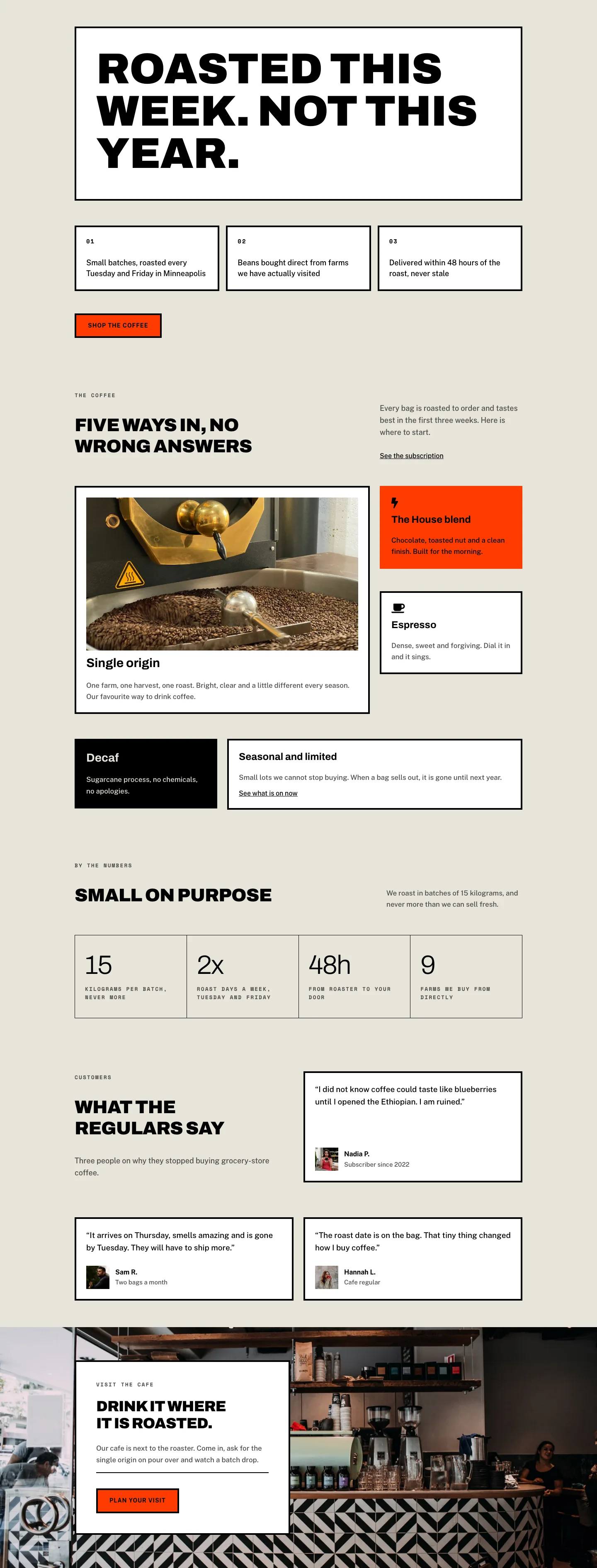
The layout opens with a deliberately asymmetric two-column split: a 16/24 content column pairs a heavy Archivo Black h1 at 64px with a narrow 8/24 image column holding a 4:5 portrait of the roastery. The headline "A small roastery with strong opinions." is set in pure black with -1px letter-spacing and text-wrap: balance, so it reads as a single authoritative statement rather than a ragged stack of words. The warm parchment background (#e8e4da) carries every section that does not need drama, and the CTA sits in burnt orange (#ff3b00) with a hard 4px black border and zero border-radius, a deliberate refusal of softness that runs through every interactive element on the page.
The second section swaps parchment for a full-bleed roastery photograph under a 70% black gradient overlay on both sides, creating a dark atmospheric band that holds a four-column milestone timeline. Each milestone card (2016, 2019, 2022, 2025) is topped with a 4px white rule, the same border motif used in black on the light sections, and the year is set in Archivo at 48px with -1px tracking, functioning as a visual anchor above the h3 label and short body paragraph. On tablet the grid collapses to two columns; on phone it becomes a single vertical list with reduced row-gap.
The team section resets to parchment with a wide split header row where the h2 sits bottom-aligned beside a short descriptor, then four 1:1 square portrait cards fill a four-column grid with hard crops and no border-radius, each capped with a 4px black top rule above the name and Space Mono role label. The founder spotlight beneath it uses a white background and an unusual portrait treatment: the image gets a pill-shaped top radius with a flat lower-right and 32px lower-left corner, breaking the page's strict right-angle grammar just once, for the founder. Large 22px Archivo body text and an italic signature reinforce the editorial register.
The "How we work" section closes on a full-width black panel with four numbered principles rendered as ruled horizontal rows. Each row has a fixed 64px Space Mono number column, a flex-grow Archivo h3 at 34px, and a max-360px body column. The page ends with a background-image section holding a white card framed by a 4px perimeter border and an interior divider before the "Book a cupping" CTA, keeping the brand voice functional and direct to the last.
What’s inside
- Asymmetric intro row (16/24 content + 8/24 image) with Archivo Black 64px h1, max-560px body text, and a dual CTA pairing an orange solid button with an inline text link
- Full-bleed story section: background image with 70% black gradient overlay and a responsive milestone timeline grid (4 cols desktop, 2 tablet, 1 phone) with large year anchors and 4px white top-rule cards
- Four-member team grid: 1:1 square portrait images with hard crops, per-card 4px black top border, Archivo h3 names, and Space Mono uppercase role labels
- Founder spotlight with an asymmetric mixed-radius portrait (pill top, flat lower-right, 32px lower-left), 22px editorial Archivo body copy across three paragraphs, and an italic signature
- Numbered principles section on a full black background: four horizontal rows divided by 4px rules, each with a Space Mono index number, a 34px Archivo principle title, and a max-360px body column
- CTA card on a background-image section: white box with 4px solid black perimeter border, interior horizontal divider, and a zero-radius orange button with black hover inversion
- Three-font typographic system throughout: Archivo Black for all display headings, Space Mono for eyebrows and index numbers, Public Sans for body copy
- Explicit responsive breakpoints on every row and grid: padding, flex-direction, column counts, and font sizes all defined at desktop, tablet, and phone
Who it’s for
Specialty coffee roasters, third-wave cafes, and coffee subscription brands that lead with craft and provenance. Web designers building About or Our Story pages for food and beverage clients who need a layout that communicates quality without relying on decorative illustration. Also a strong fit for small-batch producers in adjacent niches (a microbrewery, an artisan bakery, a fermentary) where the brand story follows the same direct-trade, founder-led structure. The brutalist typography and hard geometry translate cleanly across the food-and-drink sector wherever the brand voice is confident and unapologetic rather than approachable and soft.
Customization tips
The parchment (#e8e4da) and black (#000000) form a base pair that swaps cleanly at the preset level. Try deep navy (#0f1923) in place of black and warm cream (#f5f1e8) for parchment. The burnt-orange CTA (#ff3b00) should stay high-contrast against whichever dark you choose; mid-tone accent colors will lose legibility against the black hover state.
Portrait images in the team grid are locked to 1:1 square crops. Supply square or near-square source photos to avoid awkward object-fit cropping at the edges. The intro column and founder spotlight both expect 4:5 portrait frames; landscape images will be cropped to that ratio automatically. The story and CTA section backgrounds are full-bleed cover images and accept any landscape photo at 1920px wide.
The h1 headline uses text-wrap: balance at 64px. Keep it to seven to nine words maximum or the balance behavior loses effect. Milestone years and numbered principles are plain text modules: replace them directly in the Divi editor. Each team card role label is one line of Space Mono uppercase; longer titles will wrap and push the card height.
How to install this layout
- Download the layout JSON file from this page.
- Open the target page in the Divi 5 builder.
- Open the portability panel (up/down arrows icon) and choose the Import tab.
- Upload the JSON. Tick “replace existing content” only for full-page imports.
- Check the page at desktop and mobile widths, then swap in your copy and images.
Full walkthrough with troubleshooting: How to Import a Divi 5 Layout.
Questions about Fieldnote Coffee Roasters — Brutalist Coffee The Roastery Page for Divi 5
How does the layout behave on mobile?
Every multi-column row has explicit phone breakpoints defined in the layout JSON. The intro row and founder spotlight collapse to single columns; the milestone timeline goes from four columns to one; the team grid steps through four (desktop), two (tablet), and one (phone). Section padding also scales down at each breakpoint, so nothing feels over-spaced on small screens.
Which Divi 5 modules does this layout use?
Section, Row, Column, Heading, Text, Image, Button, Group, and Divider. All are native Divi 5 modules. No third-party plugins or custom code are required to import and use the layout.
The milestone timeline has four cards. Can I add or remove one?
Yes. The timeline is a divi/group set to CSS grid with gridColumnCount 4 on desktop. Adding a fifth group inside it creates a fifth card; the grid will wrap to a 4+1 row. On tablet it already uses gridColumnCount 2, and on phone it is a single column, so additional cards will flow naturally at those breakpoints.
What aspect ratios should I use for photos?
The intro column image and the founder spotlight both use a 4:5 (portrait) frame. The four team cards use 1:1 (square). The story section and CTA section use full-bleed background images; any landscape photo at 1920px wide with a centered subject works well since the position is set to center center with cover sizing.
Can I change the burnt-orange button color?
Yes. The button background is #ff3b00 with a #000000 hover state; both are inline values editable in the Divi visual builder. The 4px black border is a separate decoration and persists through the hover, so keep whatever accent color you choose high-contrast against black to maintain the border-versus-fill contrast the design relies on.
The founder spotlight uses a mixed border-radius on the portrait. Can I make it fully square like the team cards?
Yes. The image has topLeft and topRight set to 999px (pill) with bottomRight at 0px and bottomLeft at 32px. Set all four values to 0px in the image module's border settings to match the hard-edged style used everywhere else on the page.
Which Divi version does this layout need?
Divi 5. The layout is generated natively for Divi 5 and validated against its real module structure before publication, so it imports clean into the current builder.
Can I use this layout on client websites?
Yes. Every download includes a commercial license covering unlimited sites you own or build for clients. Only reselling or redistributing the layout file itself is prohibited.
Included in these packs
More full landing pages
Browse all full landing pages
Kiln & Clay — Minimal Pottery_studio Visit Page for Divi 5
full_landing · pottery_studio · minimal

Kiln & Clay — Minimal Pottery_studio Our Story Page for Divi 5
full_landing · pottery_studio · minimal

Kiln & Clay — Minimal Pottery_studio Studio Membership Page for Divi 5
full_landing · pottery_studio · minimal

Kiln & Clay — Minimal Pottery_studio The Shop Page for Divi 5
full_landing · pottery_studio · minimal

Kiln & Clay — Minimal Pottery_studio Classes Page for Divi 5
full_landing · pottery_studio · minimal

Kiln & Clay — Minimal Pottery_studio Home Page for Divi 5
full_landing · pottery_studio · minimal