
Fieldnote Coffee Roasters — Brutalist Coffee Subscribe Page for Divi 5
A bold brutalist Divi 5 subscription landing page for a specialty coffee roaster. Pricing cards, comparison table, how-it-works steps, FAQ toggles, and a high-contrast CTA — all in one download-ready layout.
Rate this element
Download this section, free
- Divi 5 JSON, imports in seconds
- Commercial license included
- No account needed
This page ships inside Fieldnote: Coffee Roaster & Cafe Theme (6 Pages), 6 coherent pages that share one brand.
Click to view the full page
Overview
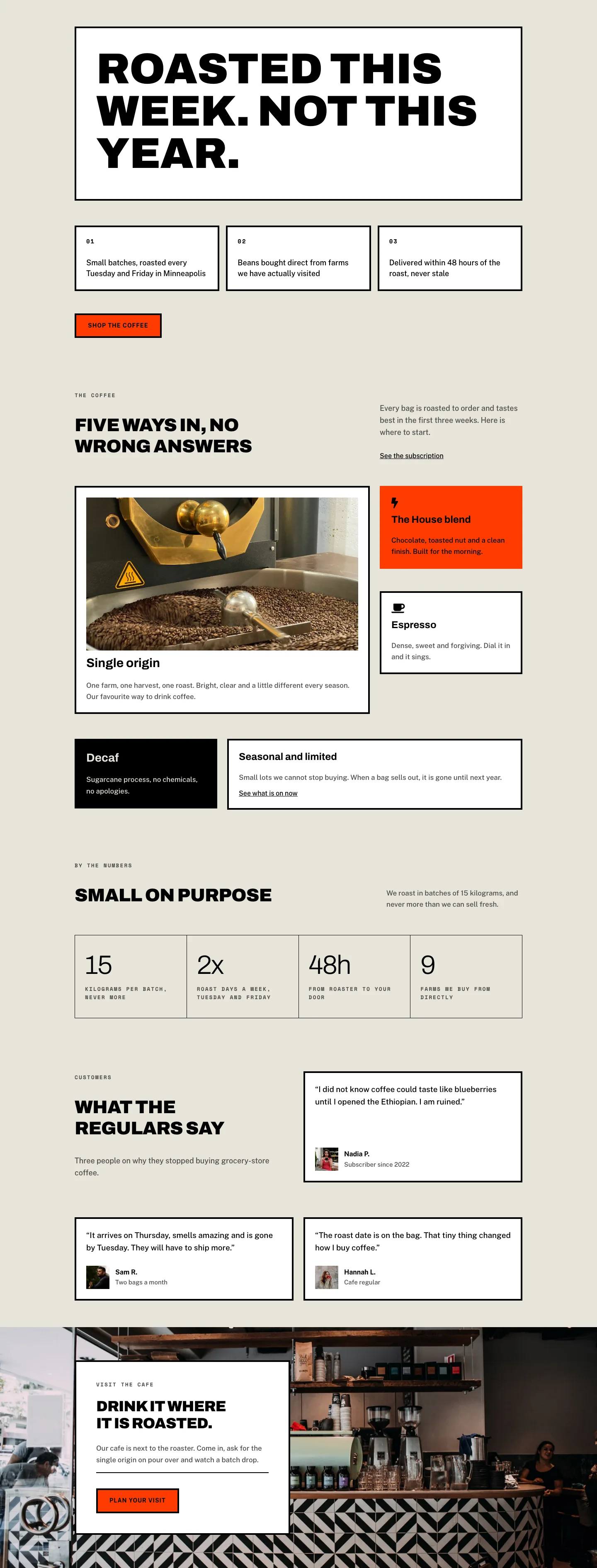
Fieldnote Coffee Roasters Subscribe is a full-page brutalist subscription layout built entirely with native Divi 5 modules. The page opens with a white header section carrying a breadcrumb trail in Space Mono (13px, 2px letter-spacing, uppercase) alongside a 52px Archivo Black h1, then drops immediately into the pricing tier section on a warm parchment ground (#e8e4da). Three plan cards sit in a strict equal-width three-column row, each boxed with a 4px solid black border and zero border-radius — a deliberate brutalist refusal of softness. The center card breaks the monochrome palette with a full #ff3b00 column background and a white "Most popular" pill badge, creating a visual anchor that drives the eye before a single word is read.
Spacing is controlled and intentional throughout. Desktop padding steps down from 72px top on the header to 64px on all interior sections, then compresses to 40px and 32px respectively on phone — the JSON encodes all three breakpoints explicitly, so the layout never relies on Divi defaults. The plan cards use flexGrow/flexShrink on the feature list group to push the subscribe button flush to the bottom of each card regardless of copy length, keeping the three CTAs optically aligned across the row.
The comparison table in section three is a CSS grid group set to four columns with 1px gaps rendered against a black background — the gap itself becomes the border, a classic print-design trick. Alternating #e8e4da and #ffffff cells produce a zebra rhythm without a single border declaration on the cells themselves. Below the table, a full-width "How it works" section uses oversized Archivo numerals (80px, -2px tracking) as step counters, separated by 2px solid black dividers — the kind of editorial typographic scaffolding that communicates craft without imagery.
The FAQ section uses Divi 5 Toggle modules with a thick 4px top rule and 4px bottom rules on each item, keeping the accordion's open/closed states visually grounded in the same brutalist border language used throughout. The page closes on a burnt-orange #ff3b00 CTA band with a horizontal flex group: headline on the left, subscribe button and reassurance copy on the right — collapsing to a stacked column on phone via an explicit flexDirection: column phone breakpoint in the row's layout decoration.
What’s inside
- Three-tier pricing card row (One bag / Two bags / Office) with 4px solid black borders, zero border-radius, and flex-grow feature lists that push CTA buttons to a consistent baseline
- Center "Most popular" card with a full `#ff3b00` accent column background and a white rounded pill badge built from a nested Group module
- 4-column CSS grid comparison table using 1px black gaps as cell borders, with alternating `#e8e4da`/`#ffffff` cell fills and FontAwesome checkmark icons
- Oversized editorial step-counter section (80px Archivo numerals, 2px dividers) for a three-step "How it works" flow
- Five-item Toggle FAQ accordion with 4px rule separators, Archivo 28px h3 titles, and explicit open/closed background and icon color declarations
- Burnt-orange `#ff3b00` full-width closing CTA band with a horizontal split layout that stacks to column on phone
- Three-font system: Archivo Black for display headings, Space Mono for uppercase eyebrow labels, Public Sans for body and UI text
- Explicit three-breakpoint padding on every section (desktop / tablet / phone) and column flex-type overrides ensuring full-width stacking on mobile
Who it’s for
This layout is purpose-built for specialty coffee roasters, tea subscription boxes, and any direct-to-consumer consumable brand selling recurring delivery plans. It works equally well for a single-origin roaster adding a subscribe page to an existing WordPress site, a new DTC brand launching from scratch, or a Divi freelancer building a subscription-commerce site for a food or beverage client. The editorial brutalist aesthetic also translates cleanly to craft spirits, hot sauce clubs, and artisan pantry subscriptions where the visual language of deliberate rawness communicates authenticity.
Customization tips
The entire palette is a three-value system: swap #000000, #ffffff, and #ff3b00 at the preset level and the accent card, CTA band, comparison table borders, and button hover states all update in one pass. The parchment ground (#e8e4da) is used as the body background on the parchment sections — replace it with any warm neutral and the typographic contrast holds.
Plan card copy is short by design: each description line is a single sentence (under 60 characters) and the price figures use a separate Text module so you can change currency without touching the size styling. The comparison table is a flat Group grid — add rows by duplicating any cell group pair and the 1px gap grid reflows automatically. Step-counter text in the "How it works" column should stay under 120 characters per step to avoid breaking the visual rhythm against the 80px numerals. The Toggle FAQ titles look best at 40–60 characters; longer titles will wrap and lose the single-line brutalist silhouette.
How to install this layout
- Download the layout JSON file from this page.
- Open the target page in the Divi 5 builder.
- Open the portability panel (up/down arrows icon) and choose the Import tab.
- Upload the JSON. Tick “replace existing content” only for full-page imports.
- Check the page at desktop and mobile widths, then swap in your copy and images.
Full walkthrough with troubleshooting: How to Import a Divi 5 Layout.
Questions about Fieldnote Coffee Roasters — Brutalist Coffee Subscribe Page for Divi 5
How is the 'Most popular' highlight built — is it a separate module or a column style?
It is a standard Divi 5 Column module with its background set to `#ff3b00`. The white pill badge is a nested Group with a white background, 12px border-radius, and a Text module inside. There is no custom CSS involved.
Does the comparison table use a Table module?
No. It is a Group module with `display: grid`, `gridColumnCount: 4`, and `columnGap: 1px` set against a black background. Each cell is its own Group module, so adding or removing features means duplicating or deleting a row of four Group modules.
How do the three plan card buttons stay vertically aligned across cards with different content lengths?
The feature-list Group inside each card has `flexGrow` and `flexShrink` set on its sizing, which pushes it to fill available space. The button sits below it and naturally lands at the same position regardless of how many feature lines are in each card.
What should I edit first to rebrand this layout?
Start with the three accent color values: `#ff3b00` (the orange), `#e8e4da` (the parchment), and the Archivo/Space Mono font families in the heading modules. Those three changes shift the entire visual character of the page.
Does the layout include any images?
No. This layout is typographic-only by design. There are no Image modules. The visual hierarchy comes entirely from scale contrast, color, and border weight — which also means there are no images to source or replace before publishing.
How does the FAQ accordion behave on mobile?
The Toggle modules are native Divi 5 modules and handle their own open/close interaction. Padding compresses from 28px top/bottom on desktop to 20px on phone via explicit breakpoint values in the JSON. The 4px rule borders scale without any adjustment needed.
Which Divi version does this layout need?
Divi 5. The layout is generated natively for Divi 5 and validated against its real module structure before publication, so it imports clean into the current builder.
Can I use this layout on client websites?
Yes. Every download includes a commercial license covering unlimited sites you own or build for clients. Only reselling or redistributing the layout file itself is prohibited.
Included in these packs
More full landing pages
Browse all full landing pages
Kiln & Clay — Minimal Pottery_studio Visit Page for Divi 5
full_landing · pottery_studio · minimal

Kiln & Clay — Minimal Pottery_studio Our Story Page for Divi 5
full_landing · pottery_studio · minimal

Kiln & Clay — Minimal Pottery_studio Studio Membership Page for Divi 5
full_landing · pottery_studio · minimal

Kiln & Clay — Minimal Pottery_studio The Shop Page for Divi 5
full_landing · pottery_studio · minimal

Kiln & Clay — Minimal Pottery_studio Classes Page for Divi 5
full_landing · pottery_studio · minimal

Kiln & Clay — Minimal Pottery_studio Home Page for Divi 5
full_landing · pottery_studio · minimal