
Folio & Fable — Elegant Bookshop About Page for Divi 5
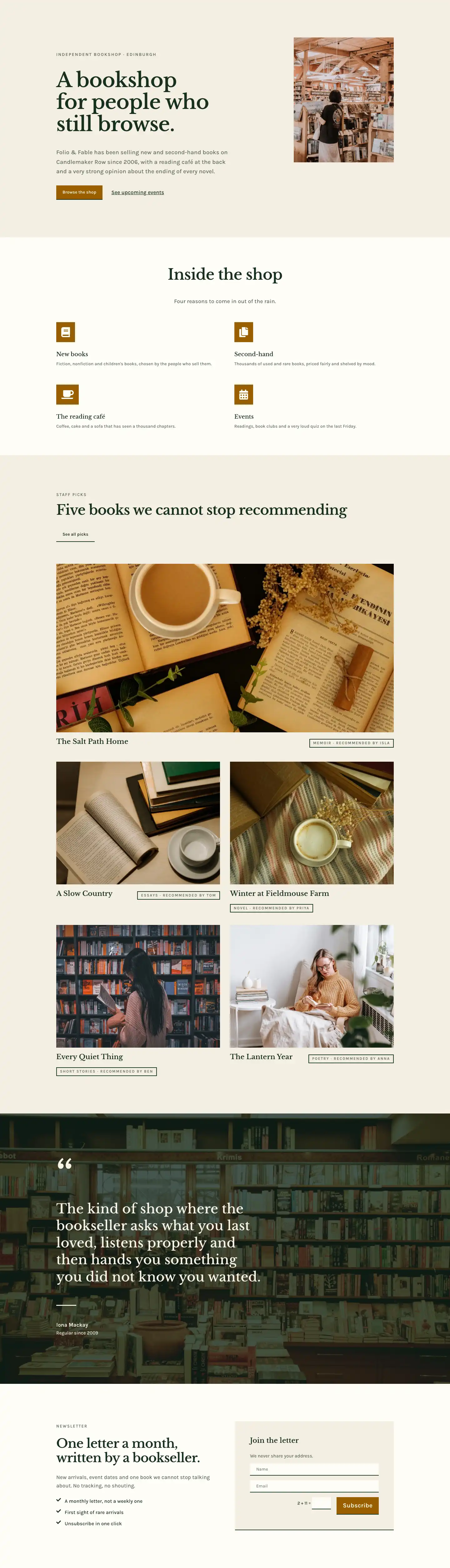
A refined Divi 5 about page for independent bookshops. Features a brand story timeline, team portraits, founder letter, and values section in warm cream and forest green.
Rate this element
Download this section, free
- Divi 5 JSON, imports in seconds
- Commercial license included
- No account needed
This page ships inside Folio & Fable: Independent Bookshop Theme (6 Pages), 6 coherent pages that share one brand.
Click to view the full page
Overview
The layout opens on a warm parchment field (#f4efe3) with a 104px Libre Baskerville headline that scales to 72px on tablet and 44px on phone, carrying the brand voice before any other element loads. A 2px warm-sand divider (#ddd3bc) falls beneath the H1, then a two-column row splits a 20px Karla origin paragraph across a wide left column (16/24 flex) against a slim right column anchored by a plain "Read our story" link. Top padding runs at 180px on desktop and collapses to 80px on mobile, giving the opener vertical room without crowding smaller viewports.
The second section inverts the palette completely: a full-bleed bookshop photograph sits behind a uniform dark-green gradient overlay (rgba(16,36,26,0.72) at both 0% and 100% stops, 90 degrees) that keeps reversed cream type (#f8f3e6) readable regardless of the image underneath. Within that field, a CSS Grid group renders four milestone cards across four columns on desktop, two columns on tablet, and a single stack on phone. Each card opens with a 3px top border in cream, drops a 48px bold Libre Baskerville year number, then an H3 title and a Karla description line. No decorative icons or counters, just typographic hierarchy doing the work.
The team section returns to parchment with a 14/24-flex heading column alongside a 10/24-flex subtitle, then opens into four equal portrait columns below. Portraits are locked to a 1:1 square aspect ratio via the module's aspect-ratio property and topped with a 3px dark-green (#17301f) border rule above each name and uppercase role label. Section four shifts to a near-white #fffdf7 and pairs a 4:5 portrait (pill-curved top radiuses, 32px corner-cut bottom) with three paragraphs of 22px Libre Baskerville founder prose and an italic italic signature. It is the only section where the serif carries body weight rather than display weight, and that shift in register signals clearly that this is a personal statement, not marketing copy. The final section flips to deep forest green (#17301f) and lists four operating principles as divider-row groups: a fixed 64px index column aligned to baseline with a 34px Libre Baskerville rule title and a capped-360px Karla description, collapsing from a horizontal three-column flex layout to a vertical stack on phone.
What’s inside
- Full-bleed hero with a 104px / 72px / 44px responsive Libre Baskerville H1, warm-sand 2px divider, and an asymmetric two-column copy/link row (16/24 + 8/24 flex)
- Photo section with a full-cover background image and a uniform 72% dark-green gradient overlay, hosting a four-milestone CSS Grid timeline (4 cols desktop, 2 tablet, 1 phone) with top-border year cards
- Team grid: split header row with a 14/24 heading column and 10/24 subtitle column, then four equal 1:1 square portrait columns with top-border name and uppercase role labels (wraps to 2x2 on tablet)
- Founder letter section on #fffdf7 pairing a 4:5 portrait with pill-top / corner-bottom border radius against three paragraphs of 22px Libre Baskerville body text and an italic signature
- Values section on deep forest green (#17301f) with four numbered divider rows, each built from a fixed 64px index column, a 34px Libre Baskerville rule title, and a max-360px Karla description
- Two-typeface system throughout: Libre Baskerville for display headings, editorial body text, and year figures; Karla for eyebrows, body paragraphs, labels, and principle descriptions
- All five sections include explicit three-breakpoint spacing and font-size values (desktop, tablet, phone) defined directly in the module JSON
Who it’s for
Independent bookshops, literary cafes, and community libraries building a first web presence or refreshing an aging one will find this layout immediately usable. It also fits small publishers wanting a studio-style About page, cultural venue operators (reading rooms, print shops, stationery stores) whose brand trades on place and craft, and freelance Divi developers working with clients in the independent retail or arts sector. The narrative structure covers origin story, chronological timeline, team faces, founder voice, and guiding principles, which means it functions as a complete About page rather than a decorative placeholder.
Customization tips
Start by swapping the five core color values: #f4efe3 (parchment) to any warm neutral, #17301f (forest green) to your brand dark, and #5a6a5c (sage) to a matching mid-tone. The timeline section uses a gradient overlay with rgba(16,36,26,0.72) at both stops; raise or lower the alpha to control how much of your background photograph shows through without touching the typefaces. Replace the Pexels background photo with any high-resolution interior or landscape shot at least 1920px wide. Team portrait images are enforced at a 1:1 aspect ratio, so any square crop at 800px or above will fit cleanly. The founder portrait uses a 4:5 ratio; aim for roughly 800x1000px. Keep each of the four principle descriptions under about 120 characters so they stay within the 360px capped-width column on desktop. The milestone years (2006, 2012, 2018, 2025) are plain Divi Text modules and update directly in the editor alongside their accompanying titles and descriptions.
How to install this layout
- Download the layout JSON file from this page.
- Open the target page in the Divi 5 builder.
- Open the portability panel (up/down arrows icon) and choose the Import tab.
- Upload the JSON. Tick “replace existing content” only for full-page imports.
- Check the page at desktop and mobile widths, then swap in your copy and images.
Full walkthrough with troubleshooting: How to Import a Divi 5 Layout.
Questions about Folio & Fable — Elegant Bookshop About Page for Divi 5
How does the timeline grid behave on smaller screens?
The four milestone cards are a CSS Grid Group module configured with gridColumnCount set to 4 on desktop, 2 on tablet, and 1 on phone. Each card keeps its 3px top border and large year number at every width. No content is hidden; it simply reflows into a narrower stack.
What aspect ratios do the images require?
Team grid portraits use a 1:1 square ratio, enforced by the module's aspectRatio property, so any square crop at 800px or above works without distortion. The founder portrait in section four is 4:5 (target roughly 800x1000px). The timeline background is a full-cover image with no fixed height constraint; 1920px wide is the recommended minimum.
Which Divi 5 modules does the layout use?
Only native Divi 5 modules: Section, Row, Column, Group, Heading, Text, Image, and Divider. No third-party plugins, custom HTML, or code modules are needed.
Can I change the number of team members?
Yes. The team row is a standard 4-column Row module with equal-columns flex. Adding or removing a column in the Divi editor redistributes widths automatically. On tablet the columns wrap in pairs, so an even total (2 or 4) keeps the grid symmetrical.
Why is the founder letter body text set in Libre Baskerville rather than Karla?
That is an intentional design choice in the layout. The three paragraphs and italic signature are set in 22px Libre Baskerville / 1.6em line height to signal editorial voice rather than UI copy. Karla handles all supporting text and labels throughout every other section; Libre Baskerville carries everything that should feel personally authored.
What is the best first thing to edit after importing?
Start with the H1 headline in section one, the background photograph in section two, and the four team portrait images. These carry the most visual weight and will make the page feel personal immediately, before you touch any of the body copy or milestone text.
Which Divi version does this layout need?
Divi 5. The layout is generated natively for Divi 5 and validated against its real module structure before publication, so it imports clean into the current builder.
Can I use this layout on client websites?
Yes. Every download includes a commercial license covering unlimited sites you own or build for clients. Only reselling or redistributing the layout file itself is prohibited.
Included in these packs
More full landing pages
Browse all full landing pages
Kiln & Clay — Minimal Pottery_studio Visit Page for Divi 5
full_landing · pottery_studio · minimal

Kiln & Clay — Minimal Pottery_studio Our Story Page for Divi 5
full_landing · pottery_studio · minimal

Kiln & Clay — Minimal Pottery_studio Studio Membership Page for Divi 5
full_landing · pottery_studio · minimal

Kiln & Clay — Minimal Pottery_studio The Shop Page for Divi 5
full_landing · pottery_studio · minimal

Kiln & Clay — Minimal Pottery_studio Classes Page for Divi 5
full_landing · pottery_studio · minimal

Kiln & Clay — Minimal Pottery_studio Home Page for Divi 5
full_landing · pottery_studio · minimal