
Folio & Fable — Elegant Bookshop The Café Page for Divi 5
A warm, editorial Divi 5 full landing page for an independent bookshop café. Features a menu showcase, numbered steps section, and FAQ accordion in cream and forest green.
Rate this element
Download this section, free
- Divi 5 JSON, imports in seconds
- Commercial license included
- No account needed
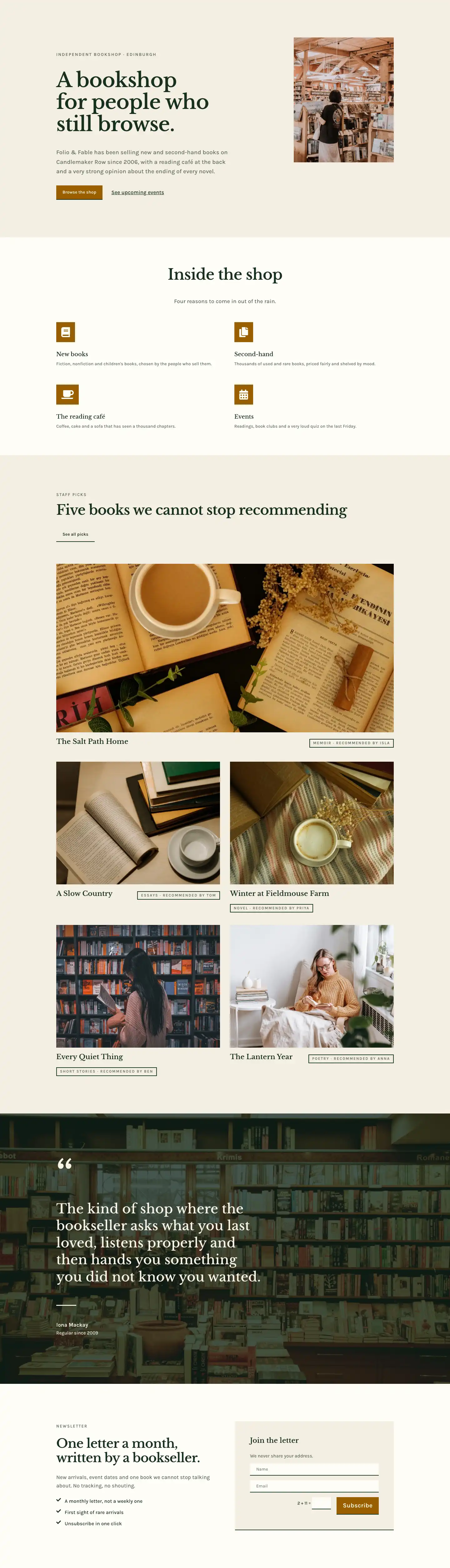
This page ships inside Folio & Fable: Independent Bookshop Theme (6 Pages), 6 coherent pages that share one brand.
Click to view the full page
Overview
The Café page for Folio & Fable opens with a breadcrumb header section on a warm cream (#fffdf7) ground, split into a 2:1 asymmetric row. The left column carries the H1 in Libre Baskerville at 52px — tight letter-spacing of -1px giving it a typeset, editorial feel — while the right column holds a single line of Karla body copy that acts as a quiet subtitle. A 1px sand-coloured border (#ddd3bc) at the section's base separates the masthead from what follows without introducing visual weight.
The main content section shifts the ground to a slightly warmer parchment (#f4efe3) and opens with a centred full-width header row: an uppercase Karla eyebrow at 14px introduces three equal-height image-and-text rows beneath it. Each row pairs a 4:3 cover image with a numbered item block. The pairing alternates sides row by row — image left on items 01 and 03, image right on item 02 — which creates a gentle zigzag rhythm down the page without feeling forced. Columns are vertically centred (alignItems: center), so text never floats awkwardly against a taller image. Each item block contains a small numbered eyebrow (01/02/03 in uppercase Karla), an H3 in Libre Baskerville at 32px, a Karla paragraph at 18px/1.6em, and a plain underlined text link. This structure keeps every content cell self-contained and easy to swap.
The third section returns to cream and introduces a two-column layout: a narrow 8/24 left column holds the section headline and intro copy in the editorial serif, while the wider 16/24 right column presents a numbered step list. Each step uses an oversized Libre Baskerville numeral (80px, weight 700, -2px tracking) as a visual anchor, followed by an H3 and a short Karla paragraph. Steps are separated by 2px #ddd3bc horizontal rules rendered through the native Divi Divider module, keeping the rhythm consistent without extra padding tricks.
The closing section returns to parchment and uses the native Divi Toggle module for an FAQ accordion. Five questions are styled with 28px Libre Baskerville titles and Karla answers at 17px; a top border of 3px #17301f anchors the group, and each toggle is separated by a 2px bottom border in the same sand tone. On mobile, all multi-column rows collapse to single-column stacks, image order is corrected with a -1 flex order on item 02's image so it appears above its text, and section padding steps down in three defined breakpoints (120px → 80px → 56px), keeping the page breathable at every viewport.
What’s inside
- Asymmetric 2-column masthead row (2:1 split) with H1 Libre Baskerville serif headline and inline breadcrumb navigation
- Three alternating image-text rows with 4:3 aspect-ratio cover images (object-fit cover), numbered eyebrows, H3 headings, and underlined text CTAs
- Oversized numeral step list (80px Libre Baskerville, weight 700) separated by native Divi Divider modules in a wide/narrow two-column layout
- Five-item native Divi Toggle FAQ accordion with 28px serif question titles, Karla body answers, and flush border-only styling (no background fill)
- Two-tone section palette alternating cream (`#fffdf7`) and parchment (`#f4efe3`) across four sections for visual chapter breaks
- Fully responsive: three-breakpoint padding scale, flex-direction column on mobile, and explicit image reorder on the reversed row
Who it’s for
This layout suits independent bookshops, literary cafes, and any small hospitality venue that wants a relaxed, editorial feel on their sub-page. It also works for tea rooms, artisan bakeries, and boutique spaces that combine retail with seating. The numbered-step section doubles as a visit guide, menu explainer, or house-rules section for any experience-led business. Designers building sites for independent cultural venues — record shops, galleries with a coffee counter, community libraries — will find the structure adapts cleanly with copy swaps alone.
Customization tips
The entire palette is controlled by two hex values: swap #fffdf7 (cream) and #f4efe3 (parchment) in the four section backgrounds to shift the warmth — a cooler off-white (#f8f8f5) and a grey-sand (#ece8e0) will suit a more minimal brand without touching any type colours. The dark forest green (#17301f) used for headings and borders can move to navy, charcoal, or any dark anchor tone in a single global find-and-replace. For the image rows, keep photos at a 4:3 crop to match the locked aspect ratio; going wider (16:9) will work but compress the visible area of each shot. H3 copy in the numbered items fits best at one to five words — longer headings break the visual balance between the serif numeral and the heading line. Toggle question titles are set at 28px, so keep questions under 60 characters to avoid three-line wraps on tablet.
How to install this layout
- Download the layout JSON file from this page.
- Open the target page in the Divi 5 builder.
- Open the portability panel (up/down arrows icon) and choose the Import tab.
- Upload the JSON. Tick “replace existing content” only for full-page imports.
- Check the page at desktop and mobile widths, then swap in your copy and images.
Full walkthrough with troubleshooting: How to Import a Divi 5 Layout.
Questions about Folio & Fable — Elegant Bookshop The Café Page for Divi 5
What modules does this layout use?
It uses Heading, Text, Image, Divider, Toggle, Group, Row, Column, and Section — all native Divi 5 modules, no third-party plugins required.
How does the alternating image layout behave on mobile?
All three rows collapse to a single column. The middle row's image has a flex order of -1 set at phone breakpoint, so it always appears above its text block regardless of desktop column order.
What aspect ratio should my photos be?
The Image modules are locked to 4:3 with object-fit cover. Source images can be any landscape crop — 4:3 or wider — and Divi will fill the frame cleanly.
Can I add more Toggle items to the FAQ section?
Yes. Each Toggle is styled with a bottom border and no background fill, so new items inherit the separator styling automatically when added inside the same Group.
What is the best first edit to make this my own?
Replace the two section background colours and the `#17301f` heading/border colour. Those three values set the mood for the entire page; fonts and copy can follow once the palette is right.
How many steps can I add to the numbered section before it breaks the layout?
The step list sits in a single tall right-hand column with no height constraint, so you can add as many steps as needed. Four to six works best visually; beyond that, consider breaking into a second section.
Which Divi version does this layout need?
Divi 5. The layout is generated natively for Divi 5 and validated against its real module structure before publication, so it imports clean into the current builder.
Can I use this layout on client websites?
Yes. Every download includes a commercial license covering unlimited sites you own or build for clients. Only reselling or redistributing the layout file itself is prohibited.
Included in these packs
More full landing pages
Browse all full landing pages
Kiln & Clay — Minimal Pottery_studio Visit Page for Divi 5
full_landing · pottery_studio · minimal

Kiln & Clay — Minimal Pottery_studio Our Story Page for Divi 5
full_landing · pottery_studio · minimal

Kiln & Clay — Minimal Pottery_studio Studio Membership Page for Divi 5
full_landing · pottery_studio · minimal

Kiln & Clay — Minimal Pottery_studio The Shop Page for Divi 5
full_landing · pottery_studio · minimal

Kiln & Clay — Minimal Pottery_studio Classes Page for Divi 5
full_landing · pottery_studio · minimal

Kiln & Clay — Minimal Pottery_studio Home Page for Divi 5
full_landing · pottery_studio · minimal