
Folio & Fable — Elegant Bookshop Contact Page for Divi 5
An elegant Divi 5 contact page for an independent bookshop. Features a split address and contact form section, accordion FAQ, and a warm amber CTA banner. Ready to import.
Rate this element
Download this section, free
- Divi 5 JSON, imports in seconds
- Commercial license included
- No account needed
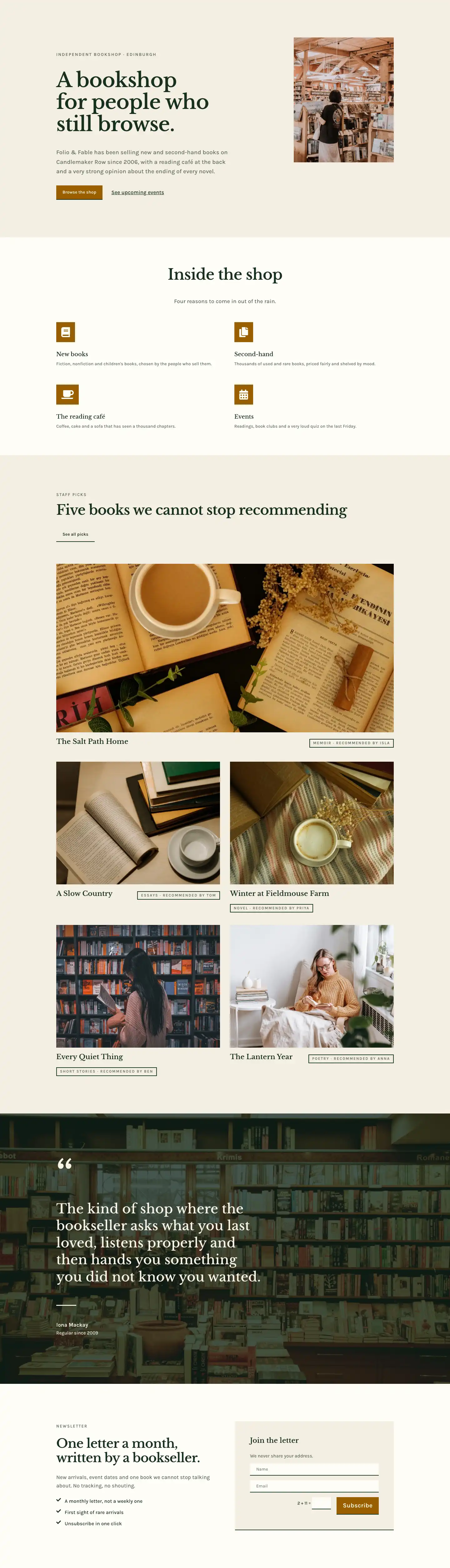
This page ships inside Folio & Fable: Independent Bookshop Theme (6 Pages), 6 coherent pages that share one brand.
Click to view the full page
Overview
The layout opens with a slim breadcrumb header on #fffdf7 parchment, its bottom border — a 1px line in muted #ddd3bc — acting as a quiet horizontal rule before anything heavier appears. A two-column row carries the H1 "Find the shop" on the wider left (Libre Baskerville, 52px, -1px tracking, deep forest #17301f) and a short orientation sentence on the narrower right, giving the page an editorial asymmetry that reads like a well-set title page rather than a utility screen.
The second section, on warm oat #f4efe3, is the structural heart: a 1/2 + 1/2 split at a 72px column gap. The left column holds a 4:5 portrait image with a distinctive arched top (999px radius on both upper corners, 32px on the lower two) beside two icon-labeled contact-detail rows. Font Awesome map-pin and clock icons in forest green sit beside small-caps "ADDRESS" and "OPENING HOURS" labels in sage #5a6a5c, keeping information scannable without adding visual weight. The right column leads with a 13px Karla uppercase eyebrow, drops into a 40px Libre Baskerville H2 with text-wrap: balance, a sage body paragraph, then the contact form. The form container, every field, and the submit button share one consistent styling decision: a single 2px bottom border in forest green, no fill, no surrounding box. This bottom-border-only motif is the layout's strongest typographic choice, making every interactive element feel like a line in a manuscript rather than a filled input.
The third section is a centred FAQ on the same oat background, framed by a Karla uppercase eyebrow and a 44px Libre Baskerville H2 at 720px max-width. Six accordion items sit at 800px max-width, the first open by default, all sharing Libre Baskerville 19px titles and Karla 16px answers with the same bottom-border treatment, so nothing in the layout ever breaks its own visual grammar. A phone-number fallback closes the section in muted sage.
The page ends on a full-bleed amber #a86a00 band, the only section that departs from the green-and-parchment palette. On desktop it splits horizontally: a 48px Libre Baskerville headline on the left, a parchment "Plan a visit" button with its bottom-border accent on the right. Vertical padding compresses from 120px (desktop) to 80px (tablet) to 56px (phone) across all four sections, and every multi-column row switches to stacked flex-column on mobile, so the full contact experience remains clear at any screen width.
What’s inside
- Four-section page: breadcrumb header, two-column contact split, centred accordion FAQ, and full-bleed amber CTA band
- 4:5 portrait image with arched top (999px upper-corner radius, 32px lower corners) and `object-fit: cover`, sized at 420px max-width
- Two icon-labeled contact-detail rows (Font Awesome map-pin + clock, forest `#17301f`) with small-caps category labels and readable 17px value text
- Native Divi 5 Contact Form with Name, Email, and Message fields (all 24/24 flex width), bottom-border-only field styling, and an amber `#a86a00` submit button
- Six-item Divi Accordion FAQ centred at 800px max-width: Libre Baskerville titles, Karla body copy, first item open by default, consistent bottom-border treatment
- Persistent bottom-border-only UI motif (2px solid `#17301f`) applied to form container, every field, submit button, accordion, and CTA button
- Two-typeface system throughout: Libre Baskerville for all headings with -1px tracking, Karla for body, labels, eyebrows, and buttons
Who it’s for
This layout suits independent bookshops, second-hand book dealers, literary cafes, and antiquarian print shops where a contact page needs the warmth of a handwritten note rather than a generic form. It also works for small galleries, specialist food shops, florists, and vintage boutiques: any indie retail business where locality, personal service, and a well-told location story carry as much weight as the contact form itself. The arch-top image and serif-led hierarchy translate equally well to B&Bs, wine merchants, and event spaces that lean into character over convention.
Customization tips
Swap the palette in two moves: replace #17301f (forest) and #a86a00 (amber) with your brand primaries, then decide whether the #f4efe3 oat background feels right or needs warming or cooling. The sage #5a6a5c on secondary text is neutral enough to carry most palettes unchanged. For the hero image, the arched shape works best with a portrait at 4:5 — landscape crops break the arch, so avoid them. Keep the H2 in the contact section under roughly 60 characters so text-wrap: balance keeps the line breaks even. The accordion items can be added or removed freely; the bottom-border style carries through automatically to new items. If the amber CTA section reads too warm for your brand, replace #a86a00 with deep navy or burgundy and update the form submit button background to match.
How to install this layout
- Download the layout JSON file from this page.
- Open the target page in the Divi 5 builder.
- Open the portability panel (up/down arrows icon) and choose the Import tab.
- Upload the JSON. Tick “replace existing content” only for full-page imports.
- Check the page at desktop and mobile widths, then swap in your copy and images.
Full walkthrough with troubleshooting: How to Import a Divi 5 Layout.
Questions about Folio & Fable — Elegant Bookshop Contact Page for Divi 5
What gives the photo its arched shape?
The image module sets `border-radius` to 999px on the top-left and top-right corners, with 32px on the bottom two. Any portrait photo at a 4:5 aspect ratio will fit cleanly inside the frame.
Which module powers the contact form?
The native `divi/contact-form` module with three `divi/contact-field` children: Name, Email, and Message, each set to 24/24 flex width so they always span the full form column.
How does the two-column layout behave on phones?
Both the contact split (section 2) and the CTA row (section 4) switch to `flex-direction: column` on phone, stacking left-then-right content top-to-bottom. Section padding compresses from 120px to 56px vertical on all four sections, so nothing feels cramped on small screens.
The accordion shows one item already open. Can I change that?
Yes. The first accordion item has `open: on` set in its module options. Edit that property to choose a different item as the default, or remove it from all items to start the accordion fully collapsed.
What is the quickest edit to make the layout feel like mine?
Start with the address and hours Text modules in the left column and the H2 in the right column of the contact section. Those three edits replace the shop-specific content without touching any styling, and the page immediately reads as your own.
Do I need any paid fonts or icon packs?
No. Libre Baskerville and Karla are both standard Google Fonts, and the icons use Font Awesome, which ships with Divi 5. No third-party font licences or additional plugin installs are required.
Which Divi version does this layout need?
Divi 5. The layout is generated natively for Divi 5 and validated against its real module structure before publication, so it imports clean into the current builder.
Can I use this layout on client websites?
Yes. Every download includes a commercial license covering unlimited sites you own or build for clients. Only reselling or redistributing the layout file itself is prohibited.
Included in these packs
More full landing pages
Browse all full landing pages
Kiln & Clay — Minimal Pottery_studio Visit Page for Divi 5
full_landing · pottery_studio · minimal

Kiln & Clay — Minimal Pottery_studio Our Story Page for Divi 5
full_landing · pottery_studio · minimal

Kiln & Clay — Minimal Pottery_studio Studio Membership Page for Divi 5
full_landing · pottery_studio · minimal

Kiln & Clay — Minimal Pottery_studio The Shop Page for Divi 5
full_landing · pottery_studio · minimal

Kiln & Clay — Minimal Pottery_studio Classes Page for Divi 5
full_landing · pottery_studio · minimal

Kiln & Clay — Minimal Pottery_studio Home Page for Divi 5
full_landing · pottery_studio · minimal