
Folio & Fable — Elegant Bookshop Home Page for Divi 5
A warm, editorial Divi 5 full-page layout for independent bookshops. Features a staff picks gallery, testimonial pull quote, and newsletter signup form in a parchment and forest-green palette.
Rate this element
Download this section, free
- Divi 5 JSON, imports in seconds
- Commercial license included
- No account needed
This page ships inside Folio & Fable: Independent Bookshop Theme (6 Pages), 6 coherent pages that share one brand.
Click to view the full page
Overview
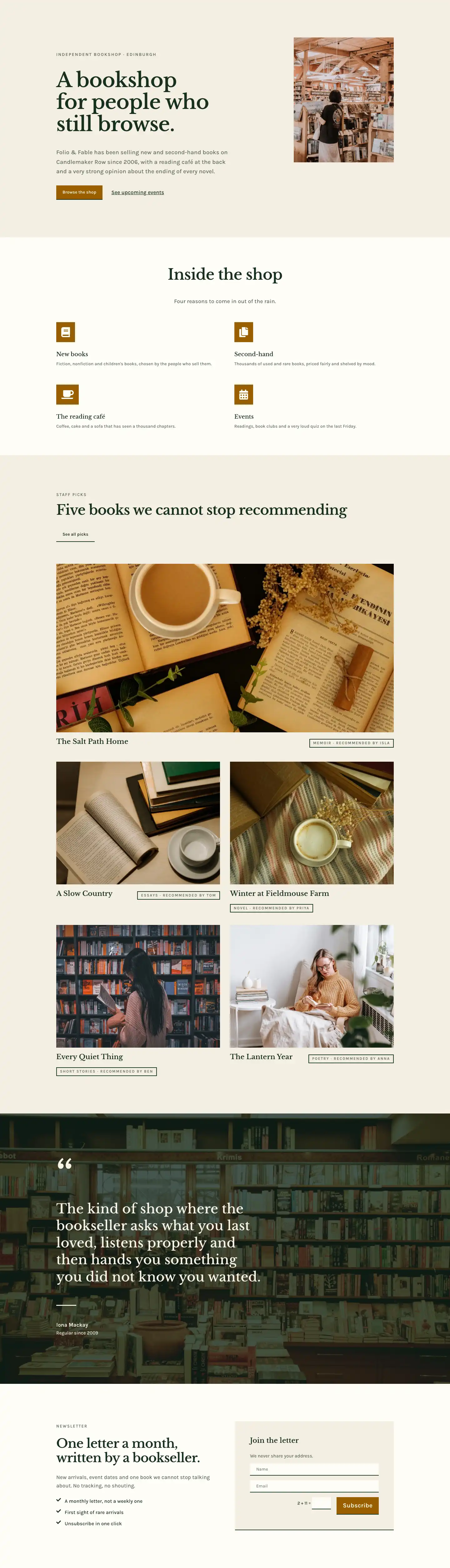
The layout opens with a split hero built on a 16/8 asymmetric column ratio: the wider left column holds the editorial text hierarchy while a 4:5 portrait photograph fills the narrower right column flush to its edge. The parchment background (#f4efe3) and forest-green headline (#17301f) establish a palette rooted in aged paper and ink, immediately communicating the character of a physical shop rather than an online store. The H4 eyebrow is set in Karla at 14 px with 2 px letter-spacing in uppercase sage (#5a6a5c), anchoring location and identity above a 64 px Libre Baskerville H1 that tightens to 46 px on tablet and 36 px on phone. Vertical section padding scales explicitly at three breakpoints (120 px desktop, 80 px tablet, 56 px phone), so the hero breathes on large screens without crushing on smaller ones. The two CTA elements sit in a flex row: a solid amber (#9a5f00) button with zero border-radius and a ghost text link styled with an underline, giving a primary and secondary action without visual noise.
The second section switches to warm off-white (#fffdf7) and introduces four Blurb modules in a 2x2 grid. Each blurb carries a square amber icon container (zero border-radius, 16 px padding) with a Font Awesome icon selected for each offering: a book for new stock, a document page for second-hand, a coffee cup for the cafe, and a calendar for events. Section headings are in Libre Baskerville, body copy in Karla at 18 px sage, and the centered section title is constrained to 810 px max-width so it never over-extends on widescreen monitors.
The staff-picks section returns to parchment and uses a CSS Grid Group module: one featured card spans both columns at a 2:1 landscape ratio, while four further cards sit below in the grid at 4:3 portrait. Each card pairs a cover image with an H3 book title and a small bordered badge showing genre and the name of the recommending bookseller, set in 12 px uppercase Karla inside a 2 px forest-green border. A justified flex header above the grid balances the section heading on the left against a ghost underline-button link on the right, a layout pattern that recurs throughout.
A full-bleed pull-quote section follows: a background photograph sits behind a 72% dark overlay (rgba(16,36,26,0.72)), and a decorative 120 px Libre Baskerville quotation mark opens the quote text, which runs at 42 px on desktop and scales to 26 px on phone. The layout closes on a newsletter section pairing a three-item benefit list (FontAwesome checkmarks in forest green beside short Karla copy lines) with a contact-form card. The card has a parchment background, bottom-border-only inputs consistent with every button in the layout, and contains Name and Email fields only, keeping the commitment light and the visual language coherent from first section to last.
What’s inside
- Split hero with a 16/8 asymmetric column ratio, a 4:5 portrait image in the right column, and three-breakpoint vertical padding (120 px / 80 px / 56 px)
- Four Blurb modules in a 2x2 grid, each with a square amber icon container and a purpose-matched Font Awesome icon (book, document page, coffee cup, calendar) at sharp zero-radius corners
- Staff-picks CSS Grid section: one 2:1 landscape featured card spanning both grid columns, plus four 4:3 portrait book cards each with an H3 title and a bordered genre-plus-recommender badge
- Full-bleed pull-quote section with a background photo behind a 72% dark overlay, oversized 120 px serif opening quotation mark, a short ruled divider, and attributed customer name with tenure
- Newsletter section combining a three-item icon-plus-text benefit list with a native Divi 5 Contact Form module (Name and Email fields, amber Subscribe button, bottom-border-only styling)
- Two-typeface system throughout: Libre Baskerville for all headings and display text, Karla for body copy, eyebrows, badges, and UI labels
- Consistent bottom-border-only treatment on all buttons and form fields, zero border-radius everywhere, giving the layout a sharp typographic character rather than a rounded SaaS aesthetic
Who it’s for
This layout is purpose-built for independent bookshops, second-hand book dealers, and literary cafes: the four blurb modules map directly onto a shop that sells new stock, pre-owned titles, runs a cafe, and hosts events. It also fits artisan stationery shops, record stores, and small creative retailers that want an editorial feel over a commercial one. Poetry publishers, literary magazines, reading-club membership sites, and small arts organizations will find the serif-led palette and staff-picks card pattern a natural match.
Customization tips
The palette runs on three anchor values: parchment (#f4efe3), warm off-white (#fffdf7), and amber (#9a5f00). Changing the amber on the icon containers and CTA button backgrounds updates every interactive element at once. The parchment and off-white alternate between sections; swapping both for cooler tones or a dark inversion only requires updating those section background values. Libre Baskerville can be replaced with any transitional or slab serif (Lora, Playfair Display) without adjusting sizes, but the 64 px H1 fits roughly 30 characters before wrapping to three lines, so keep headlines short and punchy. The staff-picks grid expects the featured card image at 2:1 landscape and the remaining four book cards at 4:3 portrait: supplying images at those exact ratios avoids object-fit cropping cutting into subjects unexpectedly. The contact form fields use bottom-border-only styling set per-module; if your theme's global form styles override this, a small CSS specificity rule targeting the form module's unique ID resolves the conflict cleanly.
How to install this layout
- Download the layout JSON file from this page.
- Open the target page in the Divi 5 builder.
- Open the portability panel (up/down arrows icon) and choose the Import tab.
- Upload the JSON. Tick “replace existing content” only for full-page imports.
- Check the page at desktop and mobile widths, then swap in your copy and images.
Full walkthrough with troubleshooting: How to Import a Divi 5 Layout.
Questions about Folio & Fable — Elegant Bookshop Home Page for Divi 5
The hero uses an asymmetric column ratio. Does it stay two columns on tablet or collapse early?
On tablet the row keeps its nowrap flex direction, so the text and image columns stay side by side. Only on phone does flexDirection switch to column, stacking the image below the text at full width (flexType 24/24). The column padding also steps down at each breakpoint, so the text never feels cramped against the image on mid-size screens.
The staff-picks grid layout looks like CSS Grid. Does it require custom code or is it a native Divi 5 setting?
It is a standard Divi 5 Group module with display set to grid and gridColumnCount set to 2 in the layout decoration panel. No custom CSS is needed. On phone the gridColumnCount drops to 1 and row gaps tighten from 40 px to 32 px, so all five cards read as a clean single column.
What image aspect ratios should I use when swapping in my own bookshop photos?
Three ratios are in use: 4:5 portrait for the hero right-column image, 2:1 landscape for the featured staff-pick card that spans both grid columns, and 4:3 portrait for the remaining four book cards. The pull-quote background is a full-section cover image and any landscape crop works there.
The pull-quote has a dark overlay on the background photo. If I replace the photo, does the overlay stay?
Yes. The gradient (two stops at rgba(16,36,26,0.72)) is configured with overlaysImage enabled in the Section background decoration, so replacing the photo URL leaves the overlay intact. If your replacement image is lighter, reduce the opacity in both gradient stops to keep the quote text readable.
None of the buttons have rounded corners. Is that a global preset or per-module?
Per-module. The primary CTA, the ghost underline-button in the staff-picks header, and the contact form submit button all have borderRadius set to 0 px individually. To switch to rounded corners, update the radius values on each button and form button module separately rather than expecting a single global override.
Which Divi version does this layout need?
Divi 5. The layout is generated natively for Divi 5 and validated against its real module structure before publication, so it imports clean into the current builder.
Can I use this layout on client websites?
Yes. Every download includes a commercial license covering unlimited sites you own or build for clients. Only reselling or redistributing the layout file itself is prohibited.
Included in these packs
More full landing pages
Browse all full landing pages
Kiln & Clay — Minimal Pottery_studio Visit Page for Divi 5
full_landing · pottery_studio · minimal

Kiln & Clay — Minimal Pottery_studio Our Story Page for Divi 5
full_landing · pottery_studio · minimal

Kiln & Clay — Minimal Pottery_studio Studio Membership Page for Divi 5
full_landing · pottery_studio · minimal

Kiln & Clay — Minimal Pottery_studio The Shop Page for Divi 5
full_landing · pottery_studio · minimal

Kiln & Clay — Minimal Pottery_studio Classes Page for Divi 5
full_landing · pottery_studio · minimal

Kiln & Clay — Minimal Pottery_studio Home Page for Divi 5
full_landing · pottery_studio · minimal