
Folio & Fable — Elegant Bookshop The Shop Page for Divi 5
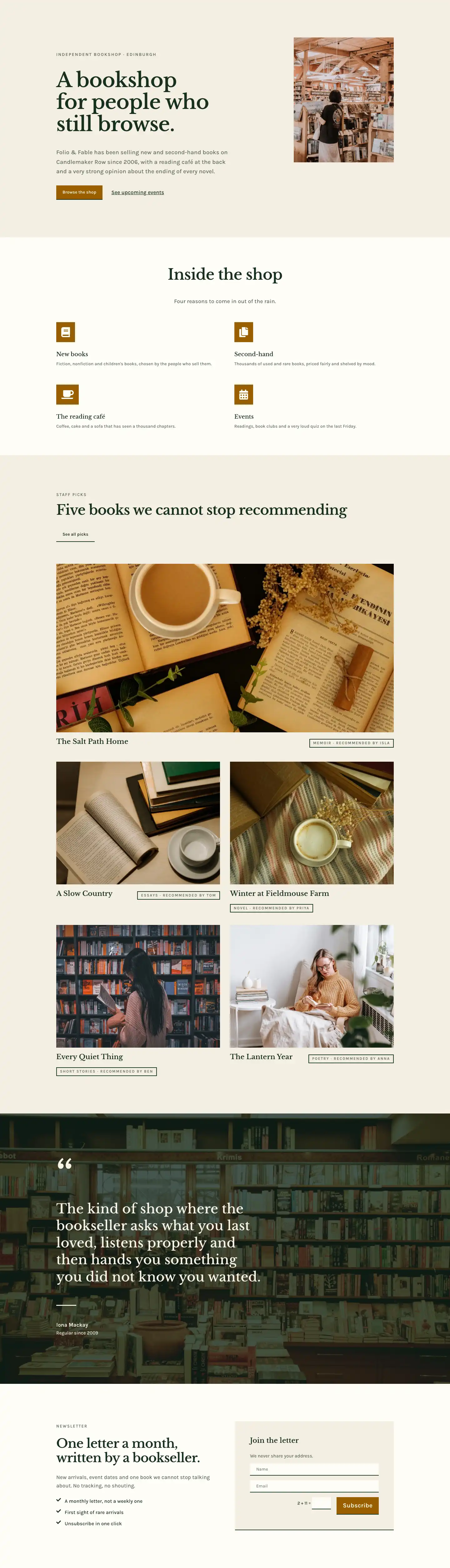
Elegant Divi 5 full-page layout for an independent bookshop. Features a hero with floor guide accordion, editorial photo gallery, services checklist, and FAQ — warm parchment tones, Libre Baskerville serif.
Rate this element
Download this section, free
- Divi 5 JSON, imports in seconds
- Commercial license included
- No account needed
This page ships inside Folio & Fable: Independent Bookshop Theme (6 Pages), 6 coherent pages that share one brand.
Click to view the full page
Overview
The layout opens with a full-bleed hero that places a dark forest-green gradient (rgba(16,36,26,0.72) on both stops) over a warm parchment base and a cover-fit bookshop photograph. A breadcrumb in Karla at 13px uppercase anchors the visitor immediately, then a 56px Libre Baskerville H1 drops into a single subline constrained to 600px. Padding steps down from 120px on desktop to 64px on phone, so the atmospheric weight of the section holds at every breakpoint rather than collapsing into a cramped banner.
The second section pairs a native Divi accordion against a 4:5 portrait image. The accordion strips all borders except a 2px dark-green bottom rule on each closed toggle, which keeps the interaction quiet and editorial. Four floor entries open and close inside Libre Baskerville 20px titles with Karla 16px body text in muted moss; on mobile, the column wraps above the image so a visitor reads the floor guide before the photograph. The asymmetric column widths (12/24 each on desktop) and center vertical alignment give the section the proportion of a magazine spread.
The gallery section follows a header row that is intentionally off-center: a 14/24-wide H2 column aligned to flex-end sits beside a 10/24 caption column, keeping the balance editorial rather than symmetrical. Below it, six images fill three equal columns, each column stacking a tall 4:5 image with a landscape 4:3. The columns alternate which ratio appears first, producing a staggered rhythm at 16px gaps that reads like a masonry grid without any custom CSS. All images use native Divi image modules with hard-coded object-fit cover and zero border radius, consistent with the layout's sharp-edged aesthetic.
The layout closes through two cream (#fffdf7) sections and a cognac (#9a5f00) CTA banner. The services section puts eight icon-and-text rows (FontAwesome checkmark, 18px, dark forest) inside a native Divi two-column CSS grid that collapses to one column on mobile. The FAQ section uses six H3 headings with a 3px top border rule as a divider instead of an accordion, keeping all answers visible for scanning. The final banner runs a space-between flex row: headline on the left in Libre Baskerville at 48px, and a ghost button with opening hours on the right, both in off-white against the warm cognac field.
What’s inside
- Full-bleed hero section with a dark forest-green double-stop gradient overlay on a cover-fit background image, Libre Baskerville H1 scaling from 56px to 32px, and a 600px-constrained subline
- Native Divi accordion module with 4 floor-guide items styled with bottom-border-only toggles (2px, no radius), paired side-by-side with a tall 4:5 portrait image column on desktop
- Six-image editorial gallery across three equal columns, each column alternating a 4:5 portrait and a 4:3 landscape image for a staggered masonry-like rhythm -- built entirely with native Divi image and group modules
- Eight-item services checklist using FontAwesome checkmark icons (18px) and text modules in flex rows, arranged inside a native Divi two-column CSS grid that collapses to a single column on mobile
- Six-question FAQ section built from Divi group, heading, and text modules with a 3px top-border rule divider per item -- always-visible answers, no accordion toggle, two equal columns on desktop
- Underline-only ghost button ('Ask a bookseller') with a 2px bottom border and transparent background, used in the FAQ header for a low-weight inline CTA
- Cognac (#9a5f00) closing CTA section with a space-between flex layout: Libre Baskerville headline on the left, solid cream 'Plan a visit' button plus opening-hours note on the right
Who it’s for
This layout suits independent bookshops and used or antiquarian book dealers who want a shop page that leads with atmosphere rather than a product grid. The accordion floor guide and always-visible FAQ are genuinely useful for multi-floor or multi-room retail spaces where helping visitors navigate before they arrive reduces friction. It also adapts naturally to literary cafes, art galleries, record shops, and any boutique cultural or lifestyle retailer built around curation and personal service. Freelance designers building sites for this kind of client will find the typographic system and section structure ready to hand off with minimal reskinning.
Customization tips
The palette runs on six hex values: dark forest #17301f, moss #5a6a5c, parchment #f4efe3, cream #fffdf7, cognac #9a5f00, and off-white #f8f3e6. Swapping the cognac to a navy, terracotta, or slate shifts the closing section's mood immediately without touching typography elsewhere. The hero background is a Pexels image set to cover with center-center position -- replace it with your own interior shot at 1920px wide minimum and the gradient overlay adapts automatically. Libre Baskerville and Karla are both Google Fonts loaded natively in Divi 5; if you substitute a different serif, the -1px letter-spacing on headings may need a small adjustment for condensed or wider faces. Keep accordion item answers to 20-25 words to preserve the vertical balance with the paired portrait image. The services grid uses two equal columns; add or remove items in pairs to keep it even on desktop. Gallery images should be cropped to exactly 4:5 and 4:3 before uploading -- the aspect ratios are locked in the image modules, so mismatched photos will be cropped, not letterboxed.
How to install this layout
- Download the layout JSON file from this page.
- Open the target page in the Divi 5 builder.
- Open the portability panel (up/down arrows icon) and choose the Import tab.
- Upload the JSON. Tick “replace existing content” only for full-page imports.
- Check the page at desktop and mobile widths, then swap in your copy and images.
Full walkthrough with troubleshooting: How to Import a Divi 5 Layout.
Questions about Folio & Fable — Elegant Bookshop The Shop Page for Divi 5
How does the accordion section behave on mobile?
The two-column row wraps to a single column on mobile, stacking the heading and accordion above the portrait image. The accordion toggles remain fully functional; only the side-by-side layout collapses.
What aspect ratios do the gallery images use, and does it matter if I swap them?
Each of the three columns stacks a 4:5 portrait image over a 4:3 landscape image, with the columns alternating which ratio appears first. The ratios are locked in the image module settings with object-fit cover, so if your photos are a different ratio they will be cropped to fit -- crop them to 4:5 and 4:3 before uploading to control the framing.
Is the FAQ section an accordion, or are all answers always visible?
Always visible. Each item is a Divi group with a 3px top border, an H3 heading module, and a text module -- no toggle interaction. The 'before you visit' context is designed for scanning, not click-to-reveal.
Can I add more items to the services checklist?
Yes. Each item is an independent Divi group containing an icon module and a text module. The parent container is a native Divi CSS grid set to two columns on desktop and one on mobile, so new items slot in automatically. Add them in pairs to keep the desktop grid balanced.
How do I change the color of the closing CTA banner?
The cognac (#9a5f00) is set as a background color directly on the last section module. Update that value. The headline and button text are both in #fffdf7 off-white -- if you switch to a light background color, update those text values for contrast.
Does the hero section require a background photo, or can it work as a flat color?
It is designed around the overlay technique: the dark gradient sits above the photo and keeps text legible regardless of image content. You can remove the image and it falls back to the #f4efe3 parchment base, but the depth and atmosphere of the section depend on having a photo behind the overlay.
Which Divi version does this layout need?
Divi 5. The layout is generated natively for Divi 5 and validated against its real module structure before publication, so it imports clean into the current builder.
Can I use this layout on client websites?
Yes. Every download includes a commercial license covering unlimited sites you own or build for clients. Only reselling or redistributing the layout file itself is prohibited.
Included in these packs
More full landing pages
Browse all full landing pages
Kiln & Clay — Minimal Pottery_studio Visit Page for Divi 5
full_landing · pottery_studio · minimal

Kiln & Clay — Minimal Pottery_studio Our Story Page for Divi 5
full_landing · pottery_studio · minimal

Kiln & Clay — Minimal Pottery_studio Studio Membership Page for Divi 5
full_landing · pottery_studio · minimal

Kiln & Clay — Minimal Pottery_studio The Shop Page for Divi 5
full_landing · pottery_studio · minimal

Kiln & Clay — Minimal Pottery_studio Classes Page for Divi 5
full_landing · pottery_studio · minimal

Kiln & Clay — Minimal Pottery_studio Home Page for Divi 5
full_landing · pottery_studio · minimal