
Halcyon Dental — Minimal Dental Home Page for Divi 5
A clean, minimal Divi 5 landing page for a family dental practice. Features a hero, treatment carousel, patient testimonials, and a contact form. Ready to customize for any dental clinic.
Rate this element
Download this section, free
- Divi 5 JSON, imports in seconds
- Commercial license included
- No account needed
This page ships inside Halcyon: Dental Clinic Theme (6 Pages), 6 coherent pages that share one brand.
Click to view the full page
Overview
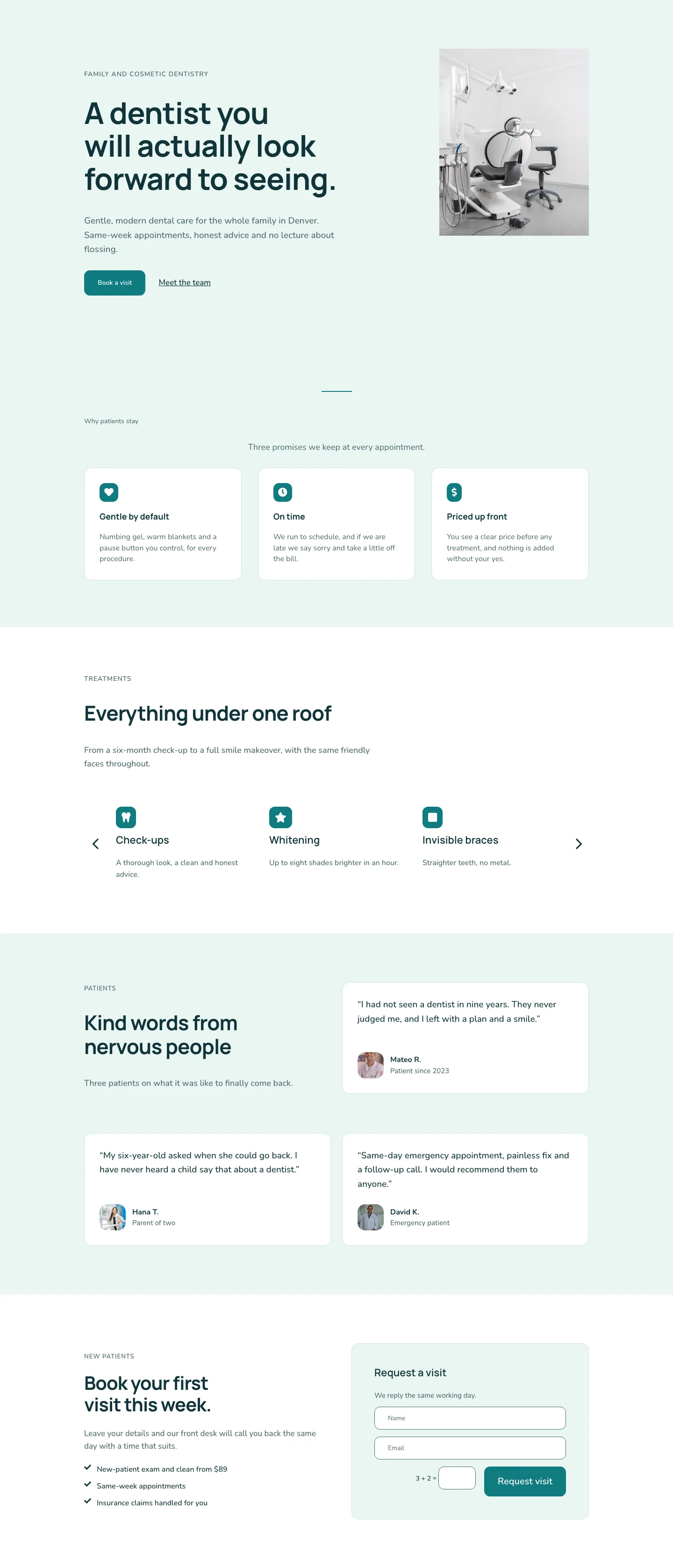
The layout opens with a two-column hero on a mint #eaf6f3 section ground. The left column carries sixteen of twenty-four flex units and stacks the full hierarchy: a 14px uppercase Nunito eyebrow in muted teal (#4c6a6e), an H1 in Manrope at 64px with textWrap: balance and a tight negative letter-spacing, a 19px Nunito lead paragraph constrained to 560px max-width, and a flex row pairing a teal #0f7c80 "Book a visit" button (12px-rounded, 28px horizontal padding) with a plain underlined "Meet the team" link. The right column (eight units) holds a single image module at a 4:5 portrait ratio with objectFit: cover, letting the photography fill the space without any overlay or caption. On mobile the row wraps into a vertical stack, the image drops below the copy block, and the H1 scales from 64px down to 36px; section padding steps from 104px to 48px so nothing feels cramped on a small screen.
Below the hero, three content sections alternate white and mint backgrounds to create a reading rhythm without any decorative imagery. The first uses a centered 2px solid teal rule above its section label to introduce the trust block: three white cards in a 1_3, 1_3, 1_3 row, each padded to 32px, bounded by a soft #cfe6e1 mint border at 16px radius, and led by a teal-background Font Awesome icon at 20px. On tablet the cards reflow to a two-plus-one wrap; on phone they stack single-column. The treatment section that follows keeps a centered full-width header (H2 at 44px Manrope, capped to 720px wide) above a native divi/group-carousel module configured for three slides on desktop, two on tablet, and one on phone, with arrow navigation on and dots off. Six treatment items populate the carousel: check-ups, whitening, invisible braces, children's dentistry, emergency care, and implants, each with a teal icon badge, an H3 at 22px, and a one-sentence description in 16px Nunito.
The testimonial section occupies a two-row grid on a mint ground. The first row pairs the section header ("Kind words from nervous people" at H2 44px Manrope) with a single testimonial card; the second row places two cards side by side. All three cards are white, 16px-rounded, and padded to 32px. Inside each card a 19px Nunito quote in near-black (#10343a) sits above a flex row: a 56px-wide 1:1 avatar image with rounded corners beside the patient name in Nunito 16px bold and a muted-teal role label at 15px. The closing section splits 50/50 on white: the left column holds an eyebrow, H2, body text, and three checkmark-icon bullet rows outlining the new-patient offer; the right column embeds the native Divi contact-form module inside a mint #eaf6f3 rounded card with 48px padding. The two form fields use 12px-rounded borders and the same teal submit button as the hero, so the booking affordance reads continuously from the very top of the page to the very bottom.
What’s inside
- Split hero with a 16/8 flex-column structure: 64px Manrope H1 with `textWrap: balance`, 19px Nunito lead capped to 560px, a dual-CTA row (teal button plus inline underlined link), and a 4:5 portrait image module that drops below the copy on mobile
- Three-promise trust cards: white 1/3-grid columns with 16px-rounded borders, `#cfe6e1` mint outline, 32px internal padding, and teal-background Font Awesome icon badges; reflows to 2-column on tablet and single-column on phone
- Native divi/group-carousel for the treatment menu: 3/2/1 slides across desktop/tablet/phone, arrow navigation, no dot indicator, housing six service items (check-ups, whitening, invisible braces, children's dentistry, emergency care, implants)
- Staggered testimonial grid across two rows: three white rounded cards with 19px quote text, 56px square avatar images with rounded corners, named patient attribution, and a muted-teal role label
- Embedded native divi/contact-form module with Name and Email fields, 12px-rounded borders and placeholder styling, inside a mint-tinted rounded card on the closing section
- Dual-font system throughout: Manrope (weight 700, negative letter-spacing) for all headings, Nunito for body copy, labels, captions, button text, and form inputs
- Three-breakpoint section padding applied consistently across all four sections: 104px desktop, 72px tablet, 48px phone
Who it’s for
This layout suits any dental practice replacing a generic WordPress theme with a clean, trust-forward home page. It works well for family dentists, cosmetic practices, and multi-treatment clinics that need to communicate a broad service menu without visual clutter. Web designers and agencies building sites for healthcare clients will find the structure straightforward to adapt: the promise cards, treatment carousel, and testimonial grid translate cleanly to physiotherapy, optometry, or GP practices with copy-only edits and no structural changes.
Customization tips
The entire palette is built on two hex values, #0f7c80 (teal) and #eaf6f3 (mint), used as section backgrounds, icon badge fills, button colors, card borders, and body text. Updating both in Divi 5's global presets will propagate changes across every instance. The hero H1 uses textWrap: balance and handles headlines up to about 70 characters comfortably; longer copy may need a manual <br> at tablet widths. The hero image expects a portrait-oriented photo at a 4:5 ratio (ideally 800 x 1000px or taller, subject centered); a landscape crop will letterbox visibly. Testimonial avatar images render at 56px square with objectFit: cover, so any headshot cropped to at least 200 x 200px works fine. The treatment carousel accepts additional slide groups beyond the included six. Form submissions route to whichever email address is set in the contact-form module's Email settings inside Divi 5.
How to install this layout
- Download the layout JSON file from this page.
- Open the target page in the Divi 5 builder.
- Open the portability panel (up/down arrows icon) and choose the Import tab.
- Upload the JSON. Tick “replace existing content” only for full-page imports.
- Check the page at desktop and mobile widths, then swap in your copy and images.
Full walkthrough with troubleshooting: How to Import a Divi 5 Layout.
Questions about Halcyon Dental — Minimal Dental Home Page for Divi 5
How does the treatment carousel behave on smaller screens?
The divi/group-carousel module is set to show three slides on desktop, two on tablet, and one on phone. Arrow navigation is on at all breakpoints; the dot indicator is off. Visitors tap the arrows to move through the six treatment items. You can change the slide counts in each breakpoint's module settings.
What aspect ratio does the hero image need, and where do I swap it?
The image module in the hero's right column uses a 4:5 aspect ratio with objectFit: cover. Open that Image module in the Divi 5 editor and replace the source URL. A portrait photo at least 800px wide works well; the module will trim top and bottom if the source image is wider than tall.
Can I add a fourth testimonial?
The testimonials span two separate Divi rows using a 1/2, 1/2 column structure. To add a fourth card, duplicate one of the existing testimonial columns in the second row and adjust the column widths to a 1/3 grid, or add a third row below following the same white-card pattern.
Does the contact form need a separate plugin to send email?
No. The layout uses the native divi/contact-form module, which submits through Divi's built-in form handler. Set the destination email address in the module's Email field in Divi 5. If you prefer a third-party form system such as Gravity Forms or WPForms, you can drop their shortcode into a Text module in the same card container.
What should I change first after importing?
Start with the hero: update the H1, eyebrow label, lead paragraph, and swap the hero image. Then update the three promise cards and the six carousel items with your actual services and copy. Leave the palette, font, and spacing settings as-is until the copy is in place, since the typography and line-height values are tuned for the text lengths in the template.
Are the section background colors tied to a global preset?
No. The mint `#eaf6f3` and white backgrounds are set directly on each section's decoration properties in this layout, not linked to a global preset by default. If you want palette-wide control, apply the colors to a Divi 5 global preset after import and re-assign each section, or define them as CSS custom properties in a child theme.
Which Divi version does this layout need?
Divi 5. The layout is generated natively for Divi 5 and validated against its real module structure before publication, so it imports clean into the current builder.
Can I use this layout on client websites?
Yes. Every download includes a commercial license covering unlimited sites you own or build for clients. Only reselling or redistributing the layout file itself is prohibited.
Included in these packs
More full landing pages
Browse all full landing pages
Kiln & Clay — Minimal Pottery_studio Visit Page for Divi 5
full_landing · pottery_studio · minimal

Kiln & Clay — Minimal Pottery_studio Our Story Page for Divi 5
full_landing · pottery_studio · minimal

Kiln & Clay — Minimal Pottery_studio Studio Membership Page for Divi 5
full_landing · pottery_studio · minimal

Kiln & Clay — Minimal Pottery_studio The Shop Page for Divi 5
full_landing · pottery_studio · minimal

Kiln & Clay — Minimal Pottery_studio Classes Page for Divi 5
full_landing · pottery_studio · minimal

Kiln & Clay — Minimal Pottery_studio Home Page for Divi 5
full_landing · pottery_studio · minimal