
Ironbound Strength Co. — Bold Fitness Contact Page for Divi 5
Reach Ironbound Strength Co. in Denver. Find gym hours, parking, and our contact form. Tours available daily — your first week is free, no card needed.
Rate this element
Download this section, free
- Divi 5 JSON, imports in seconds
- Commercial license included
- No account needed
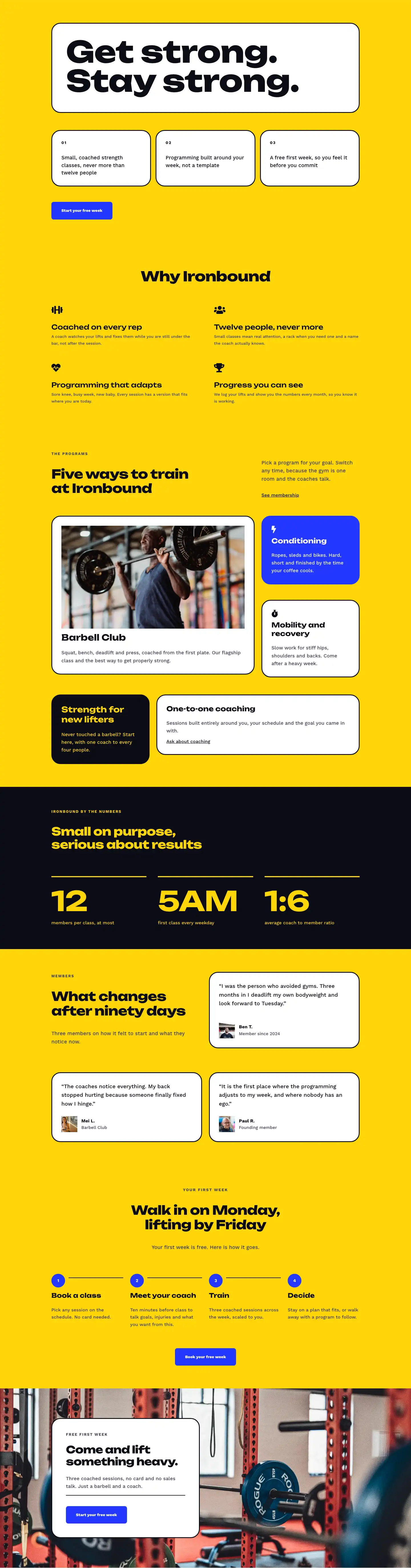
This page ships inside Ironbound: Strength & Conditioning Gym Theme (6 Pages), 6 coherent pages that share one brand.
Click to view the full page
Overview
Ironbound Strength Co. is a three-section contact page built around a tight, high-contrast palette of electric yellow (#ffd60a), deep blue (#2438ff), and near-black (#0c0c14). The page opens with a white intro bar that pairs a 52px Unbounded h1 ("Say hello", weight 800) with an 18px Work Sans subtitle in the adjacent column. A 1px bottom border in #0c0c14 separates this bar from the main content, giving the transition physical weight without a divider module. Section padding steps down in two stages (72px/64px desktop, 56px/48px tablet, 40px/36px phone), keeping proportions consistent across viewports.
The core action happens in the yellow section. An asymmetric two-column row (roughly 10/24 left, 14/24 right on desktop) places a 4:5 portrait image with a pill-top/rounded-bottom border radius (999px top, 32px bottom) beside the form column. Below the image, two icon-text groups built from native Divi icon and text modules display the address and opening hours, each using a Font Awesome glyph in #0c0c14 to anchor the row. The contact form sits inside a white rounded card (32px border radius, 3px solid #0c0c14 border) that floats on the yellow background. Field inputs carry a yellow fill with a dark 3px border so they read as part of the palette rather than a generic white embed. The submit button uses the electric blue with white text and swaps to white background with blue text on hover.
The FAQ section runs a two-column, six-question grid on white. Each item is defined by a 4px solid top border in #0c0c14 and an h3 in Unbounded 21px/700, a structural rule that keeps questions scannable without consuming vertical space. The section header uses flex alignment (alignItems: flex-end) to baseline-align a body-text sentence and an outline "Email us" button against the display heading on the left. The page closes on a full-bleed blue CTA strip with a 48px Unbounded h2, a white-on-blue CTA button with a dark hover state, and a three-word reassurance line in 14px Work Sans.
Responsive behavior is fully specified in the JSON at three breakpoints. The yellow section's row flex-wraps on tablet and stacks to a column on phone, with both columns expanding to 24/24 width. The portrait image becomes a full-width band above the contact info groups. The FAQ columns also stack on phone with row gaps tightening from 40px to 32px. The blue CTA strip switches from a horizontal space-between layout to a left-aligned column on phone, preserving readability of the heading at 32px.
What’s inside
- Four visually distinct sections: white intro bar with breadcrumb and h1, full-bleed yellow contact section, white FAQ grid, and a closing blue CTA strip
- Native Divi 5 contact-form module with three full-width contact-field children (Name, Email, Message), yellow-filled inputs, and a 3px dark border treatment
- 4:5 portrait image module with pill-top/rounded-bottom border radius (999px / 32px) and object-fit cover, inside a max-width 420px group
- Two Divi icon modules (Font Awesome map-pin and clock) wired to labelled address and opening-hours text groups below the image
- Six-question FAQ grid across two equal columns, each item separated by a 4px solid top border using Divi's native border decoration (no accordion plugin required)
- Full-bleed electric-blue CTA strip with a 48px Unbounded h2, a CTA button, and a supporting reassurance text module
- Three independent padding breakpoints per section (desktop, tablet, phone) with full column-stack behavior at phone width
- Two-typeface system throughout: Unbounded at weight 800 for all display headings, Work Sans for all body copy, labels, form fields, and buttons
Who it’s for
This layout fits any fitness or wellness brand that operates a physical location: independent gyms, strength-and-conditioning boxes, CrossFit affiliates, boxing studios, Pilates clubs, and personal training facilities. The bold yellow-and-blue palette and Unbounded display face communicate high energy without tipping into generic template territory, making it equally suitable for established clubs and new openings that want to project credibility fast. Freelance designers and WordPress agencies building fitness sites will appreciate that the contact form, address/hours info blocks, and FAQ are already populated with realistic placeholder content that maps directly to what a gym's visitors actually need to know.
Customization tips
The three accent colors operate as a system: yellow (#ffd60a) is the dominant mid-section background, blue (#2438ff) owns the CTA strip, and near-black (#0c0c14) anchors borders and primary text. Updating these three values in Divi's global color presets will retheme the entire page consistently. Unbounded is loaded via Google Fonts; swapping it for another heavy display face (Barlow Condensed, Anton, or similar) means changing the family value on four heading modules. The contact form fields are all set to 24/24 full width, so adding a fourth field (Phone, for example) drops in without restructuring the grid. The portrait image slot uses a 4:5 aspect ratio with object-fit cover, so any portrait crop at 1080x1350 or taller slots in without adjustment. Keep address and hours text to a single line each; the icon-row groups use nowrap flex and will clip longer strings on narrow viewports before the layout stacks at the phone breakpoint.
How to install this layout
- Download the layout JSON file from this page.
- Open the target page in the Divi 5 builder.
- Open the portability panel (up/down arrows icon) and choose the Import tab.
- Upload the JSON. Tick “replace existing content” only for full-page imports.
- Check the page at desktop and mobile widths, then swap in your copy and images.
Full walkthrough with troubleshooting: How to Import a Divi 5 Layout.
Questions about Ironbound Strength Co. — Bold Fitness Contact Page for Divi 5
What modules make up the contact form?
The form is a native Divi 5 contact-form module with three contact-field children (Name, Email, Message), all set to 24/24 full width. The surrounding card is a Divi group with 40px padding and a 32px border radius -- no shortcode, no third-party plugin.
Does the layout include a map embed?
No. The address is a text module paired with a Font Awesome map-pin icon module. If you need a live map, insert a Divi code module inside the left column of the yellow section; the flex column structure accommodates an extra block without restructuring.
How does the portrait image behave on mobile?
The image column expands to 24/24 (full width) on both tablet and phone, so the 4:5 portrait becomes a full-width band above the address and hours groups. Object-fit cover keeps the crop centered regardless of the container width.
What should I edit first after importing?
Start with the address, phone number, email address, and opening hours in the yellow section's two icon-text groups. Then update the contact form's recipient address in Divi > Theme Options > Email, and swap the portrait image source.
Are the FAQ items collapsible accordions?
No, they are static heading-and-text groups separated by a 4px top border -- clean and fast-loading with no JavaScript. If you need collapsible behavior, each group can be replaced with a Divi toggle module while keeping the same spacing and border style.
Can I use this layout for a non-gym fitness brand (personal trainer, online coach)?
Yes, with light edits. Remove or repurpose the address and hours blocks in the yellow section's left column -- replace them with a headshot and social links, or a short credentials list. The form and FAQ structure remain directly useful for any fitness business that fields inbound enquiries.
Which Divi version does this layout need?
Divi 5. The layout is generated natively for Divi 5 and validated against its real module structure before publication, so it imports clean into the current builder.
Can I use this layout on client websites?
Yes. Every download includes a commercial license covering unlimited sites you own or build for clients. Only reselling or redistributing the layout file itself is prohibited.
Included in these packs
More full landing pages
Browse all full landing pages
Kiln & Clay — Minimal Pottery_studio Visit Page for Divi 5
full_landing · pottery_studio · minimal

Kiln & Clay — Minimal Pottery_studio Our Story Page for Divi 5
full_landing · pottery_studio · minimal

Kiln & Clay — Minimal Pottery_studio Studio Membership Page for Divi 5
full_landing · pottery_studio · minimal

Kiln & Clay — Minimal Pottery_studio The Shop Page for Divi 5
full_landing · pottery_studio · minimal

Kiln & Clay — Minimal Pottery_studio Classes Page for Divi 5
full_landing · pottery_studio · minimal

Kiln & Clay — Minimal Pottery_studio Home Page for Divi 5
full_landing · pottery_studio · minimal