
Ironbound Strength Co. — Bold Fitness The Gym Page for Divi 5
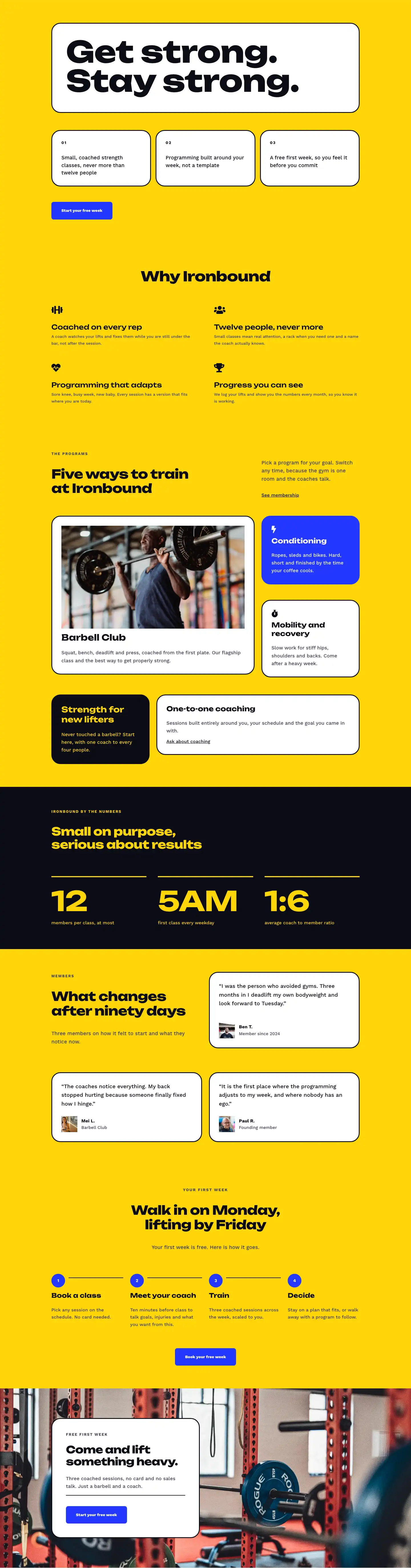
A bold, high-impact Divi 5 full landing page for a strength gym. Features a split hero, timeline story section, photo gallery, testimonial, and CTA — ready to customize for any fitness brand.
Rate this element
Download this section, free
- Divi 5 JSON, imports in seconds
- Commercial license included
- No account needed
This page ships inside Ironbound: Strength & Conditioning Gym Theme (6 Pages), 6 coherent pages that share one brand.
Click to view the full page
Overview
The layout opens on a #ffd60a electric-yellow section that pairs a full-bleed 4:5 portrait photograph on the left with a white card group on the right. The card is pulled 128px into the image column by a negative left margin, creating a deliberate overlap rather than a standard two-column split. It carries a 32px border-radius, a 3px solid near-black border (#0c0c14), and a zIndex of 5 to sit cleanly above the photograph. Inside the card: a 14px Work Sans eyebrow in uppercase, an Unbounded 800-weight H1 at 52px with textWrap: balance and -1px letter-spacing, a short body paragraph in Work Sans 18px, and a solid electric-blue (#2438ff) button. On tablet the card retreats to -96px; on phone the margin zeroes and the card stacks below the image with 72px of top padding absorbing the gap.
The second and fourth sections use a shared technique: a full-width gym photograph behind a 70% dark gradient (rgba(12,12,20,0.7) running across both directions), turning the yellow page into near-black zones. The story section uses this ground to run a four-column milestone grid spanning 2019 to 2025. Each milestone is a Divi group module topped by a 4px white border rule, then an Unbounded year numeral at 48px, a short H3, and a one-sentence caption. The grid collapses from 4 columns to 2 on tablet and 1 on phone, and the year numerals scale with it (48px to 44px to 36px), preserving the hierarchy at every width.
Section three returns to yellow for a six-image gallery. The heading row is intentionally asymmetric: 14/24 width for the H2 column and 10/24 for the body copy, baseline-aligned at the bottom of the row (alignItems: flex-end). Below it, three equal column modules each hold a group with two image modules at alternating aspect ratios (4:5 and 4:3). All images use objectFit: cover with explicit ratio constraints, producing a staggered mosaic rhythm without a masonry plugin and with fully predictable cropping regardless of source photo dimensions.
The page closes with a large-format testimonial on the dark gradient ground (a 120px Unbounded opening quote mark, a 42px pull-quote, a 64px white divider rule, and a two-line attribution block), then a #2438ff blue CTA strip. The strip uses a horizontal flex group: the H2 sits in a flexGrow/flexShrink container on the left, and a button-plus-micro-copy group sits on the right, collapsing to a left-aligned vertical stack on phone. The three section backgrounds (yellow, near-black, blue) never appear adjacently, so each zone reads as its own environment without additional decoration.
What’s inside
- Overlapping card hero: a white `group` module with a negative left margin (-128px desktop, -96px tablet, 0 mobile), 32px border-radius, and 3px solid border that bleeds into the adjacent image column at three responsive breakpoints
- Four-column milestone timeline (2019 to 2025) using nested Divi `group` modules with a 4px white top-border rule, Unbounded 48px year numerals, H3 titles, and one-sentence captions, collapsing to 2-column on tablet and 1-column on phone
- Six-image mosaic gallery across three equal columns with alternating 4:5 and 4:3 aspect ratios, all set to `objectFit: cover`, creating a staggered rhythm without a masonry plugin
- Two dark-overlay sections built with a gym photograph background plus a bidirectional gradient at rgba(12,12,20,0.7), used for the story section and testimonial section
- Large-format pull-quote block: 120px Unbounded opening mark, 42px quote text with `textWrap: balance`, a 64px white divider rule, and a two-line name-and-tenure attribution stack
- Horizontal split CTA strip on a #2438ff blue ground with a `flexGrow`/`flexShrink` heading group on the left and a button-plus-micro-copy group on the right, stacking to a vertical column on mobile
- Consistent two-typeface system throughout: Unbounded (800 weight) for all display headlines and milestone numerals, Work Sans (700 and 400) for all body text, eyebrows, and buttons
Who it’s for
Gyms, CrossFit boxes, strength clubs, and personal training studios building a first serious web presence. It also fits bootcamp operators, martial arts academies, and sport-specific performance centers that want a bold, high-contrast aesthetic without custom development. Freelancers and agencies building fitness sites will find the milestone timeline immediately reusable for any gym with a founding story, and the modular gallery section works for any brick-and-mortar business that converts through in-person visits. The two-button CTA structure (one in the hero, one in the closing strip) is designed around a tour-booking or trial-class flow rather than an e-commerce one.
Customization tips
The palette has three switching points: the yellow sections (#ffd60a), the dark gradient overlays (rgba(12,12,20,0.7)), and the CTA strip (#2438ff). Replacing yellow with a brand color works as long as the new color provides enough contrast for near-black (#0c0c14) text. The gradient opacity (0.7) can be lowered if your background photo has more contrast naturally, or raised to 0.85 for a moodier look.
The H1 in the hero card uses textWrap: balance at 52px. Keep it to four or five words or balance will push the headline to three lines and shorten the visible card height. Each milestone caption is written as a single sentence; longer copy will break the even column heights on tablet.
For gallery images, replace the Pexels sources with your own photography at the same ratios: 4:5 for the portrait slots, 4:3 for the landscape slots. Shoot or crop to at least 1200px wide on the short side. Anything above that will scale down cleanly because objectFit: cover fills the fixed-ratio containers regardless of exact dimensions.
How to install this layout
- Download the layout JSON file from this page.
- Open the target page in the Divi 5 builder.
- Open the portability panel (up/down arrows icon) and choose the Import tab.
- Upload the JSON. Tick “replace existing content” only for full-page imports.
- Check the page at desktop and mobile widths, then swap in your copy and images.
Full walkthrough with troubleshooting: How to Import a Divi 5 Layout.
Questions about Ironbound Strength Co. — Bold Fitness The Gym Page for Divi 5
Does the overlapping card in the hero actually hold up on mobile?
Yes. On phone the negative left margin is zeroed, both columns switch to `flexType: 24_24`, and the row direction becomes `column`. The card stacks below the image with 72px of top padding set at the phone breakpoint, so there is a clear visual gap between the photo and the card without any extra wrapper or spacer module.
What modules make up the four-column milestone grid?
An outer `group` module with `display: grid` and `gridColumnCount: 4` in its decoration settings holds four child `group` modules. Each child group contains a `text` module (the year in Unbounded 48px), a `heading` module (the H3 milestone title), and a second `text` module (the caption). The 4px white top-border is set directly on each child group's border decoration.
How does the six-image gallery create a mosaic pattern without a masonry plugin?
Three equal `column` modules in a 1/3, 1/3, 1/3 row each contain a `group` with two `image` modules. The images in the first column are sized 4:5 then 4:3; the second column reverses to 4:3 then 4:5; the third follows the same first-column pattern. Because every image uses `objectFit: cover` with a fixed aspect ratio, the heights are locked and the stagger is purely visual, no JavaScript layout engine required.
The pull-quote section uses a very large opening quotation mark. Will it shift layout on mobile?
The mark is a `text` module set to 120px Unbounded with `lineHeight: 0.8em`, which keeps its block height small relative to its visual size. On tablet it drops to 96px and on phone to 80px, so it scales with the section padding (104px desktop, 48px phone) and does not push the quote text off-screen.
Can I add more milestones to the timeline grid without breaking the layout?
Yes. Duplicate any child `group` inside the outer grid group. The outer group is set to `gridColumnCount: 4` on desktop, `gridColumnCount: 2` on tablet, and `gridColumnCount: 1` on phone. Adding a fifth milestone creates a second row automatically on desktop. If you prefer 3 or 5 columns, change the `gridColumnCount` value in the outer group's decoration layout settings.
Do I need to install Unbounded and Work Sans before importing this layout?
No. Both are Google Fonts. Divi 5 loads them automatically when the font family is set in a module's decoration settings, which is already the case throughout this layout. The fonts will resolve on the first page render after import.
Which Divi version does this layout need?
Divi 5. The layout is generated natively for Divi 5 and validated against its real module structure before publication, so it imports clean into the current builder.
Can I use this layout on client websites?
Yes. Every download includes a commercial license covering unlimited sites you own or build for clients. Only reselling or redistributing the layout file itself is prohibited.
Included in these packs
More full landing pages
Browse all full landing pages
Kiln & Clay — Minimal Pottery_studio Visit Page for Divi 5
full_landing · pottery_studio · minimal

Kiln & Clay — Minimal Pottery_studio Our Story Page for Divi 5
full_landing · pottery_studio · minimal

Kiln & Clay — Minimal Pottery_studio Studio Membership Page for Divi 5
full_landing · pottery_studio · minimal

Kiln & Clay — Minimal Pottery_studio The Shop Page for Divi 5
full_landing · pottery_studio · minimal

Kiln & Clay — Minimal Pottery_studio Classes Page for Divi 5
full_landing · pottery_studio · minimal

Kiln & Clay — Minimal Pottery_studio Home Page for Divi 5
full_landing · pottery_studio · minimal