
Ironbound Strength Co. — Bold Fitness Membership Page for Divi 5
Compare drop-in, unlimited, and Coach+ membership plans at Ironbound Strength Co. No contract, free first week, coached classes included. Join today.
Rate this element
Download this section, free
- Divi 5 JSON, imports in seconds
- Commercial license included
- No account needed
This page ships inside Ironbound: Strength & Conditioning Gym Theme (6 Pages), 6 coherent pages that share one brand.
Click to view the full page
Overview
The layout opens with a white header section that divides into two unequal columns: the left (16/24 flex units on desktop) carries a breadcrumb and an H1 set in Unbounded at 52px, 800 weight, and -1px letter-spacing, scaling down to 40px on tablet and 32px on phone via Divi 5's per-breakpoint font values. The right column holds an 18px Work Sans tagline about no contracts or joining fees. A 1px bottom border in near-black (#0c0c14) closes the section edge cleanly. On phone the row overrides to flexDirection: column, so the tagline drops beneath the title rather than sitting beside it.
The core pricing section uses a #ffd60a signal-yellow background that reappears on the comparison table section, creating a high-energy alternating rhythm without any photography. Three card columns (each 1/3 of the row, with 32px rounded borders and 3px solid strokes) carry the Drop-in, Unlimited, and Coach+ tiers. The middle card fills with electric blue (#2438ff) and includes a 'Most popular' badge built from a nested divi/group with a white background, 12px radius, and compressed padding. Every card contains a divi/text price block set in Unbounded at 44px, an internal group with a 2px top border acting as a divider, a stack of icon-plus-text feature rows using divi/icon (Font Awesome solid check at 15px) alongside divi/text, and a CTA button with a 3px stroke, 8px radius, and a color-swap hover state. Cards use flexGrow/flexShrink sizing so all three stretch to equal height regardless of content length. On tablet and phone each card column expands to full width and the row stacks vertically.
The comparison table immediately below uses Divi 5's native CSS grid (4 columns, 1px column and row gaps set on the outer group, which carries a #0c0c14 background to produce the grid lines). Each cell is a divi/group with its own yellow or white background, so the dark gap between them reads as a border without adding a border to individual cells. The table maps five features across all three plans using divi/text labels and divi/icon checks, followed by a single 'Join today' button filled with the blue from the hero card.
The FAQ section pairs a two-column header row (H2 in Unbounded at 40px aligned to the bottom of the row on the left, a short contact prompt and ghost 'Email the gym' button on the right) with six questions spread across two equal columns below. Each question group carries a 4px top border in near-black, an H3 in Unbounded at 21px, and a Work Sans answer at 16px with 1.6em line height. The page closes on a full-bleed electric-blue band with the H2 'Not sure yet? Train free for a week.' in Unbounded at 48px and a white-fill 'Start your free week' button with a color-swap hover to dark.
What’s inside
- Two-column header section with breadcrumb navigation, Unbounded H1 (52px desktop, responsive to 32px phone), and inline Work Sans value-prop text in a separate column
- Three pricing cards (Drop-in, Unlimited, Coach+) in equal-width columns with 32px rounded borders, 3px solid strokes, and a 'Most popular' badge on the highlighted middle card built entirely from nested divi/group and divi/text modules
- Font Awesome checkmark icon plus text feature rows inside each card, separated from the price block by a 2px internal divider line using a divi/group top border
- CTA buttons on each card with distinct hover states: ghost-to-dark on the white cards and fill-to-inverted on the blue card
- Full-width CSS-grid comparison table (4 columns, 1px gaps rendered via a dark outer group background) mapping all three plans across five feature rows using divi/text labels and divi/icon checks
- Six-question FAQ across two equal columns, each Q separated by a 4px top border and typeset in Unbounded H3 with Work Sans body text, preceded by a split header row with a contact CTA button
- Closing electric-blue CTA band with Unbounded 48px headline, white-fill button, and supporting micro-copy line, all fully responsive with three-breakpoint padding and heading-size overrides throughout
Who it’s for
This layout suits fitness studio owners, gym operators, and personal training businesses that sell monthly memberships: CrossFit boxes, strength and conditioning gyms, boutique fitness studios, yoga schools, and martial arts academies will all find the three-tier structure maps directly onto their drop-in, recurring, and premium coaching offers. The comparison grid and FAQ pattern also transfers cleanly to any subscription service business (coworking spaces, music lesson studios, swim clubs) that needs to explain tiered access side by side. Divi freelancers and web designers building for health and wellness clients will find the page ready to adapt with only copy and palette changes.
Customization tips
The entire visual identity comes from three hex values: #ffd60a for the section backgrounds and comparison grid cells, #2438ff for the hero pricing card and the closing CTA band, and #0c0c14 for all borders and body text. Updating these three values in Divi 5's global color presets will re-skin the page without touching individual modules. Unbounded handles every display heading; it can be swapped for any condensed or geometric typeface. Work Sans handles body copy at sizes between 13px and 18px, so a replacement should be similarly legible at small sizes.
Plan names are one or two words and description lines run under ten words by design. Resist adding explanatory sentences inside the cards and put that detail in the FAQ rows instead, where the Unbounded H3 and 1.6em body text give answers room to breathe. The comparison grid uses a fixed gridColumnCount: 4 value, so adding a fourth plan tier means updating that value and inserting new cell groups in the correct order. This layout ships with no hero photography; the yellow and blue section backgrounds carry the visual weight, so any imagery you introduce should go in a new section rather than replacing an existing background color.
How to install this layout
- Download the layout JSON file from this page.
- Open the target page in the Divi 5 builder.
- Open the portability panel (up/down arrows icon) and choose the Import tab.
- Upload the JSON. Tick “replace existing content” only for full-page imports.
- Check the page at desktop and mobile widths, then swap in your copy and images.
Full walkthrough with troubleshooting: How to Import a Divi 5 Layout.
Questions about Ironbound Strength Co. — Bold Fitness Membership Page for Divi 5
How do the three pricing cards stack on mobile?
Each card column has explicit tablet and phone sizing values set to 24/24 flex units, and the row uses a `flexDirection: column` override on phone. The cards stack vertically in the order Drop-in, Unlimited, Coach+, each running full width with the original 32px border radius and internal padding intact.
What modules make up the feature rows inside each card?
Each feature row is a divi/group set to flex-row with a 12px column gap, containing a divi/icon (Font Awesome solid check, 15px) and a divi/text block. These rows sit inside a parent group that has a 2px top border, which creates the visual divider between the price block and the feature list.
How is the 'Most popular' badge on the Unlimited card built?
It is a divi/group with a white background, 12px border-radius, and 6px vertical plus 12px horizontal padding wrapping a single divi/text module. The badge group is nested inside a flex-row group at the top of the Unlimited column, sitting inline with the plan name before the price block.
How does the comparison table produce its grid lines without CSS borders on each cell?
The outer group is set to `display: grid` with 4 columns, 1px column and row gaps, and a background color of #0c0c14. Each cell group has its own yellow or white background, so the 1px dark band visible between cells is the outer group showing through the gaps rather than a border on any individual cell.
Can I add more FAQ questions without breaking the two-column layout?
Yes. Each column contains three divi/group units and the two columns share a flex row that collapses to a single column on phone. To add a question, duplicate any group inside either column and update the H3 heading and body text. Keep questions roughly balanced between the two columns so neither side is noticeably longer than the other on desktop.
Does the layout include any images or background photos?
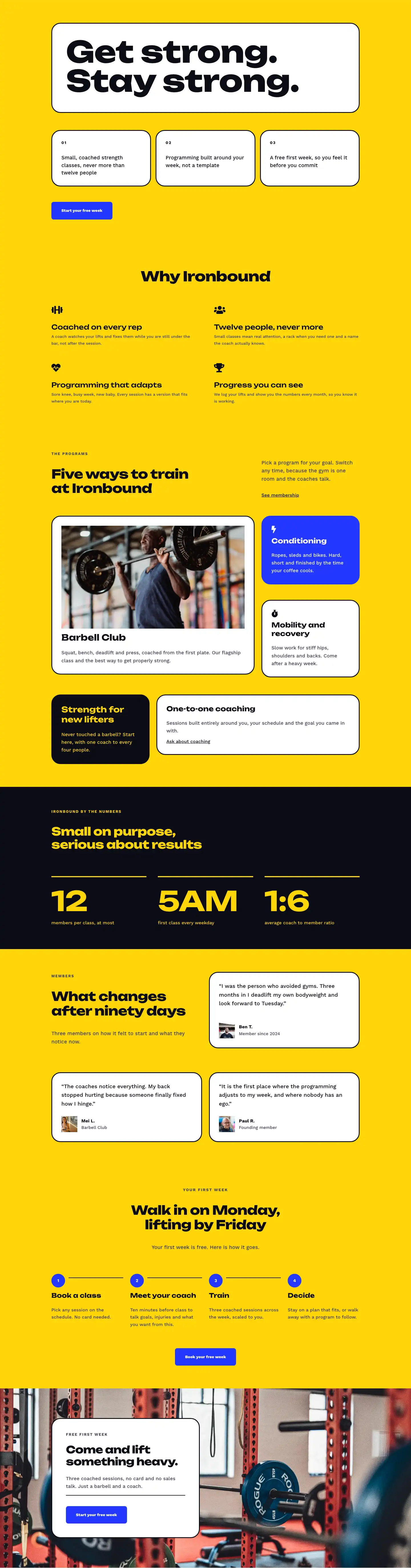
No. Every section uses a solid background color: white, signal yellow (#ffd60a), or electric blue (#2438ff). There are no image modules or background photos in the JSON. If you want to introduce photography, add a new section with an image or background image rather than replacing an existing color, since the current contrast ratios are calibrated around solid fills.
Which Divi version does this layout need?
Divi 5. The layout is generated natively for Divi 5 and validated against its real module structure before publication, so it imports clean into the current builder.
Can I use this layout on client websites?
Yes. Every download includes a commercial license covering unlimited sites you own or build for clients. Only reselling or redistributing the layout file itself is prohibited.
Included in these packs
More full landing pages
Browse all full landing pages
Kiln & Clay — Minimal Pottery_studio Visit Page for Divi 5
full_landing · pottery_studio · minimal

Kiln & Clay — Minimal Pottery_studio Our Story Page for Divi 5
full_landing · pottery_studio · minimal

Kiln & Clay — Minimal Pottery_studio Studio Membership Page for Divi 5
full_landing · pottery_studio · minimal

Kiln & Clay — Minimal Pottery_studio The Shop Page for Divi 5
full_landing · pottery_studio · minimal

Kiln & Clay — Minimal Pottery_studio Classes Page for Divi 5
full_landing · pottery_studio · minimal

Kiln & Clay — Minimal Pottery_studio Home Page for Divi 5
full_landing · pottery_studio · minimal