
Ironbound Strength Co. — Bold Fitness Programs Page for Divi 5
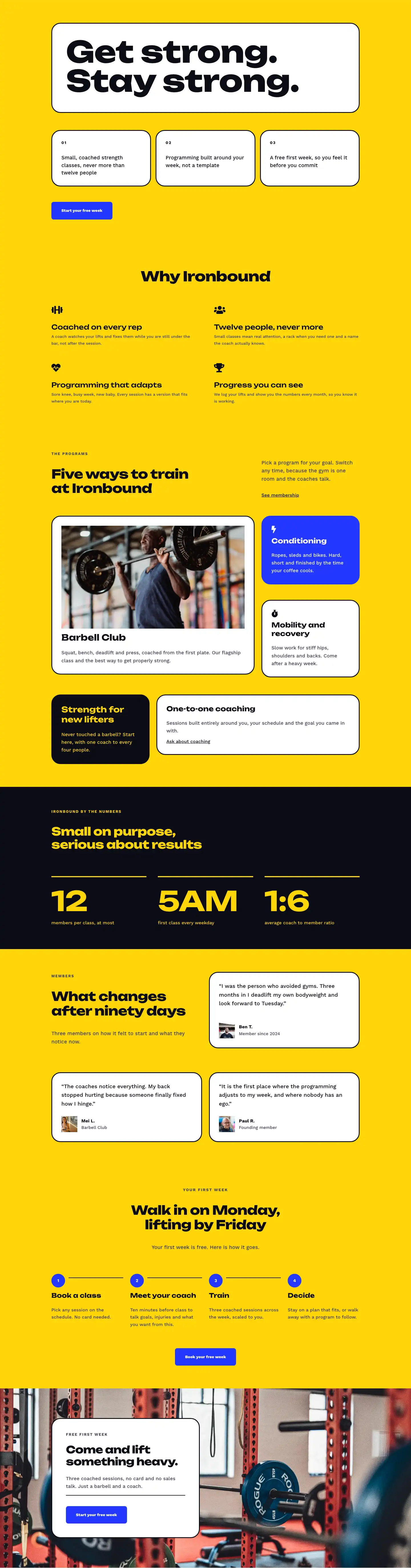
Three coached group programs under one roof: Barbell Club, Conditioning and Mobility. Capped at 12 per class. No joining fee. First week free.
Rate this element
Download this section, free
- Divi 5 JSON, imports in seconds
- Commercial license included
- No account needed
This page ships inside Ironbound: Strength & Conditioning Gym Theme (6 Pages), 6 coherent pages that share one brand.
Click to view the full page
Overview
The layout opens with a full-bleed hero: a weight-room photo (object-fit cover, centered) sits behind a 70% dark gradient overlay so the headline stays legible without a color wash. The H1 "Programs" is set in Unbounded at 56px, 800 weight, and -1px letter-spacing — a typographic choice that signals a gym with a point of view, not a corporate wellness portal. A Work Sans breadcrumb in 13px uppercase anchors visitors in the site hierarchy. Desktop padding runs 120px top and 104px bottom, stepping down to 64px/56px on phones, so the hero never crowds smaller screens.
The second section, on the signature yellow (#ffd60a), walks through three programs in alternating image-text rows. Each pairs a 4:3 aspect-ratio Pexels photo (object-fit: cover, minimum 1600px wide) with a numbered eyebrow (01/02/03 in 13px uppercase Work Sans), an Unbounded H3 at 32px, an 18px/1.6 body paragraph, and an underlined schedule link. The Conditioning row sets order:-1 on its image column for phones, so the photo always leads its description regardless of which side it occupies on desktop. Text groups are max-width-constrained at 480-520px so lines never stretch across the full column on wide monitors.
The inclusions section switches to white and uses an asymmetric column split: a narrow left column (8 of 24 units) holds the H2 headline and a supporting sentence; a wide right column (16 of 24) renders eight membership perks in a two-column CSS grid on desktop that collapses to a single column on phones. Each perk is a flex row pairing a Font Awesome checkmark icon at 18px with 17px Work Sans text, giving the list clear vertical rhythm without a ul element.
The comparison section returns to yellow with two equal-height rounded cards (32px radius, 3px solid border). The white card lists four "training alone" failure modes with X icons in muted grey (#3d3d52); the near-black (#0c0c14) card mirrors them with four coached-gym benefits in yellow, closing with an inline CTA button. The page ends on a full-width electric-blue (#2438ff) band: an Unbounded H2 and primary button sit in a flex row on desktop with a reassuring micro-copy line beneath the button, stacking to a single column on phones.
What’s inside
- Full-bleed hero section with gym photo background, 70% dark gradient overlay, Unbounded 800-weight H1, and responsive breadcrumb navigation
- Three numbered program rows (Barbell Club, Conditioning, Mobility) with alternating image/text columns, 4:3 locked aspect-ratio images, and individual schedule links
- Mobile column-order reversal on the Conditioning row (order:-1) so the photo always leads its description on phones regardless of desktop column position
- Two-column CSS grid inclusions list (8 perks) built from divi/icon and divi/text flex pairs, collapsing to a single column on phones
- Side-by-side comparison cards with 32px rounded corners and 3px solid borders: a white negatives card versus a near-black positives card with an inline CTA button
- Full-width electric-blue CTA band with flex-row heading-and-button layout, hover states on the button, and reassurance micro-copy
- Systematic responsive type scaling across all heading levels: H1 56/42/32px, H2 44/36/30px, H3 32/28/24px, CTA H2 48/40/32px
Who it’s for
Fitness studios, CrossFit-style gyms, and small-group training facilities that sell distinct program types rather than open-access floor time. Personal trainers launching a formal programs page, boutique gyms repositioning around coached classes, and gym owners competing against budget chains or home-gym culture will get the most from the comparison card section. The numbered program rows also translate cleanly for martial arts academies, yoga studios with a multi-modality schedule, or any fitness operator whose offer splits into three named tracks.
Customization tips
The palette has two primary roles and one accent. Yellow (#ffd60a) drives the section 2 and 4 backgrounds, the hero base, card borders, icon colors, and button fill. Near-black (#0c0c14) handles the contrast card background and most headline text. Swapping both to your brand colors propagates through all those elements in one pass if you use global presets. The electric blue (#2438ff) on the final CTA band is independent of those two; replace it with a darker shade of your primary for contrast without touching the button.
Each program description is written for two to three sentences (roughly 15 to 25 words). Longer copy will push the text column taller than its image neighbor on desktop, creating an unbalanced row. The 4:3 locked aspect ratio on all three program images means replacements should be pre-cropped to that ratio before upload; portrait or square shots will center-clip, losing the top or bottom of the frame. Inclusions list items work best at four to six words per line; longer labels wrap awkwardly inside the two-column grid layout.
How to install this layout
- Download the layout JSON file from this page.
- Open the target page in the Divi 5 builder.
- Open the portability panel (up/down arrows icon) and choose the Import tab.
- Upload the JSON. Tick “replace existing content” only for full-page imports.
- Check the page at desktop and mobile widths, then swap in your copy and images.
Full walkthrough with troubleshooting: How to Import a Divi 5 Layout.
Questions about Ironbound Strength Co. — Bold Fitness Programs Page for Divi 5
How do the three program rows reorder on phones?
All rows stack to a single column. The Conditioning row has an explicit order:-1 on its image column, so that photo appears above the text on phones even though it sits on the right on desktop. The Barbell Club and Mobility rows follow natural DOM order, image then text, which already reads correctly on mobile.
What image dimensions work best for the three program photos?
All three images use a locked 4:3 aspect ratio with object-fit: cover. Supply photos at least 1600px wide. Landscape shots at 1600x1200px are ideal. Portrait or square images will be center-cropped vertically, which typically removes the top and bottom of the frame.
How is the inclusions list built — is it a real list element or individual modules?
It is eight individual divi/group modules, each containing a divi/icon (Font Awesome fa-check at 18px) and a divi/text in a flex row. They sit inside a parent divi/group set to display: grid with two columns on desktop and one column on phones. There is no ul or li involved.
Can I add a fourth program without breaking the alternating layout?
Yes. Duplicate any existing image-text row and update the eyebrow number, H3 name, body copy, and schedule link. Keep the description to two or three sentences to stay visually consistent with the existing three rows. The alternating side logic is set per-row, so you will also want to decide whether the new row places the image on the left or right.
What is the fastest starting point for adapting this to a different gym?
Replace the hero background photo first, since it sets the mood for the entire page. Then update the three program names, descriptions, and schedule link URLs. The comparison card copy in section 4 is the next priority rewrite because it references Ironbound specifically and will read oddly under a different brand name.
Do the rounded corners and card borders hold up on tablets and phones?
Yes. The 32px border-radius and 3px solid border are set at the desktop breakpoint with no overrides at tablet or phone, so they persist at all sizes. The padding inside each card steps down from 44px to 28px on phones to maintain breathing room at smaller widths.
Which Divi version does this layout need?
Divi 5. The layout is generated natively for Divi 5 and validated against its real module structure before publication, so it imports clean into the current builder.
Can I use this layout on client websites?
Yes. Every download includes a commercial license covering unlimited sites you own or build for clients. Only reselling or redistributing the layout file itself is prohibited.
Included in these packs
More full landing pages
Browse all full landing pages
Kiln & Clay — Minimal Pottery_studio Visit Page for Divi 5
full_landing · pottery_studio · minimal

Kiln & Clay — Minimal Pottery_studio Our Story Page for Divi 5
full_landing · pottery_studio · minimal

Kiln & Clay — Minimal Pottery_studio Studio Membership Page for Divi 5
full_landing · pottery_studio · minimal

Kiln & Clay — Minimal Pottery_studio The Shop Page for Divi 5
full_landing · pottery_studio · minimal

Kiln & Clay — Minimal Pottery_studio Classes Page for Divi 5
full_landing · pottery_studio · minimal

Kiln & Clay — Minimal Pottery_studio Home Page for Divi 5
full_landing · pottery_studio · minimal