
Larkfield Day School — Editorial Education About Page for Divi 5
A warm, editorial about page layout for a small independent day school. Features a timeline, staff grid, head's letter, school values, and a visit CTA — built for Divi 5.
Rate this element
Download this section, free
- Divi 5 JSON, imports in seconds
- Commercial license included
- No account needed
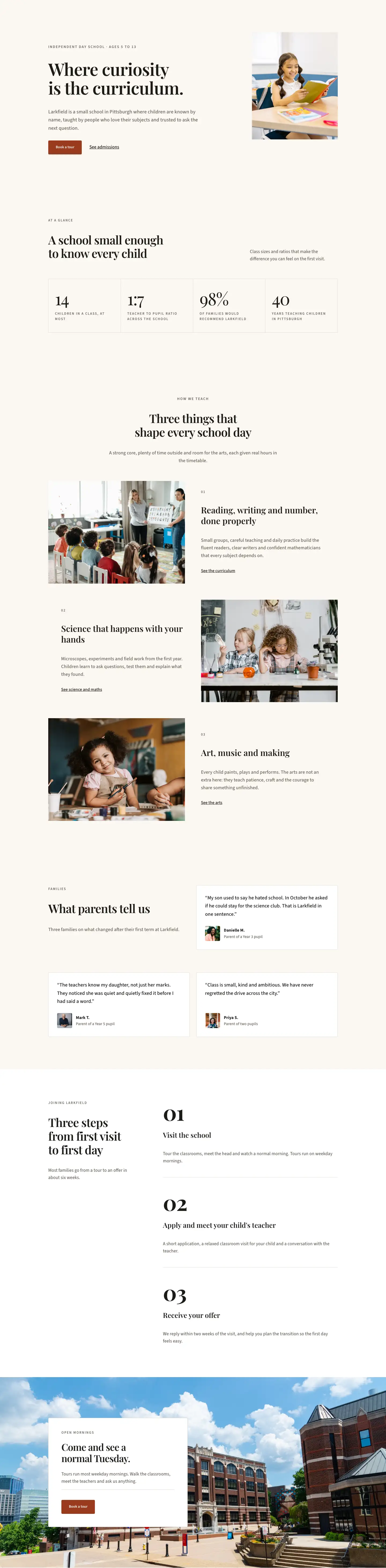
This page ships inside Larkfield: Private School & Education Theme (6 Pages), 6 coherent pages that share one brand.
Click to view the full page
Overview
The Larkfield layout is structured as six sequential sections, each with a distinct background and editorial role that builds an institutional story from introduction through to a tour booking CTA. The opening hero sits on a near-black #1c1a17 ground with a centered H1 in Playfair Display at 60px desktop (scaling to 34px on mobile via three explicit breakpoints), a 13px uppercase Source Sans 3 eyebrow above it, and a 72px centered divider rule below. A curve-shaped section divider in warm cream #faf7f2 transitions the hero into the body content at 100px tall on desktop, stepping down to 44px on mobile, creating an organic bottom edge rather than a flat cut.
The palette stays consistent across all six sections: near-black ink (#1c1a17) and warm cream (#faf7f2) alternate as section backgrounds, with pure white (#ffffff) reserved exclusively for the principal's letter section, giving that content additional visual isolation. A terracotta accent (#9a3b1f) appears only on the final CTA button. The history section uses a full-bleed photograph covered by a uniform 72% dark overlay applied at both gradient stops, so the dimming is even across the entire frame rather than directional, keeping Playfair year numerals (48px, #fbf6ec) legible at any viewport width. The closing section also uses a full-bleed photo but carries no overlay at all, relying instead on a floating white card with 48px internal padding and a 1px #e3dccf border to hold the CTA copy.
Typography does most of the compositional work throughout. Section label lines are consistently set in Source Sans 3 at 13px, 2px letter-spacing, and uppercase, an editorial grammar that marks each new topic without adding decorative icons or graphic elements. The four-column milestone timeline uses Playfair Display at 48px for the year numerals and 20px for the event titles, each card separated from its label by a 2px top border rather than a container box, keeping the grid open and print-like. The values section near the end uses numbered rows (01 through 04) separated by 2px horizontal dividers across the full column width, a format that gives four core principles the structure of a printed manifesto rather than a standard bullet list.
Every section carries explicit responsive overrides at tablet and phone, set directly in each module's decoration rather than inherited from Divi's global settings. The staff portrait grid drops from four columns to two on tablet and one on mobile with rowGap adjusted at each step. Section padding is specified independently at all three breakpoints throughout: the hero runs 112px top on desktop and compresses to 64px on mobile. Font sizes, flex direction, and grid column counts all have mobile-specific values, so the layout renders predictably at any screen width without relying on theme defaults.
What’s inside
- Dark editorial hero section: centered Playfair Display H1 (60px/46px/34px), 13px uppercase Source Sans 3 eyebrow, 72px centered divider rule, and a curve-style bottom section divider (100px/70px/44px) that flows into the cream body background
- Four-column milestone timeline on a full-bleed photo with a uniform 72% dark overlay: 48px Playfair year numerals with 2px top-border cards and single-sentence event descriptions, collapsing to 2 columns on tablet and 1 on mobile
- Staff portrait grid with four 1:1 square cover-fit images at full column width, each followed by a 2px top-bordered name and role group using Playfair H3 and uppercase Source Sans labels; responsive from 4 to 2 to 1 column
- Principal's letter section on a white background: a uniquely shaped portrait (999px top radius, 32px bottom radius) paired with 22px Playfair Display running body text and an italic italic sign-off
- Numbered values manifesto (01-04): each row uses a fixed 64px index column, a flex-grow Playfair H3 title (34px/30px/24px), and a capped 360px body column, all separated by 2px full-width horizontal dividers on the dark background
- Floating CTA card over a no-overlay full-bleed photo: white background, 4px corner radius, 1px `#e3dccf` border, 48px padding at all sides, a horizontal divider above a terracotta `#9a3b1f` button
- Full three-breakpoint responsive settings on every section: padding, font sizes, column structure, and flex direction all explicitly declared at desktop, tablet, and phone
Who it’s for
This layout suits independent and private schools, prep schools, Montessori schools, and small specialist academies that want to convey warmth, tradition, and intentional smallness rather than institutional scale. It works equally well for tutoring centers, enrichment programs, and after-school academies that need to communicate a relationship-based teaching philosophy. The editorial tone — serif headline typefaces, historical milestones, a principal's personal letter — fits any educational brand that leads with heritage and trust rather than ed-tech credentials. Web designers building school sites for clients will find the six-section structure straightforward to adapt across different school names, staff rosters, and founding stories.
Customization tips
To shift the palette, update the two values that recur most: #1c1a17 (all dark section backgrounds and ink-colored type) and #9a3b1f (the CTA button). The button color is set on both the color and hover.color properties of the button module's background decoration, so update both. Changing those two values will transform the layout's tone while keeping all contrast ratios intact.
Staff portraits use a 1:1 square aspect ratio enforced in the image module's sizing decoration with objectFit: cover, so any square or near-square headshot at 800x800px or larger will center-crop cleanly. The featured principal portrait on the letter section uses a 4:5 ratio, so use a portrait-oriented photo there for best results.
Milestone cards and values rows are intentionally brief: milestone bodies hold one sentence, values rows hold one to two sentences. Keep those tight. The principal's letter is the only section designed to hold longer text (22px Playfair body, three paragraphs in the demo), so that is where you have room to expand without disrupting the pacing of the rest of the page.
How to install this layout
- Download the layout JSON file from this page.
- Open the target page in the Divi 5 builder.
- Open the portability panel (up/down arrows icon) and choose the Import tab.
- Upload the JSON. Tick “replace existing content” only for full-page imports.
- Check the page at desktop and mobile widths, then swap in your copy and images.
Full walkthrough with troubleshooting: How to Import a Divi 5 Layout.
Questions about Larkfield Day School — Editorial Education About Page for Divi 5
Can I swap the full-bleed photo in the history section?
Yes. The photo is referenced by URL in the section's background decoration alongside the gradient overlay. Replace the Pexels URL with any landscape image at 1920px wide or larger. The 72% dark overlay is a CSS gradient applied on top of the image at both 0% and 100% stops, so the photo's own brightness does not affect text legibility.
How does the staff grid behave at smaller screen sizes?
The grid uses Divi's flexColumnStructure set to equal-columns_4 on desktop. Each staff column has flexType set to 12_24 on tablet (half width, producing a 2x2 arrangement) and 24_24 on mobile (full width, stacking all four cards vertically). These overrides are set in the column decoration, not via custom CSS.
What controls the unusual shape on the principal's portrait?
The border radius is set directly on the image module: topLeft and topRight are both 999px (creating a pill or arch at the top) while bottomRight and bottomLeft are 32px (a soft square bottom). To make it a plain rectangle, set all four values to 0px. To make it fully circular, set all four to 999px and ensure the image uses a 1:1 aspect ratio.
Can I add a fifth milestone to the history timeline?
The timeline is a divi/group using CSS grid with gridColumnCount set to 4 on desktop. A fifth card will wrap to a second row. If you want five or more milestones in a single row, increase gridColumnCount to 5 on desktop and adjust the tablet value (currently 2) to match your preference.
Which fonts does this layout use, and how are they loaded?
The layout uses two typefaces: Playfair Display (all headings, the principal's letter body text, and the milestone year numerals) and Source Sans 3 (all eyebrow labels, supporting body copy, and role text). Both are Google Fonts loaded through Divi's built-in font system — no manual enqueuing or external stylesheet links are needed.
Which Divi version does this layout need?
Divi 5. The layout is generated natively for Divi 5 and validated against its real module structure before publication, so it imports clean into the current builder.
Can I use this layout on client websites?
Yes. Every download includes a commercial license covering unlimited sites you own or build for clients. Only reselling or redistributing the layout file itself is prohibited.
Included in these packs
More full landing pages
Browse all full landing pages
Kiln & Clay — Minimal Pottery_studio Visit Page for Divi 5
full_landing · pottery_studio · minimal

Kiln & Clay — Minimal Pottery_studio Our Story Page for Divi 5
full_landing · pottery_studio · minimal

Kiln & Clay — Minimal Pottery_studio Studio Membership Page for Divi 5
full_landing · pottery_studio · minimal

Kiln & Clay — Minimal Pottery_studio The Shop Page for Divi 5
full_landing · pottery_studio · minimal

Kiln & Clay — Minimal Pottery_studio Classes Page for Divi 5
full_landing · pottery_studio · minimal

Kiln & Clay — Minimal Pottery_studio Home Page for Divi 5
full_landing · pottery_studio · minimal