
Larkfield Day School — Editorial Education Academics Page for Divi 5
Explore Larkfield Day School's academic programme for ages 5-13. Four curriculum strands, specialist teachers, small classes, and a teaching approach that moves with every child.
Rate this element
Download this section, free
- Divi 5 JSON, imports in seconds
- Commercial license included
- No account needed
This page ships inside Larkfield: Private School & Education Theme (6 Pages), 6 coherent pages that share one brand.
Click to view the full page
Overview
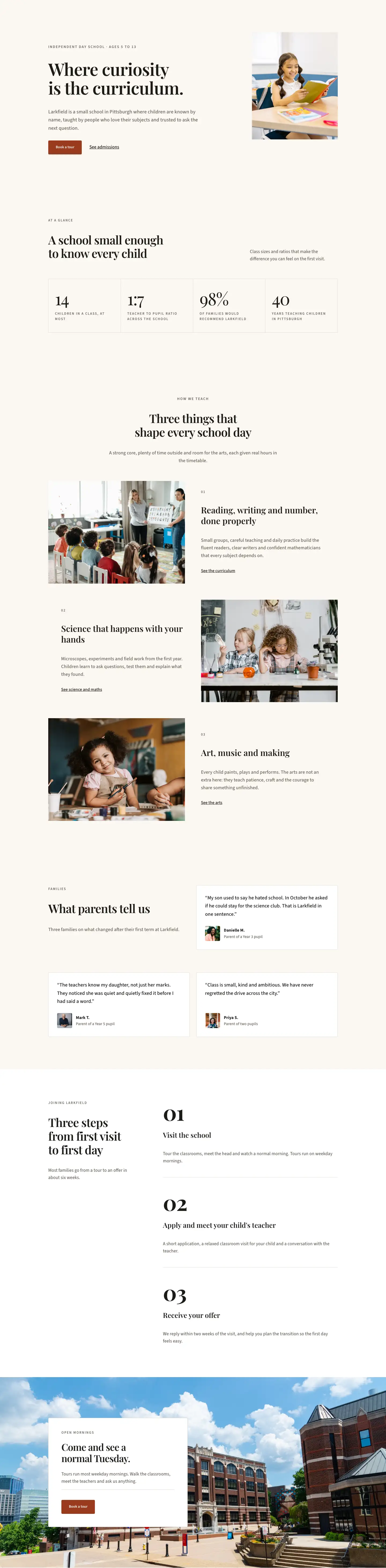
Larkfield Day School Academics is a five-section editorial page built around warm parchment tones (#faf7f2), near-black ink (#1c1a17), and a burnt terracotta accent (#9a3b1f) that appears only in the closing call-to-action section. The type pairing is deliberate: Playfair Display at 44–56 px carries every section headline, lending the page the weight of a printed prospectus, while Source Sans 3 handles all supporting text, overlines, and interface chrome. Every heading uses negative letter-spacing and textWrap: balance so multi-line titles break evenly across all viewports without orphans.
The page opens with a full-bleed hero carrying a Pexels classroom photograph under a 72% dark overlay, giving enough contrast for the ivory breadcrumb and H1 to sit clearly at any size. Padding steps down in three explicit breakpoints (120 px desktop, 88 px tablet, 64 px phone), a pattern repeated across all five sections. The curriculum section uses a 1/2–1/2 split row with alignItems: center, so the four-item Accordion module and the portrait-ratio (4:5) classroom photo balance each other without either feeling cramped. On phones the row collapses to a single column, image below text.
The third section introduces an asymmetric split (8/24 label column, 16/24 content column) holding an eight-item icon-and-text checklist laid out in a two-column CSS grid on desktop and a single column on mobile. The fourth section is the structural centrepiece: two bordered cards side by side, one on #ffffff and one on #1c1a17, each containing a heading pair and a four-item icon list using FontAwesome ✓ and ✗ glyphs to contrast what families leave behind against what they find at Larkfield. The contrast panel ends with a "Visit and see" button in the school's parchment colour against the dark card background. The final FAQ section uses the native Divi Toggle module, borderless except for a 1 px bottom rule per item, keeping the accordion visually light against the parchment ground.
What’s inside
- Hero section with full-bleed Pexels background image, 72% dark gradient overlay, breadcrumb navigation, H1 at 56 px Playfair Display, and a capped lead paragraph (max-width 600 px)
- Curriculum section: 1/2–1/2 vertically-centred row pairing a four-item Divi Accordion (language, mathematics, science, humanities) in Playfair Display with a portrait 4:5 cover image
- Checklist section: asymmetric 8/24–16/24 column split with an eight-item icon-and-text grid (two columns desktop, one column phone) using FontAwesome check glyphs
- Comparison section: two full-height bordered cards (white vs. near-black `#1c1a17`) each containing a heading pair, four icon-list rows with contrasting ✓/✗ glyphs, and a CTA button on the dark card
- FAQ section: five Divi Toggle items styled with bottom-border-only rules, open state pre-set on the first question, constrained to 720 px with a contact line below
- Terracotta CTA banner (`#9a3b1f`) with a horizontally split row, Playfair Display headline at 48 px, a white "Book a tour" button, and a supporting sub-line
- Three-breakpoint responsive padding across all six sections (120/80/56 px desktop/tablet/phone) with explicit phone column-direction overrides on every multi-column row
Who it’s for
This layout is built for independent preparatory schools, charter schools, Montessori programmes, and small private academies that need a credible, print-quality academics or curriculum page rather than a generic school-website template. It fits web designers and in-house teams working on enrolment sites for primary and middle-school institutions that compete on the quality of their teaching story, not on flashy interactivity. The editorial tone and restrained palette also translate well to tutoring centres, learning pods, or any education provider that positions itself around rigour and personalised attention.
Customization tips
Swap the palette in two passes: replace #faf7f2 (parchment background) and #1c1a17 (ink) first, then change the terracotta #9a3b1f CTA banner colour to your brand accent. All three values repeat across modules, so a find-and-replace in the JSON keeps things consistent. The hero background image should be landscape and at least 1920 px wide; the curriculum section image is locked to a 4:5 portrait ratio (roughly 800 × 1000 px minimum) so do not substitute a landscape photo there without removing the aspect-ratio constraint. Accordion and Toggle copy works best at one to two sentences per item; longer answers push the layout out of balance on tablet. The eight-item checklist can be reduced to six items by deleting two group blocks without breaking the two-column grid.
How to install this layout
- Download the layout JSON file from this page.
- Open the target page in the Divi 5 builder.
- Open the portability panel (up/down arrows icon) and choose the Import tab.
- Upload the JSON. Tick “replace existing content” only for full-page imports.
- Check the page at desktop and mobile widths, then swap in your copy and images.
Full walkthrough with troubleshooting: How to Import a Divi 5 Layout.
Questions about Larkfield Day School — Editorial Education Academics Page for Divi 5
How does the layout handle the two-column curriculum section on mobile?
The row uses `flexWrap: wrap` and `flexDirection: column` on phone breakpoint, so the accordion stack appears first and the portrait image drops below it. The image column padding resets to zero on tablet and adds 32 px bottom margin on phone to keep the two blocks separated.
What aspect ratio does the curriculum section photo need to be?
The Divi Image module has a hard 4:5 aspect ratio set with `objectFit: cover`, so any photo you supply will be cropped to portrait. Use a shot that has the important subject centred vertically, at least 800 × 1000 px, to avoid unwanted cropping.
Can I add more items to the accordion or the checklist without breaking the layout?
Yes on both. The Accordion in section two will simply grow taller. The checklist in section three is a CSS grid with `gridColumnCount: 2` on desktop; adding items fills more rows automatically. Removing items below four may leave the grid looking sparse on wide screens.
The comparison cards in section four both use icon modules — which icons are used?
The left (white) card uses FontAwesome `f00d` (the × glyph) in muted stone `#6b645a` to represent pain points. The right (dark) card uses FontAwesome `f00c` (the ✓ glyph) in parchment `#faf7f2`. Swapping the unicode values in the JSON changes the icons throughout.
Which module powers the FAQ and how many questions are included?
The native Divi Toggle module is used, not the Accordion. There are five toggle items. The first is pre-opened via `advanced.open: on`. Each item uses zero side padding and a 1 px bottom border for a clean editorial rule style.
Does the hero overlay darken automatically on all screen sizes, or only desktop?
The gradient overlay (two stops of `rgba(28,22,16,0.72)`) is set at the desktop breakpoint on the section background and applies at all sizes since no tablet or phone gradient override is defined. The background photo uses `size: cover, position: center center`, so it scales and crops automatically.
Which Divi version does this layout need?
Divi 5. The layout is generated natively for Divi 5 and validated against its real module structure before publication, so it imports clean into the current builder.
Can I use this layout on client websites?
Yes. Every download includes a commercial license covering unlimited sites you own or build for clients. Only reselling or redistributing the layout file itself is prohibited.
Included in these packs
More full landing pages
Browse all full landing pages
Kiln & Clay — Minimal Pottery_studio Visit Page for Divi 5
full_landing · pottery_studio · minimal

Kiln & Clay — Minimal Pottery_studio Our Story Page for Divi 5
full_landing · pottery_studio · minimal

Kiln & Clay — Minimal Pottery_studio Studio Membership Page for Divi 5
full_landing · pottery_studio · minimal

Kiln & Clay — Minimal Pottery_studio The Shop Page for Divi 5
full_landing · pottery_studio · minimal

Kiln & Clay — Minimal Pottery_studio Classes Page for Divi 5
full_landing · pottery_studio · minimal

Kiln & Clay — Minimal Pottery_studio Home Page for Divi 5
full_landing · pottery_studio · minimal