
Larkfield Day School — Editorial Education Admissions Page for Divi 5
A clean editorial admissions page for a private day school. Covers the step-by-step application process, lower and middle school tuition cards, FAQ, and a tour booking CTA. Playfair Display headings, warm monochrome palette.
Rate this element
Download this section, free
- Divi 5 JSON, imports in seconds
- Commercial license included
- No account needed
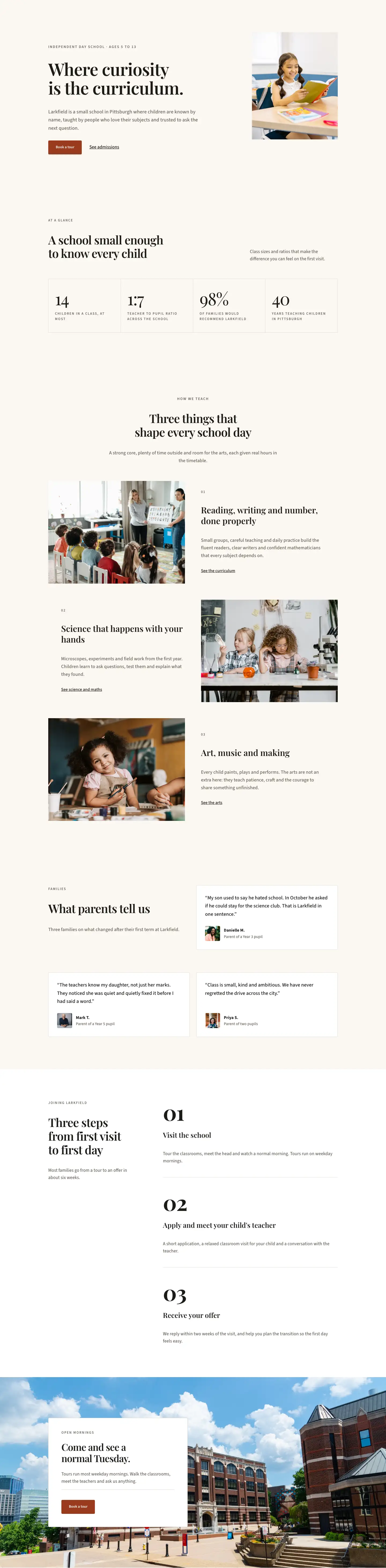
This page ships inside Larkfield: Private School & Education Theme (6 Pages), 6 coherent pages that share one brand.
Click to view the full page
Overview
The layout opens with a white editorial header that pairs a Playfair Display H1 at 52px (stepping to 32px on mobile) against a short lead sentence in Source Sans 3 at 18px. The two-column flex row uses a deliberate weight imbalance — 16/24 for the heading side, 8/24 for the introductory text — so the section title dominates without crowding the copy. An uppercase breadcrumb in Source Sans 3 at 13px with 2px letter-spacing sits above the H1 as an overline device, and a single-pixel linen border (#e3dccf) closes the section below, separating header from body with the restraint of a printed prospectus.
The admissions-process section sits on warm cream (#faf7f2) with 120px vertical padding that steps to 56px on phone. The right 16/24 column carries a hand-built vertical timeline: each of the four steps is a flex row containing a narrow 14px column that stacks a 14×14px terracotta square marker (#9a3b1f) and a 2px growing flex line against the step's content group — an uppercase step label, a Playfair H3, and a one-sentence body. The left 8/24 column holds the section overline, H2 introduction, and supporting text, proportioned so the timeline has air around each connector.
The tuition section places two pricing cards in a CSS grid (display:grid, gridColumnCount:2) inside a native divi/group. The lower-school card uses the warm cream fill with a linen border, while the middle-school card inverts to near-black (#1c1a17) with light text — the contrast making the two fee tiers legible as distinct without a separate section. Both cards share the same internal structure: an uppercase age-range label, Playfair Display H3 name, a 56px Playfair price figure, a top-bordered feature list of Font Awesome checkmarks paired with Source Sans text, and an "Apply now" button. On phones, the grid collapses to a single column.
The FAQ section uses a recurring editorial device: a 2px top border (#1c1a17) above each question, with a Playfair Display H3 at 21px and a Source Sans body answer below — no accordion, no JavaScript, just clean vertical rhythm across two equal 12/24 columns. The section's header row aligns the H2 flush-left in a 14/24 column while a real telephone number CTA sits in the adjacent 10/24 column, baseline-aligned to the bottom of the heading. The entire layout closes with a full-width terracotta section (#9a3b1f) that places the H2 call to action and a white-background button in a space-between flex row, stacking to a column on mobile.
What’s inside
- Four-step admissions timeline built entirely from nested `divi/group` modules — a 14px marker column with a 14×14px square and a 2px growing connector line, no plugins or custom CSS required
- Two-card tuition grid using a native Divi 5 CSS `display:grid` layout inside a group module, with the lower-school card in warm cream and the middle-school card in near-black, each carrying a 56px Playfair Display price figure
- Per-card feature list using `divi/icon` (Font Awesome checkmark) and `divi/text` rows in a flex column, with a 2px top border visually separating the list from the price
- Static FAQ layout across two 12/24 columns with top-bordered question groups (Playfair Display 21px H3) — no accordion, no JavaScript dependency
- Editorial header with breadcrumb navigation (uppercase Source Sans 3, 13px, 2px letter-spacing), a weighted 16/24 + 8/24 flex split, and a linen hairline bottom border (#e3dccf)
- Full-width terracotta CTA section (#9a3b1f) using a space-between flex row — H2 heading on the left, white-button + supporting subtext on the right — that collapses to a stacked column on mobile
- Responsive at three explicit breakpoints: section padding steps from 120px (desktop) to 80px (tablet) to 56px (phone), and all two-column flex rows wrap and stack on mobile
Who it’s for
This layout is a strong fit for independent and private day schools managing their own admissions process, particularly those where a prospectus-quality web presence matters to prospective families. Preparatory schools, Montessori environments, tutoring academies, and specialist junior colleges will find the four-step timeline and two-tier pricing card pattern directly transferable. Education consultants and web designers building bespoke school sites will also find the editorial structure — serif headings, warm neutrals, no photography dependency — adaptable to nurseries, early-years settings, and faith schools that want to project quiet authority rather than corporate polish.
Customization tips
The palette rests on three swappable values: near-black (#1c1a17), warm cream (#faf7f2), and the terracotta accent (#9a3b1f). Changing the terracotta to your school's primary brand color immediately updates the timeline markers and the closing CTA section background — those are the only two places it appears. The cream and white sections are independent background values on each section group, so lightening or replacing them does not require hunting down a theme variable.
For copy, keep each timeline step to one sentence. The step content group sits in a 16/24 column alongside the marker column; two long sentences will gap the connector lines awkwardly on tablet. The pricing cards accommodate five to six feature-list items cleanly; beyond seven, the "Apply now" button risks being pushed out of view on shorter mobile screens. The 56px price figure is an inline font size on a divi/text module — replace the placeholder number directly there. FAQ answers read well at up to four sentences per item; if you need longer answers, consider trimming to five questions total to keep the two-column layout level on desktop.
How to install this layout
- Download the layout JSON file from this page.
- Open the target page in the Divi 5 builder.
- Open the portability panel (up/down arrows icon) and choose the Import tab.
- Upload the JSON. Tick “replace existing content” only for full-page imports.
- Check the page at desktop and mobile widths, then swap in your copy and images.
Full walkthrough with troubleshooting: How to Import a Divi 5 Layout.
Questions about Larkfield Day School — Editorial Education Admissions Page for Divi 5
How is the vertical timeline built — is it a plugin or custom CSS?
It is built entirely from nested `divi/group` modules. Each step is a flex row containing a narrow 14px-wide group that stacks a 14×14px square (the marker) and a 2px flex-grow line (the connector) beside the step's text group. No third-party plugin, no injected CSS class, no JavaScript — it is native Divi 5 group and layout decoration only.
The two tuition cards look like a CSS grid — how is that done in Divi 5?
A single `divi/group` module has its layout decoration set to `display:grid` with `gridColumnCount:2` and `columnGap:24px`. On phone breakpoint it drops to `gridColumnCount:1` so the cards stack. This is a native Divi 5 layout property applied directly in the module's decoration — no custom CSS is needed.
Does the FAQ use an accordion? Is there any JavaScript involved?
No accordion and no JavaScript. Every question and answer is always visible. Each question group uses a 2px solid top border and a Playfair Display H3 to create rhythm. The approach is intentional — the questions are short enough that collapsing them would not save meaningful space, and static HTML is faster and more accessible.
Are there any image modules in this layout? Do I need photography to use it?
There are no `divi/image` modules anywhere in the layout. All visual interest comes from typography scale, color-block sections, and the hand-built timeline. You can use the layout as-is without photography. If you want to add school imagery, an image module can be inserted into any section column without restructuring the existing flex or grid containers.
How does the layout behave on mobile — do all the multi-column rows collapse?
Yes. Every two-column flex row has `flexWrap:wrap` and `flexDirection:column` set at the phone breakpoint, so columns stack top-to-bottom. Section padding steps from 120px (desktop) to 80px (tablet) to 56px (phone) via explicit breakpoint values in each section's spacing decoration. The tuition grid also collapses from two cards side-by-side to a single stack on phone.
Which Divi version does this layout need?
Divi 5. The layout is generated natively for Divi 5 and validated against its real module structure before publication, so it imports clean into the current builder.
Can I use this layout on client websites?
Yes. Every download includes a commercial license covering unlimited sites you own or build for clients. Only reselling or redistributing the layout file itself is prohibited.
Included in these packs
More full landing pages
Browse all full landing pages
Kiln & Clay — Minimal Pottery_studio Visit Page for Divi 5
full_landing · pottery_studio · minimal

Kiln & Clay — Minimal Pottery_studio Our Story Page for Divi 5
full_landing · pottery_studio · minimal

Kiln & Clay — Minimal Pottery_studio Studio Membership Page for Divi 5
full_landing · pottery_studio · minimal

Kiln & Clay — Minimal Pottery_studio The Shop Page for Divi 5
full_landing · pottery_studio · minimal

Kiln & Clay — Minimal Pottery_studio Classes Page for Divi 5
full_landing · pottery_studio · minimal

Kiln & Clay — Minimal Pottery_studio Home Page for Divi 5
full_landing · pottery_studio · minimal