
Larkfield Day School — Editorial Education Home Page for Divi 5
Larkfield Day School is a small Pittsburgh independent school for children aged 5 to 13. Small classes, a 1:7 staff ratio and a broad curriculum. Book a tour today.
Rate this element
Download this section, free
- Divi 5 JSON, imports in seconds
- Commercial license included
- No account needed
This page ships inside Larkfield: Private School & Education Theme (6 Pages), 6 coherent pages that share one brand.
Click to view the full page
Overview
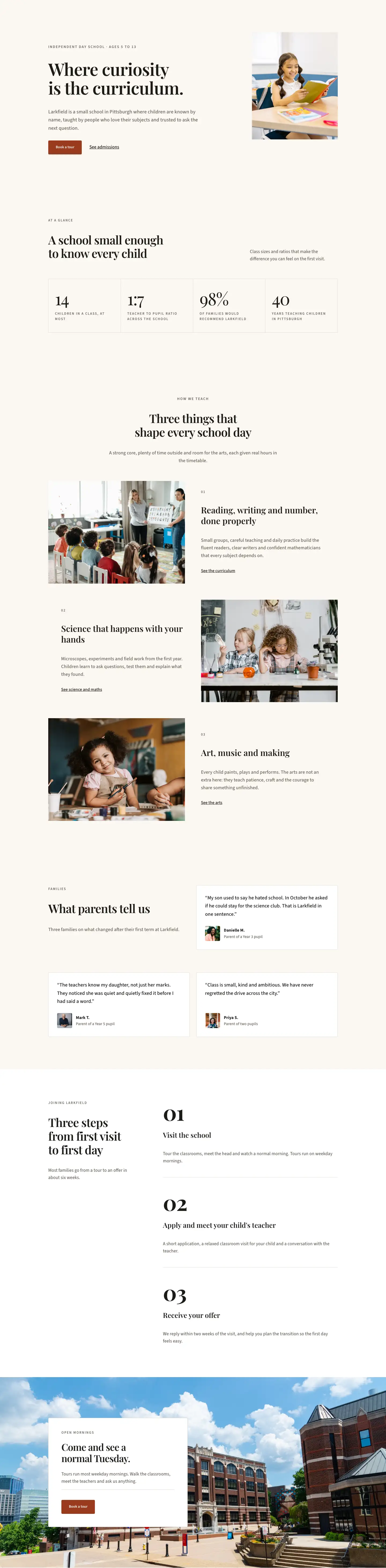
Larkfield Day School is an editorial full-page home layout built around a single tonal palette — warm parchment (#faf7f2) across every section, with pure white reserved for testimonial cards and the final CTA panel. That restraint is deliberate: the off-white ground keeps the Playfair Display headings (64px h1 down to 26px h3) from competing with the photography, while Source Sans 3 handles all supporting copy at sizes between 13px and 19px. The type scale is set in relative units with explicit lineHeight and textWrap: balance on every multi-line heading, so the layout reads cleanly at any viewport without manual tweaking.
The page opens with an asymmetric two-column hero: a wider left column carrying the school name, a 64px headline, a one-sentence description capped at 560px, and a paired CTA group (a terracotta #9a3b1f button plus a plain underlined link). The right column holds a 4:5 portrait-ratio classroom photograph that fills its flex slot without stretching. On mobile, flexWrap: wrap and flexDirection: column collapse the row cleanly, the image drops below the copy, and section padding steps down from 120px to 56px.
The stats section uses a CSS grid nested inside a Divi Group module: four cells at gridColumnCount: 4 on desktop, dropping to 2 on tablet and phone. Each cell carries a Playfair Display numeral at 64px weight 300 with tight negative letter-spacing, and an all-caps Source Sans 3 label beneath it. The grid gaps are rendered as 1px lines in #e3dccf — a deliberate editorial device that avoids drawing a visible border while still separating the cells.
The teaching and admissions sections use alternating image-text rows, each with a Divi Divider module (#e3dccf, 1px solid) serving as a step separator in the three-step admissions column. The testimonial section pairs a left column with section copy against a right column that is a full white bordered card on the first row, then two equal white bordered cards on the second row — all using justifyContent: space-between to pin the portrait byline to the bottom of each card. The final CTA is a full-bleed background image section with a left-aligned white card floating over it, keeping the tour booking action anchored without the image competing with the text.
What’s inside
- Asymmetric two-column hero with a 4:5 portrait image slot, 64px Playfair Display h1, and a dual CTA group (filled button + inline text link) — all wired with responsive flex collapse to single-column on mobile
- Four-cell stats grid using a nested Divi Group with `display: grid` and 1px `#e3dccf` gap lines as dividers — drops to a 2-column grid on tablet and phone
- Three alternating image-text rows in the teaching section, each with a numbered heading (01/02/03), Playfair Display h3 title, body copy capped at 480px, and a plain underlined section link
- Three-step admissions panel: a narrow left column with h2 headline and intro copy paired with a right column using oversized 80px Playfair Display numerals, h3 step titles, and Divi Divider separators between steps
- Testimonials section with three white bordered cards (1px `#e3dccf`) carrying quote text at 19px, and a 56px square portrait image with a name and role byline pinned to the bottom of each card
- Full-bleed background image CTA section with a left-aligned white content card (48px padding, 4px border radius) holding an h2, body text, a `#e3dccf` Divi Divider, and a terracotta tour-booking button
- Consistent three-step responsive padding: 120px desktop, 80px tablet, 56px phone across all six sections
Who it’s for
This layout suits independent primary and prep schools, Montessori and progressive day schools, tutoring academies, and private early-years settings that want a website that reads like a considered school prospectus rather than a marketing brochure. It also works well for after-school enrichment programs, specialist children's arts or STEM clubs, and small private nurseries that need to communicate warmth and academic seriousness at the same time. The editorial tone and warm palette signal substance without formality, making it a strong fit for any education provider where the personal relationship between teacher and child is the core selling point.
Customization tips
The entire palette pivots on two hex values: swap #faf7f2 (the section background) and #9a3b1f (the button and accent) using Divi's global presets and both will propagate across all six sections at once. The stats grid supports any four numbers — keep labels under 40 characters so they sit comfortably at 13px in two lines. Hero body copy is capped at 560px max-width and works best at 30 to 50 words; longer text will push the h1 and CTAs further down on mobile. Hero and teaching images use a 4:5 ratio (portrait) and 4:3 ratio (landscape) respectively — crop your photos to those ratios before uploading to avoid reframing artifacts. The three testimonial cards expect quotes of roughly 20 to 35 words; shorter quotes leave awkward white space above the byline because justifyContent: space-between distributes the gap between the quote and the portrait row.
How to install this layout
- Download the layout JSON file from this page.
- Open the target page in the Divi 5 builder.
- Open the portability panel (up/down arrows icon) and choose the Import tab.
- Upload the JSON. Tick “replace existing content” only for full-page imports.
- Check the page at desktop and mobile widths, then swap in your copy and images.
Full walkthrough with troubleshooting: How to Import a Divi 5 Layout.
Questions about Larkfield Day School — Editorial Education Home Page for Divi 5
How does the layout behave on mobile — does the hero image disappear?
No. The hero image drops below the copy column on phone because the row uses `flexDirection: column` on mobile. The image is still visible; it just stacks beneath the headline, body text, and CTAs. The 4:5 aspect ratio is preserved at full width.
The stats grid shows four cells side by side on desktop. What happens on smaller screens?
The nested Group module uses `gridColumnCount: 4` on desktop and drops to `gridColumnCount: 2` on both tablet and phone, so the four stats reflow to a 2x2 grid. The 1px gap lines that act as dividers are also generated by the grid, so they adjust automatically.
Which Divi 5 modules does this layout use?
It uses Heading, Text, Button, Image, Group, Row, Column, Section, and Divider — all native Divi 5 modules. There are no third-party modules or custom code blocks required.
What aspect ratio should I use for the teaching section images?
The three teaching rows each use a 4:3 landscape image. Crop to exactly 4:3 before uploading — the layout uses `objectFit: cover` so a different ratio will be cropped by the browser, and you may lose important subject matter.
What should I change first to adapt this for a different school?
Start with the four stats (numbers and labels in Section 2), the button colour (`#9a3b1f`), and the three testimonial quotes. Those four elements do the most work in establishing the school's identity. Update the hero headline and h4 eyebrow label last.
The final CTA section has a background image. How do I replace it?
The background image is set in the Section module's decoration background, not in an Image module. Open the Section settings in Divi 5, go to Background, and replace the image URL. The white content card overlays it automatically — no z-index or positioning adjustment is needed.
Which Divi version does this layout need?
Divi 5. The layout is generated natively for Divi 5 and validated against its real module structure before publication, so it imports clean into the current builder.
Can I use this layout on client websites?
Yes. Every download includes a commercial license covering unlimited sites you own or build for clients. Only reselling or redistributing the layout file itself is prohibited.
Included in these packs
More full landing pages
Browse all full landing pages
Kiln & Clay — Minimal Pottery_studio Visit Page for Divi 5
full_landing · pottery_studio · minimal

Kiln & Clay — Minimal Pottery_studio Our Story Page for Divi 5
full_landing · pottery_studio · minimal

Kiln & Clay — Minimal Pottery_studio Studio Membership Page for Divi 5
full_landing · pottery_studio · minimal

Kiln & Clay — Minimal Pottery_studio The Shop Page for Divi 5
full_landing · pottery_studio · minimal

Kiln & Clay — Minimal Pottery_studio Classes Page for Divi 5
full_landing · pottery_studio · minimal

Kiln & Clay — Minimal Pottery_studio Home Page for Divi 5
full_landing · pottery_studio · minimal