
Larkfield Day School — Editorial Education Student Life Page for Divi 5
Explore student life at Larkfield Day School: after-school clubs, sports, music, art, garden club, robotics, and a close-knit community where every child belongs.
Rate this element
Download this section, free
- Divi 5 JSON, imports in seconds
- Commercial license included
- No account needed
This page ships inside Larkfield: Private School & Education Theme (6 Pages), 6 coherent pages that share one brand.
Click to view the full page
Overview
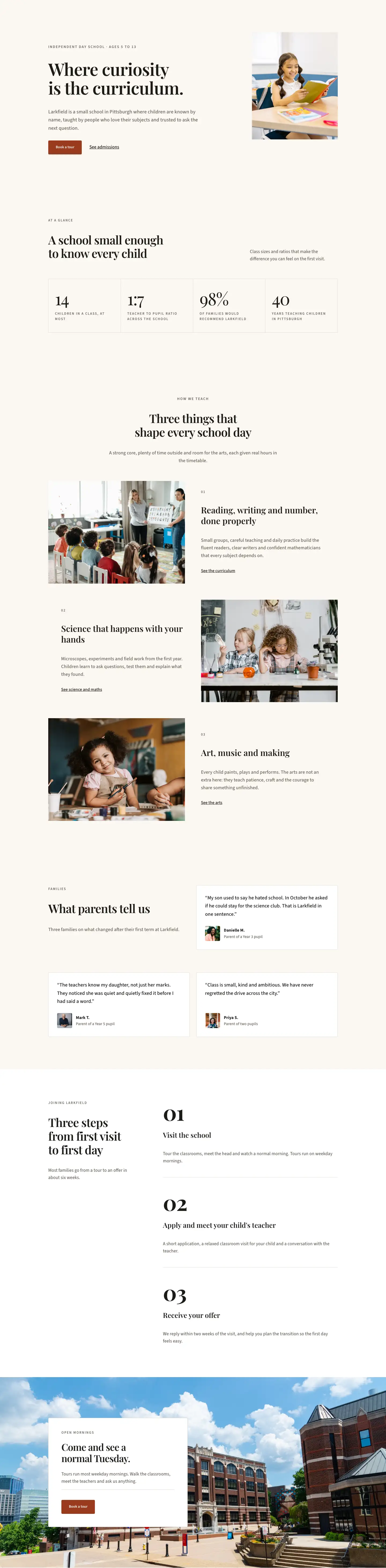
The page opens with a cinematic full-bleed hero section: a Pexels photograph sits beneath a uniform dark overlay (rgba(28,22,16,0.72)) that holds the same density from edge to edge, keeping text legible regardless of the photograph's tonal range. The warm parchment background (#faf7f2) that carries the rest of the page shows briefly at the section edges before the gradient takes over. Section padding is 120px top and bottom on desktop, stepping methodically to 88px on tablet and 64px on mobile. A breadcrumb rendered in uppercase Source Sans 3 at 13px with 2px letter spacing establishes site hierarchy first, then the H1 sits in Playfair Display at 56px with -1px tracking and a 1.12 line-height, tapering to 42px on tablet and 32px on phone. The lead line is constrained to a 600px max-width and left-aligned, giving the headline room to dominate without competition from the supporting copy.
The clubs section uses deliberate asymmetric column proportions to break from a mechanical two-column grid. The section header row splits at 16/24 and 8/24 with flex-end vertical alignment, so the H4 uppercase label and the H2 heading in the wide column land at the same visual baseline as the body copy in the narrow column, a device borrowed from magazine layout. Club cards are divi/group modules with explicit background colors that signal each activity's character: white with a 1px warm border (#e3dccf) for the Sport card, which also carries a 16:9 Pexels photograph inside it; terracotta (#9a3b1f) with a Font Awesome music note icon in white for Music; near-black (#1c1a17) with cream text for Art Studio; and white for both Garden Club (with a leaf icon) and Robotics (with an inline underlined text link). Swapping the column proportions across two rows, wide-left then narrow-left, creates visual rhythm without repetition.
The photo gallery uses three equal columns with two stacked images each, alternating aspect ratios of 4:5 and 4:3 across columns so adjacent columns sit at visually different heights without any CSS grid tricks. All six images use objectFit:cover enforced directly in Divi 5's native image sizing settings, so replacing photography never breaks the proportional system. The community section shifts to white and centers a 2x2 Blurb grid: all four blurbs carry matching terracotta icon containers at 32px with 16px padding and 4px corner radius, Playfair Display titles, and Source Sans 3 body copy at 18px in warm mid-brown (#6b645a). The pullquote section is the emotional centrepiece: a decorative opening quotation mark in Playfair Display at 120px (scaling to 80px on mobile), the quote itself at 42px with text-wrap:balance, a 64px-wide 2px solid divider rule, and a two-line attribution with the pupil name in 700-weight Source Sans 3. The page closes on a solid terracotta band with a horizontal flex layout, headline left with flex-grow, and a white button plus a brief tour availability note stacked on the right, collapsing to a left-aligned single column on mobile.
What’s inside
- Full-bleed hero with Pexels background image, uniform dark gradient overlay, Playfair Display H1 scaling 56px/42px/32px across desktop/tablet/phone, and an uppercase Source Sans 3 breadcrumb trail
- Five asymmetric club cards across two rows using 16/24 + 8/24 column splits, mixing terracotta (#9a3b1f), near-black (#1c1a17), and white card backgrounds with Font Awesome icons and a 16:9 photograph card
- Three-column editorial photo gallery with six images at alternating 4:5 and 4:3 native aspect ratios, all using Divi 5's built-in objectFit:cover image sizing
- Centered 2x2 Blurb module grid with matching terracotta icon containers (FA icons at 32px, 4px border-radius), Playfair Display titles, and Source Sans 3 body copy
- Full-bleed pullquote section: 120px decorative Playfair Display opening mark, 42px quote text with text-wrap:balance, a 64px divider rule, and two-line pupil attribution
- Solid terracotta CTA band with a horizontal flex layout (headline with flex-grow on the left, white button plus availability note on the right) that stacks to a single column on mobile
- Three-breakpoint responsive padding on every section, with all heading sizes explicitly defined at desktop, tablet, and phone in the layout JSON
Who it’s for
This layout is built for independent primary and preparatory schools, Montessori schools, forest schools, and arts-led primaries that want a student life or pastoral care page that feels warm and considered rather than corporate. It suits school web designers and Divi developers working on admissions-focused sites where clubs, community, and outdoor life are stronger selling points than performance tables. The editorial tone and parchment-cream palette also fit junior departments within larger independent schools, small private schools, and any education brand that wants its site to read more like a publication than a brochure.
Customization tips
The palette runs on three core values used consistently across the whole layout: parchment (#faf7f2) for section backgrounds, terracotta (#9a3b1f) for the CTA section, icon containers, and the Music club card, and near-black (#1c1a17) for the Art Studio card and dark overlay gradients. Updating all three globally recolors the page coherently without touching individual modules. The Playfair Display and Source Sans 3 pairing can be replaced with any editorial serif plus geometric sans combination via Divi 5's global design settings. Club card body copy should stay under 25 words per card to preserve the grid proportions. Gallery images should be shot in portrait for the 4:5 slots and landscape for the 4:3 slots; the aspect-ratio enforcement will crop to fill, so square crops will lose vertical content. The hero and pullquote background images are both Pexels URLs; swap them for your own hosted photography at 1920px wide minimum to avoid upscaling under the gradient overlays.
How to install this layout
- Download the layout JSON file from this page.
- Open the target page in the Divi 5 builder.
- Open the portability panel (up/down arrows icon) and choose the Import tab.
- Upload the JSON. Tick “replace existing content” only for full-page imports.
- Check the page at desktop and mobile widths, then swap in your copy and images.
Full walkthrough with troubleshooting: How to Import a Divi 5 Layout.
Questions about Larkfield Day School — Editorial Education Student Life Page for Divi 5
How does the three-column photo gallery behave on mobile?
Each column resets to a 24/24 flex-width on phone and the columns stack vertically into a single-column scroll. The images keep their enforced aspect ratios (4:5 and 4:3), so they run full-width one after another without unexpected crops or letterboxing.
The club cards use three different background colors. How do I change the accent color?
Each card is a divi/group module with its background color set directly in the module's decoration.background property. The terracotta Music card uses #9a3b1f and the Art Studio card uses #1c1a17. To change either, open that group module in the Divi 5 editor and update the background color field; the icon and text colors inside are set separately on the child modules.
Can I replace the Font Awesome icons in the club cards and community blurbs?
Yes. The divi/icon modules in the club section and the divi/blurb modules in the community section both reference FA unicode values. You can swap any icon using Divi 5's built-in icon picker without touching any code.
What aspect ratios should my gallery photos be, and does the layout enforce them?
The six gallery images use two ratios: 4:5 (portrait) and 4:3 (landscape), alternating per column so the columns read at different heights. All images use objectFit:cover enforced via Divi 5's native aspect-ratio sizing settings, so your photography will crop to fill without distortion as long as your subject is centered.
What is the best first thing to edit after importing the layout?
Start with the two full-bleed background images in the hero and the pullquote sections, since those set the emotional tone of the whole page. Then update the quote text and pupil attribution. After that, work through the club card names and descriptions. Leave the column proportions and typographic scale in place until you have real copy to judge length against.
Which Divi version does this layout need?
Divi 5. The layout is generated natively for Divi 5 and validated against its real module structure before publication, so it imports clean into the current builder.
Can I use this layout on client websites?
Yes. Every download includes a commercial license covering unlimited sites you own or build for clients. Only reselling or redistributing the layout file itself is prohibited.
Included in these packs
More full landing pages
Browse all full landing pages
Kiln & Clay — Minimal Pottery_studio Visit Page for Divi 5
full_landing · pottery_studio · minimal

Kiln & Clay — Minimal Pottery_studio Our Story Page for Divi 5
full_landing · pottery_studio · minimal

Kiln & Clay — Minimal Pottery_studio Studio Membership Page for Divi 5
full_landing · pottery_studio · minimal

Kiln & Clay — Minimal Pottery_studio The Shop Page for Divi 5
full_landing · pottery_studio · minimal

Kiln & Clay — Minimal Pottery_studio Classes Page for Divi 5
full_landing · pottery_studio · minimal

Kiln & Clay — Minimal Pottery_studio Home Page for Divi 5
full_landing · pottery_studio · minimal