
Marlowe & Finch — Elegant Law_firm Home Page for Divi 5
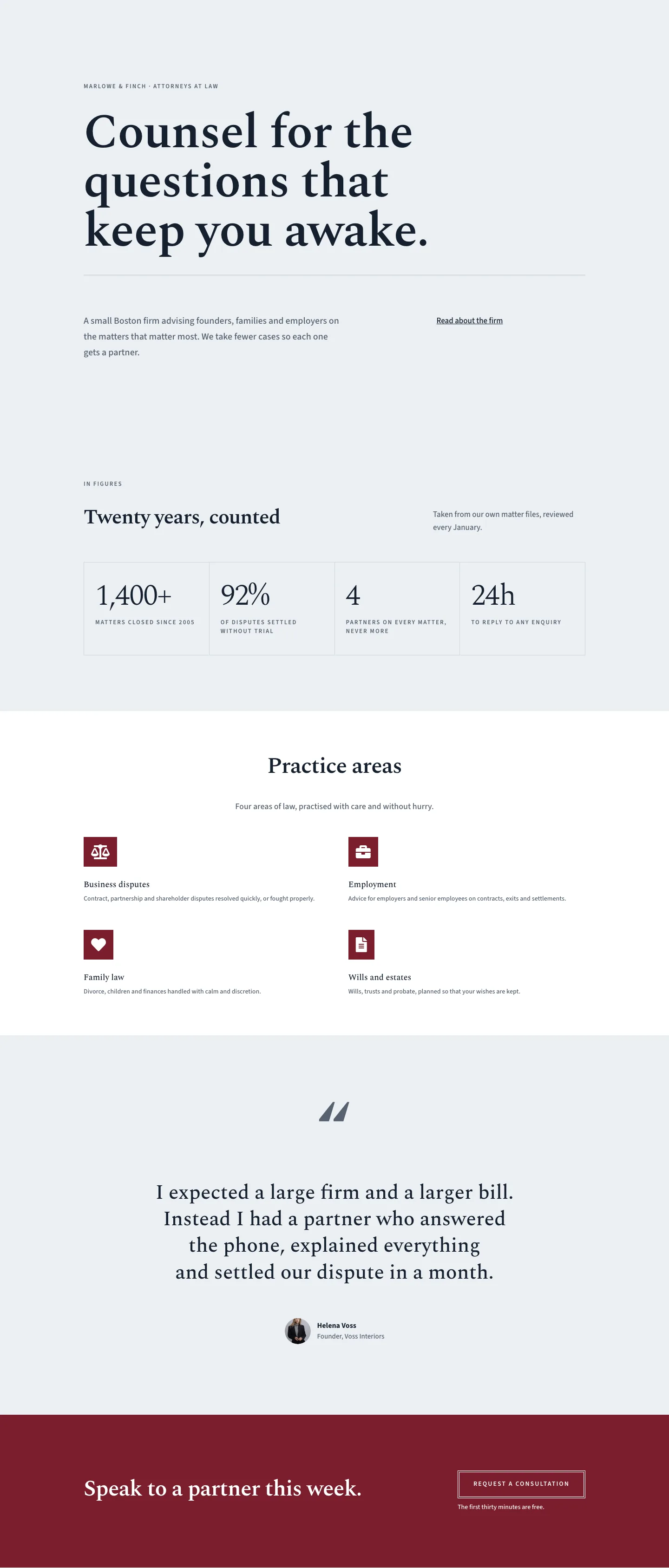
A refined Divi 5 full landing page for boutique law firms. Features a serif hero, stats grid, practice areas, pull quote, and consultation CTA in a muted blue-grey and deep crimson palette.
Rate this element
Download this section, free
- Divi 5 JSON, imports in seconds
- Commercial license included
- No account needed
This page ships inside Marlowe & Finch: Law Firm Theme (6 Pages), 6 coherent pages that share one brand.
Click to view the full page
Overview
The layout opens with a spacious hero section on a cool #eceff3 blue-grey ground -- 180px of top padding on desktop, stepping down to 80px on phones -- that sets a deliberate, unhurried pace before a single element loads. The typographic hierarchy is built from two contrasting font families: Spectral, a literary serif, carries every heading and large display numeral, while Source Sans 3, a clean humanist sans-serif, handles body text, eyebrow labels, and the CTA button. The firm name appears as a 13px uppercase eyebrow (600 weight, 2px letter-spacing) before the h1 drops in at 104px with a tight 1.02em line-height and -1px letter-spacing -- a scale that commands the page without decorative flourish. Below the h1, a 3px double-rule divider in #cfd6de separates the headline block from a two-column text row where a 20px body paragraph sits in a wider 16/24 flex column while a minimal underlined link occupies the remaining 8/24, creating an asymmetric editorial rhythm that reads as considered rather than templated.
The second section introduces a 4-cell statistics grid built on a divi/group with CSS grid layout: 4 columns on desktop, collapsing explicitly to 2 columns on both tablet and phone. The cells sit on the #eceff3 base separated by 1px hairline gaps on a #cfd6de grid background -- a technique that avoids the visual heaviness of bordered cards while still giving each stat a distinct boundary. Each cell pairs a Spectral numeral at 64px, weight 300, letter-spacing -2px, with a Source Sans 3 uppercase label at 13px and 2px tracking. The contrast of a light-weight display number against a compact uppercase caption is the section's entire design language. The section is introduced by a header row using the same 16/24 + 8/24 asymmetric column split from the hero, maintaining geometric coherence across the page.
The practice areas section switches to a white (#ffffff) ground, creating a deliberate tonal break from the repeating blue-grey. Four native divi/blurb modules are arranged in a 2x2 grid, each leading with a FontAwesome icon set against a deep crimson (#7a1e2c) square with zero border-radius -- institutional, not decorative. Spectral titles and Source Sans 3 body text carry through from the sections above, and the whole section is anchored by a centred heading at 48px (max-width 810px) and a 640px-wide subtext line. A full-width testimonial section follows on the #eceff3 ground: an ornamental Spectral opening quote mark at 160px (weight 700) leads into a centred pull-quote at 44px with a 1.3em line-height (max-width 960px), finished with a 56x56px circular avatar, name, and title stack -- the quote mark scaling to 96px and the quote text to 26px on phones.
The page closes with a deep crimson (#7a1e2c) CTA section that uses horizontal flex layout (space-between, nowrap) on desktop: a Spectral h2 at 48px on the left, and a ghost button with a 4px double-rule white border on the right, with a 14px subtext line below it that answers the hesitation silently. On mobile, the flex direction flips to column and left-aligns both elements. All five sections carry explicit breakpoint values in the JSON for padding, font sizes, column widths, and grid column counts -- desktop, tablet, and phone are each defined, with no reliance on Divi defaults or inherited scaling. The result is a layout that adapts precisely rather than approximately.
What’s inside
- Hero section with a 104px Spectral h1 (scales to 44px on phone), 13px uppercase eyebrow, and a 3px double-rule divider -- all composed on a single full-width column with a 920px max-width group
- Asymmetric two-column text row (16/24 + 8/24 flex split) pairing a 20px body paragraph with a minimal inline underlined link, stacking to full-width on mobile
- 4-cell CSS grid statistics block using a native divi/group with grid layout (4 columns desktop, 2 columns tablet and phone), 64px Spectral display numerals, and 1px hairline cell separators
- 2x2 practice areas layout using four native divi/blurb modules, each with a FontAwesome vector icon on a crimson (#7a1e2c) zero-radius square background
- Centred pull-quote section with a 160px Spectral ornamental quote mark, 44px testimonial text constrained to 960px, and a circular avatar (56x56px, border-radius 999px) with name and title attribution
- Crimson (#7a1e2c) CTA section with a horizontal Spectral heading plus ghost button row that reflows to a stacked column on mobile; button uses a 4px double-rule white border with hover fill
- Three-tier responsive breakpoints (desktop, tablet, phone) set explicitly on every section's padding, every heading's font size, and the statistics grid column count throughout the entire layout
Who it’s for
This layout suits solo practitioners and small boutique firms (roughly 2 to 10 attorneys) positioning themselves as a considered alternative to large commercial practices. It fits litigation boutiques, estate planning and probate firms, employment advisory practices, and family law chambers where personal service and calm authority are the core differentiators. Web designers and agencies building sites for legal clients will find the sections map directly to a standard law firm brief: credibility through statistics, a services overview, a trust-building testimonial, and a low-friction consultation CTA. It works as a standalone home page or as the top section in a larger multi-page site.
Customization tips
The palette is controlled by three hex values in the layout JSON: #eceff3 (all section backgrounds), #14202e (primary text and headings), and #7a1e2c (the crimson accent on blurb icon squares and the CTA section background). Replacing all three consistently gives the layout a new colour identity without touching individual modules -- the double-rule divider and CTA button border both reference the accent colour, so a single global find-and-replace covers the brand. For typography, Spectral and Source Sans 3 are both Google Fonts available in Divi's font picker; a condensed serif such as Playfair Display or Cormorant Garamond holds the same editorial weight if your brand calls for it. The h1 placeholder text runs 44 characters -- keep your headline under 60 characters to preserve the 1.02em line-height without the text wrapping awkwardly. The statistics grid is a self-contained divi/group with four child groups: replace the numeral and label text in each child, no structural editing needed. The testimonial avatar placeholder is a 1:1 image rendered at 56px -- supply a face-centred square crop at 200px minimum for clean results.
How to install this layout
- Download the layout JSON file from this page.
- Open the target page in the Divi 5 builder.
- Open the portability panel (up/down arrows icon) and choose the Import tab.
- Upload the JSON. Tick “replace existing content” only for full-page imports.
- Check the page at desktop and mobile widths, then swap in your copy and images.
Full walkthrough with troubleshooting: How to Import a Divi 5 Layout.
Questions about Marlowe & Finch — Elegant Law_firm Home Page for Divi 5
How does the statistics grid reflow on smaller screens?
The grid uses CSS grid layout set inside a native divi/group module. The desktop breakpoint defines 4 columns; the tablet and phone breakpoints in the JSON explicitly switch it to 2 columns. Each cell's padding and the large Spectral numerals also scale down through per-breakpoint font size values (64px desktop, 56px tablet, 40px phone), so the grid stays legible and balanced at every width without any additional CSS.
What font families does this layout use, and do I need a plugin to load them?
Two Google Fonts: Spectral (used for all headings, the statistics numerals, the pull-quote, and the ornamental quote mark) and Source Sans 3 (used for body text, eyebrow labels, and the CTA button). Both are loaded through Divi's built-in Google Fonts integration -- no extra font or typography plugin is required.
There are four practice area blurbs in a 2x2 grid. Can I add more or change the column count?
Yes. Each blurb sits in a 1_2,1_2 column row. To add a fifth and sixth area, duplicate one of the two existing rows and update the blurb content inside it. To switch to three columns, change the column structure on a row to 1_3,1_3,1_3 in Divi's row settings and add a third blurb -- the icon, title, and body structure inside each blurb requires no changes.
Does the layout use any raster images, or is it mostly vector and text?
The only raster image in the layout is the 56x56px circular testimonial avatar, which uses a Pexels placeholder. Everything else -- including the practice area icons -- uses FontAwesome vector icons. This means the page is fast and functional immediately after import, and you only need to source one image (a client headshot or a suitable portrait) before the layout is production-ready.
What is the most impactful thing to edit first after importing?
Start with the h1 in the hero section and the four statistics in the grid -- those are the two elements a first-time visitor reads within the first few seconds. Then replace the avatar and testimonial text, update the four blurb titles and descriptions with your actual practice areas, and update the CTA button link. Typography and colour settings can wait; the layout's defaults are production-ready as imported.
The CTA button links to '#' in the layout. What destinations work best with this design?
Any URL works: an internal contact page, a Calendly or booking widget link, or an on-page anchor. The services section in this layout already carries the CSS ID 'services' in its HTML attributes, which you can use as a model for adding an anchor ID to a contact or consultation-request section further down the page.
Which Divi version does this layout need?
Divi 5. The layout is generated natively for Divi 5 and validated against its real module structure before publication, so it imports clean into the current builder.
Can I use this layout on client websites?
Yes. Every download includes a commercial license covering unlimited sites you own or build for clients. Only reselling or redistributing the layout file itself is prohibited.
Included in these packs
More full landing pages
Browse all full landing pages
Kiln & Clay — Minimal Pottery_studio Visit Page for Divi 5
full_landing · pottery_studio · minimal

Kiln & Clay — Minimal Pottery_studio Our Story Page for Divi 5
full_landing · pottery_studio · minimal

Kiln & Clay — Minimal Pottery_studio Studio Membership Page for Divi 5
full_landing · pottery_studio · minimal

Kiln & Clay — Minimal Pottery_studio The Shop Page for Divi 5
full_landing · pottery_studio · minimal

Kiln & Clay — Minimal Pottery_studio Classes Page for Divi 5
full_landing · pottery_studio · minimal

Kiln & Clay — Minimal Pottery_studio Home Page for Divi 5
full_landing · pottery_studio · minimal