
Marlowe & Finch — Elegant Law_firm Practice Areas Page for Divi 5
A full landing page Divi 5 layout for law firms. Dark navy hero, practice areas list, transparent fee comparison, consultation checklist, and FAQ — elegant Spectral serif typography throughout.
Rate this element
Download this section, free
- Divi 5 JSON, imports in seconds
- Commercial license included
- No account needed
This page ships inside Marlowe & Finch: Law Firm Theme (6 Pages), 6 coherent pages that share one brand.
Click to view the full page
Overview
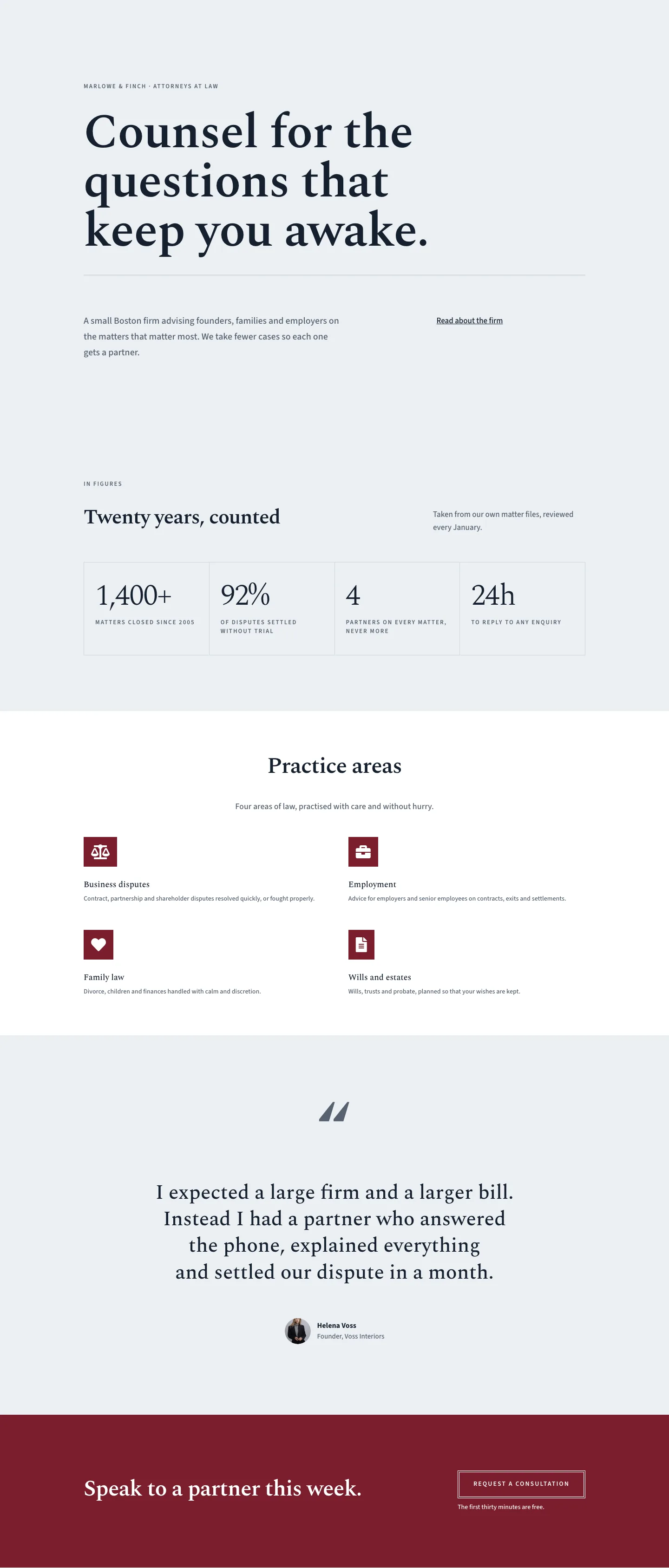
Marlowe & Finch opens with a full-bleed hero in deep navy (#14202e), padded 112px top and 168px bottom on desktop, with a native Divi 5 curve divider sweeping the base into the white content below. A small-caps Source Sans 3 eyebrow, a 60-pixel Spectral H1 at 1.12em line-height, a 72-pixel centred double-rule accent, and a paragraph in the pale #eceff3 tint occupy a single full-width column. The hierarchy is deliberate: the eyebrow anchors the page context, the H1 carries the firm's value statement, and the divider provides a visual breath before the content sections begin.
The practice areas section fills a centred single column with a section label, an H2 introduction, and five icon-led rows. Each row is a flex group: a 24-pixel Font Awesome solid icon on the left (gavel, briefcase, heart, file, building) and a flex-grow text group on the right with an H3 title in Spectral and a one-sentence body in Source Sans 3. Rows are separated by a light #cfd6de double-rule divider, while the section header uses the heavier #14202e rule for contrast. The rows are independent groups, so adding or removing a practice area means duplicating or deleting one flex group and its adjacent divider.
The fees section introduces a two-column row (8/24 left, 16/24 right on desktop) where the left column holds the heading and a brief reassurance line, and the right column holds a two-column CSS grid of pricing cards. The light card uses an #eceff3 background with a 4px double border in #14202e; the dark card reverses to a #14202e background with #eceff3 type and a matching dark border. Both cards display a label, a Spectral H3, a large 56-pixel Spectral price figure at weight 700, five Font Awesome checkmark feature rows separated by a 4px top double-rule, and a ghost button that inverts on hover. The contrast between cards is achieved entirely through background and border color, with no duplicate structural markup.
A consultation checklist section and a FAQ section follow the same asymmetric split. The checklist right column uses a CSS grid (two columns on desktop, one on phone) holding eight icon-and-text pairs with equal vertical padding. The FAQ section opens with a header row where the title column (14/24) and the intro-plus-CTA column (10/24) align to the bottom of the row, then a second row holds two equal columns each with three Q&A groups topped by a 4px double-rule. Across all sections, padding reduces in two steps and heading sizes scale down at tablet and phone breakpoints, so the layout holds its proportions at every screen width without any custom CSS.
What’s inside
- Dark navy hero section with a 60-pixel Spectral H1, centred double-rule accent, and a native Divi 5 curve SVG bottom divider transitioning into white
- Five icon-led practice area rows using Font Awesome solid icons (gavel, briefcase, heart, file-alt, building) at 24px, each with an H3 title and one-sentence description separated by light double-rule dividers
- Side-by-side pricing card pair: light (#eceff3) hourly card and dark (#14202e) fixed-fee card, each with a Spectral price figure, five checkmark feature rows, and an inverting ghost button
- Asymmetric two-column rows (8/24 left header + 16/24 right content) used across three sections: fees, consultation checklist, and FAQ
- Two-column CSS grid consultation checklist with eight icon-and-text items, collapsing to a single column on phone
- Six-question FAQ grid (three Q&As per column) with 4px top double-rule and 20px padding per item, preceded by a section header with an inline CTA button
- Fully coded responsive type scale: H1 60/46/34px, H2 44/36/30px, H3 21/20/19px, with matching padding reductions at tablet and phone breakpoints
Who it’s for
This layout is a strong fit for small to mid-size law firms, solicitors, and legal practices that want to present their services and fee structure in a single, scannable page. It works equally well for barristers' chambers, notaries, and legal consultants. The icon-led practice area format and side-by-side pricing card structure also translate cleanly to financial advisors, accountants, and professional services firms where explaining both scope and price upfront is central to converting new clients. Any firm that bills on both hourly and fixed-fee terms will find the pricing section immediately usable.
Customization tips
The two-color palette is straightforward to retheme: swap #14202e for your firm's primary dark and #eceff3 for your preferred light tint, and both the hero background and all double-rule accents update together. The #55616f mid-grey used for labels and body copy can stay as-is or shift slightly warmer or cooler to match.
Practice area rows are independent flex groups. To add a sixth, duplicate any existing row and its preceding divider, then swap the Font Awesome unicode to the icon that fits your area. To remove one, delete the group and divider pair. Keep H3 titles to one line (under 40 characters) to avoid the icon and text misaligning at narrow widths.
The pricing cards support up to seven feature rows before the card heights diverge noticeably on tablet. Replace the $425 and $2,800 figures inside the large Spectral Text modules. The "Most requested" label on the dark card is a plain Text module, so changing it to "Most popular" or removing it entirely takes one edit. Consultation checklist items should stay under 35 characters per line to hold the two-column grid on mid-range tablets.
How to install this layout
- Download the layout JSON file from this page.
- Open the target page in the Divi 5 builder.
- Open the portability panel (up/down arrows icon) and choose the Import tab.
- Upload the JSON. Tick “replace existing content” only for full-page imports.
- Check the page at desktop and mobile widths, then swap in your copy and images.
Full walkthrough with troubleshooting: How to Import a Divi 5 Layout.
Questions about Marlowe & Finch — Elegant Law_firm Practice Areas Page for Divi 5
What Font Awesome icons are used in the practice area rows?
Five FA solid icons: gavel () for disputes, briefcase () for employment, heart () for family, file-alt () for wills and trusts, and building () for business transactions. All are loaded from the native Divi 5 Icon module at 24px.
How does the pricing section behave on smaller screens?
The right-hand 2-column CSS grid of pricing cards collapses to a single column on phone (gridColumnCount drops to 1). The left header column switches from 8/24 to full-width, and all padding values step down at tablet and phone breakpoints so neither card feels cramped.
The hero has a curve divider at the bottom. Is that a custom image or a native Divi 5 feature?
It is a native Divi 5 section divider configured with style: 'curve', height 100px desktop / 70px tablet / 44px phone, colored #eceff3 to match the white sections below. No external SVG or image file is needed.
Can I add a seventh or eighth practice area row without breaking the layout?
Yes. Duplicate an existing icon-plus-group flex group and insert a new #cfd6de double-rule divider above it. The section has no fixed height, so it expands naturally. Beyond seven rows, consider splitting into two columns for readability at desktop widths.
What fonts does this layout use, and are they available in Divi?
Spectral (Google Fonts) for all headings and large price figures; Source Sans 3 (Google Fonts) for body copy, labels, and button text. Both are available in Divi's Google Fonts list with no additional setup.
How many FAQ items does the layout support before the grid looks uneven?
The layout is built with three items per column (six total). Adding a fourth item to one column will make that column taller than the other. If you need more than six, keep the counts equal across both columns to maintain the visual balance.
Which Divi version does this layout need?
Divi 5. The layout is generated natively for Divi 5 and validated against its real module structure before publication, so it imports clean into the current builder.
Can I use this layout on client websites?
Yes. Every download includes a commercial license covering unlimited sites you own or build for clients. Only reselling or redistributing the layout file itself is prohibited.
Included in these packs
More full landing pages
Browse all full landing pages
Kiln & Clay — Minimal Pottery_studio Visit Page for Divi 5
full_landing · pottery_studio · minimal

Kiln & Clay — Minimal Pottery_studio Our Story Page for Divi 5
full_landing · pottery_studio · minimal

Kiln & Clay — Minimal Pottery_studio Studio Membership Page for Divi 5
full_landing · pottery_studio · minimal

Kiln & Clay — Minimal Pottery_studio The Shop Page for Divi 5
full_landing · pottery_studio · minimal

Kiln & Clay — Minimal Pottery_studio Classes Page for Divi 5
full_landing · pottery_studio · minimal

Kiln & Clay — Minimal Pottery_studio Home Page for Divi 5
full_landing · pottery_studio · minimal