
Night Shift Studio — Minimal Creative_agency The Crew Page for Divi 5
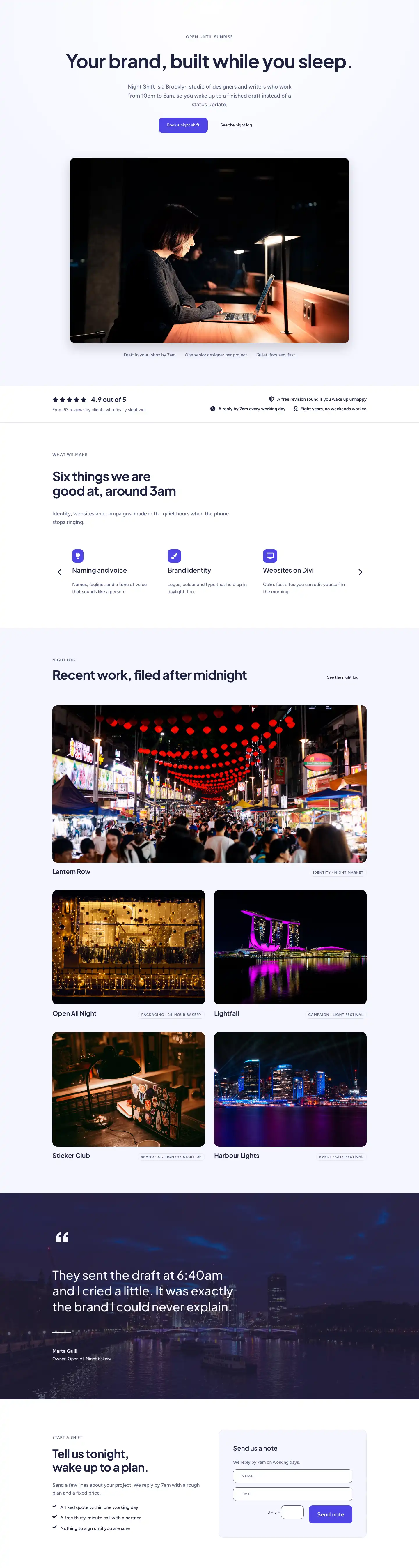
Meet the eight-person team behind Night Shift Studio. A minimal creative agency built on focus, quiet, and work that gets done after dark. Book a night shift.
Rate this element
Download this section, free
- Divi 5 JSON, imports in seconds
- Commercial license included
- No account needed
This page ships inside Night Shift Studio: Creative Agency Theme (6 Pages), 6 coherent pages that share one brand.
Click to view the full page
Overview
The Night Shift Studio Crew page spans six distinct sections across a cool indigo-and-navy palette, moving from a split hero through a milestone timeline, a four-column team grid, a founder portrait with editorial body copy, a numbered values manifesto, and a full-width CTA bar. Every section is built exclusively from native Divi 5 modules (section, row, column, heading, text, image, button, group, divider) so nothing will break on a Divi core update and every element is editable without touching code.
Typography carries the structural hierarchy. Section openers pair a 13–14px uppercase Figtree label in muted slate (#596083) with large Plus Jakarta Sans display headlines: 64px on the hero h1, 56px on the values h2, 44px on the timeline h2. Those sizes scale in the JSON itself to 46px/36px (tablet) and 36px/30px (phone), so the visual weight reads correctly at every breakpoint. Section padding follows a consistent rhythm — 104px desktop, 72px tablet, 48px phone on the lighter background sections, stepping up to 128px on the two accent sections — giving the page a generous, unhurried feel that suits a studio positioning itself around considered work rather than speed.
The palette is cool but not flat. Most sections sit on #f5f6ff, an off-white with just enough blue to echo the indigo accent. Two dark counterpoints break the rhythm: the timeline section layers a background photo behind a solid rgba(30,33,64,0.7) gradient overlay on both stops, producing a deep-navy darkroom effect without a separate dark background color; the values section uses a straight #1e2140 fill. The indigo #4f46e5 appears only on the hero CTA button and the final CTA bar, so every instance reads as a genuine call to action rather than decoration.
The hero splits into a 16/24 left column (copy, CTAs) and an 8/24 right column (4:5 portrait image) on desktop; on phone both columns become full-width and stack column-first, with the copy block gaining 32px bottom padding to separate it from the image. The four-column team grid uses Divi 5's native flexType sizing (6/24 per column on desktop, 12/24 on tablet, 24/24 on phone) to reflow from four across to two across to a single column without a media query written by hand. The founder portrait section uses a 999px top-radius combined with a 32px bottom-left/right radius directly on the image module's border decoration, creating a pill-top frame that stands out from the square crops used elsewhere in the page.
What’s inside
- Six-section full-page layout built entirely from native Divi 5 modules — section, row, column, heading, text, image, button, group, divider
- Split hero with asymmetric 16/24 + 8/24 columns, a 4:5 cover-fit portrait, and an indigo CTA button with hover-lift transform and shadow
- Dark-overlay timeline section: 4-column milestone grid (4-col desktop, 2-col tablet, 1-col phone) with large year numbers (48px), top-border accent per card, h3 title, and body copy
- Four-column team grid using 1:1 square portrait images and 2px top-border name/role blocks, reflowing to 2-column on tablet and single column on phone
- Founder portrait section with a pill-top (999px) / flat-base (32px) border-radius treatment on the image module and three paragraphs of 22px Plus Jakarta Sans editorial body copy
- Numbered values section (01–04) on solid #1e2140 navy: divider-separated rows with a fixed 64px number column, a flex-grow heading column, and a max-width-360px body column
- Indigo CTA bar with horizontal heading + white button + tagline, collapsing to a stacked column layout on mobile
Who it’s for
This layout fits independent creative studios, branding agencies, design consultancies, and motion or film production houses that want a team page with editorial weight rather than a plain grid of headshots. It works equally well for a two-person boutique positioning its founders front and center and a growing agency with four to eight staff. The minimal palette and unhurried spacing also suit architecture practices, UX studios, and any creative service business whose selling point is craft and considered thinking over speed.
Customization tips
Start by swapping the two fonts at the preset level if your brand uses different typefaces. Plus Jakarta Sans handles every headline and the founder's body copy; Figtree handles labels and regular body text. Replacing either in the Divi Theme Customizer updates all modules at once.
For the palette, the three recurring values (#f5f6ff, #1e2140, #4f46e5) each appear in multiple modules, so find-and-replace in the JSON export is the fastest path if you want to rebrand the whole page in one pass. The indigo #4f46e5 is intentionally isolated to buttons and the CTA bar, so swapping it to your brand color immediately changes the two strongest conversion points.
Portrait photos should be 1:1 crops for the team grid and 4:5 for the hero and founder sections. The images render at cover-fit, so faces should be centered in the crop. The milestone year numbers (48px bold) are plain text modules, so adding or removing timeline entries is a copy-paste operation. Keep body paragraphs in the values section under about 120 characters per line to preserve the three-column alignment on desktop.
How to install this layout
- Download the layout JSON file from this page.
- Open the target page in the Divi 5 builder.
- Open the portability panel (up/down arrows icon) and choose the Import tab.
- Upload the JSON. Tick “replace existing content” only for full-page imports.
- Check the page at desktop and mobile widths, then swap in your copy and images.
Full walkthrough with troubleshooting: How to Import a Divi 5 Layout.
Questions about Night Shift Studio — Minimal Creative_agency The Crew Page for Divi 5
How does the team grid reflow on smaller screens?
The four team columns use Divi 5's native flexType sizing: each column is set to 6/24 (25%) on desktop, 12/24 (50%) on tablet, and 24/24 (100%) on phone. The row also switches from nowrap to wrap on tablet, so the reflow is handled entirely within the module decoration settings with no custom CSS.
What is the dark section in the middle of the page?
That is a standard Divi 5 section with a background image and a two-stop gradient overlay set to rgba(30,33,64,0.7) at both 0% and 100%. The flat opacity across both stops produces a solid dark wash rather than a fade, so the background photo adds texture without affecting text legibility.
What aspect ratios do the portrait images use?
The hero and founder portrait images are 4:5 (portrait orientation). The four team grid images are 1:1 (square). All are set to object-fit cover, so the aspect ratio is locked by the module and the image fills the frame regardless of its original dimensions.
The founder portrait has a rounded top. Is that CSS or a Divi setting?
It is a native Divi 5 border-radius setting on the image module itself: topLeft and topRight are set to 999px and bottomLeft/bottomRight are set to 32px. No custom CSS class is required.
How many team members can the grid support without layout changes?
The grid row is set to 4 columns with flexWrap nowrap on desktop. If you need more than four members, duplicate the row (the second row will wrap naturally) or change the column structure to 1/3, 1/3, 1/3 for a three-column grid. Fewer than four members will leave empty column slots, so removing a column module keeps the grid tight.
What should I edit first after importing?
Replace the placeholder names, roles, and portrait images in the team grid section first, since those are the most visible personal identifiers. Then update the milestone years and copy in the timeline section to reflect your studio's actual history. The fonts, palette, and spacing are already production-ready and can be adjusted later if needed.
Which Divi version does this layout need?
Divi 5. The layout is generated natively for Divi 5 and validated against its real module structure before publication, so it imports clean into the current builder.
Can I use this layout on client websites?
Yes. Every download includes a commercial license covering unlimited sites you own or build for clients. Only reselling or redistributing the layout file itself is prohibited.
Included in these packs
More full landing pages
Browse all full landing pages
Kiln & Clay — Minimal Pottery_studio Visit Page for Divi 5
full_landing · pottery_studio · minimal

Kiln & Clay — Minimal Pottery_studio Our Story Page for Divi 5
full_landing · pottery_studio · minimal

Kiln & Clay — Minimal Pottery_studio Studio Membership Page for Divi 5
full_landing · pottery_studio · minimal

Kiln & Clay — Minimal Pottery_studio The Shop Page for Divi 5
full_landing · pottery_studio · minimal

Kiln & Clay — Minimal Pottery_studio Classes Page for Divi 5
full_landing · pottery_studio · minimal

Kiln & Clay — Minimal Pottery_studio Home Page for Divi 5
full_landing · pottery_studio · minimal