
Night Shift Studio — Minimal Creative_agency Home Page for Divi 5
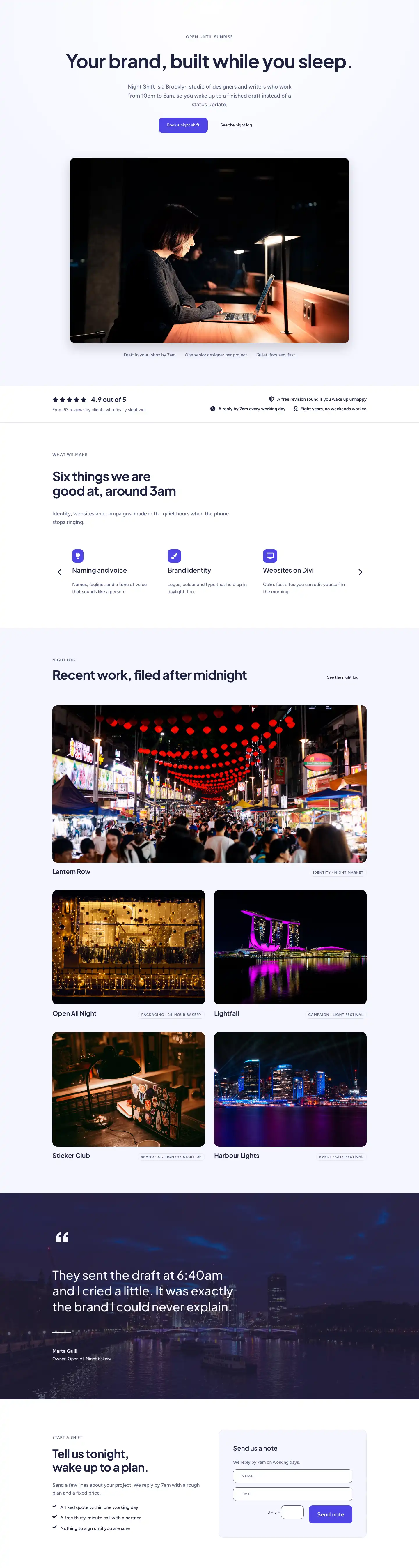
A minimal full-page Divi 5 layout for a creative agency that works overnight. Features a hero, services carousel, portfolio grid, testimonial, and contact form — clean indigo-on-white design.
Rate this element
Download this section, free
- Divi 5 JSON, imports in seconds
- Commercial license included
- No account needed
This page ships inside Night Shift Studio: Creative Agency Theme (6 Pages), 6 coherent pages that share one brand.
Click to view the full page
Overview
The layout opens on a near-white lavender ground (#f5f6ff) that fades to pure white at its centre via a radial circular gradient, an inversion that creates a soft atmospheric glow without relying on any photography at all in the hero background. Everything above the fold is centred and single-column: a small-caps H4 eyebrow in slate (#596083, Figtree 14px, 1px letter-spacing) leads into a 64px Plus Jakarta Sans H1 with -1px tracking and text-wrap: balance applied so the headline never breaks awkwardly on any viewport. A constrained body paragraph (max-width 600px) sits at 19px/1.6em, followed by an inline button pair — solid indigo (#4f46e5, 12px radius) primary and a borderless ghost secondary — both carrying an upward translate and box-shadow on hover. A full-bleed hero image constrained to 960px lands below with a 16px border-radius and a 40px drop shadow, and three short trust snippets sit in a wrapping flex row beneath it, collapsing gracefully on narrow screens.
A white trust bar with a 1px bottom border separates the hero from the services section. The left column renders a five-star cluster using five individual Divi Icon modules in a horizontal flex Group, paired with a bold 22px "4.9 out of 5" number in Plus Jakarta Sans and a Figtree 15px caption. The right column stacks three icon-and-text rows using nested Groups, each combining a Font Awesome glyph (shield, clock, handshake) with a 15px semi-bold benefit line. On phones both columns stack and the right group shifts from right-aligned to left-aligned automatically via a flex override.
The services section uses Divi's native Group Carousel set to 3 slides on desktop, 2 on tablet, and 1 on mobile, with navigation arrows in the deep navy (#1e2140) and dot navigation disabled. Six service cards each contain a square indigo icon tile (12px radius, white icon at 22px), an H3 in Plus Jakarta Sans at 22px/600 weight, and a one-line Figtree body description at 16px. The portfolio that follows uses a CSS grid (2 columns desktop, 1 mobile): the lead piece spans both columns at a 2:1 aspect ratio while the four supporting entries sit at 4:3, each with a 16px-radius rounded image using object-fit cover and a small all-caps pill badge (1px border, 12px radius) carrying the category in 12px Figtree.
The testimonial section overlays a nighttime photograph with a solid 70% navy gradient on both sides, turning it into a full-bleed dark canvas. A decorative opening quote mark runs at 120px Plus Jakarta Sans, followed by a 42px pull-quote with text-wrap balance that scales to 26px on phones without losing legibility. A short 64px-wide divider line precedes the two-line attribution. The layout closes on a two-column contact section: benefit copy on the left with three checkmark-icon bullet points, and a padded #f5f6ff card on the right containing Divi's native Contact Form module with Name and Email fields, 12px-radius rounded inputs, and the indigo submit button carrying the same hover lift as the hero CTA.
What’s inside
- Centred hero with radial-gradient lavender-to-white background, 64px (desktop) to 36px (phone) fluid H1 in Plus Jakarta Sans, max-width 600px body copy, and a 960px-wide hero image with 16px border-radius and 40px drop shadow
- Inline primary (solid indigo #4f46e5) and ghost secondary button pair, both using native Divi Button modules with upward-translate hover animation and box-shadow lift
- White trust bar containing a five-icon star row (five individual Divi Icon modules), a 22px bold rating number, and three icon-plus-text benefit rows using Font Awesome glyphs in nested flex Groups
- Group Carousel with 6 service cards (3 visible desktop, 2 tablet, 1 phone), each card built from a square indigo icon tile, Plus Jakarta Sans H3, and a Figtree description line
- CSS-grid portfolio section with 5 work entries: one 2:1 full-width lead image spanning both columns and four 4:3 supporting images, each with a 16px rounded border, object-fit cover, and a pill category badge
- Full-bleed testimonial section with a Pexels background image under a 70% navy overlay, a 120px decorative quote mark, 42px pull-quote with text-wrap balance, a short horizontal divider, and two-line attribution
- Native Divi Contact Form card (Name and Email fields, 12px-radius inputs, indigo submit button) in a padded #f5f6ff bordered container beside editorial benefit copy with three checkmark-icon bullets
Who it’s for
This layout suits boutique creative studios, brand consultancies, and independent designers who lead with personality rather than a capabilities list. The overnight-work narrative is a genuine differentiator for any studio pitching to clients across time zones, or for anyone tired of the standard agency homepage formula. It also fits naming studios, packaging designers, motion freelancers, and small agencies that handle identity, web, film, and campaigns under one roof. The portfolio grid and contact card make it equally practical for a solo designer building a first professional site as for a three-to-five-person studio ready to position itself as a premium option.
Customization tips
Start with the two typefaces as a system: Plus Jakarta Sans handles every display heading while Figtree covers body copy, button labels, and UI text. Swapping one without the other creates a noticeable mismatch, so replace both at once via the Divi theme customizer or global presets. The indigo (#4f46e5) appears on the primary button background, all six service icon tiles, and the contact form submit button. Changing it at the global preset level updates every instance in one step. The hero image sits inside a 960px-wide wrapper at 100% width, so any landscape photograph at 16:9 or wider will fill it cleanly; a portrait crop will reflow unexpectedly. Portfolio images are locked to either 2:1 (lead card) or 4:3 (four supporting cards), so prepare your own work shots at those exact ratios before swapping. Carousel card descriptions are one line each (roughly 8 to 10 words); longer copy will break height parity between visible slides. The testimonial background image sits under a 70% opacity navy overlay, so nearly any photograph with midtone or darker areas will read well without adjustment.
How to install this layout
- Download the layout JSON file from this page.
- Open the target page in the Divi 5 builder.
- Open the portability panel (up/down arrows icon) and choose the Import tab.
- Upload the JSON. Tick “replace existing content” only for full-page imports.
- Check the page at desktop and mobile widths, then swap in your copy and images.
Full walkthrough with troubleshooting: How to Import a Divi 5 Layout.
Questions about Night Shift Studio — Minimal Creative_agency Home Page for Divi 5
The services carousel shows one card at a time on mobile. Can I show two?
Yes. The Group Carousel module has a `slidesToShow` value explicitly set to 1 on phone. Open the carousel module settings, go to the phone breakpoint, and change the value to 2. Check that your service names are short enough to avoid wrapping before publishing.
How are the five stars in the trust bar built — is it a rating widget?
No widget. Each star is a separate Divi Icon module (Font Awesome unicode f005, solid weight, 18px, #1e2140) arranged in a horizontal flex Group with a 4px column gap. To change the star count, add or remove icon modules from that Group. To change colour, edit each icon module's colour setting individually.
The hero image has a rounded border and drop shadow. Will those carry over to a replacement photo?
Yes. The 16px border-radius and the 40px-blur shadow are applied to the Image module's decoration settings, not to the file itself. Any image you swap in will inherit both automatically.
The testimonial section uses a Pexels URL as a background image. Can I use that on a live site?
No. The Pexels URL is placeholder content from the generation process. You must replace it with a properly licensed image before the page goes live. Replace it in the Section module's background image settings.
What should I edit first when adapting this to a real studio?
The hero headline and body paragraph. The tone of the entire page flows from "Your brand, built while you sleep." Replacing that line with your studio's actual differentiator, then updating the three trust snippets below the hero image and the portfolio card titles, will make the layout feel original before you change a single colour.
Does the portfolio CSS grid degrade gracefully on smaller screens?
Yes. The grid is set to a single column on phones via a phone-breakpoint override on the parent Group module. The lead image reverts from a 2-column span to a single full-width block, and all images maintain their aspect-ratio constraints and object-fit cover regardless of viewport width.
Which Divi version does this layout need?
Divi 5. The layout is generated natively for Divi 5 and validated against its real module structure before publication, so it imports clean into the current builder.
Can I use this layout on client websites?
Yes. Every download includes a commercial license covering unlimited sites you own or build for clients. Only reselling or redistributing the layout file itself is prohibited.
Included in these packs
More full landing pages
Browse all full landing pages
Kiln & Clay — Minimal Pottery_studio Visit Page for Divi 5
full_landing · pottery_studio · minimal

Kiln & Clay — Minimal Pottery_studio Our Story Page for Divi 5
full_landing · pottery_studio · minimal

Kiln & Clay — Minimal Pottery_studio Studio Membership Page for Divi 5
full_landing · pottery_studio · minimal

Kiln & Clay — Minimal Pottery_studio The Shop Page for Divi 5
full_landing · pottery_studio · minimal

Kiln & Clay — Minimal Pottery_studio Classes Page for Divi 5
full_landing · pottery_studio · minimal

Kiln & Clay — Minimal Pottery_studio Home Page for Divi 5
full_landing · pottery_studio · minimal