
Night Shift Studio — Minimal Creative_agency Process Page for Divi 5
Discover the four-stage Night Shift process: brief at dusk, deep work at midnight, draft by 7am, launch by sunrise. A creative agency that works while you sleep.
Rate this element
Download this section, free
- Divi 5 JSON, imports in seconds
- Commercial license included
- No account needed
This page ships inside Night Shift Studio: Creative Agency Theme (6 Pages), 6 coherent pages that share one brand.
Click to view the full page
Overview
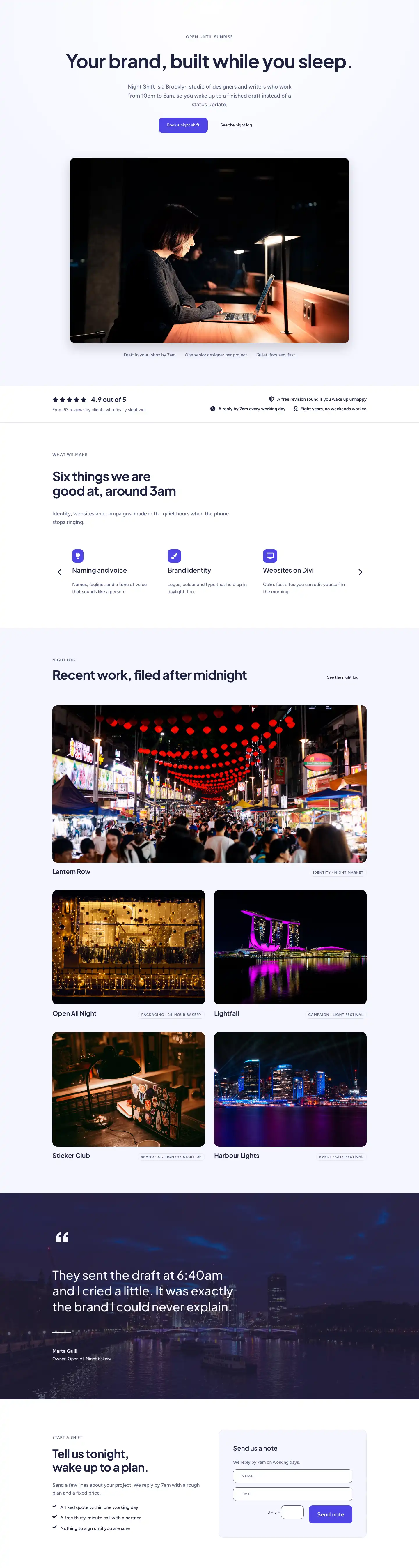
Night Shift Studio — The Shift is a five-section process page built entirely from native Divi 5 modules, using a two-tone palette of pure white (#ffffff) and a soft periwinkle tint (#f5f6ff) to alternate sections and create rhythm without any imagery dependency. The opening section splits into a deliberate 16/8 column asymmetry on desktop — the wider left column carries an H1 at 52px in Plus Jakarta Sans 700, the narrow right column holds an 18px Figtree lead at 36px top padding, creating a staggered baseline that signals editorial confidence rather than template thinking. A 1px #e0e3f5 bottom border closes the header section cleanly.
The process grid at the heart of the layout uses a CSS grid at four columns on desktop, collapsing to two on tablet and one on mobile. Each of the four steps — Dusk, Midnight, Dawn, Sunrise — is built from nested Divi Group modules: a 48×48px indigo (#4f46e5) pill badge containing a white step number, a flex-grow Divider that creates a connecting rule between the badge and the column edge (hidden on phone), an H3 step title at 22px, and a 16px body text description. The connecting-rule divider is marked disabledOn: phone, so the horizontal timeline collapses gracefully to a clean stacked list on small screens.
The deliverables section inverts the column ratio to 8/16, with the label-and-heading stack on the left and an eight-item checkmark list on the right in a two-column grid (single column on mobile). Each row pairs a Font Awesome check icon (, 18px, #1e2140) with 17px Figtree body copy, padded 14px top and bottom to produce consistent row height without relying on line-height tricks. The testimonial section uses a 160px display-weight opening quotation mark as a typographic anchor, then a centred 44px pull-quote constrained to 960px max-width, with a 56px circular avatar image using a 1:1 aspect ratio and full border-radius.
The closing CTA section layers a full-bleed background photo behind a left-anchored white card (max-width 520px, 16px radius, 1px border) that contains an eyebrow label, a compact H2 at 36px, supporting body copy, a horizontal divider, and a primary button — the same indigo #4f46e5 pill used in the step badges, lifted on hover by a -4px Y translate and a rgba(30,33,64,0.25) box shadow. The FAQ section uses the native Divi 5 Toggle module, zero-radius, flush left, separated by #e0e3f5 bottom borders, with the first item open by default.
What’s inside
- Four-step process grid using CSS grid (4 cols desktop / 2 tablet / 1 phone) with indigo 48px numbered pill badges and flex-grow connecting dividers that hide on mobile
- Asymmetric 16/8 column intro section pairing a 52px H1 with a staggered 18px lead paragraph, closed by a 1px bottom-border section divider
- Eight-item icon-and-text deliverables list in a 2-column grid using native Divi 5 Icon + Text modules with consistent 14px row padding
- Full-screen background-image CTA section with a floating white card (16px radius, 1px border, 48px internal padding), a primary button with hover lift and shadow
- Native Divi 5 Toggle FAQ module — five questions, zero border-radius, flush-left, first item open on load, separated by hairline bottom borders
- Testimonial section with a 160px display-weight quotation mark, a centred 44px pull-quote capped at 960px, and a circular avatar image at 56px with 1:1 aspect ratio
- Consistent two-tone section alternation (white / `#f5f6ff`) and graduated vertical padding (104px desktop, 72px tablet, 48px phone) across all five sections
Who it’s for
This layout is built for creative studios, independent design agencies, branding consultancies, and freelance art directors who need to explain an unconventional or async-first working process without resorting to corporate flowchart visuals. It also suits copywriting studios, UX consultancies, and production companies whose differentiation is the way they work rather than a portfolio grid. The minimal palette and editorial typography make it equally usable for architecture practices and motion studios that want their process page to feel considered rather than corporate.
Customization tips
The two accent colours you'll touch most are the indigo pill (#4f46e5) and the dark navy text (#1e2140) — swapping both in global presets will cascade through the step badges, CTA button, icon row, and all headings in one pass. The periwinkle section background (#f5f6ff) can shift to any neutral tint without affecting readability; keep it within 8–10% lightness of white so the alternating rhythm reads on screen. Each step description sits best at one to two short sentences (roughly 60–100 characters); longer copy will break the visual balance in the four-column grid, especially at tablet widths. The closing CTA card has 48px padding on desktop — if your headline runs past two lines at 36px, reduce letter-spacing from -1px to 0px before cutting words. The background image in the CTA section should be 1920px wide and at least 1080px tall with a reasonably dark or neutral centre-bottom so the white card stays legible at all viewport widths.
How to install this layout
- Download the layout JSON file from this page.
- Open the target page in the Divi 5 builder.
- Open the portability panel (up/down arrows icon) and choose the Import tab.
- Upload the JSON. Tick “replace existing content” only for full-page imports.
- Check the page at desktop and mobile widths, then swap in your copy and images.
Full walkthrough with troubleshooting: How to Import a Divi 5 Layout.
Questions about Night Shift Studio — Minimal Creative_agency Process Page for Divi 5
How does the four-step grid reflow on mobile?
The grid switches to a single column via the `gridColumnCount: 1` phone override. The horizontal connecting divider inside each step card is set to `disabledOn: phone`, so only the numbered badge and text stack remain — no broken horizontal lines.
Which Divi 5 modules make up the FAQ section?
It uses the native Divi 5 Toggle module — five instances inside a Group container that carries a 2px top border. Each toggle has zero border-radius and a 1px `#e0e3f5` bottom border, producing a clean ruled list. The first toggle is set to open on load.
Does the testimonial section require a real photo?
The layout includes a Pexels placeholder at 56×56px with a full circle crop. Replace it with any square image at least 112px wide (2× for retina); the 1:1 aspect ratio and `objectFit: cover` handle proportions automatically.
What is the background image in the closing CTA section?
It is a full-cover background image set on the section module itself (not an Image module), so you replace it inside the section's Background settings. Use a landscape photo at 1920×1080px minimum; the white card overlays the left side, so keep the right two-thirds of the image free of text or focal points.
Can I add a fifth step to the process grid without breaking the layout?
The grid is set to `gridColumnCount: 4` on desktop. Adding a fifth card will wrap onto a second row. For a five-step process, set the column count to 5 on desktop (the grid is configured on the parent Group module) and verify tablet at 2 or 3 columns still reads correctly.
Which Divi version does this layout need?
Divi 5. The layout is generated natively for Divi 5 and validated against its real module structure before publication, so it imports clean into the current builder.
Can I use this layout on client websites?
Yes. Every download includes a commercial license covering unlimited sites you own or build for clients. Only reselling or redistributing the layout file itself is prohibited.
Included in these packs
More full landing pages
Browse all full landing pages
Kiln & Clay — Minimal Pottery_studio Visit Page for Divi 5
full_landing · pottery_studio · minimal

Kiln & Clay — Minimal Pottery_studio Our Story Page for Divi 5
full_landing · pottery_studio · minimal

Kiln & Clay — Minimal Pottery_studio Studio Membership Page for Divi 5
full_landing · pottery_studio · minimal

Kiln & Clay — Minimal Pottery_studio The Shop Page for Divi 5
full_landing · pottery_studio · minimal

Kiln & Clay — Minimal Pottery_studio Classes Page for Divi 5
full_landing · pottery_studio · minimal

Kiln & Clay — Minimal Pottery_studio Home Page for Divi 5
full_landing · pottery_studio · minimal