
Night Shift Studio — Minimal Creative_agency Night Log Page for Divi 5
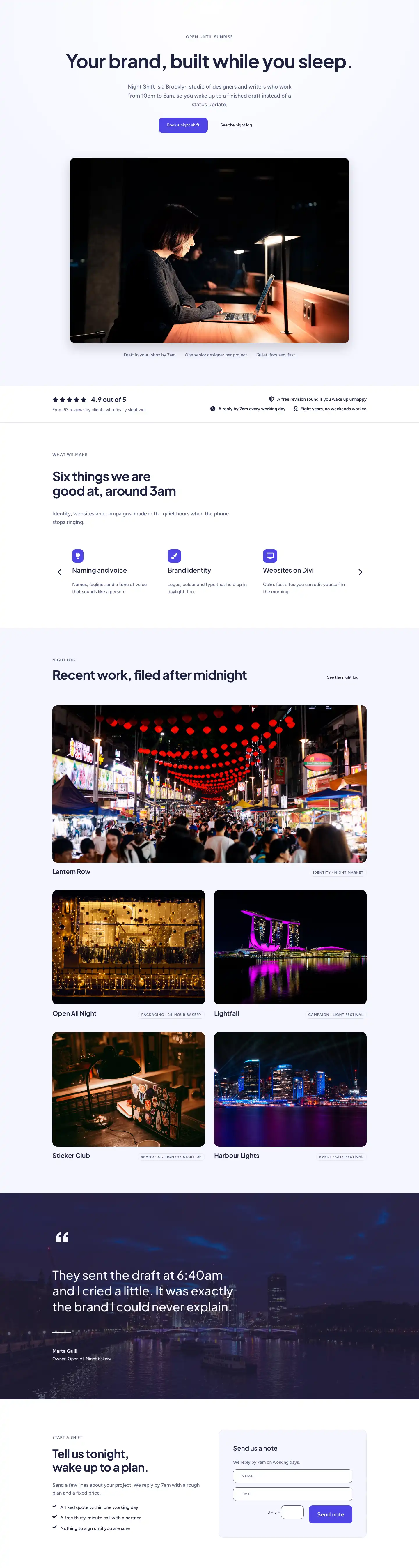
A minimal creative agency portfolio page showcasing late-night client projects, a before-and-after case study, photo gallery, and client testimonials. Built for Night Shift Studio.
Rate this element
Download this section, free
- Divi 5 JSON, imports in seconds
- Commercial license included
- No account needed
This page ships inside Night Shift Studio: Creative Agency Theme (6 Pages), 6 coherent pages that share one brand.
Click to view the full page
Overview
Night Shift Studio Night Log is a full-page creative agency layout built around a single, honest idea: work done after dark, delivered by morning. The page opens with a full-bleed hero section where a photographic background is dimmed by a deep indigo overlay (rgba(30,33,64,0.7)) and topped with a breadcrumb, an H1 set in Plus Jakarta Sans at 56px with −1px tracking, and a short subline capped at 600px width. That restraint is deliberate — the layout never shouts; it confides.
The featured-projects section that follows uses alternating two-column rows with alignItems: center so each image and its accompanying case-study copy sit at the same optical midpoint. Project numbers are rendered as tiny uppercase H4 labels (13px, 600 weight, 1px letter-spacing) in slate blue #596083, creating a numbered-log aesthetic without reaching for a custom icon set. All three case-study images enforce a locked 4:3 aspect ratio with objectFit: cover, so swapping photos never breaks the grid.
A before-and-after section on a white background introduces Divi 5's native Before/After Image module, paired with a two-entry comparison list that uses a 2px top-border rule in #1e2140 as its sole divider — no cards, no shadows, just structured white space. The gallery section follows on the #f5f6ff lavender-grey ground, arranging six images across three equal columns with mixed 4:5 and 4:3 ratios that create natural vertical rhythm. Finally, testimonial cards on hover lift 4px and cast a soft indigo shadow (rgba(30,33,64,0.25)), and the page closes on a solid #4f46e5 indigo CTA banner with a side-by-side heading and button layout that collapses cleanly to a stacked column on phone.
Mobile is handled consistently throughout: every two-column row carries an explicit flexDirection: column phone override, column widths switch to 24_24, and section padding steps down in two stages (desktop → tablet → phone) so the vertical rhythm stays proportional at every viewport.
What’s inside
- Full-bleed hero with photographic background, indigo gradient overlay, H1 in Plus Jakarta Sans, breadcrumb navigation, and a constrained 600px subline group
- Three alternating image-and-copy project rows, each with a numbered uppercase label, H3 case-study title, body paragraph, and underlined 'Read the story' link
- Native Divi 5 Before/After Image module with a bordered comparison list using 2px top-rule dividers for a before/after breakdown
- Six-image masonry-style gallery across three equal columns mixing 4:5 and 4:3 locked aspect ratios on a lavender-grey section background
- Three testimonial cards with quote text, 56px circular avatar images, client name and role, plus hover lift (`translateY −4px`) and shadow animation
- Full-width indigo CTA banner with a side-by-side H2 and white button that stacks vertically on mobile, plus a reassurance line beneath the button
Who it’s for
This layout suits solo creative studios, small brand and design agencies, and independent consultants who want their portfolio to feel considered rather than flashy. The night-shift narrative works equally well for development shops, copywriters, and motion designers who take on deadline-driven projects. It is also a strong fit for any service business that wants to lead with three featured case studies rather than a sprawling project grid — the numbered log format keeps the focus on story and outcome, not volume.
Customization tips
The two-tone palette (#1e2140 deep navy, #596083 slate, #f5f6ff lavender-grey, #4f46e5 indigo) is applied consistently at the section, column, and text-module level, so a single find-and-replace pass on those four hex values is enough to re-skin the whole page. Swap the hero background photo for any 1920px-wide landscape image; the rgba(30,33,64,0.7) gradient overlay means almost any dark or mid-tone photo will read cleanly. For the three project rows, keep case-study body copy to 30–50 words to preserve the side-by-side balance with the image. Gallery images should be provided at 4:5 (portrait) or 4:3 (landscape) ratios — the aspect-ratio lock in each Image module prevents cropping surprises. Avatar portraits in the testimonial cards are displayed at 56×56px square; supply images at least 112×112px for retina clarity.
How to install this layout
- Download the layout JSON file from this page.
- Open the target page in the Divi 5 builder.
- Open the portability panel (up/down arrows icon) and choose the Import tab.
- Upload the JSON. Tick “replace existing content” only for full-page imports.
- Check the page at desktop and mobile widths, then swap in your copy and images.
Full walkthrough with troubleshooting: How to Import a Divi 5 Layout.
Questions about Night Shift Studio — Minimal Creative_agency Night Log Page for Divi 5
How does the alternating project layout behave on mobile?
Each two-column row carries an explicit `flexDirection: column` phone override in the layout JSON. On the second row, the image column also has `order: -1` set for phone, so the photo always appears above the text regardless of its desktop position — no extra CSS needed.
Which Divi 5 modules does this layout use?
Section, Row, Column, Heading, Text, Image, Group, Button, and the native Before/After Image module. No third-party plugins or custom code blocks are required.
Can I replace the before-and-after photos with my own work samples?
Yes. The Before/After Image module accepts any two images; both are sourced from Pexels in the template at 1600px wide. Swap the `beforeImage` and `afterImage` sources inside the module settings. The slider handle and interaction are handled natively by Divi 5.
What aspect ratio should my project photos be?
The three case-study images in the featured-projects section are locked to 4:3 (`width: 4, height: 3` in the module's `aspectRatio` setting). Provide images at 1600×1200px or any 4:3 crop; the `objectFit: cover` setting handles any slight mismatch without distortion.
The gallery has six images — can I add or remove slots?
Each gallery column is a Group containing two stacked Image modules. You can remove an image from a group or duplicate a column to add a fourth column, but changing the count will require adjusting the `columnStructure` value on the parent Row from `1_3,1_3,1_3` to match your new count.
What is the easiest first edit after importing?
Start with the hero: update the H1 text, swap the background photo, and adjust the breadcrumb link. That single section sets the tone for the whole page and takes under five minutes to personalise.
Which Divi version does this layout need?
Divi 5. The layout is generated natively for Divi 5 and validated against its real module structure before publication, so it imports clean into the current builder.
Can I use this layout on client websites?
Yes. Every download includes a commercial license covering unlimited sites you own or build for clients. Only reselling or redistributing the layout file itself is prohibited.
Included in these packs
More full landing pages
Browse all full landing pages
Kiln & Clay — Minimal Pottery_studio Visit Page for Divi 5
full_landing · pottery_studio · minimal

Kiln & Clay — Minimal Pottery_studio Our Story Page for Divi 5
full_landing · pottery_studio · minimal

Kiln & Clay — Minimal Pottery_studio Studio Membership Page for Divi 5
full_landing · pottery_studio · minimal

Kiln & Clay — Minimal Pottery_studio The Shop Page for Divi 5
full_landing · pottery_studio · minimal

Kiln & Clay — Minimal Pottery_studio Classes Page for Divi 5
full_landing · pottery_studio · minimal

Kiln & Clay — Minimal Pottery_studio Home Page for Divi 5
full_landing · pottery_studio · minimal